
1. تعارف
This manual provides detailed instructions for the installation, operation, and maintenance of your JOYING 10.1 Inch Single Din Car Stereo. Please read this manual thoroughly before using the device to ensure proper functionality and safety.

Figure 1: JOYING 10.1 Inch Car Stereo in-dash view.
2. سيٽ اپ ۽ تنصيب
2.1 Important Installation Notices
- For installation, additional components such as an installation frame kit, special ISO harness, amplifier adapter, or CAN bus decoder may be required, depending on your vehicle's specific configuration.
- This unit does not support factory car GPS antennas, original backup cameras, Bluetooth, USB, or microphones.
- Only JOYING brand accessories are supported. DAB+ digital radio adapters, DVRs, OBDII scanners, reverse cameras, TPMS, and steering wheel controllers are not included and must be purchased separately.
2.2 Screen to Main Deck Assembly
The display screen is detachable from the main head unit. Follow these steps to attach the screen:
- Align the screen's mounting points with the main unit's connectors.
- Gently push the screen onto the main unit until it clicks securely into place.
- Ensure the ribbon cable is properly connected between the screen and the main unit.
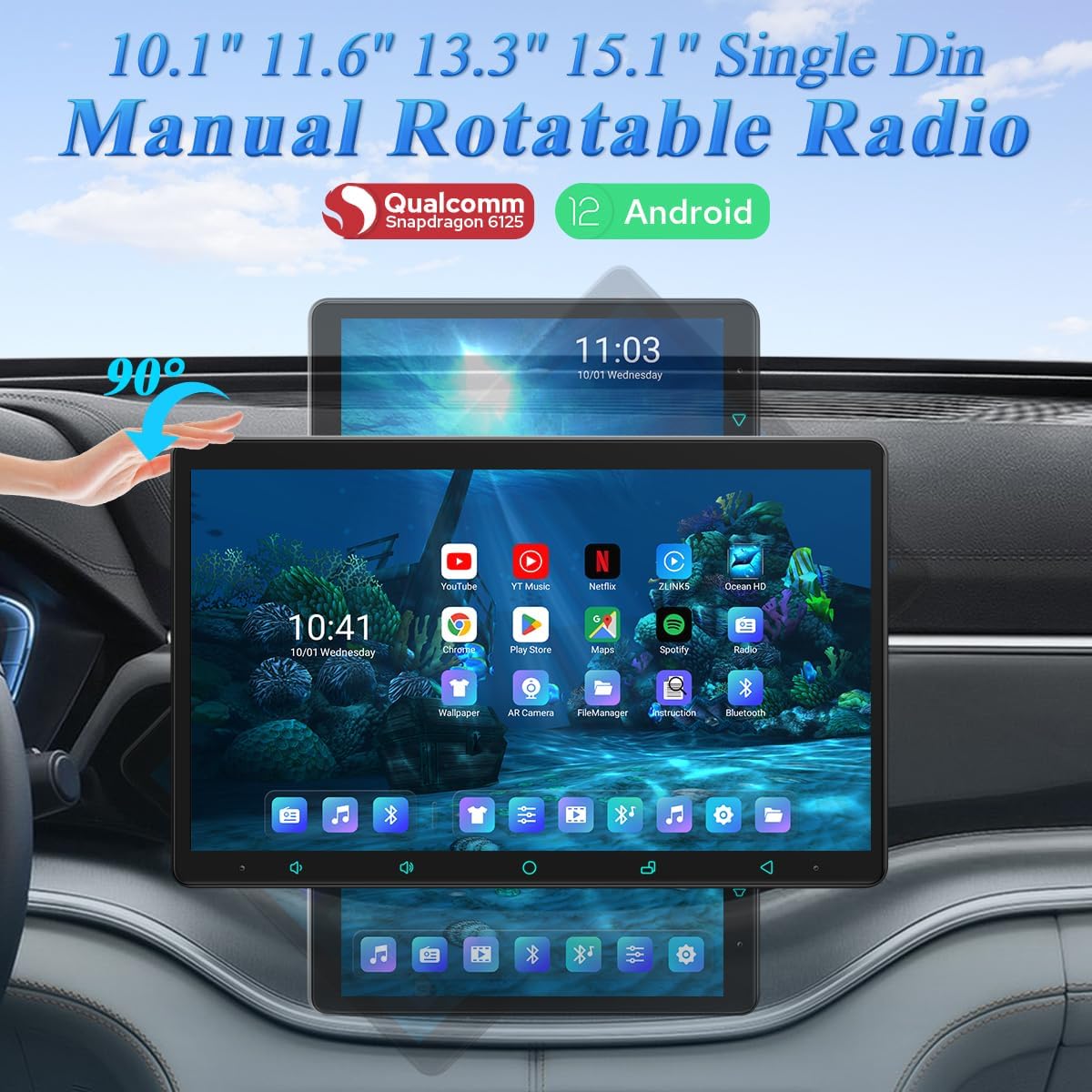
Figure 2: Detached screen component.

Figure 3: Screen attached to the main unit.
2.3 Wiring Diagram and Included Accessories
Refer to the diagram below for proper wiring connections. Ensure all cables are securely connected to their respective ports.

شڪل 4: پوئتي view of the main unit with wiring ports and included accessories.
2.4 اسڪرين جي گردش
The screen supports manual rotation between horizontal and vertical orientations. Adjust the screen to your preferred viewزاويه.

Figure 5: Horizontal to Vertical Screen Rotation.

Figure 6: Vertical to Horizontal Screen Rotation.
Video 1: Demonstrates screen rotation, connection of the main unit to the screen, and AR camera functionality. This video also shows video playback and UI navigation.
3. آپريٽنگ هدايتون
3.1 Fast Boot Feature
The device supports a fast boot feature. Once the car key is inserted, the unit will start up and enter the user interface within 2 seconds. The initial boot-up may take approximately 30-40 seconds.
3.2 User Interface Options
The system offers customizable user interfaces (UI). You can select between UI 1 and UI 2 in the settings to personalize your experience.

Figure 7: User Interface 2 with customization options.

Figure 8: User Interface 1 with navigation and media controls.
3.3 وائرليس ڪار پلي ۽ اينڊرائيڊ آٽو
Connect your mobile phone to the car radio via USB cable or Bluetooth to utilize Wireless CarPlay or Android Auto. This allows for seamless access to navigation, phone calls, and music on the larger screen. Note: When switching to vertical screen mode, you may need to reconnect CarPlay or Android Auto.

شڪل 9: وائرليس ڪار پلي ۽ اينڊرائيڊ آٽو ڪارڪردگي.
Video 2: Demonstrates the Wireless CarPlay interface and its responsiveness.
3.4 GPS نيويگيشن
The unit features precise GPS engines for accurate positioning, including GPS antennas for better satellite signal reception, ensuring faster real-time navigation. Offline maps are supported; you can download map data for specific areas and use them without an internet connection. Mobile phone map data can also be synchronized via CarPlay/Android Auto.
3.5 Built-in 4G Module
Insert a SIM card into the built-in 4G module for internet access. This module uses Qualcomm's baseband for faster internet speeds, more stable network connections, and wider signal range. Please note that it does not support making phone calls or sending SMS messages. Supported FDD-LTE bands: B2/B4/B5/B7/B12/B13/B14/B17/B25/B26/B38/B66/B71. Supported TDD-LTE band: B41.
3.6 Split-screen Multitasking
The device supports split-screen multitasking, allowing you to run two applications side-by-side on the screen. This feature enhances usability by enabling simultaneous navigation and media playback, for exampلي.
Figure 10: Split-screen multitasking in action.
3.7 HDMI آئوٽ پُٽ
The HDMI port provides a full digital image and sound-sending interface, allowing for uncompressed audio and video signals to be output synchronously without manual adjustment. This supports projection screen displays for passengers in the headrest or on-screen displays with 1080P clear picture and zero delays. Due to chassis design, a straight-head HDMI cable is not supported (HDMI cable not included).
Figure 11: HDMI Output capabilities.
3.8 Day & Night Mode and Colorful Lights Setting
The unit features a Day & Night mode for optimal visibility in various lighting conditions. The daytime mode is bright enough for clear viewing even in sunlight, while the night mode reduces brightness to prevent glare. You can also customize the button illumination color to match your car's dashboard.

Figure 12: Day & Night Mode and Colorful Lights Setting options.
3.9 Gesture Control and Floating Shortcut Key
Control the screen using intuitive two-finger gesture commands such as 'slide up', 'slide down', 'slide left', and 'slide right'. Additionally, a floating shortcut key can be enabled in the settings for easy access to controls while driving.

Figure 13: Gesture Control and Floating Shortcut Key features.
3.10 AR Camera Functionality
During driving, you can freely switch between the front and rear cameras to observe the driving environment. For optimal performance, it is recommended to purchase JOYING's AR camera, which is optimized for compatibility and provides clearer, more stable images during recording.

Figure 14: Front and Rear AR Camera views.

Figure 15: AR Camera coverage diagram.
4. آڊيو خاصيتون
4.1 Built-in DSP
The unit features a built-in Digital Signal Processor (DSP) with a 48-band EQ and 20 preset sound effects, allowing for enhanced audio customization.

Figure 16: Built-in DSP interface.
4.2 EQ Setting and DTS Scenes
The subwoofer output can be amplified and adjusted independently. Frequency adjustments for ultra-bass, bass, mid-bass, mid-sound, mid-treble, treble, and super-treble are available. The unit is equipped with DTS 5.1 panoramic surround sound effects and sound field correction to provide an immersive surround experience.
Figure 17: EQ Setting and DTS Scenes.
4.3 High-precision Sound Processing
The DSP module performs high-precision digital processing of audio signals to achieve various sound effects, including reverberation, delay, distortion, and filtering.

Figure 18: High-precision Sound Processing interface.
5. وضاحتون
| خاصيت | تفصيل |
|---|---|
| ماڊل نمبر | JY-UZS10N8-MR |
| سي پي يو | Qualcomm Snapdragon 6125 Octa Core 64bit ARM (4xA73@2.0GHz, 4xA53@1.8GHz) |
| جي پي يو | Adreno 610@950 MHz |
| ميموري جو قسم | LPDDR4X |
| پيداوار ٽيڪنالاجي | 11 نانو ميٽر |
| رام ۽ روم | 8 جي بي + 128 جي بي |
| اسڪرين جي قرارداد | 1280x800P (10.1 inch) |
| ريفريش جي شرح | 60 هز |
| اسڪرين جي کثافت | 273 ppi (10.1 inch) |
| ڊي پي آئي | 160 dpi (mdpi) |
| پوزيشننگ سسٽم | GPS / GLONASS / Beidou |
| وائي فائي | Wi-Fi 5 (Up to 600 Mbps DL 802.11ac Wi-Fi X12 LTE modem) |
| نيٽ ورڪ | 4G/3G/Bluetooth OBD (5.0) |
| رابطي ٽيڪنالاجي | بلوٽوٿ، ايٿرنيٽ، HDMI، USB، وائي فائي |
| ڪنٽرولر جو قسم | Android |
| خاص خصوصيت | ٽچ اسڪرين |
| مطابقت رکندڙ ڊوائيسز | اسمارٽ فون ، اسپيڪر |
| ڪل HDMI بندرگاهن | 1 |
| ڪنيڪٽر جو قسم | HDMI |
| آڊيو آئوٽ پٽ موڊ | چوڌاري |
| چوڌاري آواز چينل جي جوڙجڪ | 5.1 |
| وڊيو انڪوڊنگ | ايڇ.264، ايڇ.265/ايڇ اي وي سي |
| پيڪيج جي ماپ | 12 x 8 x 5 انچ |
| شيءِ جو وزن | 5.72 پائونڊ |

Figure 19: Processor and Memory Specifications.

Figure 20: Screen and Network Specifications.
6. مسئلا حل ڪرڻ
This section addresses common issues you might encounter with your JOYING car stereo.
6.1 مائڪروفون جا مسئلا
If the microphone is not working or audio quality is poor during calls, ensure the external microphone is securely connected. In some cases, replacing the microphone may resolve the issue.
6.2 Bluetooth Connectivity Limitations
The Bluetooth chip primarily supports audio reception. It may not support communication with certain Bluetooth LE devices or electronic logging devices. Verify device compatibility if you experience connection issues with non-audio Bluetooth accessories.
6.3 CarPlay/Android Auto and Wi-Fi Connection Problems
If CarPlay, Android Auto, or Wi-Fi connections are unstable or fail to connect, try the following:
- Restart the car stereo unit.
- Ensure your phone's Wi-Fi and Bluetooth are enabled and discoverable.
- For Wireless CarPlay/Android Auto, reconnect your phone via USB or Bluetooth.
- Check for any obstructions or interference with the Wi-Fi or Bluetooth signals.
6.4 System Freezing or Unresponsiveness
If the unit becomes unresponsive, perform a soft reset by pressing and holding the power button until the unit restarts. If the issue persists, consult the manufacturer's support for further assistance.
7. وارنٽي ۽ سپورٽ
For warranty information, please refer to the documentation provided at the time of purchase or visit the official JOYING website. For technical support, product inquiries, or service requests, please contact JOYING customer service through their official channels.