
اهم حفاظتي هدايتون
Please read these instructions carefully before using the device and retain them for future reference. Incorrect use may result in electric shock, fire, or other hazards.
- ڊوائيس کي مينهن، نمي، يا انتهائي گرمي پد جي سامهون نه رکو.
- ڊوائيس کي گرمي جي ذريعن جهڙوڪ ريڊيئيٽر، اسٽو، يا ٻين گرمي پيدا ڪندڙ سامان جي ويجهو رکڻ کان پاسو ڪريو.
- Use only the power adapter and cables specified by the manufacturer.
- ڊوائيس نه کوليو casing. سڀني خدمتن کي قابل اهلڪارن جي حوالي ڪريو.
- ڊوائيس جي چوڌاري مناسب وائيٽليشن کي يقيني بڻائي.
- بيٽري جي حفاظت: To prolong battery life, turn off the device when not in use or before recharging. The CD player automatically shuts off after 15 minutes of inactivity to conserve energy. To restart, turn it off for 5 seconds, then turn it back on.
پيداوار ختمview
The TANLANIN CD-001WT is a portable CD player designed with a vintage aesthetic, featuring a white synthetic leather exterior and rose gold hardware. It offers multiple audio playback options and connectivity features.
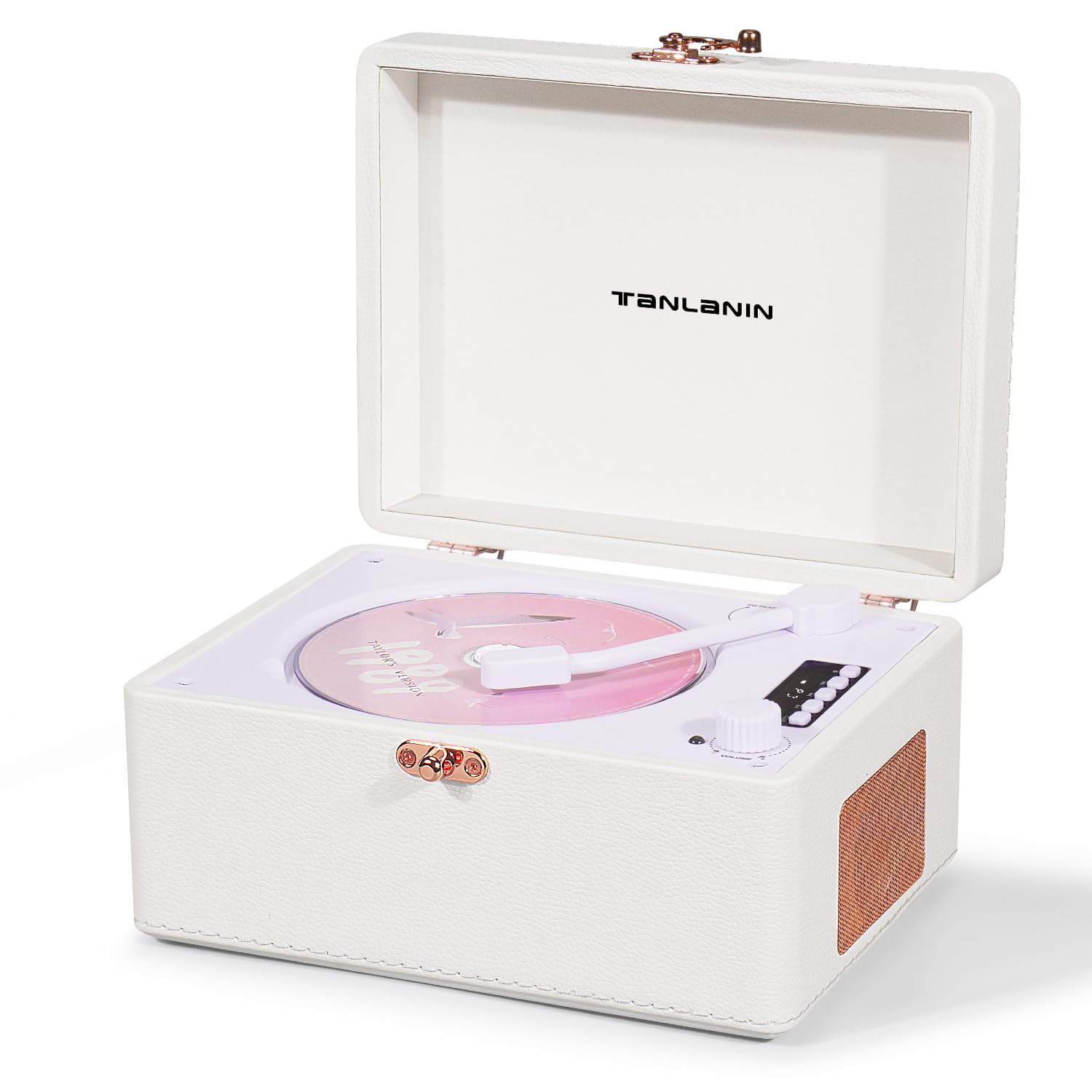
Image: TANLANIN CD-001WT Vintage Desktop CD Player. This image displays the front view of the portable CD player, highlighting its white synthetic leather finish, rose gold hardware, and integrated speakers.
شامل اجزاء:
- 1 x TANLANIN CD-001WT Vintage CD Player
- 1 x ٽائپ-سي چارجنگ ڪيبل
- 1 x ريموٽ ڪنٽرول
- 1 x استعمال ڪندڙ دستياب
ڪنٽرول ۽ بندرگاهن:
The device features an intuitive LED control panel for playback functions (Play, Pause, Stop, Fast Forward, Rewind). Various ports are located on the unit for connectivity.
- ايل ايل ڊسپلي: موجوده موڊ ۽ ٽريڪ جي معلومات ڏيکاري ٿو.
- ڪنٽرول بٽڻ: Play/Pause, Stop, Skip Forward, Skip Backward, Mode, Volume.
- سي ڊي ڪمپارٽمينٽ: آڊيو سي ڊيز داخل ڪرڻ لاءِ.
- USB پورٽ: USB پلے بیک لاءِ.
- AUX Input/Output (3.5mm): For connecting external audio sources or outputting audio.
- هيڊ فون جڪ (3.5mm): ذاتي ٻڌڻ لاءِ.
- ٽائپ-سي چارجنگ پورٽ: اندروني بيٽري چارج ڪرڻ لاءِ.
سيٽ اپ ڪريو
ڊوائيس چارج ڪرڻ:
- Connect the provided Type-C charging cable to the charging port on the CD player.
- ڪيبل جي ٻئي ڇيڙي کي هڪ مطابقت رکندڙ USB پاور اڊاپٽر (شامل نه آهي) يا ڪمپيوٽر جي USB پورٽ سان ڳنڍيو.
- The LED indicator will show charging status. A full charge provides approximately 5 to 8 hours of playback.
شروعاتي پاور آن:
- پڪ ڪريو ته ڊوائيس ڪافي چارج ٿيل آهي.
- Locate the Power button, typically on the side or back of the unit.
- Press and hold the Power button for a few seconds until the LED display illuminates.
آپريٽنگ هدايتون
سي ڊي پلے بیک:
- سي ڊي ڪمپارٽمينٽ جو ڍڪ کوليو.
- Carefully place a compatible CD (CD/CD-R/CD-RW/MP3/WMA format) onto the spindle, label side up.
- سي ڊي ڪمپارٽمينٽ جي ڍڪ کي محفوظ طور تي بند ڪريو.
- Press the 'Mode' button to select CD mode if not automatically detected.
- Press the 'Play/Pause' button to begin playback.
- Use the 'Skip Forward' and 'Skip Backward' buttons to navigate tracks.
- Press the 'Stop' button to end playback.
- ورجائي فنڪشن: Press the 'Repeat' button to cycle through repeat modes (e.g., repeat one track, repeat all tracks).
Bluetooth Input (Receiving Audio):
- Power on the CD player.
- Press the 'Mode' button to select Bluetooth input mode. The LED display will indicate Bluetooth pairing status.
- On your external device (e.g., smartphone), enable Bluetooth and search for available devices.
- Select 'TANLANIN CD-001WT' from the list to pair.
- Once paired, audio from your external device will play through the CD player's speakers.
Bluetooth Output (Transmitting Audio):
- پڪ ڪريو ته توهان جا بلوٽوٿ هيڊفون يا اسپيڪر پيئرنگ موڊ ۾ آهن.
- On the CD player, select the desired audio source (CD, USB, AUX).
- Press and hold the 'Bluetooth' button (or specific button for Bluetooth output, refer to device markings) to activate Bluetooth transmission.
- The CD player will search for and connect to nearby Bluetooth audio receivers.
- Once connected, audio will be transmitted to your Bluetooth headphones or speaker.
USB پلے بیک:
- هڪ USB فليش ڊرائيو داخل ڪريو جنهن ۾ MP3/WMA آڊيو هجي. files USB پورٽ ۾.
- Press the 'Mode' button to select USB mode.
- Playback will begin automatically or by pressing 'Play/Pause'.
AUX ان پٽ:
- Connect one end of a 3.5mm audio cable (not included) to the AUX IN port on the CD player.
- Connect the other end to the headphone jack or audio output of an external audio device.
- Press the 'Mode' button to select AUX mode.
- پنهنجي ٻاهرين ڊوائيس تان پلے بیک ۽ حجم کي ڪنٽرول ڪريو.
هيڊ فون جو استعمال:
- هيڊ فون جيڪ ۾ 3.5mm هيڊفون لڳايو.
- Audio will automatically switch from the internal speakers to the headphones.
ريموٽ ڪنٽرول:
The included remote control allows for convenient operation of playback functions, mode selection, and volume adjustment from a distance.
سار سنڀال
صفائي:
- Before cleaning, ensure the device is powered off and unplugged.
- Wipe the exterior with a soft, dry cloth. For stubborn marks, a slightly damp ڪپڙو استعمال ڪري سگھجي ٿو، ان کان پوءِ سڪل ڪپڙو.
- گھڙڻ وارا صاف ڪندڙ، محلول، يا مضبوط ڪيميڪل استعمال نه ڪريو، ڇاڪاڻ ته اهي ختم کي نقصان پهچائي سگهن ٿا.
- For the CD lens, use a specialized CD lens cleaner disc or a soft, lint-free cloth designed for optical lenses.
بيٽري جي سنڀال:
- بيٽري کي بار بار مڪمل طور تي چارج ڪرڻ کان پاسو ڪريو.
- If storing the device for an extended period, charge the battery to approximately 50% and store in a cool, dry place.
- Recharge the battery every few months to prevent deep discharge.
مشڪلاتون
If you encounter issues with your TANLANIN CD-001WT, please refer to the following common solutions:
- طاقت ناهي: Ensure the device is charged. Connect the Type-C cable and charge for at least 30 minutes. Check if the power button is pressed correctly.
- سي ڊي نه هلندي: Ensure the CD is clean and free of scratches. Verify the CD is inserted correctly, label side up. Make sure the CD compartment is fully closed. Check if the device is in CD mode.
- آواز ناهي: Check the volume level on the device and any connected external speakers/headphones. Ensure the correct audio mode (CD, Bluetooth, USB, AUX) is selected. If using headphones, ensure they are fully plugged in.
- بلوٽوٿ جوڙڻ جا مسئلا: Ensure the CD player is in Bluetooth pairing mode. Turn off and on Bluetooth on your external device. Move the devices closer to each other. Disconnect from other Bluetooth devices if necessary.
- USB Playback Not Working: Ensure the USB drive is formatted correctly (FAT32) and contains compatible audio files (MP3/WMA). Try a different USB drive.
- ريموٽ ڪنٽرول جواب نه ڏئي رهيو آهي: Check the battery in the remote control. Ensure there are no obstructions between the remote and the CD player.
جيڪڏهن انهن قدمن کي آزمائڻ کان پوءِ به مسئلو برقرار رهي ٿو، ته مهرباني ڪري ڪسٽمر سپورٽ سان رابطو ڪريو.
وضاحتون
| برانڊ | تانلانين |
| ماڊل نمبر | CD-001WT |
| رنگ | اڇو |
| رابطي ٽيڪنالاجي | 3.5mm AUX Input/Output, Bluetooth Input/Output, USB |
| خاص خاصيتون | LED Display, CD-R/RW Compatible, Battery Protection Function, Battery Level Indicator, Rechargeable (built-in 2000 mAh battery) |
| سپورٽ ٿيل آڊيو فارميٽ | MP3، WMA |
| ڊسڪ جو تعداد | 1 |
| هيڊ فون جيڪ | 3.5mm جيڪ |
| سراسري بيٽري جي زندگي | 6 ڪلاڪ |
| بيٽري جو قسم | 1 ليٿيم آئن (شامل) |
| شيون طول و عرض (L x W x H) | 20.5 x 15.5 x 10.5 سينٽي |
| شيءِ جو وزن | 2.2 پائونڊ |
وارنٽي ۽ سپورٽ
This product comes with a standard manufacturer's warranty. For detailed warranty information, please refer to the documentation included in your product packaging or contact TANLANIN customer support.
For technical assistance, troubleshooting, or any other inquiries, please visit the official TANLANIN website or contact their customer service department using the contact information provided with your purchase.