
1. تعارف
This manual provides essential information for the safe and efficient operation of your Devoko 0428-1822 Height Adjustable Electric Standing Desk. This desk is designed to promote healthy working habits by allowing seamless transitions between sitting and standing positions. It features a spacious 180 x 80 cm desktop, integrated USB A charging ports, and a cable management system for an organized workspace. Please read this manual thoroughly before assembly and use, and retain it for future reference.

Image 1.1: The Devoko Electric Standing Desk in a typical office setup, showcasing its large surface area and integrated features.
2. حفاظتي هدايتون
- پڪ ڪريو ته سڀئي اجزاء استعمال ڪرڻ کان اڳ محفوظ طور تي تيز آهن.
- زخم کان بچڻ لاءِ آپريشن دوران ٻارن ۽ پالتو جانورن کي ڊيسڪ کان پري رکو.
- Do not overload the desk. Refer to the specifications for weight limits.
- مائع کي سڌو سنئون ڪنٽرول پينل تي يا بجلي جي حصن جي ويجهو رکڻ کان پاسو ڪريو.
- صفائي ڪرڻ يا ڪنهن به سار سنڀال ڪرڻ کان اڳ بجلي بند ڪريو.
- Do not attempt to modify the desk's electrical or mechanical components. Contact support for assistance.
- The desk is equipped with an anti-collision system. Ensure the area around the desk is clear during height adjustments to prevent damage or injury.
3. پيڪيج مواد
مھرباني ڪري اسيمبلي شروع ڪرڻ کان اڳ پڪ ڪريو ته سڀئي حصا موجود آھن ۽ خراب نه آھن. جيڪڏھن ڪو به پرزو غائب يا خراب آھي، ڪسٽمر سپورٽ سان رابطو ڪريو.
- Desktop sections (typically 3 pieces for this model)
- Desk frame (legs, crossbar)
- Electric motor and control box
- Control panel with USB A charging ports
- ڪيبل انتظام ٽري
- 360° Swivel Wheels (pre-installed or to be attached)
- هيڊفون ٿلهو
- Assembly hardware (screws, bolts, Allen wrenches)
- پاور اڊاپٽر ۽ ڪيبل
- استعمال ڪندڙ دستي
4. سيٽ اپ ۽ اسيمبلي
Assembly typically takes approximately 30 minutes. Tools required for assembly are included. An electric screwdriver may expedite the process for attaching the desktop sections.
- انپيڪ اجزاء: پيڪنگ مان سڀني حصن کي احتياط سان هٽايو ۽ انهن کي صاف، نرم مٿاڇري تي رکو ته جيئن ڇڪڻ کان بچي سگهجي.
- ڊيسڪ فريم گڏ ڪريو: Follow the included assembly diagram to connect the desk legs to the crossbar and motor assembly. Ensure all bolts are tightened securely.
- ڊيسڪ ٽاپ لڳايو: Place the desktop sections onto the assembled frame. Align the pre-drilled holes and secure the desktop to the frame using the provided screws.
- ڪنٽرول پينل انسٽال ڪريو: Mount the control panel to the underside of the desktop in a convenient location. Connect the control panel cable to the motor control box.
- ڪيبل مئنيجمينٽ ٽري انسٽال ڪريو: Attach the cable management tray to the underside of the desk to organize power strips and cables.
- Attach Headphone Hook: Secure the headphone hook to the desired location on the desk frame.
- پاور Connectنيو: پاور اڊاپٽر کي ڪنٽرول باڪس ۾ ۽ پوءِ وال آئوٽليٽ ۾ لڳايو.

Image 4.1: An illustration of the desk frame assembly, highlighting the ease of installation with included tools.

Image 4.2: The integrated cable management tray, designed to keep power cords and adapters neatly organized beneath the desktop.
5. آپريٽنگ هدايتون
5.1. اونچائي جي ترتيب
استعمال ڪريو Up (▲) ۽ هيٺ (▼) buttons on the control panel to adjust the desk height. The desk can be adjusted smoothly and quietly within a range of 72 cm to 118 cm.
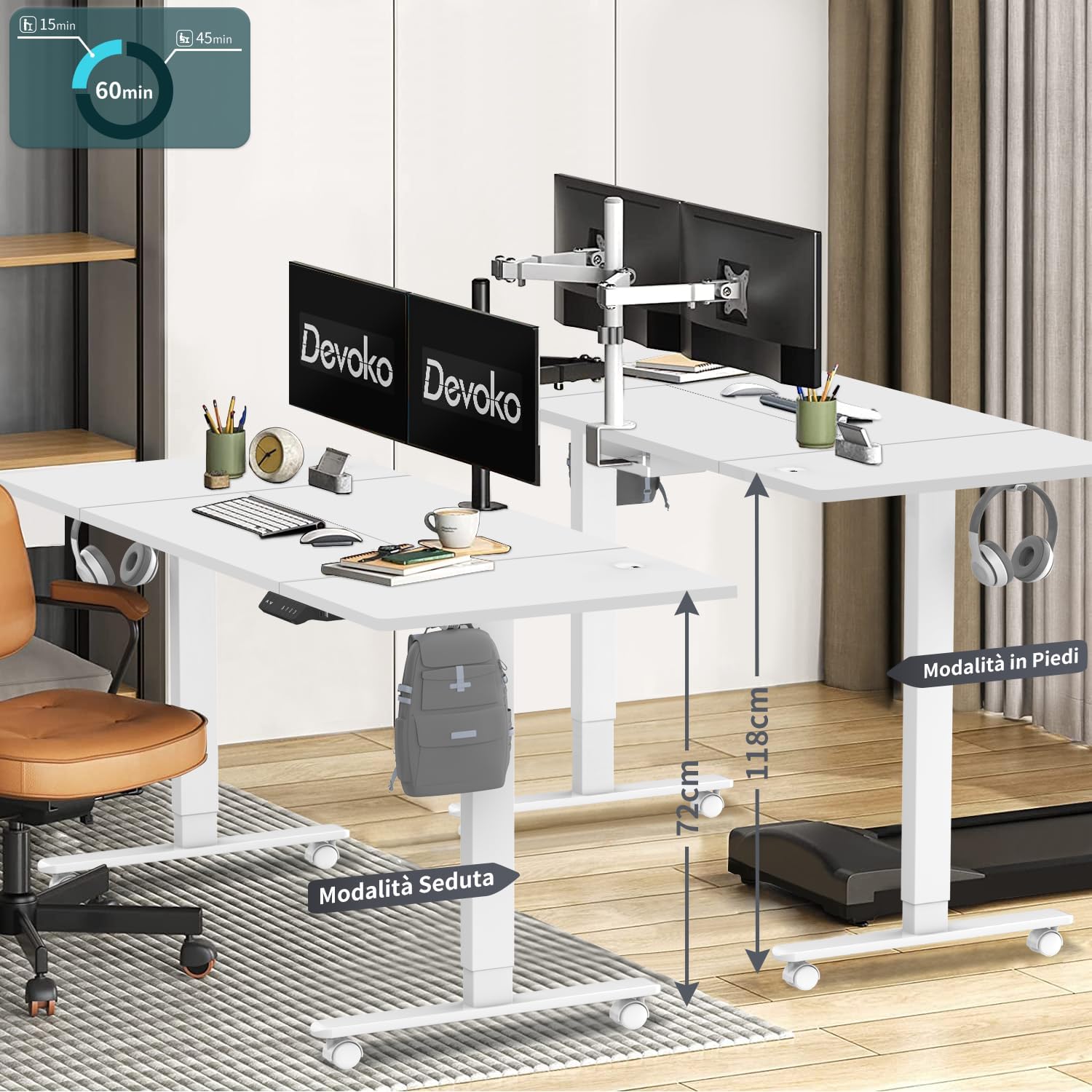
Image 5.1: The desk illustrating its adjustable height range, suitable for both sitting (72 cm) and standing (118 cm) positions.
5.2. ياداشت جا اڳواٽ سيٽ
The control panel features three memory keys (1, 2, 3) to save your preferred sitting and standing heights.
- اوچائي بچائڻ لاءِ: Adjust the desk to your desired height. Press the "ايس" button, then press one of the number buttons (1, 2, or 3) within 3 seconds. The display will confirm the setting.
- محفوظ ڪيل اوچائي استعمال ڪرڻ لاءِ: Press the corresponding number button (1, 2, or 3). The desk will automatically move to the saved height.
5.3. USB A Charging Ports
The control panel includes integrated USB A charging ports for convenient charging of mobile devices. Simply connect your device's USB cable to the port. Note: While the product description specifies USB A, some visual representations of the control panel may show a USB-C port. Please refer to your specific product's control panel.
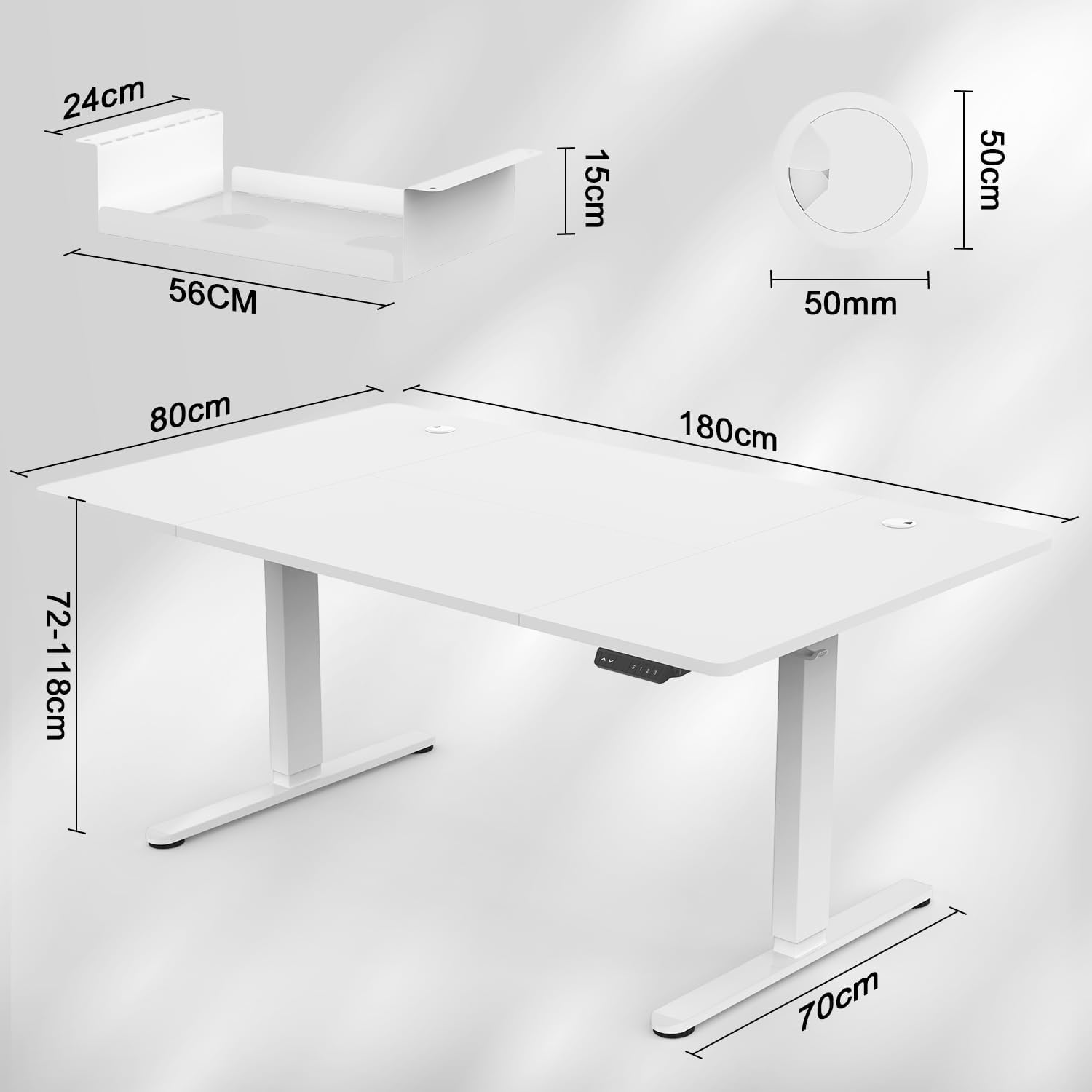
Image 5.2: The intelligent multifunction control panel, featuring memory presets, up/down controls, and a charging port (shown here as USB-C, but product features USB-A).
5.4. ٽڪراءُ مخالف نظام
The desk is equipped with a sensitive anti-collision system that detects reaction forces. If the desk encounters an obstruction during height adjustment, it will automatically stop and reverse slightly to prevent damage or injury. Ensure the area around the desk is clear during operation for optimal safety.
5.5. 360° Wheels
The desk is fitted with 360° swivel wheels, allowing for easy mobility and repositioning within your workspace. Lock the wheels when the desk is in its desired position to ensure stability.
6. سار سنڀال
- صفائي: ڊيسڪ ٽاپ ۽ فريم کي نرم، ڊي سان صاف ڪريوamp ڪپڙو. گھڙڻ وارا صاف ڪندڙ يا سخت ڪيميڪلز کان پاسو ڪريو.
- چڪاس: وقت بوقت سڀني اسڪرو ۽ بولٽن کي چيڪ ڪريو ته جيئن پڪ ڪري سگهجي ته اهي تنگ رهن. جيڪڏهن ضروري هجي ته ٻيهر مضبوط ڪريو.
- ڪيبل جو انتظام: Regularly inspect cables for wear or damage. Ensure cables are neatly organized within the cable management tray to prevent snagging.
7. مسئلا حل ڪرڻ
| مسئلو | ممڪن سبب | حل |
|---|---|---|
| ڊيسڪ حرڪت نٿي ڪري. | Power cable disconnected; control panel cable loose; motor error. | Check power connections. Ensure control panel cable is securely plugged in. Unplug the desk for 10 seconds and plug it back in to reset. |
| ڊيسڪ غير مساوي طور تي هلي ٿي يا غير معمولي شور ڪري ٿي. | اڻ برابر لوڊ؛ ڍلو ڳنڍ؛ رڪاوٽ. | Ensure weight is evenly distributed. Check all assembly screws. Clear any obstructions. |
| ٽڪراءُ مخالف نظام اڪثر چالو ٿيندو آهي. | Obstruction in the path of movement. | Ensure the area around the desk is clear of objects during height adjustment. |
| USB چارجنگ پورٽ ڪم نه ڪري رهيو آهي. | Device not compatible; cable issue; power issue. | Try a different device or cable. Ensure the desk is powered on. |
If you encounter issues not listed here or require further assistance, please contact Devoko customer support.
8. وضاحتون

Image 8.1: Detailed dimensions of the desk, including desktop size (180x80 cm) and height range (72-118 cm).

تصوير 8.2: هڪ اوور هيڊ view confirming the 180 cm by 80 cm desktop dimensions.
- ماڊل: 0428-1822
- برانڊ: ديووڪو
- ڊيسڪ ٽاپ جا طول و عرض: 180 سينٽي (ڊگھائي) x 80 سينٽي (ويڪر)
- ڊيسڪ ٽاپ ٿلهي: 15 ملي ميٽر
- اونچائي جي حد: 72 سينٽي کان 118 سينٽي ميٽر
- کڻڻ واري مشين: بجلي
- کڻڻ جي رفتار: 20mm/s
- شور جي سطح: 45 ڊي بي کان گھٽ
- سرٽيفڪيشن: TÜV, CE
- شامل خاصيتون: USB A Charging Ports, Cable Management Tray, 360° Wheels, Headphone Hook, Anti-Collision System, 3 Height Memory Keys
- فريم مواد: ڌاتو
- شيء جو وزن: 35 ڪلوگرام
- اسيمبلي جي ضرورت آهي: ها
9. وارنٽي ۽ سپورٽ
وارنٽي: The Devoko 0428-1822 Electric Standing Desk comes with a 5-year warranty on the motor and table frame, ensuring long-term reliability and performance.
واپسي: A 30-day unconditional return policy is provided.
ڪسٽمر سپورٽ: For any installation issues, operational questions, or warranty claims, please contact Devoko customer support through the Amazon platform. Our team is committed to responding within 24 hours to assist you.