
1. تعارف
This manual provides essential information for the installation, operation, and maintenance of your SYLVOX 43-inch Outdoor Signage TV (Model SS43A0KAGD). Please read this manual thoroughly before using the product to ensure proper function and safety. This television is designed for commercial outdoor use, offering high brightness and robust weather protection.
2. حفاظت جي ڄاڻ
پراڊڪٽ کي نقصان کان بچائڻ ۽ استعمال ڪندڙ جي حفاظت کي يقيني بڻائڻ لاءِ هيٺ ڏنل حفاظتي احتياطن تي عمل ڪريو:
- بجلي جي فراهمي: پڪ ڪريو ته طاقت جو ذريعو وال سان ملندو آهيtage گهرجون مصنوعات جي ليبل تي بيان ڪيل آهن.
- پاڻي ۽ نمي: While the TV is IP55 waterproof, avoid direct high-pressure water jets. Ensure all port covers are securely closed when not in use.
- وينٽيليشن: Do not block ventilation openings. Adequate airflow is necessary to prevent overheating.
- چڙهڻ: Use appropriate mounting hardware and follow VESA standards (400 x 200 mm) for secure installation. Professional installation is recommended for outdoor environments.
- صفائي: صفائي کان اڳ بجلي بند ڪريو. نرم، ڊي استعمال ڪريوamp ڪپڙو. سخت ڪيميائي کان بچاء.
- گرمي پد: Operate the TV within the specified temperature range (-4°F to 113°F).
3. پيڪيج مواد
پڪ ڪريو ته سڀئي شيون پيڪيج ۾ موجود آهن:
- SYLVOX 43-inch Outdoor Signage TV
- ريموٽ ڪنٽرول (2 AAA بيٽريون شامل آهن)
- پاور ڪنڊ
- استعمال ڪندڙ جي دستياب
- وارنٽي ڪارڊ
- Screws for mounting (BM8X14MM for full motion cantilever mount, BM8X28MM & Gasket for fixed wall mount)

Figure 3.1: Included accessories with the SYLVOX 43-inch Outdoor Signage TV.
4. پراڊڪٽ ختمview
4.1 اهم خاصيتون
- ڏيکاريو: 43-inch 4K UHD (3840x2160) LED display with 1000 nits brightness and 1.07 Billion Colors.
- استحڪام: IP55 waterproof rating, corrosion-resistant and scratch-resistant metal casing. Designed for 7x24 hour operation with temperature protection.
- آپريٽنگ سسٽم: Linux-based system with pre-installed applications (Netflix, Pandora, Facebook, YouTube, Twitter). Note: Signage 1.0 series does not support downloading additional apps.
- رابطي: Built-in ATSC & NTSC tuners, Bluetooth, 2.4G WiFi.
- آڊيو: بلٽ ان اسپيڪر.

Figure 4.1: SYLVOX 43-inch Outdoor Signage TV in a commercial setting, showcasing its bright 4K display.

Figure 4.2: The TV's IP55 waterproof and wide temperature range capabilities.

Figure 4.3: Visual representation of 4K UHD picture quality and color depth.

شڪل 4.4: ختمview of the Linux system and integrated features.
4.2 بندرگاهن ۽ ڪنيڪشن
The TV offers a variety of input and output ports for versatile connectivity:
- RS232
- USB Input x 2 (USB 1.0, USB 2.0, USB 3.0 compatible)
- RJ45 (Ethernet)
- HDMIx3
- آپٽيڪل آئوٽ
- Audio L/R In
- YPbPr In
- Antenna In (ATSC/NTSC Tuner)
- ائرفون اهر
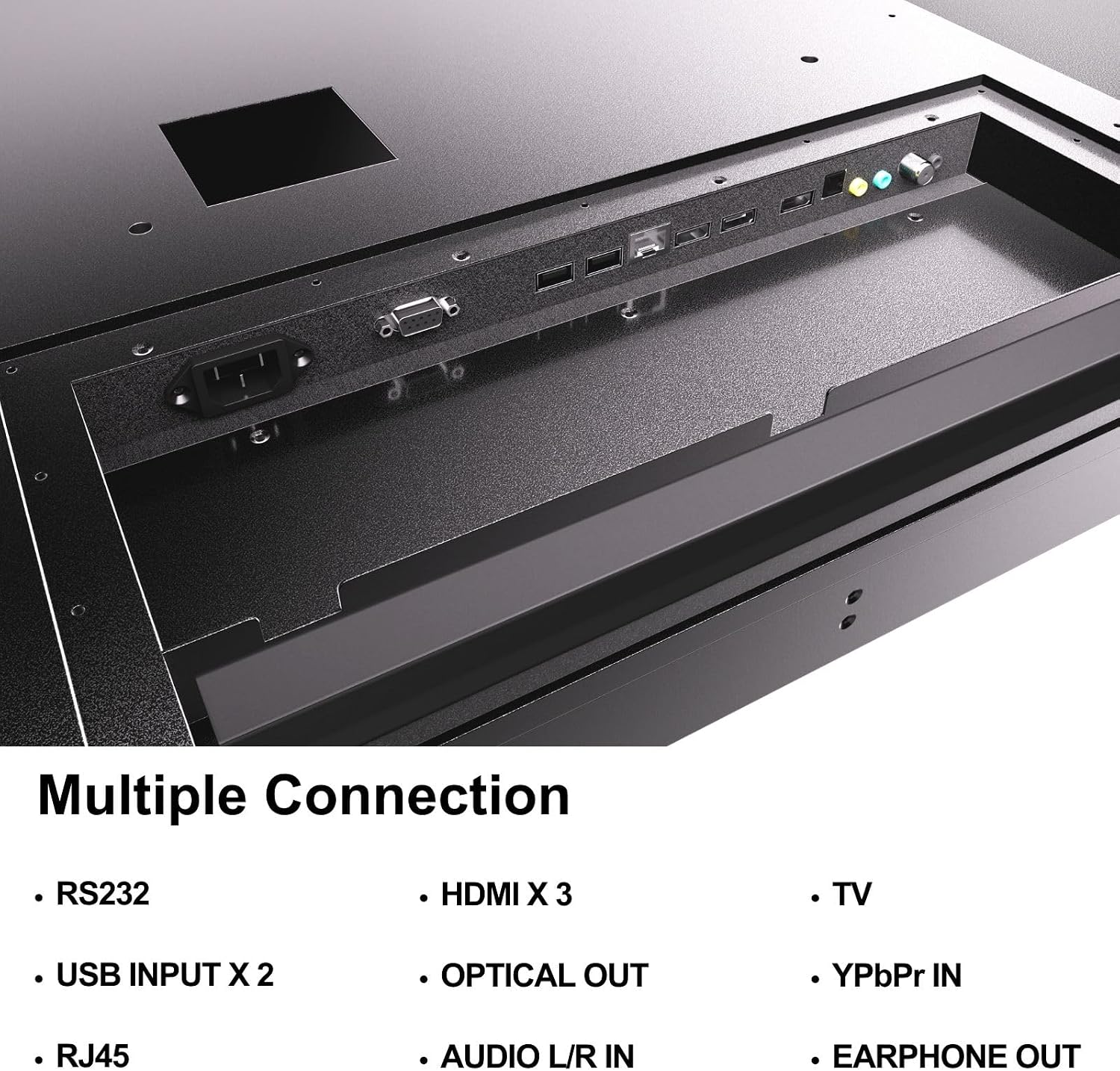
Figure 4.5: Rear panel connections of the SYLVOX Outdoor Signage TV.
5. سيٽ اپ
5.1 ٽي وي لڳائڻ
The SYLVOX Outdoor Signage TV supports wall mounting. Ensure the mounting surface is sturdy enough to support the TV's weight and is suitable for outdoor conditions.
- جڳھ چونڊيو: هڪ جڳهه چونڊيو جيڪا بهترين فراهم ڪري ٿي viewing and protection from extreme weather, even with the TV's waterproof rating.
- وال مائونٽ انسٽال ڪريو: Attach a VESA-compatible wall mount (400 x 200 mm) to the desired location according to the mount manufacturer's instructions. Use the provided screws (BM8X14MM for full motion, BM8X28MM with gasket for fixed mount).
- Attach TV to Mount: Carefully lift the TV and secure it to the installed wall mount. Ensure all connections are tight and secure.
5.2 شروعاتي پاور آن
- پاور Connectنيو: Plug the power cord into the TV's power input and then into a grounded outdoor-rated power outlet.
- بيٽري داخل ڪريو: Open the remote control battery compartment and insert the two AAA batteries, observing polarity.
- پاور آن: ريموٽ ڪنٽرول يا ٽي وي تي پاور بٽڻ دٻايو.
- شروعاتي سيٽ اپ مددگار: Follow the on-screen instructions to select language, time zone, and perform initial channel scanning.
5.3 نيٽورڪ ڪنيڪشن
To access smart TV features and streaming applications, connect the TV to your network.
- وائي فائي ڪنيڪشن: Navigate to the TV's settings menu, select 'Network', then 'Wi-Fi'. Choose your network from the list and enter the password.
- Ethernet ڪنيڪشن: پنهنجي روٽر کان ٽي وي تي RJ45 پورٽ سان هڪ ايٿرنيٽ ڪيبل ڳنڍيو. ٽي وي خودڪار طريقي سان وائرڊ ڪنيڪشن کي ڳولي وٺندو.
- بلوٽوٿ: For connecting audio devices, go to the Bluetooth settings, enable Bluetooth, and pair with your desired device.
6. آپريٽنگ هدايتون
6.1 بنيادي ٽي وي ڪم
- طاقت: کي دٻايو طاقت ٽي وي کي آن يا آف ڪرڻ لاءِ ريموٽ تي بٽڻ.
- ان پٽ جو ذريعو: کي دٻايو ان پٽ button to cycle through available input sources (HDMI 1/2/3, TV, YPbPr, USB).
- حجم: استعمال ڪريو حجم +/- آواز جي سطح کي ترتيب ڏيڻ لاء بٽڻ.
- چينل: استعمال ڪريو چينل +/- buttons to change channels when using the built-in tuner.
- نيويگيشن: Use the directional arrows and OK مينيو کي نيويگيٽ ڪرڻ لاءِ بٽڻ.
6.2 سمارٽ ٽي وي جون خاصيتون
The TV runs on a Linux operating system and comes with several pre-installed applications:
- Access the home screen to view and launch applications like Netflix, Pandora, Facebook, YouTube, and Twitter.
- Use the remote control's dedicated app buttons (if available) for quick access.
- Note that the Signage 1.0 series does not support downloading additional applications.
6.3 Screencasting (Android Only)
The TV supports screencasting from Android mobile phones:
- Ensure your Android device and the TV are connected to the same Wi-Fi network.
- On your Android phone, enable the screen mirroring or screencasting feature (names may vary by device, e.g., 'Smart View', 'Cast', 'Wireless Display').
- Select your SYLVOX TV from the list of available devices.
6.4 Vertical/Horizontal Display
The TV can be installed and operated in both horizontal (landscape) and vertical (portrait) orientations. When using the screen vertically, the display direction is adjusted by the input device or content source.
7. سار سنڀال
Proper maintenance ensures the longevity and performance of your outdoor TV:
- اسڪرين جي صفائي: نرم، لِنٽ کان پاڪ ڪپڙي سان اسڪرين کي نرميءَ سان صاف ڪريو. ضدي نشانن لاءِ، ٿورو ڊيampڪپڙي کي پاڻي سان ڍڪيو. صاف ڪندڙ کي سڌو سنئون اسڪرين تي نه اسپري ڪريو.
- سي جي صفائيasing: نرم استعمال ڪريو، ڊيamp cloth to clean the metal casing. گھڙڻ وارا صاف ڪندڙ يا محلولن کان پاسو ڪريو.
- پورٽ ڪَوَر: Regularly check that all unused port covers are securely sealed to maintain the IP55 waterproof rating.
- ماحولياتي چڪاس: Periodically inspect the TV and mounting hardware for any signs of wear, corrosion, or damage, especially after severe weather conditions.
- سافٽ ويئر اپڊيٽ: Check for available software updates through the TV's settings menu to ensure optimal performance and security.
8. مسئلا حل ڪرڻ
If you encounter issues with your SYLVOX Outdoor Signage TV, refer to the following common problems and solutions:
| مسئلو | ممڪن سبب | حل |
|---|---|---|
| طاقت نه آهي | Power cord disconnected; no power from outlet; remote batteries dead. | Check power cord connection; test outlet; replace remote batteries. |
| تصوير ناهي، پر آواز موجود آهي. | غلط ان پٽ ذريعو چونڊيو ويو آهي؛ ٻاهرين ڊوائيس جو مسئلو. | Press 'Input' button to select correct source; check external device connections. |
| آواز ڪونهي، پر تصوير موجود آهي. | آواز خاموش يا تمام گهٽ آهي؛ ٻاهرين آڊيو ڊوائيس جو مسئلو. | Unmute volume or increase level; check audio cables for external devices. |
| Wi-Fi connection unstable or disconnected | Router issue; TV too far from router; incorrect password. | Restart router; move TV closer or use a Wi-Fi extender; re-enter Wi-Fi password. |
| ريموٽ ڪنٽرول ڪم نه ڪري رهيو آهي | Batteries dead or incorrectly inserted; obstruction between remote and TV. | Replace batteries; ensure clear line of sight to TV's IR receiver. |
If the problem persists after trying these solutions, please contact SYLVOX customer support.
9. وضاحتون
| ماڊل نالو | SS43A0KAGD |
| اسڪرين جي ماپ | 43 انچ |
| ڊسپلي ٽيڪنالاجي | ايل اي ڊي |
| قرارداد | 4K (3840x2160) |
| ريفريش جي شرح | 60 هز |
| Maximum Display Brightness | 1000 نائيٽ |
| مقابلي جي نسبت | 3000:1 |
| جوابي وقت | 8 ملي سيڪنڊ |
| پنروڪ درجه بندي | IP55 |
| آپريٽنگ سسٽم | لينڪس |
| رابطي ٽيڪنالاجي | Wireless (Bluetooth, Wi-Fi), Wired (HDMI, USB, RJ45, RS232) |
| آڊيو ان پٽ | HDMI, Optical, USB, Audio L/R In |
| سگنل فارميٽ | ATSC، NTSC |
| Total Number of HDMI Ports | 3 |
| ڪل USB بندرگاهن | 2 |
| پيداوار جا طول و عرض (ڊي x ڊبليو x ايڇ) | 3.4"ڊي x 38.6"ڊي x 22.4"ايڇ |
| ويسا ماؤنٽ معياري | 400 x 200 ملي ميٽر |
| واتtage | 120 واٽ ڪلاڪ |
| ٺاهيندڙ | Kontech Electronics Co., Ltd. |
| يو پي سي | 810079224838 |
10. وارنٽي ۽ سپورٽ
10.1 وارنٽي ڄاڻ
SYLVOX provides a 2 سالن جي ٺاهيندڙ جي وارنٽي هن پراڊڪٽ لاءِ. هي وارنٽي عام استعمال هيٺ مواد ۽ ڪاريگري ۾ خرابين کي ڍڪيندي آهي. وارنٽي دعوائن لاءِ مهرباني ڪري خريداري جو ثبوت رکو.
10.2 ڪسٽمر سپورٽ
If you require assistance with installation, operation, troubleshooting, or warranty service, please contact SYLVOX customer support. We recommend checking the product upon receipt to ensure it is in good condition and functions normally.
For further support, please visit the official SYLVOX webسائيٽ تي وڃو يا پنهنجي وارنٽي ڪارڊ تي ڏنل رابطي جي معلومات جو حوالو ڏيو.