
Topsolar 30W-KIT
Topsolar 30W 12V/24V Solar Panel Kit User Manual
Model: 30W-KIT
تعارف
Thank you for choosing the Topsolar 30W 12V/24V Solar Panel Kit. This kit is designed to provide a reliable and efficient solution for charging and maintaining 12V batteries in various off-grid applications. It is ideal for use with cars, RVs, boats, motorcycles, cabins, and other remote power systems. This manual provides detailed instructions for installation, operation, and maintenance to ensure optimal performance and longevity of your solar panel kit.
حفاظت جي ڄاڻ
Please read all safety instructions carefully before installing or operating the solar panel kit. Failure to follow these instructions may result in electric shock, fire, or serious injury.
- Always wear appropriate personal protective equipment (PPE), including safety glasses and insulated gloves, during installation.
- پڪ ڪريو ته سڀئي ڪنيڪشن محفوظ ۽ صحيح طرح سان موصل آهن ته جيئن شارٽ سرڪٽ کان بچي سگهجي.
- Do not attempt to disassemble or repair the solar panel or charge controller. Refer to qualified personnel for service.
- Keep the solar panel and electrical components away from flammable materials and sources of ignition.
- Avoid touching the exposed ends of wires when the solar panel is exposed to sunlight, as it generates electricity.
- Ensure proper ventilation around the charge controller to prevent overheating.
- Connect the battery to the charge controller first, then the solar panel, and finally the load (if any). Disconnect in reverse order.
پيڪيج مواد
تصديق ڪريو ته هيٺ ڏنل سڀئي جزا توهان جي پيڪيج ۾ شامل آهن:
- 1 x 30 Watt 12V Monocrystalline Solar Panel
- 1 x 10A PWM LCD Display Solar Charge Controller
- 1 x 6.5 ft Extension Cable with Battery Clips
- 1 x 6.5 ft Extension Cable with O-Ring Terminal
- 1 x U Shape Mount Tilt Rack (Adjustable Mount Bracket)

سيٽ اپ ۽ تنصيب
Follow these steps for proper installation of your solar panel kit.
1. سولر پينل لڳائڻ
Choose a location for the solar panel that receives maximum direct sunlight throughout the day, unobstructed by shadows from trees, buildings, or other objects. The adjustable mount bracket allows for optimal angling towards the sun.


2. Charge Controller Connection
The 10A PWM charge controller manages the power flow from the solar panel to the battery, preventing overcharging and protecting against discharge, over-voltage, short circuits, and reversed polarity.

3. Wiring Diagram and Connection Steps
Follow the connection sequence carefully to avoid damage to the components.
- Step 1: Connect the Battery to the Charge Controller. Connect the positive (+) and negative (-) terminals of your 12V battery to the corresponding battery terminals on the charge controller. Ensure a secure connection. The charge controller display should light up.
- Step 2: Connect the Solar Panel to the Charge Controller. Connect the positive (+) and negative (-) cables from the solar panel to the corresponding solar panel terminals on the charge controller.
- Step 3: Connect the Load (Optional). If you are connecting a DC load directly to the charge controller, connect its positive (+) and negative (-) wires to the load terminals on the controller. For AC loads, connect a power inverter to the battery (not the controller's load terminals), and then connect your AC devices to the inverter.
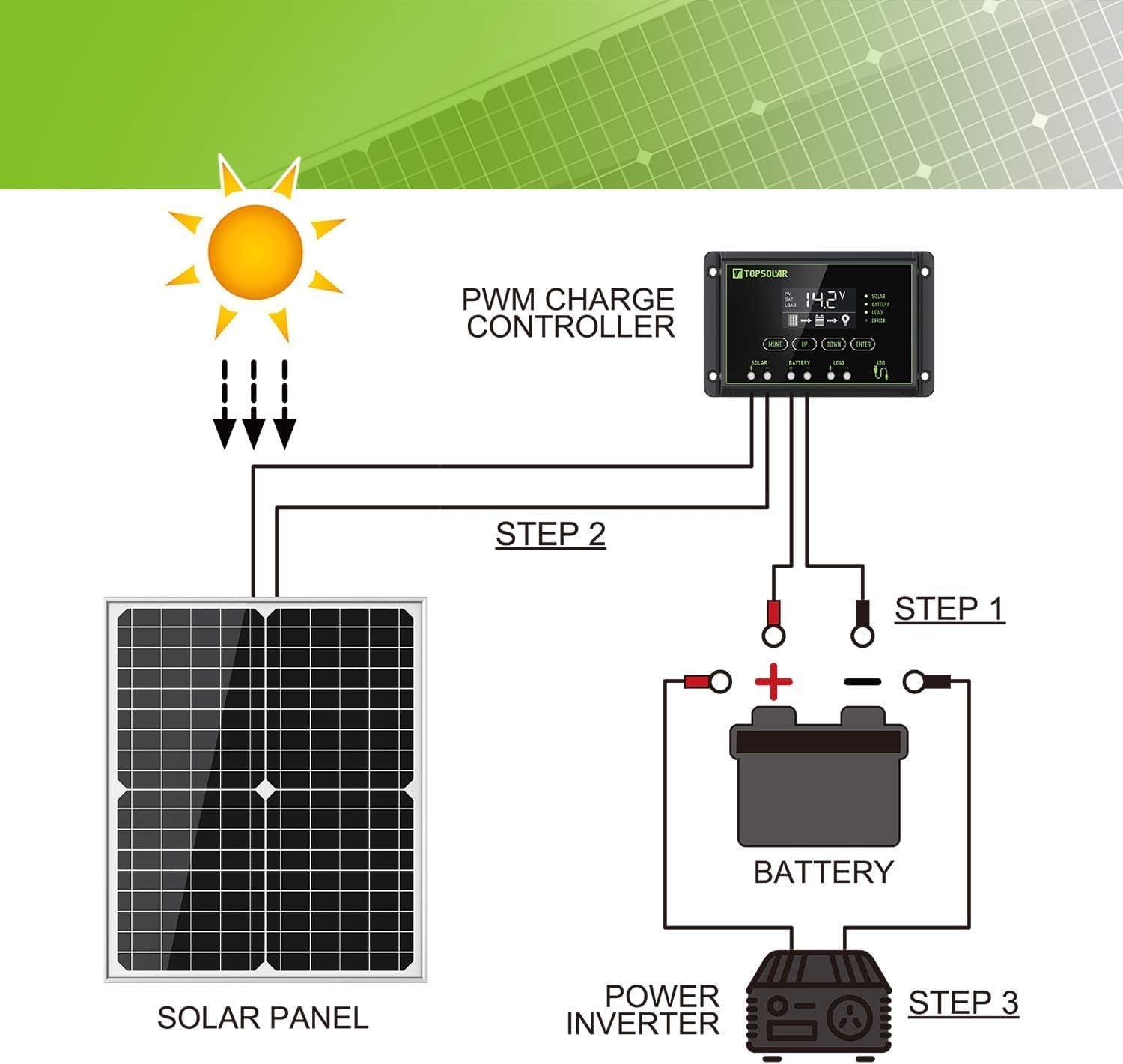
Disconnection Sequence: To disconnect the system, reverse the order: first disconnect the load, then the solar panel, and finally the battery.
آپريٽنگ هدايتون
The 10A PWM charge controller features an LCD display for monitoring system status and buttons for setting parameters.
- LCD ڊسپلي: ڏيکاري ٿو بيٽري جو حجمtage, charging current, discharging current, battery state of charge, and various system icons (solar charging, load status, battery type).
- بٽڻ: Typically include 'Menu', 'Up', and 'Down' buttons to navigate through display screens and adjust settings such as battery type (lead-acid, gel, flood), load control modes (e.g., 24-hour output, dusk-to-dawn), and charge/discharge parameters. Refer to the specific charge controller's mini-manual for detailed button functions and programming.
- چارج ڪرڻ: When the solar panel receives sufficient sunlight, the controller will automatically begin charging the connected battery. The display will indicate charging activity.
- لوڊ ڪنٽرول: If a DC load is connected to the controller, it can be configured to turn on/off based on time or battery voltage.

سار سنڀال
Regular maintenance ensures the longevity and efficiency of your solar panel kit.
- شمسي پينل جي صفائي: وقتي طور تي سولر پينل جي مٿاڇري کي نرم، ڊي سان صاف ڪريوamp cloth to remove dust, dirt, and debris. A clean panel ensures maximum sunlight absorption. Avoid abrasive cleaners or harsh chemicals.
- ڪنيڪشن چيڪ: Regularly inspect all electrical connections (solar panel to controller, controller to battery, controller to load) to ensure they are tight and free from corrosion.
- ڪيبل جي چڪاس: Check cables for any signs of wear, fraying, or damage. Replace damaged cables immediately.
- بيٽري جي سار سنڀال: Follow the manufacturer's recommendations for your specific battery type. Ensure battery terminals are clean and free of corrosion.
- ماحولياتي عنصر: While the panel is built with strong tempered glass and an aluminum frame for weather resistance, extreme conditions may require additional protection or inspection.
مشڪلاتون
هتي ڪجھ عام مسئلا ۽ انهن جا امڪاني حل آهن:
| مسئلو | ممڪن سبب | حل |
|---|---|---|
| No power output from solar panel / Controller display off | No sunlight; Panel dirty; Loose connections; Reversed polarity (battery); Faulty component. | Ensure panel is in direct sunlight. Clean panel surface. Check all wiring connections for tightness and correct polarity. Verify battery voltage. |
| بيٽري چارج نه ٿي رهي آهي يا سست چارج ٿي رهي آهي | Insufficient sunlight; Panel partially shaded; Dirty panel; Undersized panel for battery/load; Faulty battery. | Relocate panel for better sun exposure. Remove any shading. Clean panel. Check battery health. |
| لوڊ ڪم نه ڪري رهيو آهي | گھٽ بيٽري جو حجمtage; Overload; Incorrect load settings on controller; Loose load connection. | بيٽري جو حجم چيڪ ڪريوtage. Reduce load. Verify load settings on controller. Check load wiring. |
| Controller displaying error code | Specific error (e.g., over-voltagاي، شارٽ سرڪٽ). | Consult the charge controller's specific manual for error code definitions and solutions. Often involves checking connections or reducing load. |
وضاحتون
| خاصيت | تفصيل |
|---|---|
| برانڊ | مٿي شمسي |
| ماڊل | 30W-KIT (Solar Panel: mc4) |
| مواد | مونڪوڪيسٽلينڊلينڊ سلکان |
| وڌ ۾ وڌ طاقت | 30 واٽ |
| و Vol ۾ و Voltage | 24 Volts (System Voltage) |
| AC Adapter Current (Charge Controller) | 10 Amps |
| Product Dimensions (Solar Panel) | 22.05"ليٽر x 13.3"ڊبليو x 0.78"ايڇ |
| شيءِ جو وزن | 5.59 پائونڊ |
| ڪارڪردگي | اعلي ڪارڪردگي |
| ڪنيڪٽر جو قسم | MC4 (for solar panel connection) |
وارنٽي ۽ سپورٽ
The Topsolar 30W Solar Panel Kit comes with a 12-month worry-free warranty. For technical support, warranty claims, or any questions regarding your product, please contact Topsolar customer service through the retailer's platform or the official Topsolar webسائيٽ. مھرباني ڪري سپورٽ سان رابطو ڪرڻ وقت پنھنجي خريداري جي تفصيل ۽ ماڊل نمبر تيار رکو.
درخواستون
This solar panel kit is versatile and suitable for a wide range of off-grid 12V battery charging and maintenance applications, including:
- Maintaining car, RV, boat, and motorcycle batteries.
- Powering remote cabins, sheds, and gate openers.
- Providing backup power for small systems.
- Off-grid lighting and small electronic devices.

Ask a question about this manual
Ask about setup, troubleshooting, compatibility, parts, safety, or missing instructions. Manuals+ will review the question and use this page’s manual context to help answer it.