
تعارف
Thank you for choosing the Xmenha Mini Invisible Bluetooth Earbuds Y9. These earbuds are designed for discreet, comfortable listening, featuring a compact size and ergonomic fit suitable for small ears. This manual provides essential information for setting up, operating, maintaining, and troubleshooting your earbuds to ensure optimal performance and longevity.
پيڪيج مواد
- Xmenha Mini Invisible Bluetooth Earbuds (1 pair)
- چارج ڪيس
- USB چارجنگ ڪيبل
- استعمال ڪندڙ دستي
- سلڪون اِرٽِپس (مختلف سائز)
پيداوار ختمview
The Xmenha Y9 earbuds are engineered for a low-profile fit and high-quality audio. Below are visual representations of the product and its key features.

Image: The Xmenha Y9 mini earbud is shown held by a finger, highlighting its exceptionally small and discreet design next to its charging case.

تصوير: هڪ ويجهو تصوير view of a woman's ear demonstrates how the Xmenha Y9 earbud sits almost entirely within the ear canal, making it nearly invisible.

Image: A visual guide illustrating the simple one-step Bluetooth pairing process between the Xmenha Y9 earbuds and a smartphone.
Video: Official product video demonstrating the features and compact design of the Xmenha Y9 Mini Bluetooth Earbuds.
سيٽ اپ ڪريو
1. ائربڊس ۽ ڪيس کي چارج ڪرڻ
Before first use, fully charge the earbuds and charging case. The charging case provides additional power for on-the-go use.
- ائربڊس کي چارجنگ ڪيس ۾ رکو. پڪ ڪريو ته اهي چارجنگ شروع ڪرڻ لاءِ صحيح طرح سان ويٺا آهن.
- USB چارجنگ ڪيبل کي ڪيس تي چارجنگ پورٽ ۽ پاور سورس سان ڳنڍيو (مثال طور، ڪمپيوٽر USB پورٽ، وال اڊاپٽر).
- The indicator lights on the case will show the charging status. Refer to the case's specific light patterns for full charge indication.
- A single charge provides approximately 4 hours of playback time. The fully charged case can extend total listening time to about 30 hours.

Image: This graphic illustrates the battery performance, showing 4-5 hours of playback on a single earbud charge and up to 30 hours total with the charging case.
2. بلوٽوٽ جوئر
The earbuds feature automatic pairing for convenience.
- پهريون ڀيرو جوڙڻ: چارجنگ ڪيس کوليو. ائربڊس پاڻمرادو آن ٿيندا ۽ پيئرنگ موڊ ۾ داخل ٿيندا.
- پنهنجي ڊوائيس (اسمارٽ فون، ٽيبليٽ، وغيره) تي، بلوٽوٿ کي فعال ڪريو ۽ موجود ڊوائيسز جي ڳولا ڪريو.
- Select "Y9" from the list of available devices to connect. Once connected, you will hear a confirmation tone.
- ايندڙ جوڙ: After the initial connection, the earbuds will automatically connect to the last paired device when removed from the charging case.
آپريٽنگ هدايتون
1. ائربڊس پائڻ
For optimal sound quality and comfort, ensure the earbuds are properly seated in your ear canal.
- کاٻي (L) ۽ ساڄي (R) ائربڊس جي سڃاڻپ ڪريو.
- هر ائربڊ کي نرميءَ سان لاڳاپيل ڪن ڪينال ۾ داخل ڪريو.
- Rotate the earbud slightly until it feels secure and comfortable. The ergonomic design is intended to fit snugly and discreetly.
- Experiment with different silicone eartip sizes to find the best fit for noise isolation and comfort.

تصوير: هڪ پاسي وارو پروfile view showing the Xmenha Y9 earbud worn discreetly, demonstrating its low-profile ڊيزائن.

Image: A man and woman are shown wearing the Xmenha Y9 invisible Bluetooth earbuds, highlighting their comfortable and discreet fit for various ear sizes.
2. ٽچ ڪنٽرول
The Xmenha Y9 earbuds feature intuitive touch controls on each earbud for managing audio playback and calls.
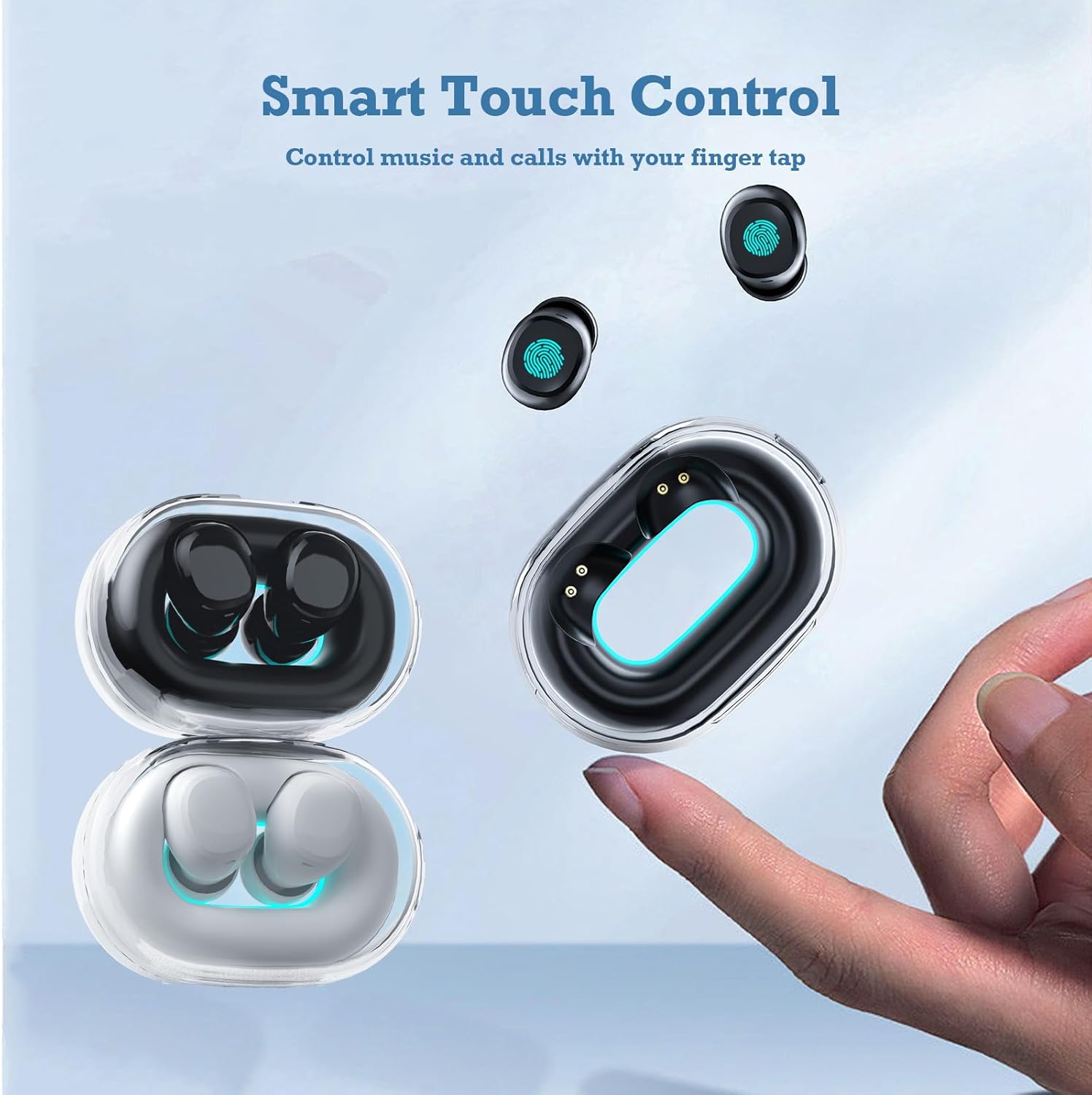
Image: A hand interacts with an Xmenha Y9 earbud, illustrating the smart touch control functionality for managing media and calls.
| عمل | فنڪشن |
|---|---|
| سنگل ٽيپ (کاٻي/ساڄي) | موسيقي هلايو/روڪيو، ڪال جو جواب ڏيو/ختم ڪريو |
| ڊبل ٽيپ (ساڄي) | ايندڙ ٽريڪ |
| ٻٽي ٽيپ (کاٻي) | اڳيون ٽريڪ |
| ٽي ڀيرا ٽيپ ڪريو (کاٻي/ساڄي) | وائيس اسسٽنٽ کي فعال ڪريو |
| ڊگھو پريس (2 سيڪنڊ) | ڪال رد ڪريو |
سار سنڀال
1. صفائي
باقاعده صفائي آواز جي معيار ۽ صفائي کي برقرار رکڻ ۾ مدد ڪري ٿي.
- ائربڊس ۽ چارجنگ ڪيس کي صاف ڪرڻ لاءِ نرم، سڪل، لِنٽ فري ڪپڙو استعمال ڪريو.
- ضدي مٽيءَ لاءِ، ٿورو ڊيampen the cloth with water or a mild, non-abrasive cleaner. Avoid getting liquid into openings.
- Remove silicone eartips and clean them separately with water and mild soap, then dry thoroughly before reattaching.
- سخت ڪيميڪل، الڪوحل، يا رگڙيندڙ مواد استعمال نه ڪريو.
2. اسٽوريج
Proper storage extends the lifespan of your earbuds.
- جڏهن ائربڊس استعمال ۾ نه هجن ته انهن کي بچائڻ ۽ چارج رکڻ لاءِ هميشه انهن جي چارجنگ ڪيس ۾ رکو.
- Store the case and earbuds in a cool, dry place, away from direct sunlight, extreme temperatures, and humidity.
مشڪلاتون
If you encounter issues with your Xmenha Y9 earbuds, try the following solutions:
- ائربڊس جوڙو نه پيا لڳن: Ensure both earbuds are charged. Place them back in the case, close it, then open it again to re-enter pairing mode. Delete "Y9" from your device's Bluetooth list and try pairing again.
- هڪ ائربڊ مان آواز نه ٿو اچي: Ensure both earbuds are charged. Try resetting the earbuds (refer to the full product manual if available for specific reset instructions). Re-pair with your device.
- چارج ڪرڻ جا مسئلا: Check the charging cable and power source. Ensure the earbuds are correctly seated in the charging case. Clean the charging contacts on both the earbuds and the case.
- غريب آواز جي معيار: Ensure the earbuds are properly inserted and the correct size eartips are used for a good seal. Clean any debris from the earbud nozzles. Move closer to your connected device to avoid interference.
- ڪنن جا ڪري پوڻ: Try different sizes of silicone eartips to find a more secure fit. Ensure they are inserted correctly as described in the "Wearing the Earbuds" section.
وضاحتون
| خاصيت | تفصيل |
|---|---|
| برانڊ | Xmenha |
| ماڊل نمبر | Xmenha-GWC-Y9-Black |
| ماڊل نالو | AK57 |
| رنگ | ڳاڙهو ڳاڙهو |
| ڪن جي جڳهه | ڪن ۾ |
| فارم فيڪٽر | ڪن ۾ |
| شور ڪنٽرول | آواز جي اڪيلائي |
| رابطي ٽيڪنالاجي | وائرليس (بلوٽوت) |
| بلوٽوت ورزن | 5.0 |
| بلوٽوٿ رينج | 10 ميٽر |
| ڪنٽرول قسم | شور ڪنٽرول |
| ڪنٽرول جو طريقو | Remote (Touch) |
| آڊيو ڊرائيور جو قسم | متحرڪ ڊرائيور |
| تعدد جي حد | 20 هرٽز - 20,000 هرٽز |
| بند ٿيل مواد | پلاسٽڪ |
| پاڻي جي مزاحمت جي سطح | پنروڪ |
| Battery Average Life (Single Charge) | 4 ڪلاڪ |
| ڪل بيٽري جي زندگي (چارجنگ ڪيس سان) | 30 ڪلاڪ تائين |
| وزن (ايربڊس) | Approximately 0.71 ounces (total for both) |
| طول و عرض (ايئربڊ) | تقريبن 0.3 x 0.2 x 0.5 انچ |
وارنٽي ۽ سپورٽ
For detailed warranty information, please refer to the documentation included with your purchase or contact the retailer. If you require further assistance or have questions not covered in this manual, please reach out to Xmenha customer support through their official channels or the platform where you purchased the product.