
1. تعارف
This user manual provides detailed instructions for the assembly, operation, and maintenance of your FLEXISPOT Lite Electric Standing Desk. Please read this manual thoroughly before installation and use to ensure proper function and safety. Keep this manual for future reference.
2. اهم حفاظتي ڄاڻ
انهن حفاظتي هدايتن تي عمل ڪرڻ ۾ ناڪامي جي نتيجي ۾ پيداوار کي زخم يا نقصان ٿي سگهي ٿو.
- The desk has a maximum load capacity of 70 ڪلوگرام (154 پائونڊ)هن وزن جي حد کان وڌيڪ نه ڪريو.
- اسيمبلي هڪ بالغ طرفان ڪيو وڃي.
- پڪ ڪريو ته سڀئي اسڪرو ۽ بولٽ استعمال ڪرڻ کان اڳ محفوظ طور تي سخت آهن.
- Keep children and pets away from the desk during operation to prevent injury from moving parts.
- Do not place hands or other objects near the lifting mechanism while the desk is in motion.
- صفائي ڪرڻ يا ڪنهن به سار سنڀال ڪرڻ کان اڳ بجلي بند ڪريو.
- Use only the power adapter supplied with the desk.
- ڪنٽرول پينل يا موٽر جي حصن تي مائع ڦھلائڻ کان پاسو ڪريو.
3. پراڊڪٽ ختمview ۽ خاصيتون
The FLEXISPOT Lite Electric Standing Desk is designed to promote a healthy work environment by allowing seamless transitions between sitting and standing positions. It features a robust motor, memory presets, and an anti-collision system.

Figure 3.1: FLEXISPOT Lite Electric Standing Desk setup with accessories.
اهم خاصيتون:
- Ergonomic ڊيزائن: Facilitates alternating between sitting and standing to reduce physical strain.
- Quiet and Durable Motor: Operates at less than 50 dB, ensuring a quiet workspace.
- Electric Height Adjustment with Memory: Easily adjust height with a control panel and save up to four preferred height settings.
- مضبوط تعمير: Steel frame with a T-foot design provides stability and supports up to 70 kg.
- وسيع ڊيسڪ ٽاپ: 140x60 cm maple tabletop with rounded corners and integrated wire holes.
- Anti-Collision Rebound Function: Automatically stops and reverses if an obstruction is detected during movement.
- مربوط لوازمات: Includes two hooks and a cup holder for convenience.
4. سيٽ اپ ۽ اسيمبلي
This section outlines the general steps for assembling your FLEXISPOT Lite Electric Standing Desk. Refer to the separate assembly guide included in your package for detailed, step-by-step instructions and diagrams.
4.1 کولڻ
- احتياط سان پيڪنگ کوليو ۽ سڀني حصن کي هٽايو.
- Place all parts on a clean, flat, and soft surface (e.g., a carpet) to prevent scratches.
- تصديق ڪريو ته اسيمبلي گائيڊ ۾ درج ٿيل سڀئي حصا موجود آهن.
4.2 اجزاء جي سڃاڻپ
Familiarize yourself with the main components:
- Desktop sections
- Leg columns (lifting columns)
- پيرن جي حمايت
- ڪنٽرول باڪس
- ڪنٽرول پينل
- پاور اڊاپٽر ۽ ڪيبل
- Hardware (screws, bolts, tools)
- Accessories (hooks, cup holder)
4.3 اسيمبلي جا مرحلا (عام)
- لفٽنگ ڪالمن کي ڊيسڪ ٽاپ فريم سان ڳنڍيو.
- پيرن جي سپورٽ کي کڻڻ واري ڪالمن جي تري ۾ محفوظ ڪريو.
- Mount the control box and control panel to the underside of the desktop.
- Connect all cables from the motors to the control box, and then connect the power adapter.
- Attach the desktop sections together (if applicable) and secure them to the frame.
- Install the cup holder and hooks as desired.
Note: Refer to the detailed assembly manual for specific screw types, torque requirements, and visual aids for each step.
5. پنهنجي ڊيسڪ کي هلائڻ
This section explains how to use the control panel to adjust your desk height and utilize its features.

Figure 5.1: Smart Control Panel.
5.1 ڪنٽرول پينل جا ڪم
- ايل ايل ڊسپلي: Shows the current desk height in centimeters.
- مٿي/هيٺ بٽڻ (▲ / ▼): ڊيسڪ جي اوچائي کي مٿي يا هيٺ مسلسل ترتيب ڏيڻ لاءِ دٻايو ۽ رکو. گهربل اوچائي تي روڪڻ لاءِ بٽڻ کي ڇڏي ڏيو.
- Sit/Stand Button (i): This button may function as a quick switch between a default sitting and standing height, or as a general indicator. Refer to your specific control panel model for exact functionality.
- Memory Preset Buttons (1, 2, 3, 4): اهي بٽڻ توهان کي چار ترجيحي اوچائي سيٽنگن کي محفوظ ڪرڻ ۽ ياد ڪرڻ جي اجازت ڏين ٿا.
5.2 ميموري پري سيٽ سيٽ ڪرڻ
- مٿي/هيٺ بٽڻن کي استعمال ڪندي ڊيسڪ کي پنهنجي گهربل اوچائي تي ترتيب ڏيو.
- Press the 'M' or 'Set' button (if available, otherwise proceed to step 3). The display may flash.
- Immediately press one of the number buttons (1, 2, 3, or 4) to save the current height to that preset. The display will show 'S-' followed by the number, confirming the setting.
5.3 ياداشت جي اڳوڻن سيٽن کي ياد ڪرڻ
Simply press the desired number button (1, 2, 3, or 4). The desk will automatically move to the saved height.
5.4 Anti-Collision Rebound Function
The desk is equipped with an anti-collision system. If the desk encounters an obstruction while moving up or down, it will automatically stop and reverse slightly to prevent damage or injury.
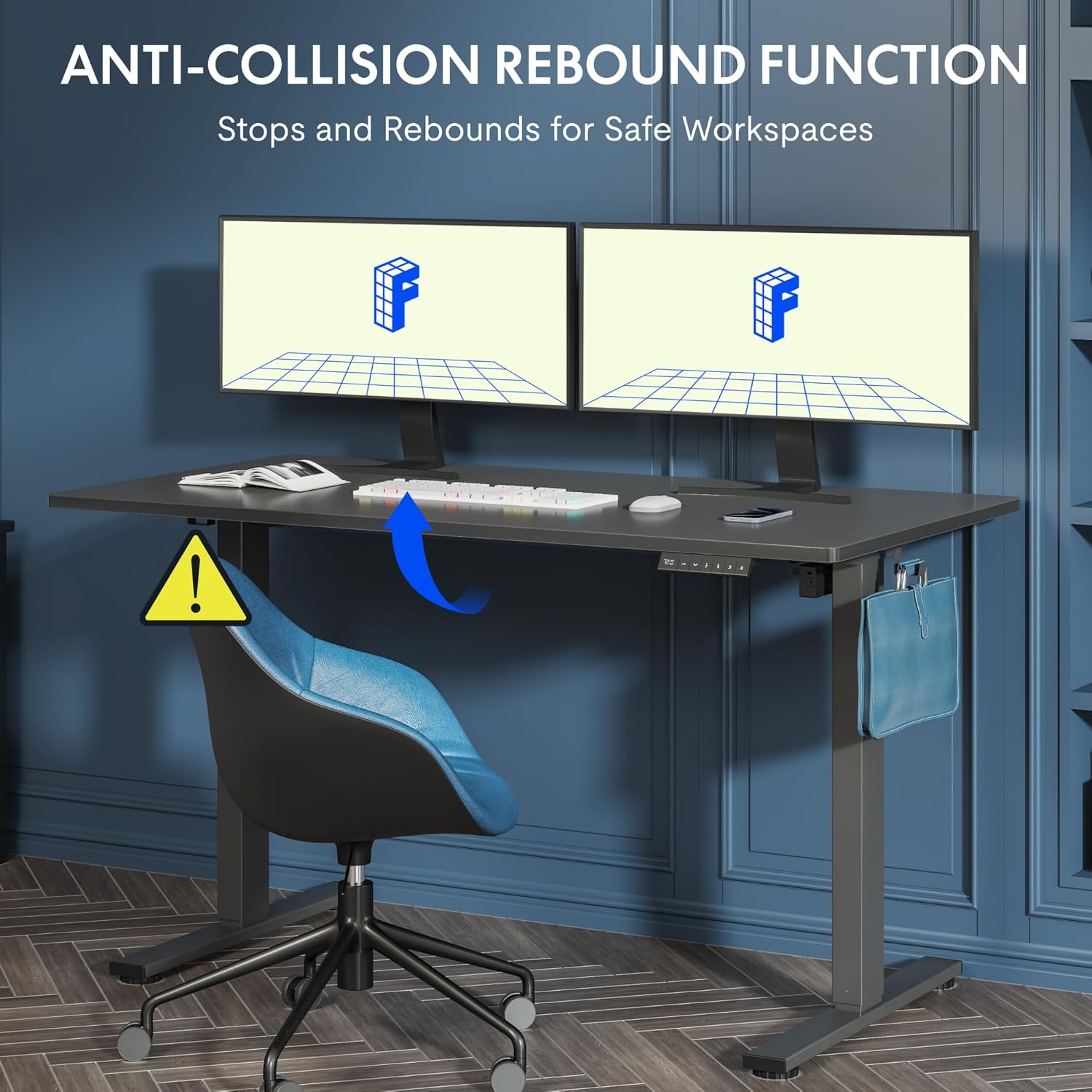
Figure 5.2: Anti-Collision Rebound Function in action.
6. سار سنڀال ۽ سنڀال
باقاعده سار سنڀال توهان جي اسٽينڊنگ ڊيسڪ جي ڊگهي عمر ۽ بهترين ڪارڪردگي کي يقيني بڻائي ٿي.
- صفائي: ڊيسڪ ٽاپ ۽ فريم کي نرم، ڊي سان صاف ڪريوamp ڪپڙو. گھڙڻ وارا صاف ڪندڙ يا سخت ڪيميڪلز کان پاسو ڪريو.
- چڪاس: وقت بوقت سڀني اسڪرو ۽ بولٽن کي چيڪ ڪريو ته جيئن پڪ ڪري سگهجي ته اهي تنگ آهن. جيڪڏهن ضروري هجي ته ٻيهر مضبوط ڪريو.
- ڪيبل جو انتظام: Ensure all cables are neatly routed and not pinched or tangled, which could affect operation.
- لوڊ گنجائش: Do not overload the desk beyond its 70 kg capacity.
7. مسئلو حل ڪرڻ جي ھدايت
جيڪڏهن توهان کي پنهنجي ڊيسڪ سان مسئلا درپيش اچن ٿا، ته هيٺ ڏنل عام مسئلن ۽ حلن جو حوالو ڏيو:
| مسئلو | ممڪن سبب | حل |
|---|---|---|
| ڊيسڪ نه حرڪت ڪري ٿي ۽ نه ئي ڪنٽرولن جو جواب ڏئي ٿي. | Power cable disconnected; control box cable loose; motor cable loose. | Check all cable connections. Ensure the power cable is securely plugged into the wall outlet and the control box. |
| ڊيسڪ غير مساوي طور تي هلي ٿي يا غير معمولي آواز ڪري ٿي. | Overload; loose screws; obstruction. | Reduce weight on the desk. Check and tighten all assembly screws. Ensure no obstructions are in the path of the lifting columns. |
| Desk stops moving unexpectedly. | Anti-collision system activated; motor overheating. | Check for obstructions and remove them. If no obstruction, allow the motor to cool down for 20 minutes before attempting operation again. |
| ڪنٽرول پينل تي غلطي ڪوڊ ڏيکاريل آهي. | مخصوص سسٽم جي خرابي. | Refer to the detailed assembly manual for specific error code meanings and troubleshooting steps. If the issue persists, contact customer support. |
8. ٽيڪنيڪل وضاحتون

Figure 8.1: Desk Dimensions and Performance Metrics.
| تفصيل | تفصيل |
|---|---|
| برانڊ | FLEXISPOT |
| ماڊل نمبر | QS1M-1460-IE |
| رنگ | White Frame + Maple Top |
| Desktop Dimensions (L x W) | 140 سينٽي x 60 سينٽي ميٽر |
| اونچائي جي ترتيب جي حد | 73.5 سينٽي - 118 سينٽي ميٽر |
| مواد | Wood (Maple Top), Metal (Alloy Steel Frame) |
| وڌ ۾ وڌ لوڊ گنجائش | 70 ڪلو |
| شيءِ جو وزن | 26.9 ڪلو |
| شور جي سطح | <50 ڊي بي |
| ترتيب ڏيڻ جي رفتار | 20mm/s |
| خاص خاصيتون | Ergonomic, Adjustable, Anti-Collision, Memory Presets |
9. وارنٽي ۽ ڪسٽمر سپورٽ
For warranty information, specific troubleshooting not covered in this manual, or to purchase replacement parts, please contact FLEXISPOT customer support directly. Refer to the product packaging or the official FLEXISPOT webرابطي جي تفصيل لاءِ سائيٽ.