
1. تعارف
This manual provides detailed instructions for the safe and effective operation of your Andoer Mini WiFi Action Camera L11. This compact digital video camera is designed for capturing high-quality 1080P video at 30 frames per second, featuring a 0.96-inch LCD screen, built-in rechargeable battery, motion detection, and versatile mounting options. Please read this manual thoroughly before using the device.
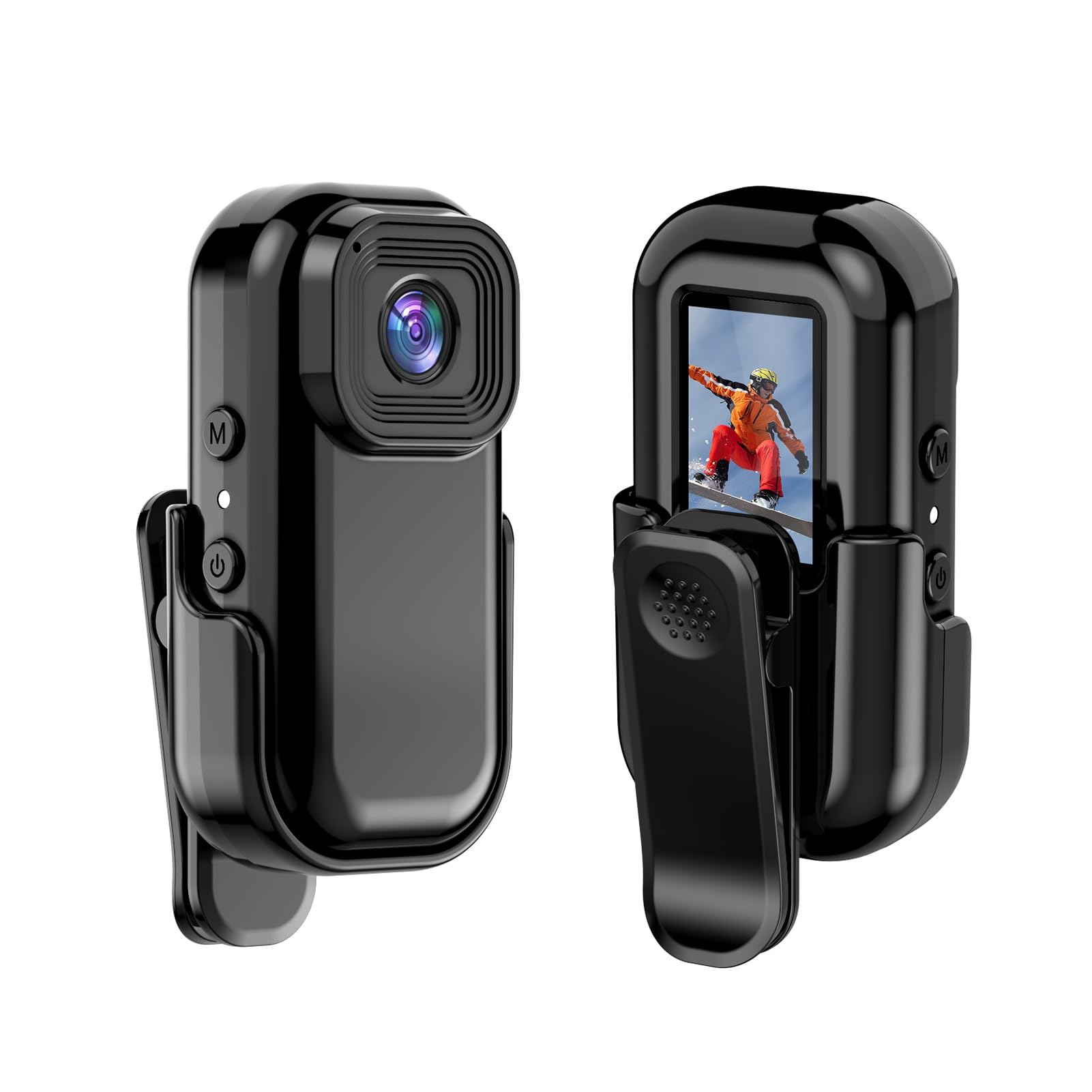
تصوير: اڳيان ۽ پوئتي view of the Andoer Mini WiFi Action Camera L11, showing the lens and the 0.96-inch LCD screen.
2. پيڪيج مواد
پڪ ڪريو ته هيٺ ڏنل سڀئي شيون توهان جي پيڪيج ۾ شامل آهن. جيڪڏهن ڪا به شيءِ غائب يا خراب آهي، مهرباني ڪري ڪسٽمر سپورٽ سان رابطو ڪريو.
- 1 x Andoer Mini WiFi Action Camera L11
- 1 x حفاظتي ڪپڙا
- 1 x 1/4in Adapter Mount
- 1 x Back Clip Mount
- 1 x ڪارڊ ريڊر
- 1 x ٽائپ-سي ڪيبل
- 1 x استعمال ڪندڙ دستياب (هي دستاويز)
3. مصنوعات جون خاصيتون
- اعلي معيار جي وڊيو: Records in 1080P at 30 frames per second, suitable for various applications including live broadcasting and video conferencing.
- ڪمپيڪٽ ۽ پورٽبل: Super mini size allows for easy portability and discreet placement.
- Magnetic Body: Features a magnetic base for secure attachment to smooth metal surfaces.
- Seamless WiFi Connectivity: Connects wirelessly to a dedicated app for live view ۽ ڪنٽرول.
- ورسٽائل چڙهڻ: Includes a 1/4-inch adapter mount and a back clip mount for diverse installation options.

تصوير: Examples of application scenarios for the camera, including parachute jumping, cycling, parent-child activities, and skiing.

Image: The camera being used as a portable video recorder in various outdoor activities like camping, cycling, climbing, and sports.
4. سيٽ اپ
4.1 بيٽري کي چارج ڪرڻ
Before first use, fully charge the camera's built-in 400mAh battery. Connect the provided Type-C cable to the camera's USB port and the other end to a standard USB power adapter (5V, ≥1A). The charging indicator light will typically show the charging status and turn off or change color when fully charged.
4.2 ميموري ڪارڊ داخل ڪرڻ
The camera supports TF (Micro SD) cards up to 128GB. Ensure the card is formatted to FAT32 for optimal performance. Gently insert the TF card into the designated slot until it clicks into place. To remove, press the card in slightly until it springs out.
Note: A memory card is required for recording video and taking photos.
4.3 پاور آن/آف
- پاور آن ڪرڻ: Press and hold the Power button (usually marked with a power symbol) for a few seconds until the screen illuminates.
- پاور آف ڪرڻ: Press and hold the Power button again for a few seconds until the screen turns off.
5. آپريٽنگ هدايتون
5.1 بنيادي آپريشن
The 0.96-inch color display provides visual feedback for modes and settings. Use the navigation buttons (if present, typically 'M' for Mode and another for selection/shutter) to cycle through options and confirm selections.
5.2 رڪارڊنگ وڊيو
In video mode, press the Shutter/Record button to start recording. Press it again to stop. Videos are saved in AVI format at 1920x1080P resolution. The camera supports loop recording with 3-minute segments.

Image: The camera's screen displaying a family scene, indicating video recording at 1920x1080P resolution.
5.3 تصويرون ڪڍڻ
Switch to photo mode using the Mode button. Press the Shutter button to capture a still image. Photos are saved in JPG format.

Image: Icons representing photo, video, and audio recording modes, illustrating the camera's ability to capture various moments.
5.4 حرڪت جي چڪاس
The camera features motion detection capabilities. Refer to the on-screen menu or the dedicated app for instructions on how to activate and configure this feature. When enabled, the camera will automatically begin recording when motion is detected within its field of view.
6. وائي فائي ڪنيڪشن
The Andoer L11 camera supports wireless WiFi connectivity for remote control and live viewing via a smartphone application. Follow these general steps:
- Download the official Andoer camera app from your device's app store (iOS or Android).
- Power on the camera and activate its WiFi mode (refer to the camera's on-screen menu).
- On your smartphone, go to WiFi settings and connect to the camera's WiFi network (SSID and password will be displayed on the camera screen or in the app).
- Open the Andoer app. You should now see a live view from the camera and be able to control recording and settings remotely.

Image: A smartphone displaying a live view from the camera, demonstrating the WiFi connectivity feature.
7. چڙهڻ جا اختيار
The Andoer L11 offers flexible mounting solutions:
- مقناطيسي جبل: The camera body has a magnetic feature, allowing it to be securely attached to smooth metal surfaces like refrigerator doors or metal poles.
- 1/4-inch Adapter Mount: Use the included 1/4-inch adapter mount to attach the camera to standard tripods, monopods, or other accessories with a 1/4-inch screw.
- Back Clip Mount: The back clip mount allows you to attach the camera to clothing, backpacks, or other thin objects for hands-free recording.
8. سار سنڀال
- صفائي: ڪئميرا جي باڊي کي صاف ڪرڻ لاءِ نرم، سڪل ڪپڙو استعمال ڪريو. لينس لاءِ، لينس جي صفائي لاءِ خاص ڪپڙو ۽ محلول استعمال ڪريو. سخت ڪيميڪلز کان پاسو ڪريو.
- اسٽوريج: ڪئميرا کي سڌي سج جي روشني ۽ انتهائي گرمي پد کان پري ٿڌي، سڪل جاءِ تي رکو.
- بيٽري جي سنڀال: For long-term storage, charge the battery to about 50% every few months to maintain its health.
- فرم ويئر اپڊيٽس: Check the official Andoer webبهترين ڪارڪردگي ۽ نئين خاصيتن کي يقيني بڻائڻ لاءِ ڪنهن به دستياب فرم ويئر اپڊيٽ لاءِ وقتي طور تي سائيٽ چيڪ ڪريو.
9. مسئلا حل ڪرڻ
| مسئلو | ممڪن حل |
|---|---|
| ڪئميرا آن نٿو ٿئي. | Ensure the battery is fully charged. Connect to a power source and try again. |
| وڊيو رڪارڊ نه ٿو ڪري سگھجي/فوٽو نه ٿو ڪڍي سگھجي. | Check if a TF card is inserted and properly formatted. Ensure there is sufficient storage space. |
| وائي فائي ڪنيڪشن جا مسئلا. | Ensure WiFi is enabled on the camera and your smartphone. Restart both devices. Verify the correct app is installed. |
| خراب وڊيو/تصوير جي معيار. | Ensure the lens is clean. Check lighting conditions. Verify camera settings are correct (e.g., resolution). |
| ڪئميرا منجمد ٿي وڃي ٿو يا غير جوابده ٿي وڃي ٿو. | Perform a soft reset by holding the power button until it turns off, then restart. If persistent, remove and reinsert the memory card. |
10. وضاحتون
| خاصيت | تفصيل |
|---|---|
| مشين جو قسم | L11 |
| لينس زاويه | 140 درجا |
| TFT ڊسپلي | 0.96 انچ رنگ ڊسپلي |
| وڊيو قرارداد | 1920*1080P |
| بيٽري | 400mAh |
| وڊيو File فارميٽ | AVI |
| ڦوٽو فارميٽ | جي پي جي |
| لوپ ويڊيو | 3 منٽ |
| رڪارڊنگ File فارميٽ | WAV (Audio) |
| ڪم ڪندڙ نمي | 30% |
| آپريٽنگ جي درجه حرارت | -25 کان + 75 ° سي (-13 کان + 167 ° F) |
| بجلي جي فراهمي | USB حجمtage 5V، موجوده ≥1A |
| ميموري ڪارڊ | TF ڪارڊ، 128G تائين سپورٽ ڪري ٿو |
| رابطي ٽيڪنالاجي | وائي فائي |
| فارم فيڪٽر | ڪمپيڪٽ |
| شيءِ جو وزن | 4.2 آونس (تقريبن 119 گرام) |
| پيڪيج جي ماپ | 3.94 x 2.36 x 1.97 انچ |
11. حفاظت جي ڄاڻ
- Do not expose the camera to extreme temperatures outside the specified operating range (-25°C to +75°C).
- Avoid operating the camera in humidity levels exceeding 30%.
- Keep the device away from water and other liquids unless explicitly stated as waterproof.
- ڪئميرا کي ڌار ڪرڻ يا تبديل ڪرڻ جي ڪوشش نه ڪريو، ڇاڪاڻ ته اهو وارنٽي کي رد ڪري ڇڏيندو ۽ نقصان پهچائي سگھي ٿو.
- Use only the specified power supply (USB 5V, ≥1A) for charging.
- ٻارن جي پهچ کان پري رکو.