
تعارف
This manual provides detailed instructions for the safe and effective use of your Andoer Portable Digital Camera. Please read this manual thoroughly before operating the device and retain it for future reference.
پيڪيج مواد
پڪ ڪريو ته هيٺ ڏنل سڀئي شيون توهان جي پيڪيج ۾ شامل آهن:
- 1 x Andoer Digital Camera
- 1 x 32GB ميموري ڪارڊ
- 1 x USB ڪيبل (ٽائيپ-سي)
- 1 x صفائي واري ڪپڙي
- 1 x لين يارڊ
- 1 x اسٽوريج بيگ
- 1 x استعمال ڪندڙ دستياب
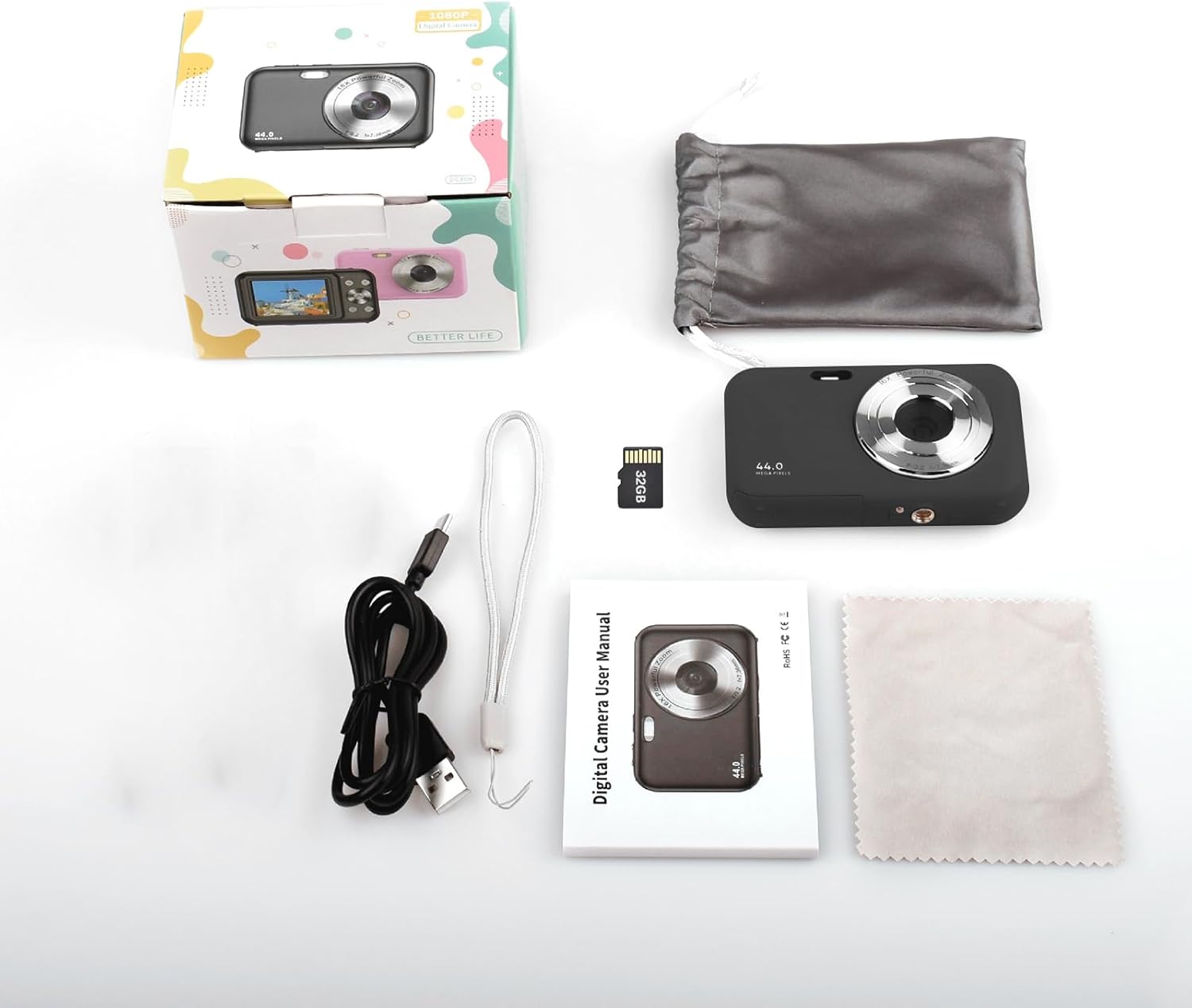
Image: Contents of the Andoer Digital Camera package.
ڪئميرا ختمview
Familiarize yourself with the various parts of your camera.

Image: Multi-angle view of the Andoer Digital Camera, highlighting its compact design and button layout.
- سامهون: Lens, Flash, Microphone.
- مٿي: Power Button, Shutter Button.
- پوئتي: 2.4-inch IPS Screen, Navigation Buttons (Up, Down, Left, Right, OK), Menu Button, Mode Button, Zoom (W/T).
- پاسي: USB Type-C Port.
- هيٺيون: Battery/Memory Card Compartment.
سيٽ اپ ڪريو
1. بيٽري کي چارج ڪرڻ
The camera is equipped with a built-in 700mAh rechargeable lithium battery. Before first use, fully charge the battery.
- Connect the included USB Type-C cable to the camera's USB port.
- USB ڪيبل جي ٻئي ڇيڙي کي USB پاور اڊاپٽر (شامل نه آهي) يا ڪمپيوٽر جي USB پورٽ سان ڳنڍيو.
- چارجنگ انڊيڪيٽر لائيٽ روشن ٿيندي. چارجنگ مڪمل ٿيڻ کان پوءِ اها بند ٿي ويندي يا رنگ تبديل ڪندي.
نوٽ: The camera can be used while charging. A full charge provides approximately 150 minutes of continuous shooting or 90 minutes of video recording.

Image: Battery life information for the 700mAh battery.
2. ميموري ڪارڊ داخل ڪرڻ
The camera supports a 32GB memory card (included). Ensure the camera is powered off before inserting or removing the memory card.
- ڪئميرا جي تري ۾ بيٽري/ميموري ڪارڊ ڪمپارٽمينٽ ڪَوَر ڳوليو.
- ڪپڙا کوليو.
- Insert the 32GB memory card into the designated slot with the metal contacts facing the correct direction (refer to the diagram inside the compartment if available) until it clicks into place.
- محفوظ طور تي ڪمري واري ڍڪ کي بند ڪريو.
اهم: Format the memory card in the camera's settings menu before first use to ensure optimal performance.
آپريٽنگ هدايتون
1. پاور آن/آف
- پاور آن ڪرڻ لاءِ، دٻايو ۽ رکو پاور بٽڻ on the top of the camera.
- بجلي کي بند ڪرڻ لاءِ ، دٻايو ۽ رکو پاور بٽڻ again. The camera also features an auto power-off function (configurable in settings).
2. فوٽو ڪڍڻ
The camera captures photos up to 44MP resolution.
- ڪئميرا آن ڪريو.
- Ensure the camera is in photo mode (indicated on the 2.4-inch IPS screen). If not, press the موڊ بٽڻ مٽائڻ.
- Frame your shot using the IPS screen.
- کي دٻايو شٽر بٽڻ halfway down to focus, then press it fully to take the picture.

تصوير: Example of a high-resolution photo taken with the 44MP camera.
3. رڪارڊنگ وڊيوز
The camera records videos in 1080P resolution.
- ڪئميرا آن ڪريو.
- کي دٻايو موڊ بٽڻ to switch to video recording mode.
- کي دٻايو شٽر بٽڻ to start recording. A red indicator will typically appear on the screen.
- کي دٻايو شٽر بٽڻ ٻيهر رڪارڊنگ کي روڪڻ لاء.

Image: Screen view during 1080P video recording.
4. ڊجيٽل زوم استعمال ڪندي
The camera features 16X digital zoom.
- In photo or video mode, press the T (Telephoto) button وڏو ڪرڻ.
- کي دٻايو W (Wide-angle) button وڏو ڪرڻ.

Image: Comparison of 1x and 16x digital zoom effects.
5. ٻيا ڪم
- خود ٽائمر: Set a delay (e.g., 2s, 5s, 10s) before a photo is taken. Access this option in the camera's menu.
- لڳاتار شوٽنگ: Take multiple photos in quick succession. This setting is also found in the menu.
- مخالف kingڪڻ: Digital image stabilization helps reduce blur from camera movement. This feature is typically enabled by default or can be toggled in settings.
- پلے بیک: کي دٻايو هلڻ واري بٽڻ (often indicated by a triangle icon) to view photos and videos. Use the navigation buttons to browse.
- مينيو سيٽنگون: کي دٻايو مينيو بٽڻ to access various camera settings, including resolution, white balance, exposure, date/time, and formatting the memory card.
منتقلي Files to a Computer or Phone
You can transfer photos and videos from the camera to a computer or a mobile phone.
1. Via USB Cable (to Computer)
- Connect the camera to your computer using the provided USB Type-C cable.
- ڪئميرا تي پاور.
- The camera should appear as a removable disk or media device on your computer.
- Open the camera's folder and copy the desired files توهان جي ڪمپيوٽر ڏانهن.
2. Via Memory Card Reader (to Computer/Phone)
For direct transfer from the memory card, you can use a card reader.
- Remove the memory card from the camera.
- Insert the memory card into a compatible card reader.
- Connect the card reader to your computer or mobile phone (via an OTG adapter if necessary).
- تائين رسائي files on the memory card and transfer them.

Image: OTG usage diagram for transferring files from memory card to phone.
سار سنڀال
- ڪئميرا جي جسم کي صاف ڪرڻ: ڪئميرا جي باڊي کي صاف ڪرڻ لاءِ نرم، سڪل ڪپڙو استعمال ڪريو. ضدي مٽيءَ لاءِ، ٿورو ڊيampپاڻي سان ڪپڙو. سخت ڪيميڪلز کان پاسو ڪريو.
- لينس جي صفائي: Use the included cleaning cloth or a specialized lens cleaning cloth. Gently wipe the lens in a circular motion. Do not use abrasive materials.
- اسڪرين جي سنڀال: The 2.4-inch IPS screen can be cleaned with a soft, lint-free cloth. Avoid pressing too hard.
- اسٽوريج: When not in use for extended periods, store the camera in the provided storage bag in a cool, dry place, away from direct sunlight and extreme temperatures.
- بيٽري جي سنڀال: Recharge the battery regularly, even if the camera is not used frequently, to maintain battery health. Avoid fully discharging the battery for long periods.
مشڪلاتون
| مسئلو | ممڪن سبب | حل |
|---|---|---|
| ڪئميرا آن نٿو ٿئي. | بيٽري ختم ٿي وئي آهي يا صحيح طرح سان نه لڳائي وئي آهي. | بيٽري کي مڪمل طور تي چارج ڪريو. پڪ ڪريو ته بيٽري صحيح طرح سان لڳل آهي. |
| تصويرون نه ٿا ڪڍجن/ وڊيوز رڪارڊ نه ٿا ڪري سگهجن. | ميموري ڪارڊ ڀريل آهي، داخل نه ڪيو ويو آهي، يا خراب ٿيل آهي. | Check memory card insertion. Delete unnecessary files or replace the card. Format the card (this will erase all data). |
| تصويرون blurry آهن. | Lens is dirty, insufficient light, or camera shake. | Clean the lens. Ensure adequate lighting. Hold the camera steady or enable anti-shaking. |
| ڪئميرا منجمد ٿي وڃي ٿو يا غير جوابده ٿي وڃي ٿو. | سافٽ ويئر جي خرابي يا گهٽ بيٽري. | Remove and reinsert the battery (if possible) or press and hold the power button for 10 seconds to force a shutdown. Recharge the battery. |
| منتقل نه ٿو ڪري سگھجي fileڪمپيوٽر ڏانهن. | Incorrect USB connection or driver issue. | Ensure the USB cable is securely connected. Try a different USB port or computer. Check if the camera is recognized as a device. |
وضاحتون
| خاصيت | تفصيل |
|---|---|
| ڏيکاريو | 2.4 انچ IPS اسڪرين |
| وڊيو قرارداد | 1080P/720P/480P |
| تصويري قرارداد | 44MP/42MP/36MP/24MP (Effective Still Resolution: 44 MP) |
| File فارميٽ | JPG (Image), AVI (Video) |
| اليڪٽرانڪ زوم | 16X |
| USB پورٽ | ٽائپ-سي |
| بيٽري | 3.7V/ 700mAh Rechargeable Lithium Battery |
| فوڪل ڊگھائي | f=7.36mm |
| اَپرچر | F/3.2 |
| پاور بچايو | Auto power off in 1Min/2Mins/3Mins/4Mins/5Mins/10Mins |
| سپورٽ سسٽم | Windows XP, Vista, 7, 8, 10, Mac 10.2 and above |
| ميموري رکڻ جي صلاحيت | 32 GB (شامل) |
| خودڪار فوڪس ٽيڪنالاجي | تضاد جي چڪاس |
| تصوير جي استحڪام | ڊجيٽل |
| عمر جي حد جي وضاحت | ٻار |
وارنٽي ۽ سپورٽ
For warranty information and technical support, please refer to the contact details provided with your purchase documentation or visit the official Andoer webسائيٽ. وارنٽي دعوائن لاءِ خريداري جو ثبوت رکو.