
1. تعارف
This manual provides instructions for the Varmilo Koi 73 JIS Keyboard with Sakura Switches (Model: VMMA73A039SAKURA). This keyboard features a unique design inspired by traditional Chinese Koi fish and water elements, combined with a modern aesthetic. It is a compact 65% size keyboard with a Japanese Industrial Standard (JIS) layout, designed for both functionality and portability. The keyboard is equipped with Cherry-style stabilizers for a stable typing experience.
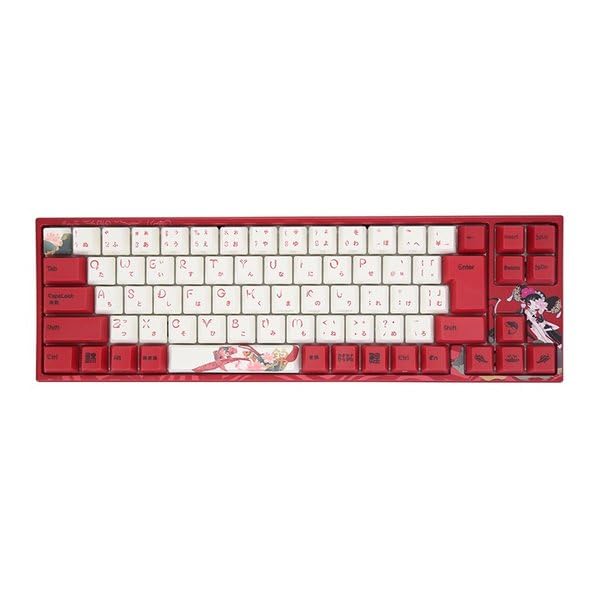
Image: Varmilo Koi 73 JIS Keyboard overview.
2. اهم خاصيتون
- Unique Koi Design: Features vibrant koi fish illustrations and a red aesthetic, developed in collaboration with illustrator Li Huan.
- JIS Layout: 73-key Japanese Industrial Standard layout for specific regional input needs.
- Compact 65% Size: Optimizes desk space while retaining essential function and arrow keys.
- Customizable Switches: Offers a choice of Varmilo mechanical electrostatic capacity switches to suit individual typing preferences.
- Cherry-Style Stabilizers: Ensures consistent and stable key presses, especially for larger keys.
- USB ڪنيڪشن: Reliable wired connection for stable performance.
3. سيٽ اپ گائيڊ
3.1 پيڪيج مواد
شروع ڪرڻ کان اڳ، مھرباني ڪري پڪ ڪريو ته سڀئي شيون پيڪيج ۾ موجود آھن:
- Varmilo Koi 73 JIS Keyboard
- USB ڪيبل
- استعمال ڪندڙ جو دستياب (ھي دستاويز)
3.2 ڪي بورڊ کي ڳنڍڻ
To connect your Varmilo Koi 73 keyboard to your computer, follow these steps:
- ڪيبورڊ جي پوئين پاسي USB-C پورٽ ڳوليو.
- Connect one end of the provided USB cable to the keyboard's USB-C port.
- USB ڪيبل جي ٻئي پڇاڙي کي توهان جي ڪمپيوٽر تي موجود USB پورٽ سان ڳنڍيو.
- ڪيبورڊ کي توهان جي آپريٽنگ سسٽم طرفان خودڪار طريقي سان سڃاڻڻ گهرجي.
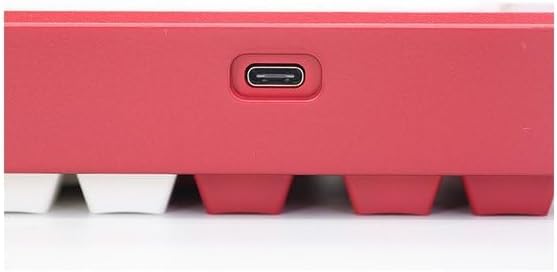
Image: USB-C port for keyboard connection.
3.3 ڊرائيور جي انسٽاليشن (اختياري)
For advanced customization and optimal performance, it is recommended to install the Varmilo driver software. This software allows you to remap keys, adjust performance settings, and customize lighting effects.
Video: This video demonstrates the driver installation process and software usage for Varmilo keyboards. While it features the Muse65 model, the steps for driver installation and basic software navigation are generally applicable to other Varmilo keyboards like the Koi 73.
Please visit the official Varmilo website for the latest driver downloads specific to your keyboard model. Follow the on-screen instructions during installation.
4. آپريٽنگ هدايتون
4.1 بنيادي اهم ڪم
The Varmilo Koi 73 keyboard features a standard JIS layout. Most keys function as labeled. For special functions, refer to the combination keys below.
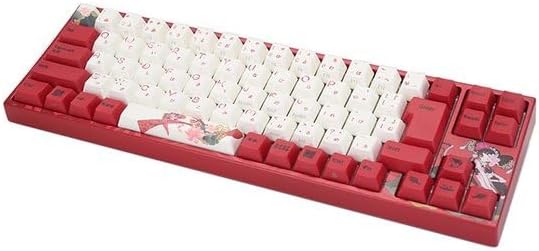
تصوير: مٿانview of the Varmilo Koi 73 JIS Keyboard layout.
4.2 فنڪشن (Fn) اهم مجموعا
Since this is a 73-key layout, some functions are accessed via the Fn key. Hold down the Fn key and press the corresponding key to activate its secondary function. Common Fn combinations include:
- ايف اين + ايف 1-ايف 12: Multimedia controls (e.g., volume, play/pause).
- ايف اين + تير جون چاٻيون: Page Up/Down, Home/End (specific to model, refer to keycap legends).
- Fn + Win Key: Locks/unlocks the Windows key.

Image: Left side keys, often used with Fn for additional functions.
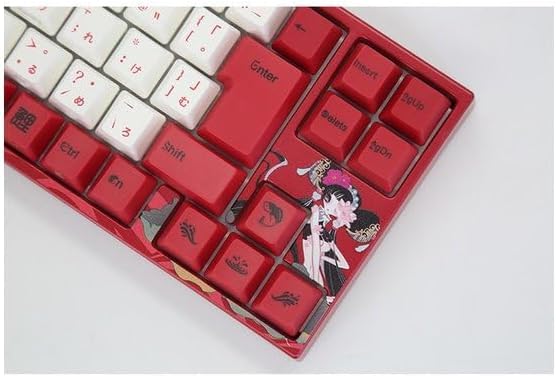
Image: Right side keys, including navigation and utility keys.
4.3 روشني جا اثر
The Varmilo Koi 73 keyboard supports various RGB lighting effects. You can cycle through different modes and adjust brightness using specific key combinations. Refer to your keyboard's specific keycap legends or the driver software for detailed lighting controls.
Video: This video showcases various RGB lighting effects on a Varmilo keyboard. While the model shown is Muse65, it provides a general idea of the dynamic lighting capabilities available on Varmilo keyboards, including the Koi 73.
5. سار سنڀال ۽ سنڀال
Proper maintenance ensures the longevity and optimal performance of your Varmilo Koi 73 keyboard.
- ڪي ڪيپس جي صفائي: Gently remove keycaps using a keycap puller. Clean the keycaps with a soft cloth dampنرم صابڻ ۽ پاڻي سان ڌوئي ڇڏيو. ٻيهر ڳنڍڻ کان اڳ پڪ ڪريو ته اهي مڪمل طور تي سڪي ويا آهن.
- ڪي بورڊ جي جسم کي صاف ڪرڻ: ڪيبورڊ جي جسم کي صاف ڪرڻ لاءِ نرم، سڪل ڪپڙو استعمال ڪريو. ضدي مٽيءَ لاءِ، ٿورو ڊيamp cloth with a small amount of isopropyl alcohol can be used. Avoid excessive moisture.
- مٽي هٽائڻ: چاٻين جي وچ مان مٽي ۽ ملبہ هٽائڻ لاءِ دٻيل هوا استعمال ڪريو.
- مائع کان بچاء: نقصان کان بچڻ لاءِ ڪيبورڊ کان مائع شيون پري رکو.
- ڪيبل جي سنڀال: USB ڪيبل کي تمام گهڻو نه موڙيو يا نه ڇڪيو.
6. مسئلا حل ڪرڻ
If you encounter issues with your Varmilo Koi 73 keyboard, try the following solutions:
- ڪي بورڊ جواب نه ڏئي رهيو آهي:
- پڪ ڪريو ته USB ڪيبل ڪيبورڊ ۽ ڪمپيوٽر ٻنهي سان محفوظ طور تي ڳنڍيل آهي.
- ڪيبورڊ کي پنهنجي ڪمپيوٽر تي ڪنهن ٻئي USB پورٽ سان ڳنڍڻ جي ڪوشش ڪريو.
- پنهنجي ڪمپيوٽر کي ٻيهر شروع ڪريو.
- جيڪڏهن توهان USB هب استعمال ڪري رهيا آهيو، ته پوءِ سڌو ڪمپيوٽر سان ڳنڍڻ جي ڪوشش ڪريو.
- رجسٽر نه ٿيندڙ چاٻيون:
- Check for any debris or foreign objects under the keycaps.
- If specific keys are not working, consider reinstalling the keyboard driver.
- روشني جا مسئلا:
- Ensure the keyboard driver is installed and up to date.
- Use the Fn key combinations or driver software to adjust lighting modes and brightness.
- ونڊوز ڪي لاڪ ٿيل:
- دٻايو Fn + Win Key ونڊوز ڪي لاڪ کي ٽوگل ڪرڻ لاءِ.
If the problem persists, please contact Varmilo customer support for further assistance.
7. وضاحتون
| برانڊ | ورميلو |
| ماڊل نمبر | VMMA73A039SAKURA |
| ڪي بورڊ لي آئوٽ | 73-key JIS (Japanese Industrial Standard) |
| رابطي | USB وائرڊ |
| سوئچ جو قسم | Mechanical (Linear) |
| مطابقت رکندڙ ڊوائيسز | ليپ ٽاپ |
| پيداوار جي ماپ | 34.2 سينٽي (L) x 34.2 سينٽي (W) x 5.1 سينٽي (H) |
| شامل اجزاء | USB ڪيبل |
8. وارنٽي ۽ سپورٽ
Varmilo products typically come with a manufacturer's warranty. Please refer to the warranty card included with your product or visit the official Varmilo webتفصيلي وارنٽي شرطن ۽ ضابطن لاءِ سائيٽ.
For technical support, driver downloads, or further inquiries, please visit the official Varmilo support page or contact their customer service.
Official Varmilo Webسائيٽ: www.varmilo.com