
VALUCAM VC-PTI08-A180-PV
VALUCAM Dual-Lens 4K (8MP) TiOC Outdoor POE Camera
Model: VC-PTI08-A180-PV User Manual

1. پراڊڪٽ ختمview
The VALUCAM Dual-Lens 4K (8MP) TiOC Outdoor POE Camera (Model: VC-PTI08-A180-PV) is an advanced surveillance solution designed for both home and commercial environments. This camera features dual 4MP CMOS sensors, delivering an ultra-clear 8MP (4096 × 1860) video resolution at 20 frames per second. Its 2.8mm lenses provide a seamless 180° panoramic view, effectively eliminating blind spots.
Key functionalities include Smart Motion Detection (SMD 4.0) for accurate human and vehicle detection, dual-light technology for full-color night vision, and TiOC 2.0 active deterrence with red and blue strobe lights and customizable audio alerts. The camera supports Power over Ethernet (PoE) for simplified installation and offers versatile storage options. Its robust IP67 weatherproof design ensures reliable performance in various environmental conditions.
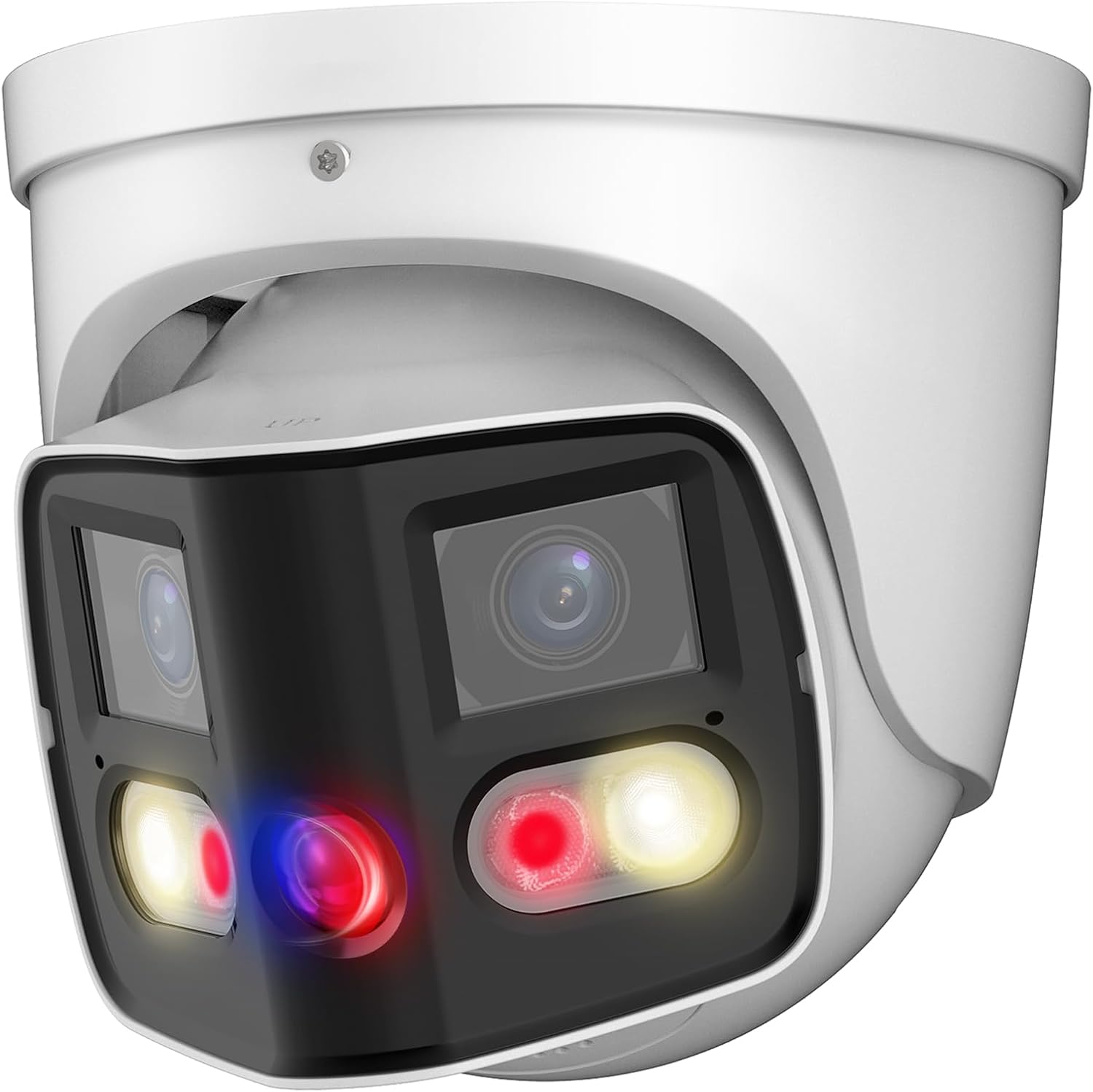
Figure 1.1: VALUCAM Dual-Lens 4K TiOC Outdoor POE Camera (VC-PTI08-A180-PV)
2. پيڪيج مواد
Before installation, please verify that all items are included in your package:
- 1 x VALUCAM 8MP Turret POE IP Camera
- 1 x تڪڙو شروع ھدايت
- 1 x Hexagon socket
- 1 x Positioning stickers
- لڳائڻ لاء اسڪرو
- Waterproof Accessories
Note: Power adapter is not included and must be purchased separately if not using Power over Ethernet (PoE).
3. انسٽاليشن گائيڊ
3.1 جسماني تنصيب
The camera is designed for wall mounting. Ensure the mounting surface is strong enough to support the camera's weight and withstand environmental factors.
- چڙهڻ جو هنڌ چونڊيو: هڪ جڳهه چونڊيو جيڪا گهربل مهيا ڪري viewing angle and is within reach of your network cable (for PoE) or power source.
- Mark Drilling Holes: Use the provided positioning sticker to mark the drilling points on the wall.
- سوراخ ڪريو ۽ اينڪرز لڳايو: Drill holes according to the marks and insert wall anchors if necessary.
- ڪئميرا کي محفوظ ڪريو: ڪيمرا بيس کي ڊرل ٿيل سوراخن سان ترتيب ڏيو ۽ مهيا ڪيل اسڪرو استعمال ڪندي ان کي محفوظ ڪريو.
- ڪيبل ڳنڍڻ: Connect the Ethernet cable to the camera's PoE port. If not using PoE, connect a 12V DC power supply to the power input. Ensure waterproof accessories are used for outdoor installations.

Figure 3.1: Typical Wiring Diagram for PoE and Non-PoE Setup

Figure 3.2: Camera Dimensions and Port Layout
3.2 نيٽ ورڪ ۽ سافٽ ويئر سيٽ اپ
For initial setup and configuration, it is recommended to connect the camera directly to a computer via Ethernet or to a network with a DHCP server.
- سافٽ ويئر ڊائون لوڊ ڪريو: Obtain the latest versions of SmartPSS Lite (for PC) or DMSS (for mobile devices) from the VALUCAM official website or app stores. A configuration tool may also be available for initial IP address setup.
- Initialize Camera: Follow the instructions within the software to initialize the camera. This typically involves setting a new password for security.
- نيٽورڪ سيٽنگون ترتيب ڏيو: Assign a static IP address or ensure the camera obtains an IP address from your network's DHCP server.
- Integrate with NVR (Optional): If using a Dahua/Dahua OEM/Valucam NVR, add the camera to your NVR system for centralized recording and management.

Figure 3.3: Local and Remote Viewing Options via Software
4. ڪئميرا کي هلائڻ
4.1 زنده View ۽ رڪارڊنگ
Access the live video feed through SmartPSS Lite on your computer or the DMSS app on your smartphone/tablet. From here, you can view حقيقي وقت footage, initiate manual recordings, and take snapshots.
4.2 Key Features and Configuration
- 180 ° Panoramic View: The dual-lens design provides a wide, seamless 180° panoramic field of view. Configure detection areas within this panoramic view for precise monitoring.
- Smart Motion Detection (SMD 4.0): Enable SMD 4.0 to significantly reduce false alarms caused by animals or environmental factors. This feature accurately distinguishes between human and vehicle targets.
- Dual Color Night Vision (TiOC 2.0): The camera automatically switches between IR (infrared) and warm white light for full-color video capture in low-light conditions upon human/vehicle detection.
- فعال رڪاوٽ: Utilize the built-in red and blue strobe lights and customizable audio alerts to deter intruders. You can set custom voice messages via the DMSS app.
- ٻه طرفي آڊيو: Engage in real-time two-way communication through the camera's built-in microphone and speaker. This allows for interaction with visitors or deterring unwanted guests.
- EPTZ (Electronic Pan, Tilt, Zoom): Digitally zoom in and track specific areas within the camera's field of view for detailed surveillance.
- اسٽوريج جا اختيار: The camera supports various storage methods including MicroSD card (up to 256GB), Network Video Recorders (NVR), Network Attached Storage (NAS), and FTP.

Figure 4.1: Seamless 180° Panoramic Coverage

Figure 4.2: SMD 4.0 for Accurate Human/Vehicle Detection

Figure 4.3: Comparison of IR and Full Color Night Vision
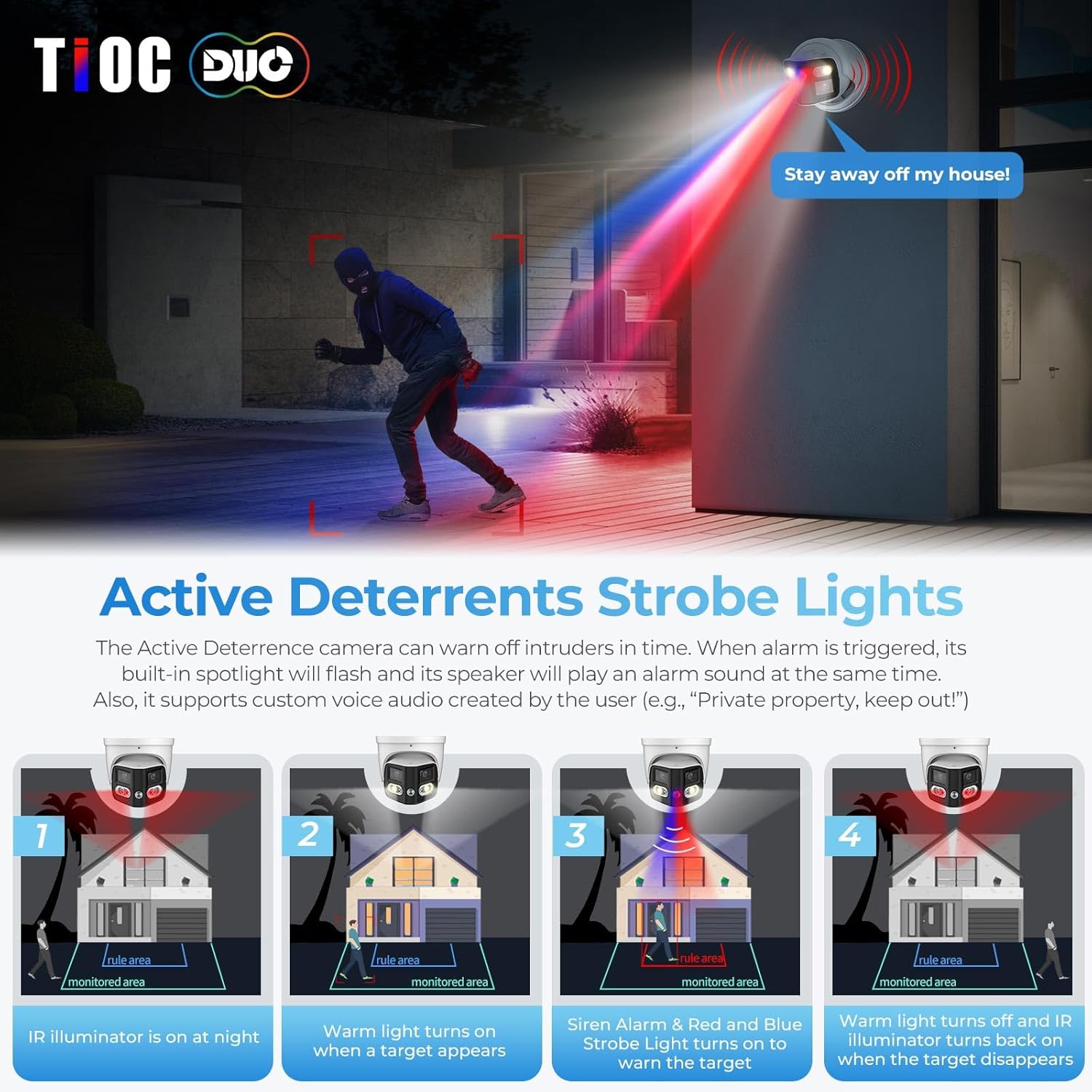
Figure 4.4: Active Deterrence with Strobe Lights and Audio

Figure 4.5: Two-Way Audio Communication Interface
5. سار سنڀال
- صفائي: ڪئميرا لينس ۽ هائوسنگ کي باقاعدي طور تي نرم، ڊي سان صاف ڪريوamp ڪپڙو. گھڙڻ وارا صاف ڪندڙ يا محلولن کان پاسو ڪريو جيڪي مٿاڇري کي نقصان پهچائي سگھن ٿا.
- فرم ويئر اپڊيٽس: Periodically check for and install firmware updates from the VALUCAM official website. Firmware updates often include performance improvements, new features, and security enhancements.
- ڪيبل جي چڪاس: For outdoor installations, periodically inspect all cables and connections for signs of wear, damage, or corrosion to ensure continuous operation and weather resistance.
6. مسئلا حل ڪرڻ
| مسئلو | ممڪن سبب | حل |
|---|---|---|
| ڪابه وڊيو فيڊ | No power; Network connectivity issue; Incorrect IP address. | Check power supply/PoE connection. Verify Ethernet cable connection. Ensure camera and viewing device are on the same network segment or configured correctly. Use the Config Tool to find and set the IP address. |
| خراب تصوير جو معيار | گندو لينس؛ گهٽ روشني جون حالتون؛ نيٽ ورڪ بينڊوڊٿ جا مسئلا. | Clean the camera lens. Ensure sufficient lighting or verify night vision settings. Check network bandwidth and reduce video stream quality if necessary. |
| بار بار غلط الارم | Motion detection sensitivity too high; Environmental factors (e.g., swaying trees, rain). | Adjust SMD 4.0 settings to reduce sensitivity to non-human/vehicle motion. Define specific detection zones to exclude areas with frequent irrelevant motion. |
| ٻه طرفي آڊيو ڪم نه ڪري رهيو آهي | Microphone/speaker settings disabled; Volume too low; Network latency. | Check audio settings in the software (DMSS/SmartPSS Lite). Increase volume levels. Ensure stable network connection. |
7. وضاحتون
| خاصيت | تفصيل |
|---|---|
| ماڊل نالو | VC-PTI08-A180-PV |
| اندروني / ٻاهران استعمال | اندريون، ٻاهريون |
| وڊيو ڪيپچر ريزوليوشن | 4K (8MP, 4096 × 1860) |
| فريم جي شرح | 20 فريم في سيڪنڊ |
| Viewزاويه | 180 Degrees (Panoramic) |
| لينس جو قسم | 2.8mm فيڪٽر لينس |
| نائيٽ ويزن رينج | 82 فوٽ |
| گھٽ روشني ٽيڪنالاجي | Smart Dual IR / Color Night Vision |
| ڪنيڪشن پروٽوڪول | ايٿرنيٽ (PoE) |
| ذخيرو | Micro SD card (up to 256GB), NVR, NAS, FTP |
| آڊيو | Built-in Dual Mic, Two-Way Audio |
| روڪڻ | Red and Blue Strobe Lights, Customizable Audio Alerts |
| پتو لڳائڻ | Human/Vehicle Detection (SMD 4.0), Perimeter Protection |
| موسم جي مزاحمت | IP67 پنروڪ |
| مواد | All Metal, Aluminum |
| طاقت جو ذريعو | Corded Electric (12V DC) / PoE |
| طول و عرض (L x W x H) | 5.31 x 5.31 x 5.32 انچ |
| شيءِ جو وزن | 2.53 پائونڊ |
8. وارنٽي ۽ سپورٽ
The VALUCAM Dual-Lens 4K (8MP) TiOC Outdoor POE Camera comes with a 2-year Valucam warranty، پراڊڪٽ جي معيار ۽ ڪارڪردگي جي حوالي سان ذهني سڪون کي يقيني بڻائڻ.
For technical assistance, troubleshooting, or warranty claims, please refer to the contact information provided on the official VALUCAM website or your purchase documentation. Lifetime support is available to assist you with any inquiries or issues you may encounter.
Ask a question about this manual
Ask about setup, troubleshooting, compatibility, parts, safety, or missing instructions. Manuals+ will review the question and use this page’s manual context to help answer it.