
تعارف
This manual provides detailed instructions for the setup, operation, and maintenance of your MageGee V560 Wireless Gaming Keyboard and Mouse Combo. Please read this manual thoroughly before use to ensure optimal performance and longevity of your device.

Image: The MageGee V560 Wireless Gaming Keyboard and Mouse Combo, featuring a blue, white, and purple color scheme, with the USB receiver visible.
پيڪيج مواد
مھرباني ڪري تصديق ڪريو ته سڀ شيون پيڪيج ۾ موجود آھن:
- MageGee V560 وائرليس ڪي بورڊ
- ميج گي وائرليس ماؤس
- 2.4GHz USB Receiver (stored in mouse battery compartment)
- USB-C چارجنگ ڪيبل
- استعمال ڪندڙ دستي

Image: Contents of the MageGee V560 package, including the keyboard, mouse, USB receiver, charging cable, and user manual.
سيٽ اپ جون هدايتون
- USB رسيور ڳوليو: Open the battery cover of the wireless mouse. The 2.4GHz USB receiver is stored inside the compartment next to the mouse battery slot.
- وصول ڪندڙ کي ڳنڍيو: USB رسيور کي توهان جي ڪمپيوٽر تي موجود USB پورٽ ۾ پلگ ان ڪريو.
- پاور آن ڊوائيسز: Ensure both the keyboard and mouse are powered on. The devices are plug-and-play and should connect automatically.
- شروعاتي چارج For optimal performance, it is recommended to fully charge both the keyboard and mouse before first use. Use the provided USB-C charging cable.

Image: Illustration showing the 2-in-1 USB receiver connecting the keyboard and mouse wirelessly to a laptop.
آپريٽنگ هدايتون
ڪي بورڊ افعال
- آر جي بي بيڪ لائيٽنگ ڪنٽرول:
- دٻايو FN + INS پٺتي پيل يا بند ڪرڻ لاء.
- دٻايو FN + PgUp or FN + PgDn to adjust the 3-level backlight brightness.
- دٻايو FN + 1 / 2 / 3 / 4 / 5 to switch between different backlight modes. Note: Backlight settings are not saved after power off.
- ملٽي ميڊيا شارٽ ڪٽ: استعمال ڪريو FN چاٻي سان گڏ F1-F12 keys for quick access to multimedia functions such as volume control, media playback, and more.
- Ergonomic ڊيزائن: The keyboard features a stepped layout and foldable brackets at the bottom, allowing you to adjust the typing angle for comfort during extended use.
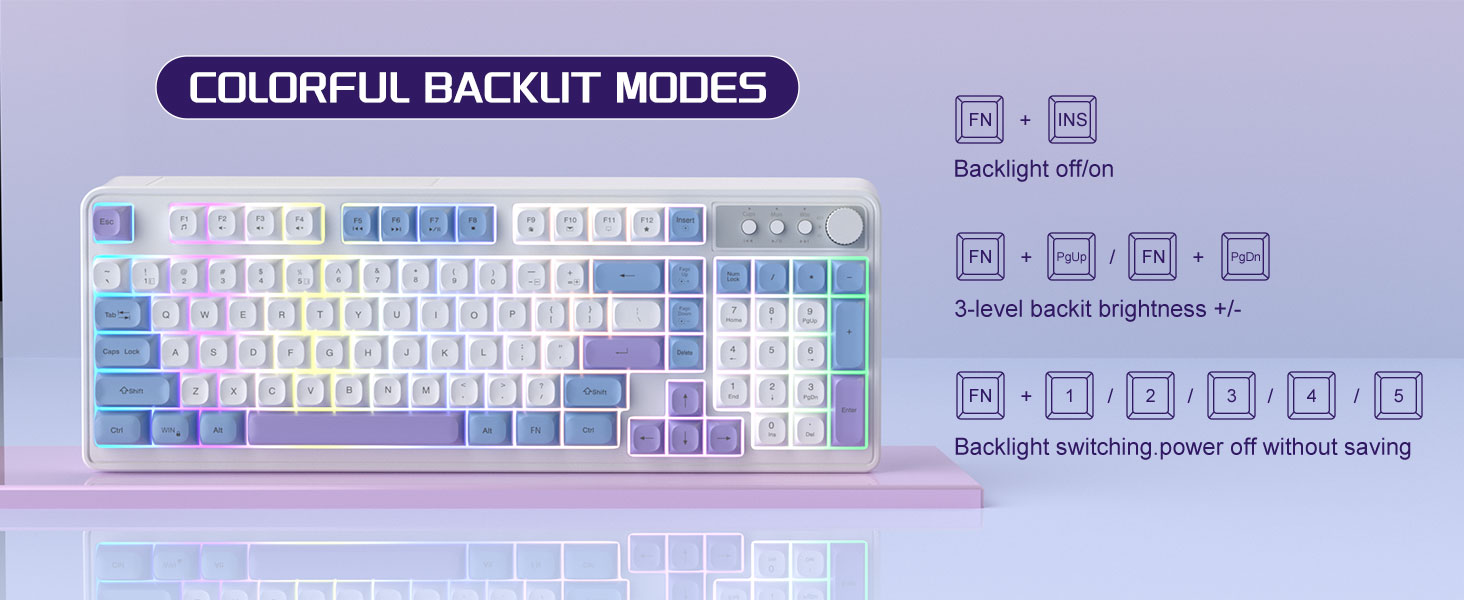
Image: The MageGee V560 keyboard displaying various colorful backlit modes, with instructions for controlling them.

Image: A visual representation of the 16 multimedia shortcuts available on the MageGee V560 keyboard, activated via the FN key.
ماؤس جا ڪم ڪار
- ڊي پي آءِ ايڊجسٽمينٽ: The mouse supports 6 levels of DPI adjustment (600-3200 DPI). Press the DPI button (usually located below the scroll wheel) to cycle through the sensitivity settings. Internal indicator lights will show the current DPI level.
- Breathing Backlight: The mouse features 7 dazzling color breathing backlights. This lighting is automatic and indicates mouse activity.

Image: The MageGee V560 mouse highlighting its DPI settings (1000, 1200, 1600 DPI) and showing the USB-C charging port.
چارج ۽ بيٽري جي زندگي
- Both the keyboard and mouse are rechargeable. Use the provided USB-C charging cable to charge them.
- Keyboard Standby Time: 365 ڏينهن تائين.
- Mouse Standby Time: 270 ڏينهن تائين.
- خودڪار ننڊ جو ڪم: The devices automatically enter sleep mode after a period of inactivity to conserve battery power and extend battery life.

Image: An illustration demonstrating the intelligent auto-sleep feature of the MageGee V560 combo, which conserves battery life.
مطابقت
The MageGee V560 Wireless Gaming Keyboard and Mouse Combo is compatible with the following operating systems:
- Win2000
- Win XP
- مون کي فتح
- وسٽا
- Win7
- Win8
- Win10
- Android
- لينڪس
- Mac OS
مشڪلاتون
جيڪڏهن توهان کي پنهنجي MageGee V560 ڪمبو سان مسئلا درپيش اچن ٿا، ته مهرباني ڪري هيٺ ڏنل عام حلن جو حوالو ڏيو:
- ڊوائيس ڳنڍيل نه آهي:
- پڪ ڪريو ته USB رسيور محفوظ طور تي ڪم ڪندڙ USB پورٽ ۾ لڳل آهي.
- Verify that both the keyboard and mouse are powered on.
- Check the battery levels of both devices and charge if necessary.
- ڪوشش ڪريو USB وصول ڪندڙ کي مختلف USB پورٽ ۾ پلگ ان ڪرڻ.
- دير يا ڊسڪنيڪٽيشن:
- Ensure the devices are within the 33 ft (10 meter) operating range of the USB receiver.
- Minimize interference from other 2.4GHz wireless devices (e.g., Wi-Fi routers, cordless phones).
- Charge the devices to ensure sufficient power.
- Keys Not Registering / Mouse Not Responding:
- ڪي بورڊ ۽ مائوس کي ري چارج ڪريو.
- Ensure the USB receiver is properly connected.
- پنهنجي ڪمپيوٽر کي ٻيهر شروع ڪريو.
- بيڪ لائيٽ جا مسئلا:
- پڪ ڪريو ته ڪيبورڊ چارج ٿيل آهي.
- استعمال ڪريو FN + INS بيڪ لائيٽ کي ٽوگل ڪرڻ لاءِ.
- روشني کي ترتيب ڏيو ايف اين + پي جي اپ/پي جي ڊي اين.
وضاحتون
| برانڊ | ميج گي |
| ماڊل | V560 |
| رابطي ٽيڪنالاجي | 2.4GHz وائرلیس |
| خاص خاصيتون | RGB lighting, rechargeable keyboard and mouse, ergonomic design |
| مطابقت رکندڙ ڊوائيسز | Personal Computer (Win2000, Win XP, Win ME, Vista, Win7, Win8, Win10, Android, Linux, Mac OS) |
| شيءِ جو وزن | 1.87 پائونڊ |
| پيڪيج جي ماپ | 16.61 x 9.21 x 1.73 انچ |
| ٺاهيندڙ | مئجيجي |
سار سنڀال
- صفائي: ڪيبورڊ ۽ مائوس کي صاف ڪرڻ لاءِ نرم، سڪل ڪپڙو استعمال ڪريو. ضدي مٽيءَ لاءِ، ٿورو ڊيamp ڪپڙو استعمال ڪري سگهجي ٿو، انهي ڳالهه کي يقيني بڻائڻ لاءِ ته ڪو به مائع ڊوائيس ۾ داخل نه ٿئي.
- اسٽوريج: ڊوائيسز کي سڌي سج جي روشني ۽ انتهائي گرمي پد کان پري ٿڌي، سڪل جاءِ تي رکو.
- بيٽري جي سنڀال: Avoid fully discharging the batteries frequently. Charge them regularly to maintain battery health.
وارنٽي ۽ سپورٽ
هي پراڊڪٽ هڪ سان گڏ اچي ٿو 1 سال وارنٽي خريداري جي تاريخ کان.
For any questions or support needs, please contact MageGee customer service via Amazon email. We aim to respond within 12 hours and provide a satisfactory solution.