
1. تعارف
The ELECTROPRIME Hishell M9 Translator is a portable, intelligent device designed for multi-language simultaneous translation, facilitating communication across language barriers. It supports both online and offline translation modes, along with photo and recording translation functionalities. This manual provides essential information for the proper setup, operation, and maintenance of your device.
2. حفاظت جي ڄاڻ
- ڊوائيس کي انتهائي گرمي پد، سڌي سج جي روشني، يا وڌيڪ نمي جي سامهون نه رکو.
- ڊوائيس کي مضبوط اثرن لاءِ ڇڏڻ يا تابع ڪرڻ کان پاسو ڪريو.
- Keep the device away from water and other liquids. If it gets wet, power it off immediately and allow it to dry completely before use.
- Use only the provided or approved charging cable and adapter.
- Do not attempt to disassemble, repair, or modify the device yourself. Contact customer support for assistance.
- مقامي ضابطن جي مطابق ڊوائيس ۽ ان جي بيٽري کي ختم ڪريو.
3. پيڪيج مواد
مھرباني ڪري ھيٺ ڏنل شين لاءِ پيڪيج چيڪ ڪريو:
- ELECTROPRIME Hishell M9 Translator Device
- USB چارجنگ ڪيبل
- استعمال ڪندڙ جو دستياب (ھي دستاويز)
4. ڊوائيس اوورview
Familiarize yourself with the physical components of your Hishell M9 Translator.
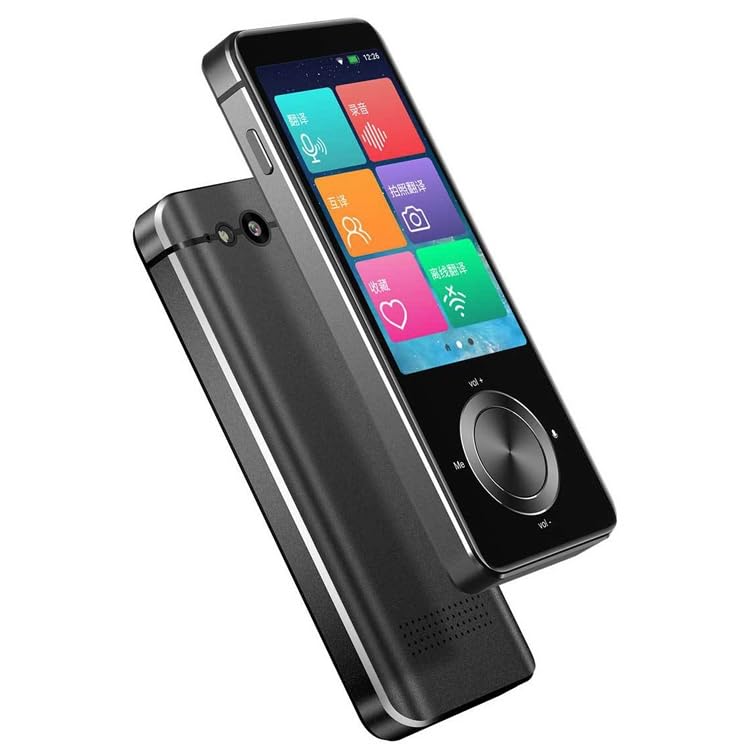
تصوير 1: سامهون ۽ پاسي view of the ELECTROPRIME Hishell M9 Translator. This image shows the device's screen, volume buttons, and power button on the side, along with the speaker grille at the bottom.
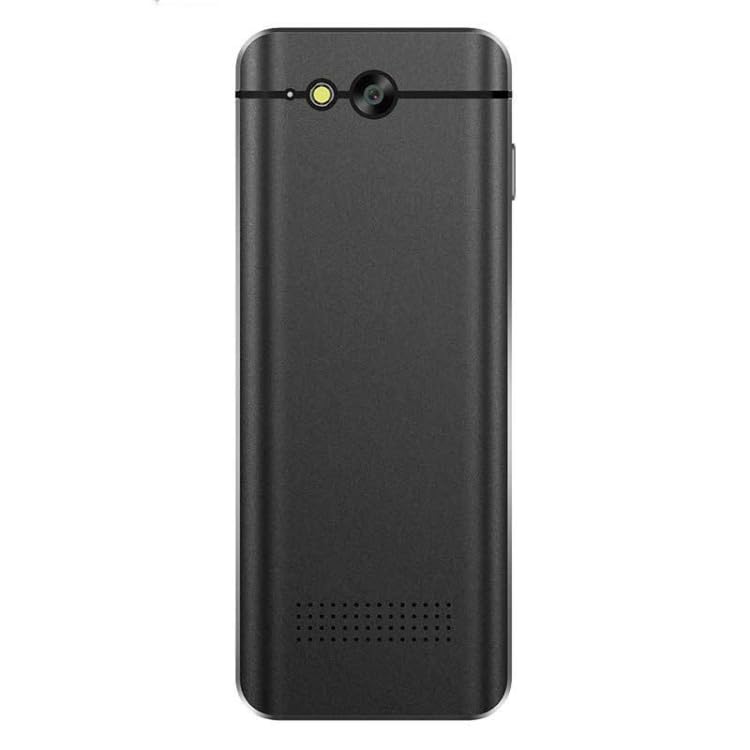
تصوير 2: پوئتي view of the ELECTROPRIME Hishell M9 Translator. This image highlights the rear camera and flash, along with the microphone and speaker perforations.
- ٽچ اسڪرين ڊسپلي: Main interface for interaction.
- پاور بٽڻ: Located on the side, used for powering on/off and screen lock.
- حجم بٽڻ: آڊيو آئوٽ پُٽ ليول کي ترتيب ڏيو.
- مائڪروفون: Captures spoken language for translation.
- اسپيڪر: Outputs translated audio.
- ڪئميرا: Used for photo translation.
- USB پورٽ: ڊوائيس چارج ڪرڻ لاء.
5. سيٽ اپ
5.1. ڊوائيس کي چارج ڪرڻ
- Connect the USB charging cable to the device's USB port.
- ڪيبل جي ٻئي ڇيڙي کي هڪ مطابقت رکندڙ USB پاور اڊاپٽر (شامل نه آهي) يا ڪمپيوٽر جي USB پورٽ ۾ لڳايو.
- The device will indicate charging status on the screen. Allow the device to fully charge before first use.
5.2. پاور آن/آف
- پاور آن ڪرڻ: ڊوائيس جي پاسي تي پاور بٽڻ کي دٻايو ۽ رکو جيستائين اسڪرين روشن نه ٿئي.
- پاور آف ڪرڻ: Press and hold the Power button until a power-off menu appears on the screen. Select 'Power Off'.
- اسڪرين کي لاڪ/ان لاڪ ڪرڻ لاءِ: مختصر طور تي پاور بٽڻ کي دايو.
5.3. شروعاتي ٻولي سيٽنگون
Upon first power-on, you may be prompted to select the device's system language and your preferred translation languages. Follow the on-screen instructions.
5.4. نيٽ ورڪ ڪنيڪشن (وائي فائي)
For online translation features, a Wi-Fi connection is required.
- From the main screen, navigate to 'Settings'.
- 'وائي فائي' چونڊيو ۽ ان کي آن ڪريو.
- فهرست مان پنھنجو مطلوب وائي فائي نيٽ ورڪ چونڊيو.
- جيڪڏهن چيو وڃي ته پاسورڊ داخل ڪريو ۽ ڳنڍيو.
6. آپريٽنگ هدايتون
6.1. Real-time Online Translation
This mode requires an active Wi-Fi connection.
- From the main menu, select the 'Real-time Translation' or 'Voice Translation' icon.
- Select the source language (the language you will speak) and the target language (the language you want to translate to).
- Press and hold the designated button (often marked 'Me' or a microphone icon) and speak clearly into the device's microphone.
- Release the button. The device will process your speech and display/speak the translation in the target language.
6.2. آف لائن ترجمو
The Hishell M9 supports offline translation for certain language pairs. Ensure necessary language packs are downloaded in advance via Wi-Fi in the 'Settings' menu.
- Select 'Offline Translation' from the main menu.
- Choose the downloaded source and target language packs.
- Proceed with voice input as described in section 6.1.
6.3. تصويري ترجمو
This feature translates text from images using the device's camera.
- Select 'Photo Translation' from the main menu.
- Point the camera at the text you wish to translate. Ensure good lighting and clear focus.
- تصوير ڪڍڻ لاءِ اسڪرين کي ٽيپ ڪريو.
- The device will analyze the text and display the translation.
6.4. Recording Translation
This function allows you to record longer conversations and translate them.
- Select 'Recording Translation' from the main menu.
- Tap the 'Record' button to start recording.
- Tap 'Stop' when finished.
- Select the recorded audio file and choose the desired translation language. The device will process and display the translated text.
6.5. سيٽنگون
Access the 'Settings' menu to adjust various device parameters:
- وائي فائي: نيٽ ورڪ ڪنيڪشن منظم ڪريو.
- روشني: اسڪرين جي روشني کي ترتيب ڏيو.
- حجم: اسپيڪر جي مقدار کي ڪنٽرول ڪريو.
- ٻولي سيٽنگون: Change system language and download offline language packs.
- سسٽم اپڊيٽ: سافٽ ويئر اپڊيٽ جي جانچ ڪريو ۽ انسٽال ڪريو.
- ڊوائيس بابت View ڊوائيس جي ڄاڻ.
7. سار سنڀال
7.1. صفائي
- ڊوائيس جي اسڪرين ۽ جسم کي صاف ڪرڻ لاءِ نرم، سڪل، لِنٽ فري ڪپڙو استعمال ڪريو.
- گھڙڻ وارا صاف ڪندڙ، الڪوحل، يا ڪيميائي محلول استعمال نه ڪريو.
7.2. اسٽوريج
- ڊوائيس کي سڌي سج جي روشني ۽ انتهائي گرمي پد کان پري ٿڌي، سڪل جاءِ تي رکو.
- If storing for an extended period, ensure the battery is charged to approximately 50% to prolong its lifespan.
7.3. بيٽري جي سنڀال
- بيٽري کي بار بار مڪمل طور تي چارج ڪرڻ کان پاسو ڪريو.
- Do not leave the device connected to a charger for excessively long periods after it is fully charged.
8. مسئلا حل ڪرڻ
| مسئلو | ممڪن سبب | حل |
|---|---|---|
| ڊوائيس تي طاقت نه آهي. | بيٽري گهٽ آهي؛ ڊوائيس منجمد آهي. | Charge the device for at least 30 minutes. If still unresponsive, perform a hard reset (refer to device-specific instructions if available, usually holding power button for 10-15 seconds). |
| ترجمو غلط آهي يا ڪم نه ڪري رهيو آهي. | Poor internet connection; incorrect language selection; unclear speech. | Ensure stable Wi-Fi connection. Verify source and target languages. Speak clearly and at a moderate pace. For offline mode, ensure language packs are downloaded. |
| وائي فائي ڪنيڪشن جا مسئلا. | غلط پاسورڊ؛ حد کان ٻاهر؛ روٽر جو مسئلو. | Re-enter Wi-Fi password. Move closer to the Wi-Fi router. Restart the device and the router. |
| اسڪرين غير جوابده آهي. | سافٽ ويئر جي خرابي؛ ڊوائيس منجمد ٿي وئي آهي. | Restart the device. If unresponsive, perform a hard reset. |
9. وضاحتون
- ماڊل: Hishell M9
- برانڊ: Electroprime
- رابطي: وائرليس
- پيڪيج وزن: 0.23 ڪلوگرام / 0.51 پائونڊ
- پيڪيج جي ماپ: 18 cm x 12 cm x 3 cm / 7.09 inches x 4.72 inches x 1.18 inches
- ٺاهيندڙ: Electroprime
10. وارنٽي ۽ سپورٽ
For warranty information and customer support, please refer to the warranty card included with your purchase or contact ELECTROPRIME customer service directly. Keep your proof of purchase for any warranty claims.
For further assistance, visit the official ELECTROPRIME webسائيٽ تي وڃو يا انهن جي سپورٽ چينلز سان رابطو ڪريو.