
اهم حفاظتي ڄاڻ
مھرباني ڪري اسيمبلي ۽ استعمال کان اڳ سڀ ھدايتون احتياط سان پڙھو. مستقبل جي حوالي لاءِ ھي دستوري رکو.
- This product has a maximum weight recommendation of 350 ايل بي ايس (158 kg). Do not exceed this weight limit.
- Improper assembly or use may lead to instability or malfunction, potentially causing injury.
- To avoid health issues associated with prolonged sitting, take regular breaks and adjust your posture during extended use.
- Ensure all screws and connections are tightened securely before use and periodically check for looseness.
پيڪيج مواد
اسيمبلي شروع ڪرڻ کان اڳ پڪ ڪريو ته سڀئي حصا موجود آهن. جيڪڏهن ڪو به پرزو غائب يا خراب آهي، مهرباني ڪري ڪسٽمر سروس سان رابطو ڪريو.
- هٿيار (2)
- ڪاسٽر (5)
- گئس لفٽ (1)
- ڪنڌ (1)
- يوزر گائيڊ (1)
- Assembly Tools (1 set)
- Chair Base (1)
- سيٽ کشن (1)
- پوئتي (1)

شڪل 1: Example of a caster wheel, part of the chair's base assembly.
سيٽ اپ ۽ اسيمبلي
The FLEXISPOT OC4 Lite chair is designed for straightforward assembly. A detailed user manual with step-by-step instructions and all necessary tools are included in the package. Assembly can typically be completed in approximately 30 minutes.
- انپيڪ اجزاء: احتياط سان پيڪنگ مان سڀئي حصا هٽايو ۽ انهن کي صاف، فليٽ مٿاڇري تي رکو.
- ڪاسٽر کي بيس سان ڳنڍيو: Insert the five caster wheels into the holes on the chair base until they click securely into place.
- گئس لفٽ داخل ڪريو: گيس لفٽ سلنڈر کي ڪرسي جي بنياد جي وچ واري سوراخ ۾ رکو.
- سيٽ ۽ پٺيءَ کي گڏ ڪريو: Follow the specific instructions in the included user guide to attach the backrest to the seat cushion and then to the chair mechanism.
- هيڊ ريسٽ لڳايو: Secure the headrest to the top of the backrest.
- Connect to Gas Lift: گڏ ٿيل سيٽ ۽ پٺيءَ کي احتياط سان گئس لفٽ سلنڈر تي رکو.
- آخري چڪاس: استعمال ڪرڻ کان اڳ پڪ ڪريو ته سڀئي ڪنيڪشن تنگ آهن ۽ ڪرسي مستحڪم آهي.
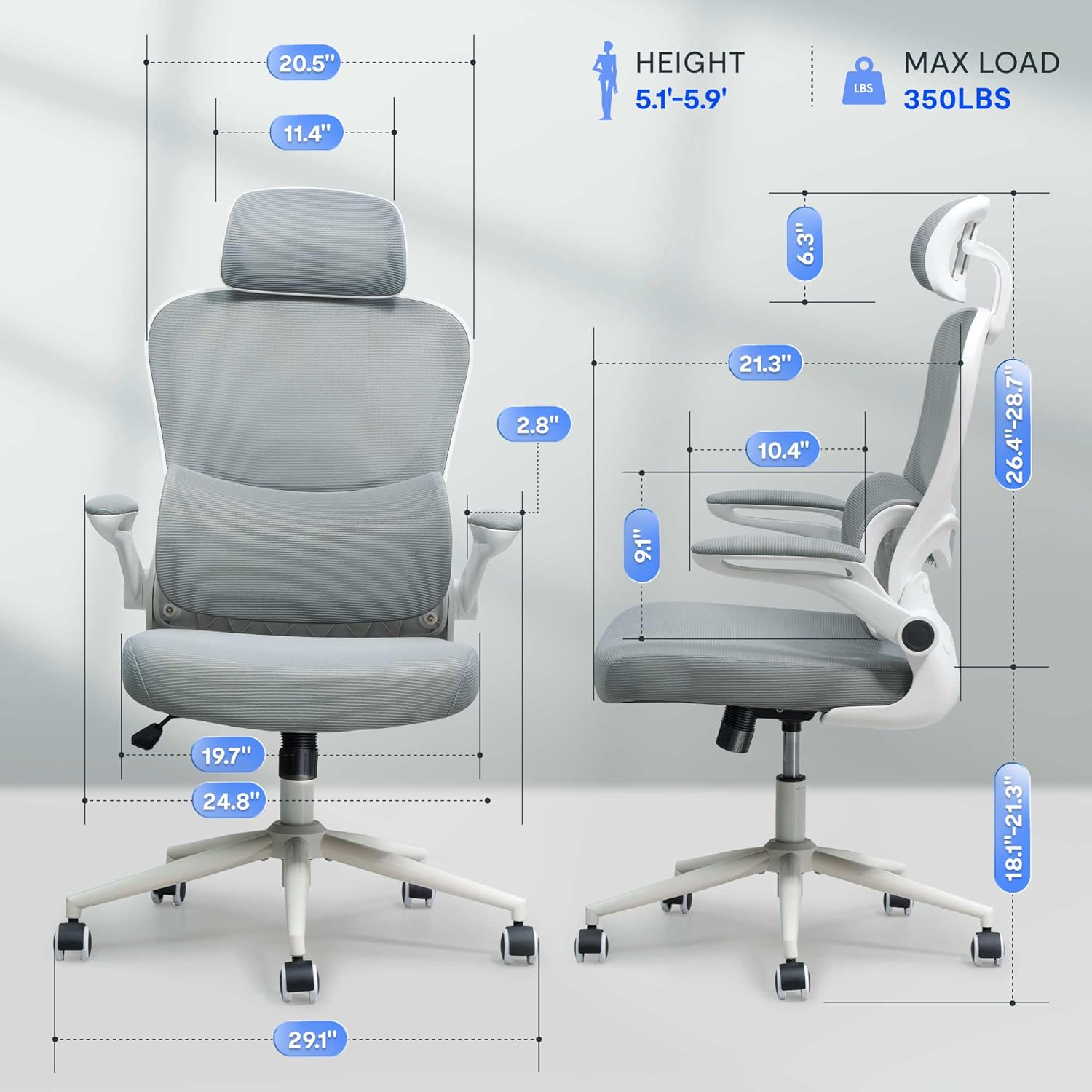
شڪل 2: Assembled chair with key dimensions for reference.
آپريٽنگ هدايتون
The FLEXISPOT OC4 Lite chair offers multiple adjustment points to customize your seating experience for optimal comfort and support.
1. سيٽ جي اوچائي جي ترتيب
سيٽ جي اوچائي کي ترتيب ڏيڻ لاءِ، سيٽ جي هيٺان ساڄي پاسي ليور کي ڏسو. سيٽ کي هيٺ ڪرڻ لاءِ ويٺي ليور کي مٿي ڇڪيو، يا سيٽ کي مٿي ڪرڻ لاءِ بيٺي ليور کي مٿي ڇڪيو. گهربل اوچائي تي ليور کي ڇڏي ڏيو.
2. Tilt Function and Tension Control
The chair features a tilt function allowing the backrest and seat to recline together. Use the lever on the left side beneath the seat to lock or unlock the tilt. The tilt tension knob, located at the front center beneath the seat, can be rotated to adjust the resistance of the tilt mechanism.

شڪل 3: Adjusting the chair's tilt angle and tension.
3. ترتيب ڏيڻ وارو لمبر سپورٽ
The chair includes adjustable lumbar support that adapts to your waist movement, providing dynamic support. The lumbar support can be adjusted vertically by sliding it up or down along the backrest frame to align with the natural curve of your spine.
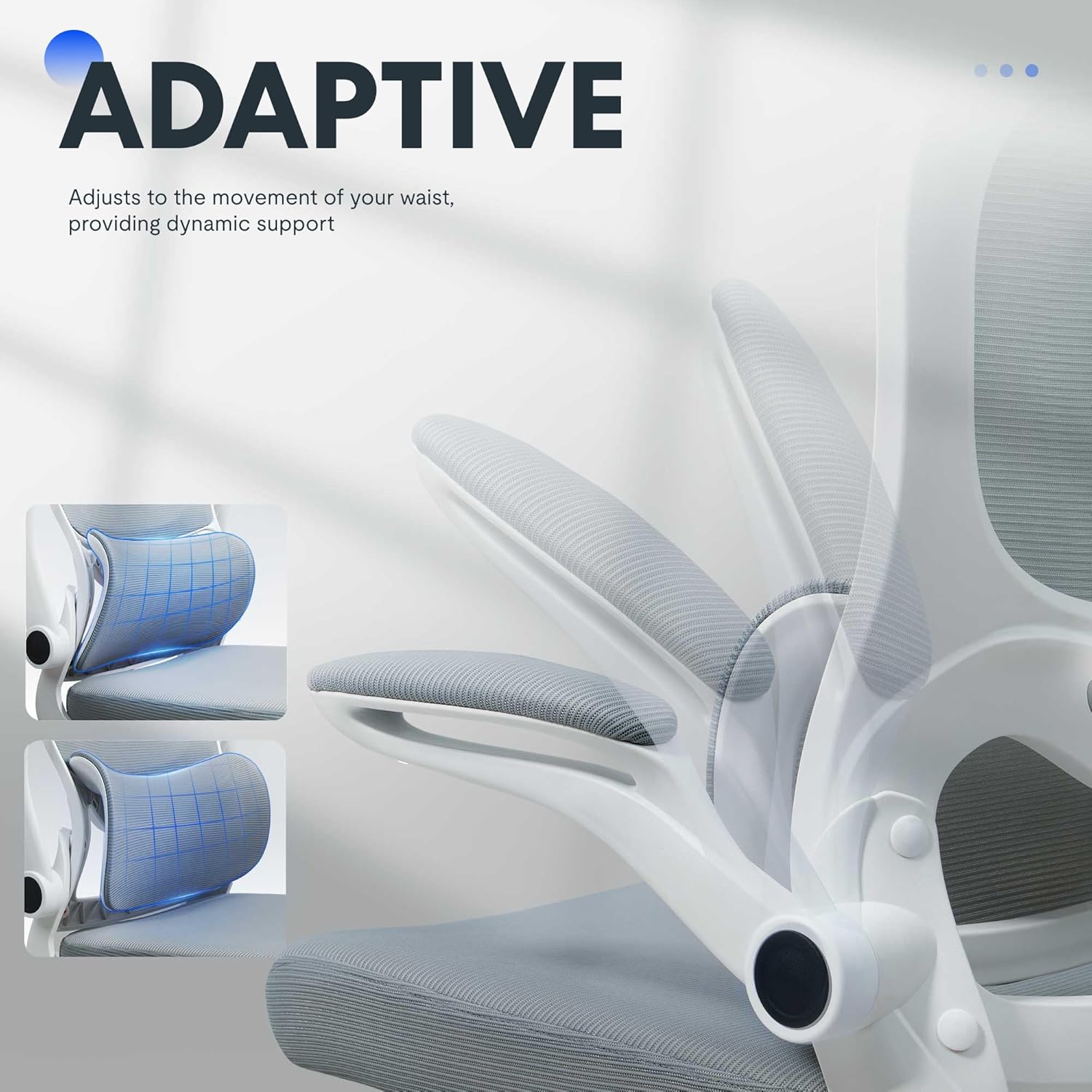
شڪل 4: Adaptive lumbar support for personalized comfort.
4. Adjustable headrest
The headrest can be adjusted for height and angle to provide optimal neck and head support. Gently push or pull the headrest to move it to your preferred position.
5. فلپ اپ آرم ريسٽس
The armrests can be flipped up to allow the chair to be pushed closer to a desk, saving space. To flip them up, lift the armrests until they lock into the vertical position. To return them, gently pull them down.

شڪل 5: Chair with armrests flipped up for space-saving storage.
سار سنڀال
Proper care will extend the life and appearance of your office chair.
- صفائي: عام صفائي لاءِ، مٿاڇري کي اشتهار سان صاف ڪريوamp cloth. For fabric areas, dry clean or wipe clean as needed. Avoid harsh chemical cleaners that may damage the material.
- چڪاس: Periodically check all bolts and screws to ensure they are tight. Re-tighten if necessary to maintain stability and safety.
- ڪيسٽر جي سنڀال: هموار حرڪت کي يقيني بڻائڻ لاءِ ڪيسٽر کي وارن ۽ ملبي کان پاڪ رکو.
مشڪلاتون
If you encounter any issues with your chair, refer to the common problems and solutions below.
| مسئلو | ممڪن سبب | حل |
|---|---|---|
| ڪرسي اوچائي کي ترتيب نه ٿي ڏئي | گيس لفٽ ۾ خرابي يا ليور لڳل نه هجڻ. | پڪ ڪريو ته اوچائي جي ترتيب ڏيڻ وارو ليور مڪمل طور تي لڳل آهي. جيڪڏهن مسئلو برقرار رهي ٿو، ته گئس لفٽ کي تبديل ڪرڻ جي ضرورت پئجي سگهي ٿي. ڪسٽمر سروس سان رابطو ڪريو. |
| ڪرسي لڏپلاڻ ڪري ٿي يا غير مستحڪم محسوس ٿئي ٿي | ڍِلا پيچ يا اڻ برابر فرش. | سڀني اسيمبلي اسڪرو کي چيڪ ڪريو ۽ سخت ڪريو. پڪ ڪريو ته ڪرسي هڪ فليٽ، برابر سطح تي آهي. |
| ڪاسٽر آساني سان نه ڦرندا آهن | ڪاسٽرن ۾ ملبہ يا خراب ڪاسٽر. | Remove any hair or debris from the caster wheels. If casters are damaged, they may need replacement. |
| Backrest does not tilt or lock | Tilt mechanism locked or tension too high. | Ensure the tilt lock lever is disengaged. Adjust the tilt tension knob to a lower setting. |
پيداوار جي وضاحت
| برانڊ | FLEXISPOT |
| ماڊل نالو | OC4-V2 |
| رنگ | اڇو |
| مواد | Alloy Steel, Mesh, Nylon |
| پيداوار جا طول و عرض (ڊي x ڊبليو x ايڇ) | 29.1" x 29.1" x 50" (73.9 سينٽي ميٽر x 73.9 سينٽي ميٽر x 127 سينٽي ميٽر) |
| شيءِ جو وزن | 32 پائونڊ (14.5 ڪلوگرام) |
| وڌ ۾ وڌ وزن جي سفارش | 350 پائونڊ (158 ڪلوگرام) |
| سيٽ جي کوٽائي | 21.3 انچ (54.1 سينٽي) |
| ڪرسي جي پٺيءَ جي ويڪر | 20.5 انچ (52.1 سينٽي) |
| پوئتي انداز | ميش پوئتي |
| بازو جو انداز | Flip-up arms |
| فرنيچر جي بنيادي تحريڪ | ٻرندڙ |
| گهربل اسيمبلي | ها |
| سرٽيفڪيشن | BIFMA, SGS |
وارنٽي ۽ سپورٽ
The FLEXISPOT OC4 Lite Ergonomic Office Chair is rigorously tested and certified by BIFMA and SGS, ensuring durability and safety. The reinforced nylon base is capable of supporting significant weight, and the resilient mesh fabric is designed to maintain its shape over time.
For any questions, concerns, or assistance with assembly, operation, or troubleshooting, please contact our professional customer service team. Refer to the contact information provided with your purchase or visit the official FLEXISPOT webحمايت جي تفصيل لاء سائيٽ.