
AdaLov CPE660, WA635X
Adalov Wireless Bridge and WiFi 6 Outdoor Access Point User Manual
Models: CPE660, WA635X
1. تعارف
This manual provides detailed instructions for the installation, operation, and maintenance of your Adalov Wireless Bridge (CPE660) and WiFi 6 Outdoor Access Point (WA635X) bundle. This powerful networking solution is designed to extend your network connectivity over long distances and provide high-speed, reliable WiFi coverage in various environments.
The Adalov CPE660 Wireless Bridge is ideal for creating seamless point-to-point or point-to-multipoint connections, extending your network to remote buildings up to 3 kilometers away. The Adalov WA635X WiFi 6 Outdoor Access Point delivers ultra-fast speeds of up to 5378Mbps, ensuring robust and wide-ranging wireless coverage for up to 128 devices. Both devices are built with durable, weatherproof designs for reliable performance in challenging outdoor conditions.
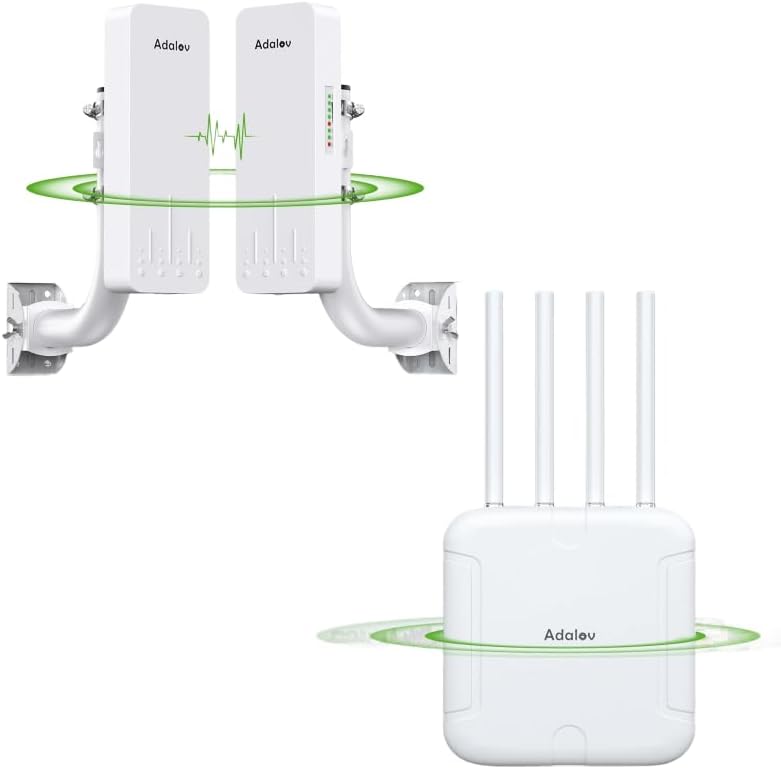
Figure 1: Adalov Wireless Bridge (CPE660) and WiFi 6 Outdoor Access Point (WA635X) Bundle.
This image displays the complete Adalov networking bundle, featuring two CPE660 wireless bridge units and one WA635X WiFi 6 outdoor access point, illustrating their compact and robust design.
2. پيڪيج مواد
مھرباني ڪري پڪ ڪريو ته پيڪيج کولڻ وقت سڀ شيون موجود آھن ۽ سٺي حالت ۾ آھن:
- 2 x Adalov CPE660 Wireless Bridge Units
- 1 x Adalov WA635X WiFi 6 Outdoor Access Point
- 2 x Mounting Brackets for CPE660
- 1 x Mounting Kit for WA635X (e.g., pole strap, screws)
- 3 x Power over Ethernet (PoE) Adapters (for powering devices)
- 3 x پاور تار
- Ethernet ڪيبل
- استعمال ڪندڙ جو دستياب (ھي دستاويز)
نوٽ: The "Antenna" listed in the product specifications refers to the integrated high-gain antennas within the CPE660 units and the external antennas on the WA635X.
3. مصنوعات جون خاصيتون
- Long-Range Wireless Bridge (CPE660): Offers up to 3KM range for seamless connectivity between buildings, ideal for extending networks over long distances.
- Fast WiFi 6 Access Point (WA635X): Delivers ultra-fast speeds of up to 5378Mbps, perfect for extending coverage over large areas.
- Multiple Modes Supported: The CPE660 supports Point-to-Point (PtP), Point-to-Multi-Point (PtMP), and Bridge modes. The WA635X supports up to 128 devices.
- Weatherproof & Durable Design: CPE660 features an IP65-rated outdoor enclosure, while the WA635X has an IP67-rated, waterproof design, ensuring uninterrupted performance in harsh weather.
- آسان پلگ ۽ راند سيٽ اپ: CPE660 offers effortless installation with pre-programmed WDS mode. WA635X supports PoE+ and flexible mounting.
- جديد وائرليس ٽيڪنالاجيون: Enjoy reliable and fast internet with Mesh WiFi, Seamless Roaming, Band Steering, and Airtime Fairness on the WA635X. The CPE660’s 14dBi antenna ensures strong, directional signal reception.
- ڊبل بينڊ آپريشن: Both devices support 2.4GHz and 5GHz frequencies for flexible and optimized network performance.
4. سيٽ اپ گائيڊ
4.1 Adalov CPE660 Wireless Bridge Setup
The CPE660 units are designed for easy pairing and deployment for long-range wireless connections.
4.1.1 Mounting the CPE660 Units
Each CPE660 unit comes with a bracket mount for secure installation on poles or walls. Choose a location with a clear line of sight between the two units for optimal performance. Ensure the units are mounted securely to withstand environmental conditions.
4.1.2 Powering and Pairing the CPE660 Units
The CPE660 units are powered via Power over Ethernet (PoE) adapters. Connect an Ethernet cable from the LAN port of the CPE660 to the PoE port of the adapter, and another Ethernet cable from the LAN port of the adapter to your network device (router/switch).

Figure 2: CPE660 Single-Key Operation & Auto-Pairing Process.
This image illustrates the simple three-step auto-pairing process for the CPE660 wireless bridge: 1. Set Master CPE to "A" and Slave CPE to "B". 2. Select the same channel on both devices. 3. Wait for pairing to complete.
- Set Master/Slave: On the back of each CPE660 unit, there is a switch. Set one unit as the "Master" (e.g., position 'A') and the other as the "Slave" (e.g., position 'B').
- چينل چونڊيو: Ensure both devices are set to the same operating channel.
- خودڪار جوڙڻ: Power on both devices. They will automatically attempt to pair. The indicator lights will show the pairing status. Once paired, the connection is established.
4.1.3 Network Configuration Examples (PtP/PtMP)

Figure 3: CPE660 Network Configuration Examples.
This diagram shows typical setups for the CPE660, including Point-to-Point (PtP) for connecting two locations (e.g., main building to a remote camera) and Point-to-Multi-Point (PtMP) for connecting one master unit to multiple slave units (e.g., multiple remote cameras or network extensions).
- Point-to-Point (PtP): Connects two distinct locations. One CPE660 acts as the Master, connected to your main network (e.g., router/switch), and the other acts as the Slave, providing network access at the remote location.
- Point-to-Multi-Point (PtMP): A single Master CPE660 can connect to multiple Slave CPE660 units (up to 8 receivers supported), extending network access to several remote points from a central location.
4.2 Adalov WA635X WiFi 6 Outdoor Access Point Setup
The WA635X provides high-speed WiFi coverage for outdoor and large indoor areas.
4.2.1 Mounting the WA635X Unit
The WA635X comes with flexible mounting options, including pole and wall mounting. Choose a central location that provides optimal WiFi coverage for your desired area. Ensure the unit is securely mounted and positioned to avoid obstructions.
4.2.2 Powering the WA635X Unit
The WA635X supports Power over Ethernet Plus (PoE+). Connect an Ethernet cable from a PoE+ enabled switch or the provided PoE+ adapter to the LAN port of the WA635X. This single cable will provide both power and data connectivity.

Figure 4: WA635X Ports and Indicators.
This image details the ports and indicator lights on the WA635X, including the 2.5G SFP+ port, 1Gbs LAN port, reset button, and LED indicators for signal, SFP+, LAN, and power.
- 2.5G SFP+ Port: For high-speed fiber optic connections.
- 1Gbs LAN Port: Standard Gigabit Ethernet connection for data and PoE+.
- ري سيٽ بٽڻ: Used to reset the device to factory defaults (press and hold for 10 seconds while powered on).
- اشارو بتيون:
- اشارو اشارو: Shows wireless signal strength.
- SFP+ Indicator: Indicates SFP+ port activity.
- LAN اشارو: Indicates LAN port activity.
- PWR (Power) Indicator: طاقت جي حالت کي ظاهر ڪري ٿو.
4.2.3 نيٽ ورڪ انٽيگريشن
Connect the WA635X to your existing network (e.g., router or switch) via the LAN port. The device will automatically configure itself for basic operation. For advanced settings, refer to the device's web interface (usually accessible via a default IP address, check the product packaging or AdaLov support webتفصيل لاء سائيٽ).

Figure 5: WA635X Supports 5G & 2.4G Dual Bands.
This image highlights the WA635X's capability to operate on both 2.4GHz and 5GHz frequency bands, providing flexible and high-speed wireless connectivity.
5. آپريٽنگ هدايتون
5.1 Verifying Connection Status
After setup, observe the LED indicators on both the CPE660 and WA635X units.
- CPE660: Power and signal strength indicators should be lit, indicating a successful link between the Master and Slave units.
- WA635X: The PWR, LAN, and Signal indicators should be lit, confirming power, network connectivity, and active wireless signal.
5.2 Network Usage
Once connected, the CPE660 bridge extends your wired network, allowing devices at the remote location to access the internet or local network resources. The WA635X broadcasts a WiFi network, enabling wireless devices to connect.

Figure 6: WA635X Mesh Technology Support.
This aerial view illustrates how multiple WA635X units can form a mesh network, providing seamless and extended WiFi coverage across a large area like a resort or campاسان.
- ڊبل بينڊ آپريشن: The WA635X supports both 2.4GHz and 5GHz bands. Devices will automatically connect to the optimal band for performance.
- ميش وائي فائي: If deploying multiple WA635X units, they can form a mesh network for seamless roaming and extended coverage without signal drops.
- بي عيب رومنگ: Devices will automatically switch between WA635X units as you move, ensuring an uninterrupted connection.
- بينڊ اسٽيئرنگ: Optimizes client connections by guiding dual-band devices to the less congested 5GHz band.
- هوائي وقت جي انصاف: يقيني بڻائي ٿو ته سست ڊوائيسز ايئر ٽائيم تي اجارداري نه ڪن، مجموعي نيٽ ورڪ ڪارڪردگي کي بهتر بڻائي.

Figure 7: WA635X Providing Worry-Free WiFi Coverage.
This image contrasts a user struggling with poor WiFi signal with another user enjoying seamless connectivity thanks to the WA635X, emphasizing its ability to provide reliable outdoor WiFi coverage.
6. سار سنڀال
Both the CPE660 and WA635X are designed for minimal maintenance due to their robust, weatherproof construction.

Figure 8: Adalov Devices Built to Endure Harsh Environments.
This composite image showcases the durability of Adalov outdoor networking devices, highlighting their resistance to water, dust, cold, and sunlight, ensuring reliable operation in diverse weather conditions.
- صفائي: Periodically inspect the exterior of the units for dirt, dust, or debris buildup. Wipe clean with a soft, damp ڪپڙو. استعمال نه ڪريو سخت ڪيميائي يا گھڻائي صاف ڪندڙ.
- فرم ويئر اپڊيٽس: Check the official AdaLov website periodically for firmware updates. Keeping your devices updated ensures optimal performance, security, and access to new features. Follow the instructions provided with the firmware update carefully.
- ماحولياتي تحفظ: While weatherproof, ensure the units are not submerged in water or exposed to extreme physical impact.
7. مسئلا حل ڪرڻ
If you encounter issues with your Adalov devices, try the following troubleshooting steps:
- طاقت ناهي:
- Ensure the PoE adapter is properly connected to a power outlet and the Ethernet cables are securely plugged into the correct ports (PoE to device, LAN to network).
- Check the power indicator light on the PoE adapter and the device.
- No Network Connection (CPE660):
- Verify that both Master and Slave CPE660 units are powered on and their indicator lights show a successful link.
- Ensure the Master and Slave switches are correctly set and they are on the same channel.
- Check the Ethernet cables connecting the CPE660 units to your network devices.
- Ensure clear line of sight between the two CPE660 units. Obstructions can severely degrade performance.
- No WiFi Signal (WA635X):
- Check the PWR and LAN indicator lights on the WA635X.
- Ensure the WA635X is properly connected to your network via the LAN port.
- Verify that the WiFi function is enabled in the device's settings (if you have accessed the web انٽرفيس).
- Slow Speed or Intermittent Connection:
- CPE660: Check the signal strength indicators. If low, adjust alignment or clear obstructions. Ensure no other strong 5.8GHz interference sources are nearby.
- WA635X: Ensure the device is mounted in an optimal location, free from physical obstructions. Check for potential wireless interference from other devices.
- Restart both the Adalov devices and your main router/modem.
- فيڪٽري ڊفالٽ کي ري سيٽ ڪرڻ:
- If issues persist, you may need to reset the device to its factory default settings. For the WA635X, locate the reset button (refer to Figure 4) and press and hold it for approximately 10 seconds while the device is powered on. For the CPE660, consult the specific product documentation or AdaLov support.
- خبردار: Resetting will erase all custom configurations.
If these steps do not resolve the issue, please contact AdaLov customer support for further assistance.
8. وضاحتون
| خاصيت | تفصيل |
|---|---|
| برانڊ | AdaLov |
| ماڊل جا نالا | CPE660 (Wireless Bridge), WA635X (WiFi 6 Outdoor Access Point) |
| وائرلیس معياري | 802.11ax (وائي فائي 6) |
| فريڪوئنسي بينڊ ڪلاس | ڊوئل بينڊ (2.4GHz ۽ 5GHz) |
| Max. Wireless Speed (WA635X) | 5378Mbps تائين |
| Bridge Range (CPE660) | Up to 3KM (with non-blocking obstacles) |
| Antenna Gain (CPE660) | 14dBi هاء گائن اينٽيننا |
| Weatherproof Rating (CPE660) | IP65 |
| Weatherproof Rating (WA635X) | IP67 |
| رابطي ٽيڪنالاجي | Wi-Fi 6, Ethernet, PoE/PoE+ |
| مطابقت رکندڙ ڊوائيسز | Router, Switch, IP Cameras, DVRs, etc. |
| تجويز ڪيل استعمال | Indoor/Outdoor, Home, Office, Farm, Yard, RV |
| آپريٽنگ سسٽم (اندروني) | روٽر او ايس (فرم ويئر) |
9. وارنٽي ۽ سپورٽ
For information regarding the product warranty, please refer to the warranty card included with your purchase or visit the official AdaLov webسائيٽ.
If you require technical support or have questions not covered in this manual, please contact AdaLov customer support through their official webسائيٽ يا توهان جي پراڊڪٽ سان مهيا ڪيل رابطي جي معلومات.
Ask a question about this manual
Ask about setup, troubleshooting, compatibility, parts, safety, or missing instructions. Manuals+ will review the question and use this page’s manual context to help answer it.