
1. تعارف
Thank you for choosing the FLEXISPOT QB2W-2080-IE Height Adjustable Standing Desk. This electric standing desk is designed to provide a versatile and ergonomic workspace, allowing you to easily switch between sitting and standing positions. Featuring a robust dual-motor lift system, intelligent control panel with memory functions, and an anti-collision system, this desk offers stability, efficiency, and safety for your daily work.
2. حفاظت جي ڄاڻ
Please read all safety instructions carefully before assembly and use to prevent injury or damage to the product. Keep this manual for future reference.
- وڌ ۾ وڌ وزن جي گنجائش: Do not exceed the maximum static load capacity of 120 ڪلوگرام (264 پائونڊ) or dynamic load capacity of 100 ڪلوگرام (220 پائونڊ). Overloading can cause instability and damage.
- اونچائي جي ترتيب جي حد: Ensure the desk operates within its specified height range of 70 سينٽي کان 119 سينٽي (27.6 انچ کان 46.9 انچ) for optimal stability and safety.
- ٻار ۽ پالتو جانور: حادثن کان بچڻ لاءِ آپريشن دوران ٻارن ۽ پالتو جانورن کي ڊيسڪ کان پري رکو.
- بجلي جي فراهمي: Connect the desk only to a properly grounded power outlet. Do not use damaged power cords or adapters.
- صفائي: Ensure there are no obstructions above or below the desk during height adjustments to allow the anti-collision system to function effectively.
- اسيمبلي: Assembly requires two people. Ensure all components are securely fastened before use.
- مائع اسپيل: Avoid spilling liquids on the control panel or electrical components. In case of a spill, immediately disconnect power and allow to dry completely before reconnecting.
3. پيڪيج مواد
اسيمبلي شروع ڪرڻ کان اڳ، پڪ ڪريو ته سڀئي حصا موجود آهن ۽ انهن کي نقصان نه پهتو آهي. جيڪڏهن ڪو به حصو غائب يا خراب آهي، مهرباني ڪري ڪسٽمر سپورٽ سان رابطو ڪريو.
- Desktop (4 parts)
- ڊيسڪ ٽنگون (2)
- فريم اجزاء
- Dual Motor Lift System
- ڪنٽرول پينل
- پاور اڊاپٽر ۽ ڪيبل
- All necessary assembly tools and connection elements
- استعمال ڪندڙ دستي
4. سيٽ اپ ۽ اسيمبلي
Assembly of the FLEXISPOT QB2W-2080-IE desk requires approximately 2 people and includes all necessary tools. Follow these general steps:
- انپيڪ اجزاء: پيڪنگ مان سڀني حصن کي احتياط سان هٽايو ۽ انهن کي صاف، نرم مٿاڇري تي رکو ته جيئن ڇڪڻ کان بچي سگهجي.
- فريم گڏ ڪريو: Attach the crossbars to the lifting columns (desk legs) using the provided hardware. Ensure all screws are tightened securely.
- ڊيسڪ ٽنگون ڳنڍيو: Secure the feet to the bottom of the lifting columns.
- ڊيسڪ ٽاپ لڳايو: Place the desktop sections onto the assembled frame. The desktop is made of 4 parts and includes connection elements for stability. Align the pre-drilled holes and secure the desktop to the frame using the provided screws.
- ڪنٽرول پينل ۽ پاور کي ڳنڍيو: Connect the control panel cable to the motor control box. Then, connect the power adapter to the control box and plug it into a grounded power outlet.
- ڪيبل جو انتظام: Use the included cable ties or management accessories to organize cables neatly under the desk.
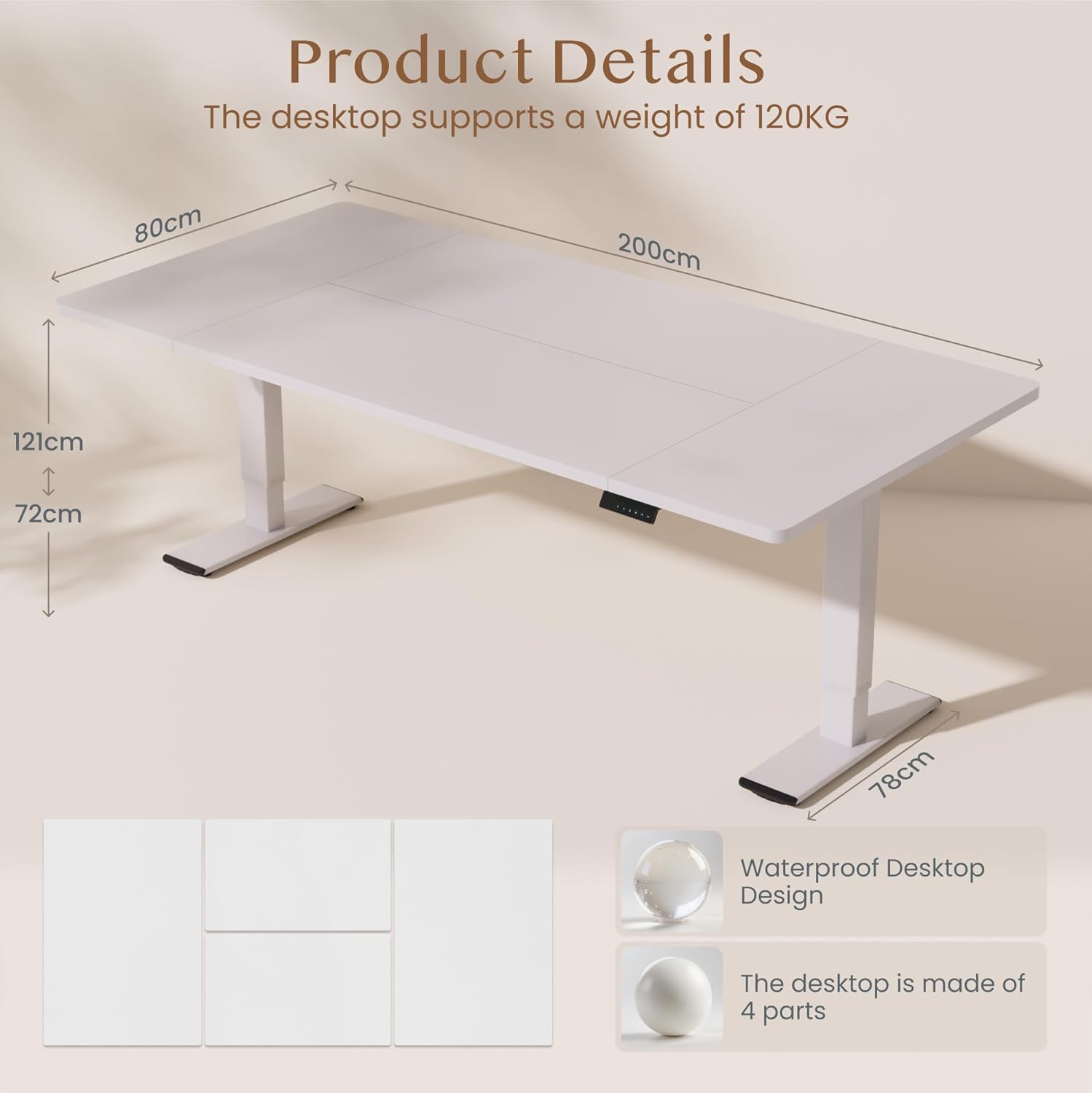
تصوير: Product details of the FLEXISPOT standing desk, illustrating its dimensions (200cm length, 80cm width, 72-121cm height range) and the four-part, waterproof desktop design. The desktop supports a weight of 120KG.

تصوير: The FLEXISPOT standing desk shown at its minimum (72cm) and maximum (121cm) height, demonstrating its height adjustability for both sitting and standing positions.
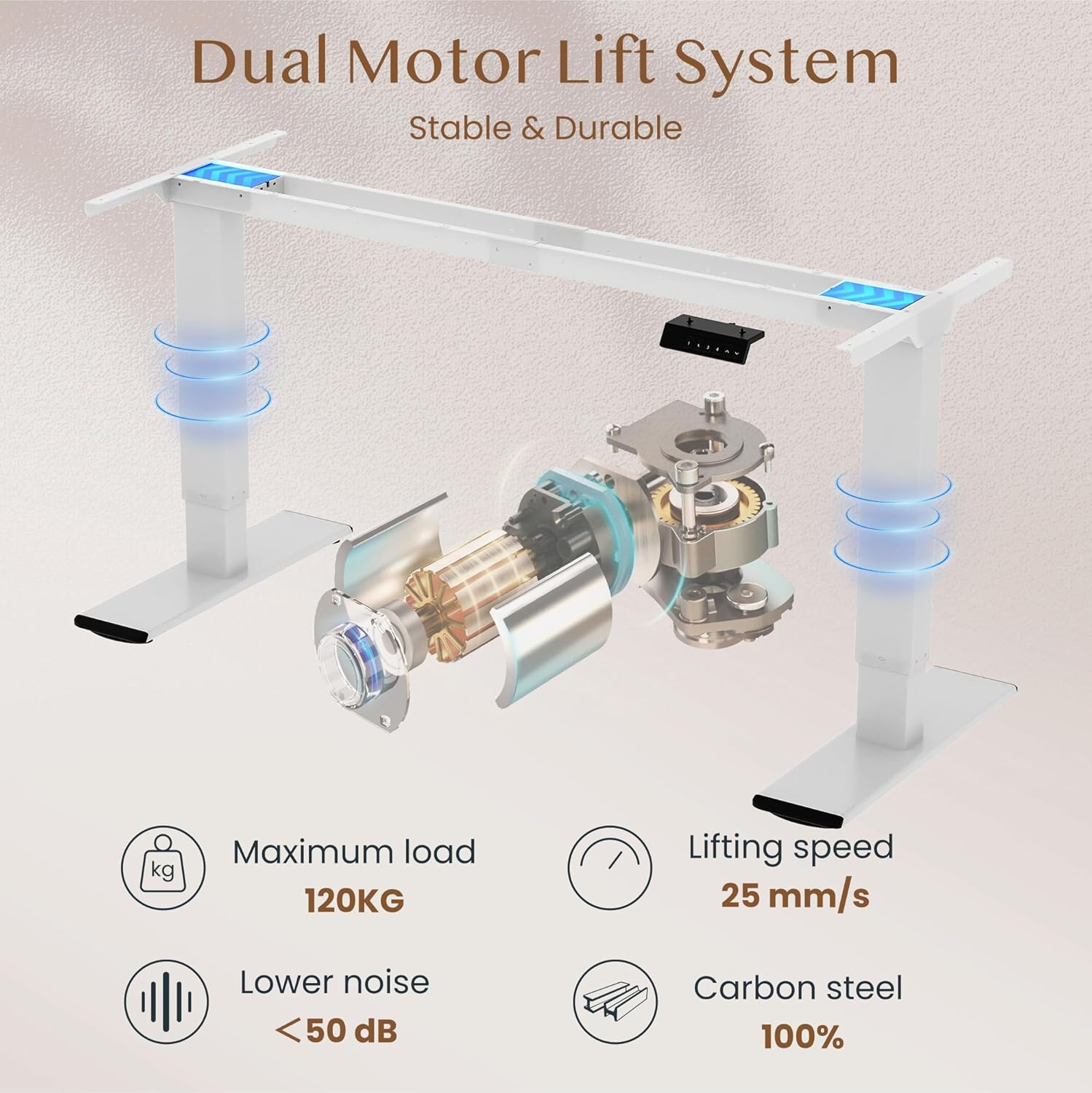
تصوير: Diagram illustrating the FLEXISPOT dual motor lift system, highlighting its stable and durable design. Key specifications like maximum load (120KG), lifting speed (25 mm/s), lower noise (<50 dB), and 100% carbon steel construction are visible.
5. آپريٽنگ هدايتون
The FLEXISPOT QB2W-2080-IE desk features an intuitive control panel for easy height adjustment and memory functions.
5.1. Basic Height Adjustment
- کي دٻايو "^" (Up) ڊيسڪ کي مٿي ڪرڻ لاءِ بٽڻ.
- کي دٻايو "v" (Down) ڊيسڪ کي هيٺ ڪرڻ لاءِ بٽڻ.
- Release the button to stop the desk at the desired height.
5.2. ياداشت جا اڳواٽ سيٽ
The control panel allows you to save up to four preferred height settings.
- مٿي/هيٺ بٽڻن کي استعمال ڪندي ڊيسڪ کي پنهنجي گهربل اوچائي تي ترتيب ڏيو.
- کي دٻايو "M" (Memory) button (often represented by a 'f' symbol). The LED display will show "S-".
- فوري طور تي نمبر بٽڻن مان هڪ کي دٻايو ("1", "2", "3", or "4") to save the current height to that preset. The display will show "S-1", "S-2", etc., to confirm.
- محفوظ ڪيل اوچائي کي ياد ڪرڻ لاءِ، صرف لاڳاپيل نمبر بٽڻ کي دٻايو. ڊيسڪ خودڪار طريقي سان محفوظ ڪيل پوزيشن ڏانهن منتقل ٿي ويندي.
5.3. Anti-Collision Function
The desk is equipped with an anti-collision system that automatically stops and slightly reverses the desk's movement if it encounters an obstruction during height adjustment. This feature enhances safety and prevents damage to the desk or other objects.

تصوير: Close-up of the FLEXISPOT intelligent control panel, showing buttons for Up & Down adjustment, 4 Memory Heights, an LED Screen, and the Anti-Collision Function indicator.

تصوير: The FLEXISPOT standing desk in an office setting, illustrating its smooth and quiet operation with a lifting speed of 25mm/s and noise levels below 50 dB. The control panel is visible under the desk.

تصوير: A visual comparison demonstrating the FLEXISPOT safety collision avoidance system. One side shows an object being avoided by the desk's upward movement (WITH Anti-Collision Function), while the other side implies a collision without the function.
6. سار سنڀال
باقاعده سار سنڀال توهان جي FLEXISPOT اسٽينڊنگ ڊيسڪ جي ڊگهي عمر ۽ بهترين ڪارڪردگي کي يقيني بڻائي ٿي.
- صفائي: ڊيسڪ جي مٿاڇري ۽ ٽنگن کي اشتهار سان صاف ڪريوamp ڪپڙو. سخت ڪيميڪلز يا رگڙيندڙ ڪلينر استعمال ڪرڻ کان پاسو ڪريو جيڪي ختم کي نقصان پهچائي سگهن ٿا.
- ڪنيڪشن چيڪ ڪريو: وقت بوقت سڀني اسڪرو ۽ بولٽن کي چيڪ ڪريو ته جيئن پڪ ڪري سگهجي ته اهي تنگ آهن. جيڪڏهن ضروري هجي ته ٻيهر سخت ڪريو.
- ڪيبل جو انتظام: Ensure all cables are neatly organized and not pinched or tangled, which could affect desk operation or cause damage.
- اوور لوڊ ڪرڻ کان پاسو ڪريو: Do not place items exceeding the maximum weight capacity on the desk.
7. مسئلا حل ڪرڻ
If you encounter issues with your desk, refer to the following common troubleshooting steps:
- ڊيسڪ نه حرڪت:
- چيڪ ڪريو ته ڇا پاور ڪيبل ڊيسڪ ۽ وال آئوٽليٽ ٻنهي ۾ محفوظ طور تي لڳل آهي.
- Ensure there are no obstructions preventing movement.
- ڊيسڪ کي 10 سيڪنڊن لاءِ ان پلگ ان ڪري ۽ پوءِ ان کي واپس پلگ ان ڪري ري سيٽ ڪرڻ جي ڪوشش ڪريو.
- ڊسپلي تي غلطي ڪوڊ:
- If an error code appears, consult the specific error code section in the full manual (if available) or contact customer support. Often, a reset (unplugging and replugging) can clear minor errors.
- Uneven Movement/Instability:
- پڪ ڪريو ته ڊيسڪ هڪ سطح جي سطح تي آهي.
- چيڪ ڪريو ته سڀئي اسيمبلي اسڪرو سخت آهن.
- Verify that the weight on the desk is evenly distributed and does not exceed the maximum capacity.
- Anti-Collision System Triggering Unnecessarily:
- Ensure there are no loose cables or objects near the desk's path that could be mistaken for an obstruction.
جيڪڏهن انهن قدمن سان مسئلو حل نه ٿيو ته مهرباني ڪري وڌيڪ مدد لاءِ FLEXISPOT ڪسٽمر سپورٽ سان رابطو ڪريو.
8. وضاحتون
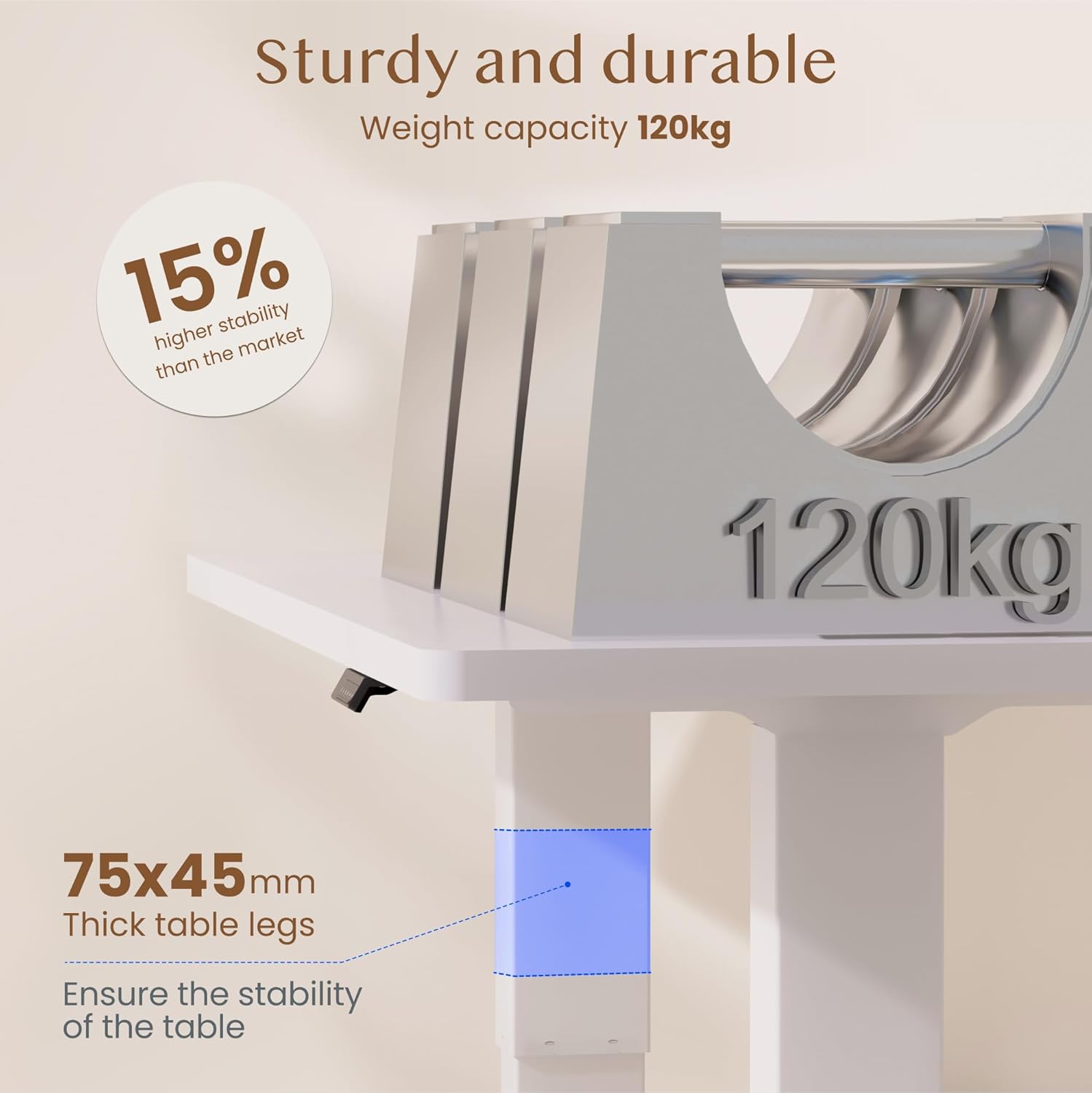
تصوير: The FLEXISPOT standing desk highlighting its sturdy and durable construction, specifically the 75x45mm thick table legs designed to ensure stability and support a weight capacity of 120kg.

تصوير: هڪ بند اپ view of the FLEXISPOT desk's thickened table legs, illustrating the adjustable height range from 70cm to 119cm, providing unmatched stability.
| خاصيت | تفصيل |
|---|---|
| ماڊل نمبر | QB2W-2080-IE |
| برانڊ | FLEXISPOT |
| طول و عرض (L x W x H) | 200 x 80 x 72 cm (min height) |
| اونچائي جي ترتيب جي حد | 70 سينٽي ميٽر - 119 سينٽي ميٽر (27.6 انچ - 46.9 انچ) |
| ڊيسڪ ٽاپ ٿلهي | 25 ملي ميٽر |
| Maximum Load Capacity (Static) | 120 ڪلوگرام (264 پائونڊ) |
| Maximum Load Capacity (Dynamic) | 100 ڪلوگرام (220 پائونڊ) |
| لفٽنگ سسٽم | ٻٽي موٽر |
| کڻڻ جي رفتار | 25mm/s |
| شور جي سطح | <50 ڊي بي |
| مواد | Alloy Steel (Base and Top Material) |
| رنگ | اڇو |
| اسيمبلي گهربل | Yes (2 people recommended, tools included) |
| خاص خاصيتون | Electric, 4 Memory Presets, Anti-Collision System |
| پيداوار جو وزن | 40.9 ڪلو |
| يو پي سي | 810072889508 |
9. وارنٽي ۽ سپورٽ
For warranty information, product support, or to report any issues, please contact FLEXISPOT customer service. Keep your purchase receipt and model number (QB2W-2080-IE) handy when contacting support.
The seller for this product is FLEXISPOT GmbH. Please refer to their official webمخصوص وارنٽي شرطن ۽ رابطي جي تفصيلن لاءِ سائيٽ يا توهان جي خريداري دستاويز.