
MageGee MK-Storm
MageGee Mechanical Gaming Keyboard MK-Storm User Manual
Brand: MageGee | Model: MK-Storm
1. تعارف
Thank you for choosing the MageGee MK-Storm Mechanical Gaming Keyboard. This 104-key wired keyboard is designed for an enhanced typing and gaming experience, featuring durable brown switches, blue backlighting, and anti-ghosting technology. This manual provides essential information for setup, operation, and maintenance to ensure optimal performance.
2. اهم خاصيتون
- Blue Backlit Gaming Keyboard: Features 20 different backlit modes, 5 brightness levels, and 5 speed adjustments. The backlight can be easily turned off.
- Mechanical Brown Switches: Offers moderate trigger key travel and force, suitable for both typing and gaming. Provides tactile feedback with a slight sound.
- Anti-Ghosting Keyboard: All 104 keys have individual switches with full N-key rollover, ensuring faster response and simultaneous key presses without conflict.
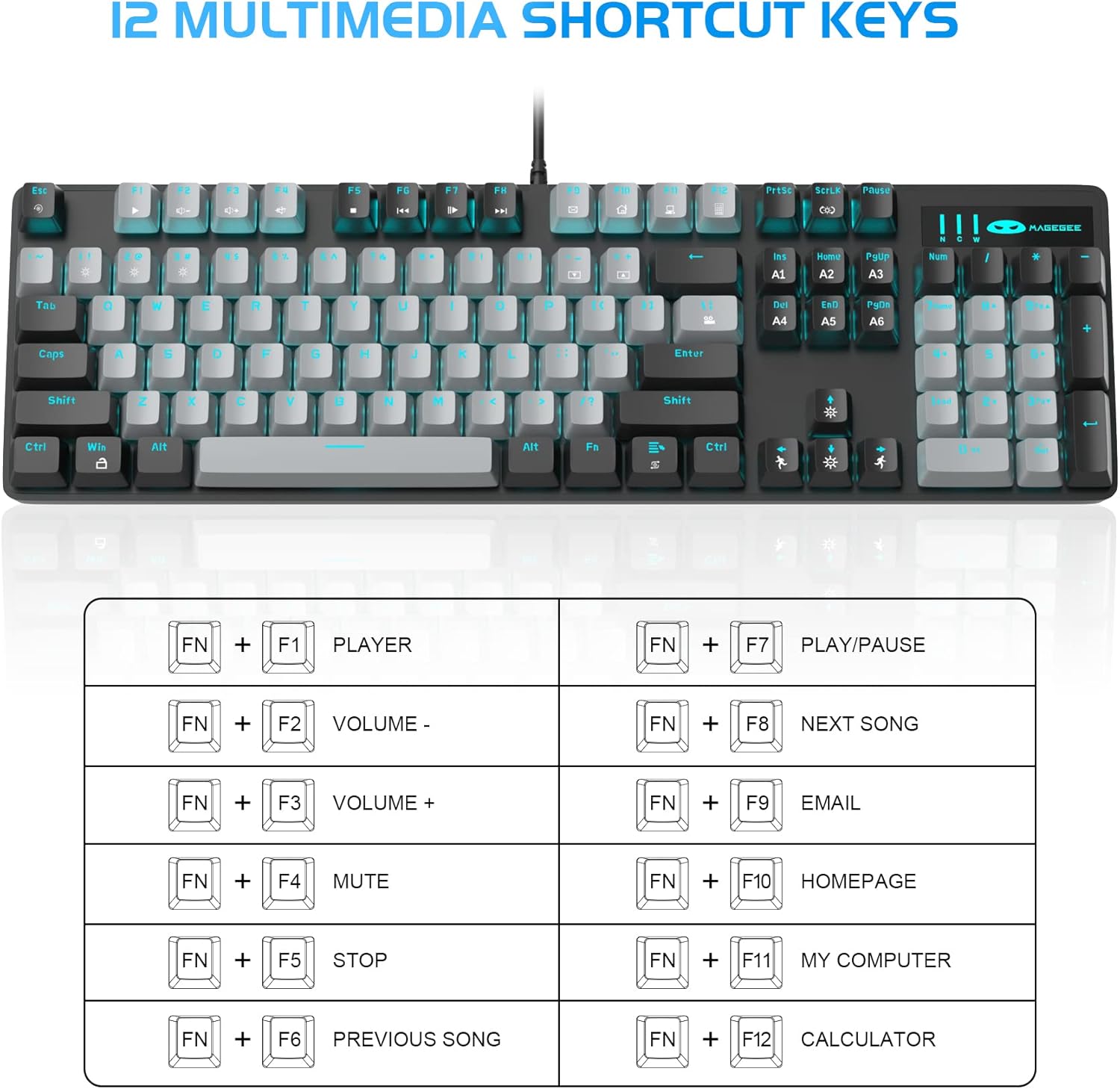
- 12 ملٽي ميڊيا ڪمبينيشن ڪيز: Quick operations via FN+ F1~F12 for media control and office functions.
- Ergonomic ڊيزائن: Premium metal panel construction for stability. Ergonomic key layout and two-step adjustable feet for comfortable typing angles.
- وسيع مطابقت: USB wired connection compatible with Windows 2000/Vista/Win7/Win8/Win10/MAC/Linux.

3. پيڪيج مواد
The MageGee MK-Storm Mechanical Gaming Keyboard package includes the following items:
- MageGee Mechanical Gaming Keyboard (MK-Storm)
- USB Wired Cable (attached to keyboard)
- ڪي ڪيپ ڪڍڻ وارو اوزار
- 16 Extra Keycaps (color scheme varies by keyboard variant)
- استعمال ڪندڙ دستي
4. سيٽ اپ
- ڪي بورڊ ڳنڍيو: Plug the USB connector of the keyboard cable into an available USB port on your computer (PC, laptop, or desktop).
- ڊرائيور لڳائڻ: The keyboard is plug-and-play. Your operating system should automatically detect and install the necessary drivers. No additional software installation is typically required for basic functionality.
- ڪي بورڊ جي زاويه کي ترتيب ڏيو: Flip out the two-step feet on the underside of the keyboard to adjust the typing angle to your preference.

5. آپريٽنگ هدايتون
5.1 Backlight ڪنٽرول
The MK-Storm keyboard features a single blue backlight with multiple modes and adjustable settings.
- بيڪ لائيٽ موڊ تبديل ڪريو: دٻايو FN + INS to cycle through 20 different backlight modes.
- روشني کي ترتيب ڏيو: دٻايو FN + (Up Arrow) to increase brightness (5 levels). Press FN + (هيٺ تير) چمڪ گهٽائڻ لاءِ.
- رفتار کي ترتيب ڏيو: دٻايو FN + (Left Arrow) to decrease animation speed (5 levels). Press FN + (Right Arrow) to increase animation speed.
- بيڪ لائيٽ بند ڪريو: The backlight can be turned off by cycling through the brightness levels until it is off, or by selecting a mode that has no illumination.

5.2 ملٽي ميڊيا ڪيز
Access multimedia and system functions quickly using the FN key in combination with the F1-F12 keys.
| ڪنيڪشن | فنڪشن |
|---|---|
| FN + F1 | رانديگر |
| FN + F2 | جلد جو |
| FN + F3 | جلد + |
| FN + F4 | گونگا |
| FN + F5 | روڪ |
| FN + F6 | اڳيون گيت |
| FN + F7 | راند/روڪ |
| FN + F8 | ايندڙ گيت |
| FN + F9 | اي ميل |
| FN + F10 | هوم صفحو |
| FN + F11 | منهنجو ڪمپيوٽر |
| FN + F12 | حساب ڪندڙ |
5.3 ڪسٽم پروfiles (If applicable)
The keyboard supports custom lighting profiles. Refer to the manufacturer's website or included software (if any) for detailed instructions on programming and saving custom lighting zones or key assignments. Once programmed, these profiles can often be accessed directly from the keyboard using FN key combinations (e.g., FN+1, FN+2, FN+3 for different profiles).
6. حسب ضرورت
The MageGee MK-Storm keyboard allows for customization of keycaps and switches.
- ڪي ڪيپ جي متبادل: Use the included keycap puller tool to carefully remove existing keycaps. Align the new keycap with the switch stem and press down gently until it clicks into place.
- سوئچ جي متبادل: The keyboard comes with extra brown switches. To replace a switch, first remove the keycap. Then, use a switch puller (not included, but often similar to a keycap puller) to gently extract the switch from the PCB. Insert the new switch, ensuring the pins align correctly, and press firmly until it seats properly.


7. سار سنڀال
- صفائي: The floating keys design makes cleaning easier. Use a soft brush or compressed air to remove dust and debris from between the keycaps. For stubborn dirt, remove keycaps using the provided tool and wipe the keyboard surface with a slightly damp ڪپڙو. صفائي ڪرڻ کان اڳ پڪ ڪريو ته ڪيبورڊ ڊسڪنيڪٽ ٿيل آهي.
- اسٽوريج: ڪيبورڊ کي سڌي سج جي روشني ۽ انتهائي گرمي پد کان پري سڪل، ٿڌي جاءِ تي رکو.
- ڪيبل جي سنڀال: نقصان کان بچڻ لاءِ USB ڪيبل کي گهڻو موڙڻ يا مروڙڻ کان پاسو ڪريو.
8. مسئلا حل ڪرڻ
- ڪي بورڊ جواب نه ڏئي رهيو آهي:
- پڪ ڪريو ته USB ڪيبل ڪيبورڊ ۽ ڪمپيوٽر ٻنهي ۾ محفوظ طور تي لڳل آهي.
- پنهنجي ڪمپيوٽر تي ڪيبورڊ کي ڪنهن ٻئي USB پورٽ ۾ لڳائڻ جي ڪوشش ڪريو.
- پنهنجي ڪمپيوٽر کي ٻيهر شروع ڪريو.
- سسٽم جي مخصوص مسئلي کي رد ڪرڻ لاءِ ٻئي ڪمپيوٽر تي ڪيبورڊ آزمايو.
- بيڪ لائيٽ ڪم نه ڪري رهي آهي/غلط:
- Ensure the backlight is not turned off (FN + ↓ to increase brightness).
- Cycle through backlight modes using FN + INS.
- Check if any specific software is interfering with the lighting settings.
- رجسٽر نه ٿيندڙ چاٻيون:
- Clean around the affected key to ensure no debris is obstructing the switch.
- If a specific switch is faulty, consider replacing it with one of the spare switches provided, following the customization instructions.
9. وضاحتون
| خاصيت | تفصيل |
|---|---|
| برانڊ | ميج گي |
| ماڊل نمبر | MK-Storm |
| ڪيچس لي آئوٽ | 104 چاٻيون (مڪمل سائيز) |
| سوئچ جو قسم | Mechanical Brown Switches |
| پٺاڻ | Blue Backlit (20 modes, 5 brightness, 5 speed) |
| رابطي | USB وائرڊ |
| مخالف گھوسٽنگ | مڪمل اين-ڪي رول اوور |
| ملائي ميڊيا چيڪ | 12 (FN + F1-F12) |
| مواد | Metal Panel Construction |
| مطابقت رکندڙ ڊوائيسز | ليپ ٽاپ، پي سي |
| آپريٽنگ سسٽم | Windows 2000/Vista/Win7/Win8/Win10/MAC/Linux |
| شيءِ جو وزن | 2.77 پائونڊ |
| پيڪيج جي ماپ | 17.63 x 12.36 x 1.89 انچ |

10. وارنٽي ۽ سپورٽ
For warranty information, technical support, or any product-related inquiries, please contact MageGee customer service through the retailer where the product was purchased or visit the official MageGee webسائيٽ. وارنٽي جي دعوي لاء توهان جي خريداري جي رسيد رکو.
Ask a question about this manual
Ask about setup, troubleshooting, compatibility, parts, safety, or missing instructions. Manuals+ will review the question and use this page’s manual context to help answer it.