
تعارف
This manual provides comprehensive instructions for the assembly, operation, maintenance, and troubleshooting of your FLEXISPOT 79 x 32 Inch Large Standing Desk. Please read this manual thoroughly before use to ensure proper function and safety. Keep this manual for future reference.

Image: The FLEXISPOT standing desk in an office setting, showcasing its large surface area with multiple monitors and accessories.
حفاظت جي ڄاڻ
Always follow assembly instructions carefully. Do not exceed the maximum weight recommendation of 132 pounds to ensure stability and safety. Ensure all connections are secure before operating the desk. Keep children and pets away from the desk during operation.
پيڪيج مواد
Verify that all components are present before beginning assembly. Your FLEXISPOT standing desk package typically includes:
- Desktop (79 x 32 inches, may be a splice board design)
- ڊيسڪ فريم (ٽنگون، ڪراس بار، موٽر)
- ڪنٽرول پينل
- پاور اڊاپٽر ۽ ڪيبل
- ڪپ هولڊر
- هيڊ فون ٿلهو
- اسيمبلي هارڊويئر (اسڪرو، اوزار)
- ھدايت وارو دستور
Note: Due to the size and weight, your desk may arrive in multiple packages that could ship and arrive separately.

Image: Illustration showing two separate boxes for the desktop and desk frame, indicating that components may arrive in multiple shipments.
سيٽ اپ ۽ اسيمبلي
Assembly of the FLEXISPOT standing desk is designed to be straightforward. A power drill may be needed for some steps (not included). Follow the detailed instructions provided in the included assembly guide. Ensure all screws are tightened securely, but do not overtighten.
اسيمبلي جي صلاح:
- شروع ڪرڻ کان اڳ سڀئي حصا ۽ هارڊويئر ترتيب ڏيو.
- Ensure the desktop halves (if applicable) are correctly aligned before securing.
- When installing the transmission rod, ensure it slides smoothly into the motor. Tolerances can be tight.
- It is recommended to have a second person assist when flipping the desk over after assembly.
آپريٽنگ هدايتون
Your FLEXISPOT standing desk features an electric height adjustment system with a multifunctional controller.
اونچائي جي ترتيب:
- The desk height can be adjusted smoothly and quietly from 28.9 inches to 46.5 inches.
- استعمال ڪريو UP ۽ هيٺ buttons on the control panel to manually adjust the desk to your desired height.
ياداشت جي اڳڪٿي:
The control panel includes 4 programmable memory presets, allowing you to save and recall your preferred sitting and standing heights with a single touch.
- مٿي/هيٺ بٽڻن کي استعمال ڪندي ڊيسڪ کي پنهنجي گهربل اوچائي تي ترتيب ڏيو.
- کي دٻايو M button (or similar memory set button) followed by one of the numbered preset buttons (1, 2, 3, or 4) to save the current height.
- محفوظ ڪيل اوچائي کي ياد ڪرڻ لاءِ، صرف لاڳاپيل نمبر واري پري سيٽ بٽڻ کي دٻايو.
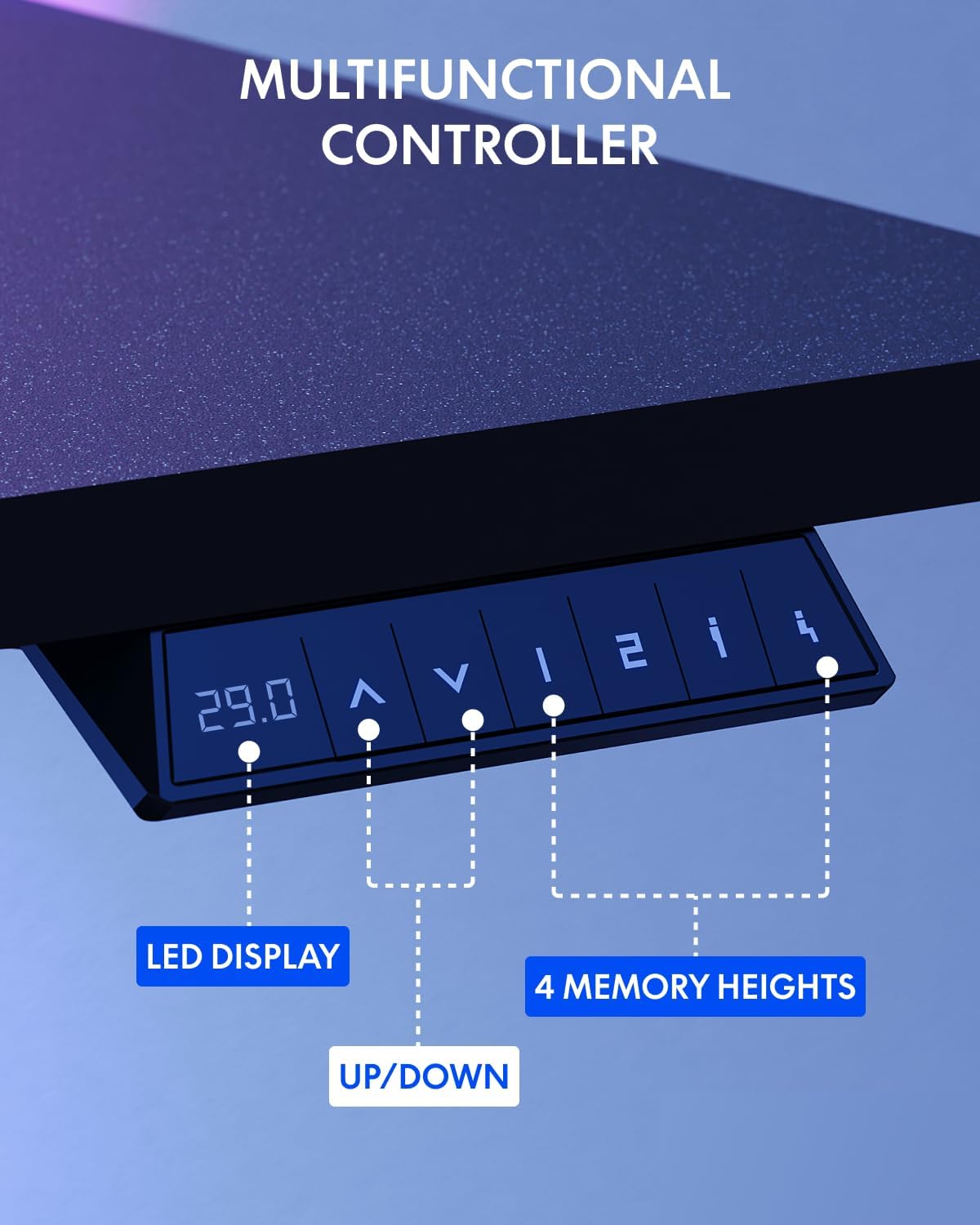
Image: The multifunctional control panel with an LED display and buttons for height adjustment and four memory presets.
لوازمات جو استعمال:
- The included cup holder can be attached to the side of the desk for convenient beverage access.
- The headphone hook provides a dedicated storage spot for your headphones, keeping your workspace tidy.

Image: Details of the integrated cup holder and headphone hook accessories.
سار سنڀال
باقاعده سار سنڀال توهان جي اسٽينڊنگ ڊيسڪ جي ڊگهي عمر ۽ بهترين ڪارڪردگي کي يقيني بڻائي ٿي.
- صفائي: ڊيسڪ ٽاپ ۽ فريم کي نرم، ڊي سان صاف ڪريوamp ڪپڙو. گھڙڻ وارا صاف ڪندڙ يا سخت ڪيميڪلز کان پاسو ڪريو.
- ڪنيڪشن چيڪ ڪريو: وقت بوقت سڀني اسڪرو ۽ بولٽن کي چيڪ ڪريو ته جيئن پڪ ڪري سگهجي ته اهي تنگ رهن. جيڪڏهن ضروري هجي ته ٻيهر مضبوط ڪريو.
- ڪيبل جو انتظام: Organize cables to prevent snagging during height adjustments.
مشڪلاتون
If you encounter issues with your FLEXISPOT standing desk, refer to the following common solutions:
| مسئلو | ممڪن سبب | حل |
|---|---|---|
| ڊيسڪ حرڪت نٿي ڪري. | Power cable disconnected, motor error | Check power connections. Unplug and replug the desk. If an error code is displayed, consult customer support. |
| اڻ برابري اونچائي جي ترتيب | Obstruction, uneven load | Ensure no obstructions are present. Distribute weight evenly on the desktop. Perform a reset if available (refer to specific controller instructions). |
| ڊيسڪ لڏپلاڻ | Loose connections, uneven floor | Tighten all assembly screws. Ensure the desk is on a level surface. Adjust foot pads if necessary. |
For persistent issues or error codes not listed, please contact FLEXISPOT customer support.
وضاحتون
Key specifications for the FLEXISPOT 79 x 32 Inch Large Standing Desk:
- برانڊ: FLEXISPOT
- ماڊل: 79 x 32 Inch Large Standing Desk
- پيداوار جي ماپ: 32"D x 79"W x 29"H (at minimum height)
- رنگ: Black Frame + Black Top
- انداز: جديد
- بنيادي مواد: مصر جو اسٽيل
- مٿين مواد جو قسم: انجنيئر ڪاٺ
- ختم جو قسم: پائوڊر ليپ ٿيل
- اونچائي جي حد: 28.9" کان 46.5" تائين
- وڌ ۾ گھٽ وزن سفارش: 132 پائونڊ
- خاص خاصيتون: 79" x 32" Large Tabletop, Splice Board, Cup Holder, Headphone Hook, Electric Height Adjustment, 4 Memory Presets
- اسيمبلي: گھربل
- UPC: 810072869357

Image: Visual representation of the desk's dimensions and adjustable height range.
وارنٽي ۽ سپورٽ
FLEXISPOT provides the following warranty for your standing desk:
- فريم ۽ مشيني حصا: 5 سالن جي محدود وارنٽي
- اليڪٽرانڪس: 2 سالن جي محدود وارنٽي
For warranty claims, technical assistance, or any questions regarding your product, please contact FLEXISPOT customer support. You can find contact information on the official FLEXISPOT webسائيٽ يا توهان جي خريداري پليٽ فارم ذريعي.
Visit the official FLEXISPOT Store for more information and products: فليڪس اسپاٽ اسٽور