
1. تعارف
خريد ڪرڻ لاءِ مهربانيasing the Xiaomi Cordless Vacuum Cleaner G20 Lite. This manual provides essential information for the safe and efficient use, maintenance, and troubleshooting of your new vacuum cleaner. Please read this manual thoroughly before first use and keep it for future reference.
2. حفاظتي هدايتون
To reduce the risk of fire, electric shock, or injury, always follow basic safety precautions when using your vacuum cleaner:
- اوزار استعمال ڪرڻ کان پهريان سڀ هدايتون پڙهو.
- ٻاهر استعمال نه ڪريو يا گندي سطحن تي.
- رانديڪن جي طور تي استعمال ڪرڻ جي اجازت نه ڏيو. جڏهن ٻارن جي ويجهو يا ويجھو استعمال ڪيو وڃي ته ڌيان ڏيڻ ضروري آهي.
- صرف استعمال ڪريو جيئن هن دستور ۾ بيان ڪيو ويو آهي. صرف ٺاهيندڙ جي تجويز ڪيل منسلڪ استعمال ڪريو.
- خراب ٿيل ڪنڊ يا پلگ سان استعمال نه ڪريو. جيڪڏهن اوزار ڪم نه ڪري رهيو آهي جيئن ان کي گهرجي، ڇڏيو ويو آهي، خراب ٿي ويو آهي، ٻاهر ڇڏي ويو آهي، يا پاڻي ۾ ڦٽو ڪيو ويو آهي، ان کي سروس سينٽر ڏانهن واپس آڻيو.
- ڊار سان نه ڇڪيو يا نه کڻو، ڊار کي هينڊل طور استعمال ڪريو، ڪنڊ تي دروازو بند ڪريو، يا تار کي تيز ڪنارن يا ڪنڊن جي چوڌاري ڇڪيو. ڪنڊ مٿان اوزار نه هلايو. تار کي گرم سطحن کان پري رکو.
- ڪنڊ تي ڇڪڻ سان ان پلگ نه ڪريو. ان پلگ ڪڍڻ لاءِ، پلگ کي پڪڙيو، نه ڪي ڪنڊ.
- گلي هٿن سان پلگ يا اوزار نه سنڀاليو.
- ڪنهن به شئي کي کولڻ ۾ نه وجهي. ڪنهن به افتتاحي بلاڪ سان استعمال نه ڪريو؛ مٽي، لنٽ، وار، ۽ هر شيء کان پاڪ رکو جيڪو هوا جي وهڪري کي گھٽائي سگھي ٿو.
- وار، ٿلها ڪپڙا، آڱريون ۽ جسم جي سڀني حصن کي کليل ۽ هلندڙ حصن کان پري رکو.
- ٻرندڙ يا تماڪ ڇڪڻ واري شيءِ نه کڻو، جهڙوڪ سگريٽ، ماچس، يا گرم راھ.
- ٻرندڙ يا ٻرندڙ مائع کڻڻ لاء استعمال نه ڪريو، جهڙوڪ گيسولين، يا انهن علائقن ۾ استعمال ڪريو جتي اهي موجود هجن.
- زهريلو مواد نه کڻو، جهڙوڪ ڪلورين بليچ، امونيا، يا ڊرين ڪلينر.
- بغير مٽي کپ ۽ / يا فلٽر جي جاء تي استعمال نه ڪريو.
- ان پلگ ڪرڻ کان اڳ سڀ ڪنٽرول بند ڪريو.
- ڏاڪڻ تي صفائي ڪرڻ وقت اضافي احتياط استعمال ڪريو.
- اوزار گھر جي اندر اسٽور ڪريو.
- يونٽ کي ٻاهر چارج نه ڪريو.
- صرف ٺاهيندڙ پاران بيان ڪيل چارجر استعمال ڪريو.
3. پراڊڪٽ ختمview
The Xiaomi Cordless Vacuum Cleaner G20 Lite is designed for efficient cleaning with its powerful suction and versatile attachments. Key features include:
- Maximum 18,000Pa suction power for thorough cleaning.
- Integrated white LED light on the brush head to illuminate dark areas.
- ترقي يافته 5-stage powerful filter system to prevent secondary pollution.
- Large capacity 2200mAh battery providing up to 45 minutes of runtime.
- One-touch dust disposal for easy and hygienic emptying.
- 2-way brush nozzle and extension rod for versatile cleaning.
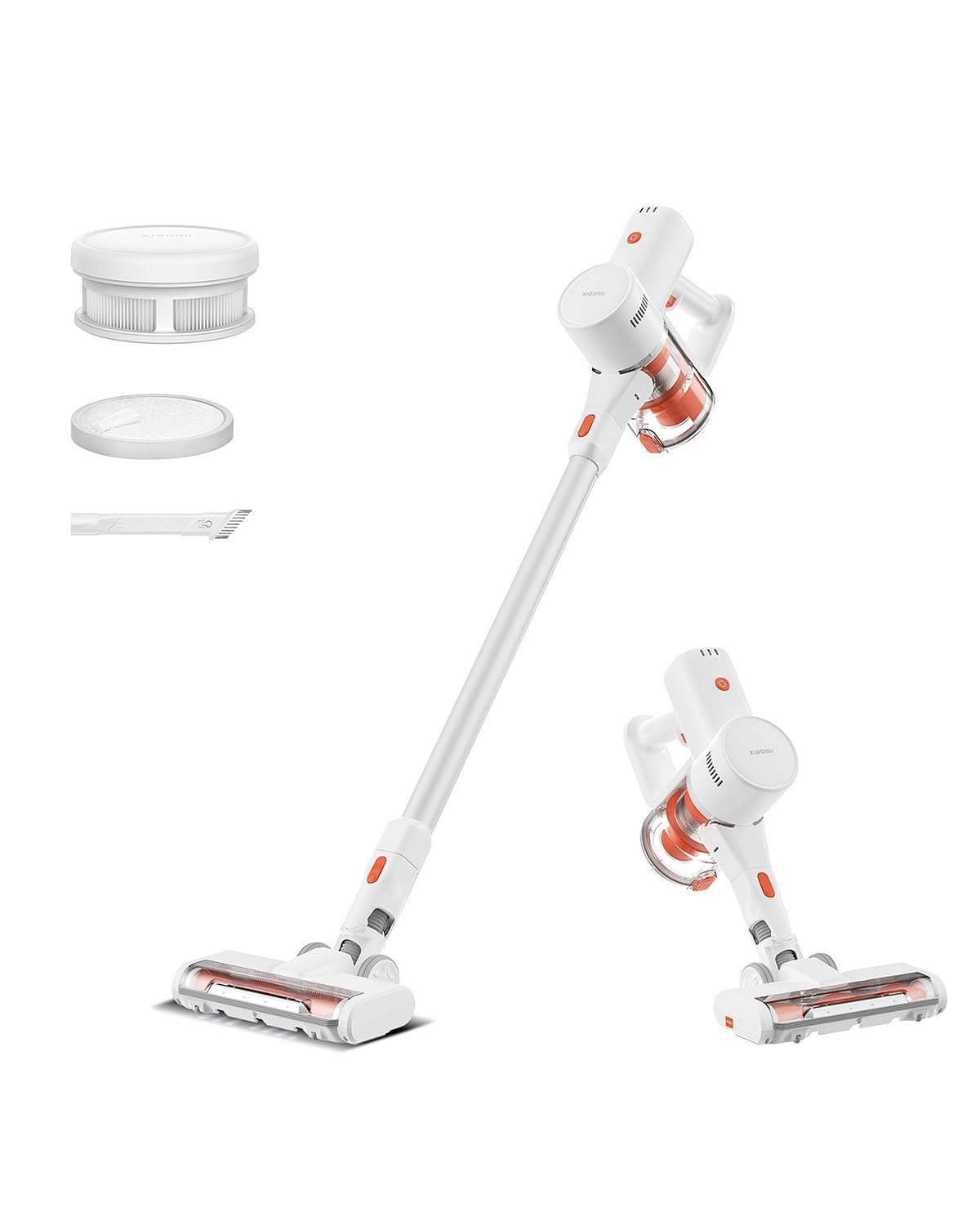
Image: Xiaomi Cordless Vacuum Cleaner G20 Lite, showing the full product assembly.

Image: Illustration of the vacuum cleaner's internal motor, highlighting its 18,000Pa suction power.
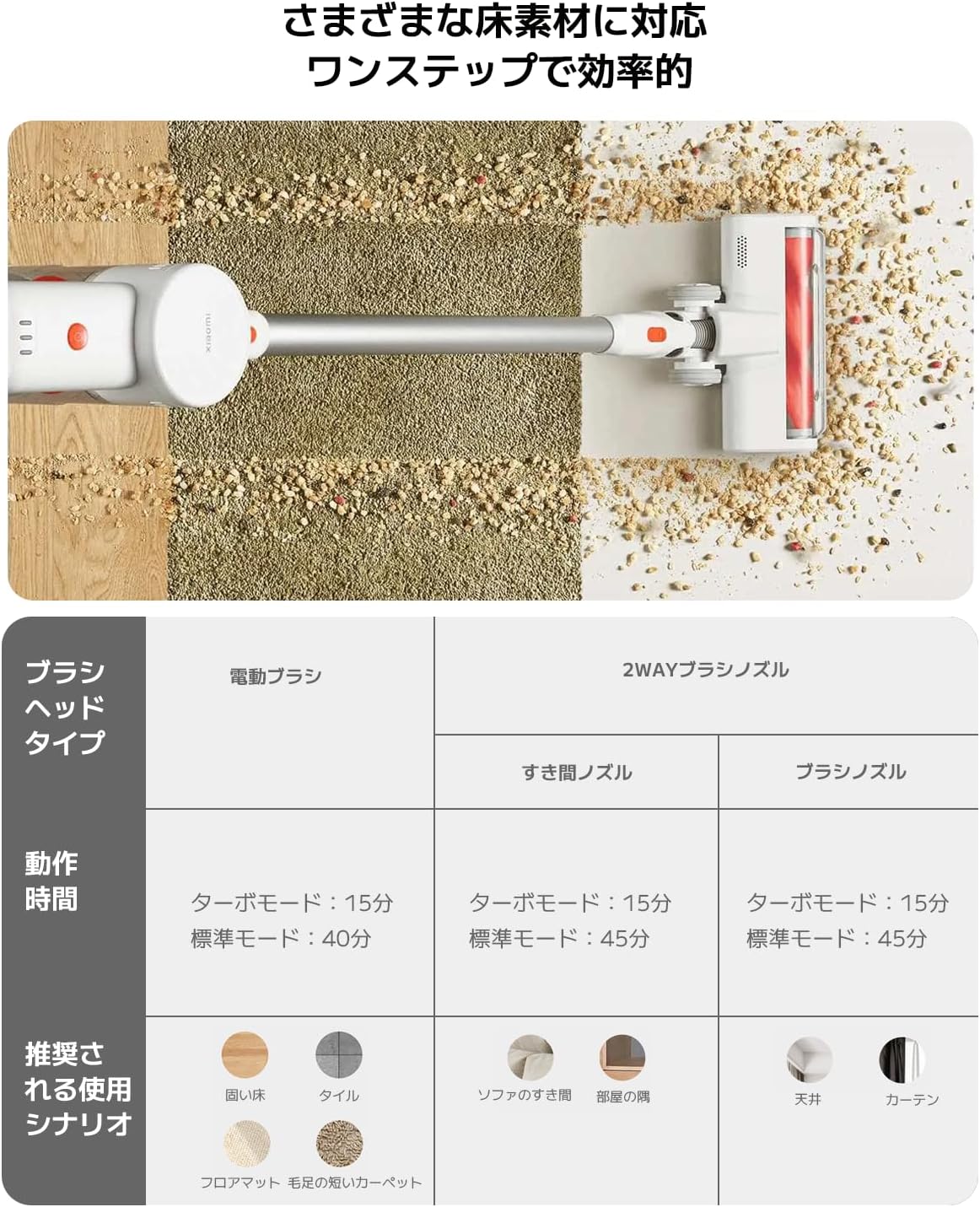
Image: Transparent view of the vacuum cleaner's handle, showing the internal large-capacity battery cells.
4. سيٽ اپ
پنھنجي ويڪيوم ڪلينر کي گڏ ڪرڻ لاءِ ھنن قدمن تي عمل ڪريو:
- انپيڪ اجزاء: Carefully remove all parts from the packaging. Ensure all accessories (main unit, extension rod, motorized brush head, 2-way brush nozzle, crevice nozzle, adapter) are present.
- Attach Extension Rod: Connect the extension rod to the main unit until it clicks into place.
- برش سر سان ڳنڍيو: Connect the desired brush head (motorized brush or 2-way brush nozzle) to the other end of the extension rod. For handheld use, attach the 2-way brush nozzle or crevice nozzle directly to the main unit.
- بيٽري چارج: Before first use, fully charge the vacuum cleaner. Connect the adapter to the charging port on the main unit and plug it into a power outlet. The power indicator lights will show the charging status.

Image: The vacuum cleaner being stored on a wall-mounted charging dock, illustrating convenient storage and charging.
5. آپريٽنگ هدايتون
Your Xiaomi Cordless Vacuum Cleaner G20 Lite offers versatile cleaning options:
پاور آن/آف ۽ سکشن موڊس
Press the power button to turn the vacuum on. Press the mode button to cycle through different suction power levels (Standard, Turbo). The power indicator lights will show the current mode and battery level.
Video: A short demonstration of turning the vacuum cleaner on and cycling through its suction modes using the power and mode buttons.
منسلڪات استعمال ڪندي
پنهنجي صفائي جي ڪم لاءِ مناسب برش هيڊ چونڊيو:
| برش هيڊ جو قسم | Operating Time (Standard/Turbo) | Recommended Use Scenario |
|---|---|---|
| موٽر برش | 40 منٽ / 15 منٽ | Hard Floor, Tile, Floor Mat, Short Pile Carpet |
| 2-Way Brush Nozzle (Crevice) | 45 منٽ / 15 منٽ | Sofa Crevices, Room Corners |
| 2-Way Brush Nozzle (Brush) | 45 منٽ / 15 منٽ | Ceiling, Curtains |

Image: Close-up of the vacuum cleaner's motorized brush head, showing the integrated white LED lights illuminating the floor.

Image: A person using the vacuum cleaner with the extension rod to clean high areas, and with a specialized nozzle for narrow gaps and desk surfaces.
6. سار سنڀال
باقاعده سار سنڀال بهترين ڪارڪردگي کي يقيني بڻائي ٿي ۽ توهان جي ويڪيوم ڪلينر جي عمر وڌائي ٿي.
ڊسٽبن کي خالي ڪرڻ
The vacuum cleaner features a one-touch dust disposal system. Simply press the release button on the dustbin to open the bottom flap and empty collected debris directly into a trash can. Empty the dustbin regularly to maintain suction power.

Image: A hand demonstrating the one-touch dust disposal mechanism, showing debris falling from the dustbin. Also visible is the power indicator light on the handle.
فلٽر جي صفائي
5-stage powerful filter system requires periodic cleaning. Refer to the diagram below for filter components. Remove the dustbin and separate the filter components. Tap off loose dirt and rinse washable parts under running water. Ensure all filter components are completely dry before reassembling them into the vacuum cleaner.

تصوير: ڌماڪو ٿيو view of the vacuum cleaner's main unit, illustrating the components of the 5-stage filter system.
Cleaning Brush Heads
Periodically check brush heads for tangled hair or debris. Use scissors to cut away any tangled hair and remove any obstructions to ensure smooth operation.
7. مسئلا حل ڪرڻ
جيڪڏهن توهان کي پنهنجي ويڪيوم ڪلينر سان مسئلا درپيش اچن ٿا، ته هيٺ ڏنل عام مسئلن ۽ حلن جو حوالو ڏيو:
- طاقت ناهي:
- چيڪ ڪريو ته بيٽري چارج ٿيل آهي يا نه. جيڪڏهن ضروري هجي ته ري چارج ڪريو.
- پڪ ڪريو ته پاور بٽڻ کي مضبوط طور تي دٻايو ويو آهي.
- گھٽ سکشن پاور:
- گند ڪچرو خالي ڪريو.
- Clean the filters. Ensure they are dry before reinstallation.
- Check for blockages in the brush head, extension rod, or main unit.
- برش جو مٿو نه ڦرڻ:
- Check for tangled hair or debris obstructing the brush roll.
- Ensure the brush head is correctly attached.
- غير معمولي شور:
- Check for any foreign objects caught in the brush head or suction path.
- پڪ ڪريو ته سڀئي حصا محفوظ طور تي گڏ ڪيا ويا آهن.
جيڪڏهن مسئلو برقرار رهي، مهرباني ڪري ڪسٽمر سپورٽ سان رابطو ڪريو.
8. وضاحتون
| تفصيل | تفصيل |
|---|---|
| برانڊ | Xiaomi |
| ماڊل نمبر | BHR8232US |
| پيداوار جو قسم | اسٽيڪ صاف ڪندڙ |
| خاصيتون | بي تار |
| فلٽر جو قسم | HEPA فلٽر |
| سفارش ٿيل استعمال | Carpet, Hard Floors, Sofa, Curtains, Beds, Tiles, Blankets |
| طاقت جو ذريعو | Battery Powered (Charges via power cord) |
| ظرف | 0.55 ليٽر |
| رنگ | اڇو |
| پورٽبل | ها |
| اندروني / ٻاهرين استعمال | اندريون |
| آپريٽنگ جلدtage | 21.6 وولٽ |
| بيٽري جي گنجائش | 215 Watt-hours (2200mAh) |
| ڪنٽرولر جو قسم | هٿ جو ڪنٽرول |
| رابطي | Bluetooth (for potential smart features) |
| شامل اجزاء | Accessory kit, Adapter |
| اصل جو ملڪ | چين |
| پيداوار جو وزن | 2.4 ڪلوگرام |
| شيون طول و عرض (L x W x H) | 66.2 سينٽي x 32 سينٽي x 13.2 سينٽي ميٽر |
9. وارنٽي ۽ سپورٽ
Xiaomi products are designed with quality and reliability in mind. For warranty information and customer support, please refer to the details below:
وارنٽي ڄاڻ
This product comes with a standard manufacturer's warranty. Please retain your proof of purchase for warranty claims. For specific warranty terms and conditions, refer to the documentation included with your product or visit the official Xiaomi webسائيٽ.
ڪسٽمر سپورٽ
For technical assistance, troubleshooting, or service inquiries, please contact the Xiaomi Customer Service Center:
- فون: 0120-767-378 (Reception hours: 9:00 - 18:00, excluding year-end and New Year holidays)
- اي ميل: service.jp@support.mi.com
Xiaomi Service Center (Akihabara Store)
For in-person support or repairs, you may visit our service center:
- ائڊريس: 4-6-7 Kanda Sakumacho, Chiyoda-ku, Tokyo
- ڪاروباري ڪلاڪ: 10:00 - 19:00
- بند ٿيل: اربع
- Last Reception: 18:00