
تعارف
This manual provides detailed instructions for the installation, operation, and maintenance of your LOFOV 360° 4-Channel 1080P Dash Cam. Designed for comprehensive vehicle surveillance, this device captures video from the front, rear, left, and right sides of your vehicle simultaneously, ensuring 360-degree coverage. Please read this manual thoroughly before using the product to ensure proper function and safety.
دٻي ۾ ڇا آهي
- LOFOV 360° 4-Channel Dash Cam Unit
- 64GB SD ڪارڊ
- سکشن کپ مائونٽ
- Power Cable (USB Type-C to 12V Car Charger)
- استعمال ڪندڙ دستي
- تڪڙو رستو
سيٽ اپ ۽ تنصيب
- Attach Suction Cup Mount: Securely attach the suction cup mount to your vehicle's windshield. Ensure the surface is clean and dry for optimal adhesion.
- ڊيش ڪيم لڳايو: Slide the LOFOV Dash Cam unit onto the suction cup mount until it clicks into place. The mount allows for rotation and swiveling to achieve the desired viewing angles for the side cameras.
- پاور Connectنيو: Plug the provided USB Type-C power cable into the dash cam and the 12V car charger into your vehicle's cigarette lighter socket. Route the cable neatly along the windshield and dashboard edges to avoid obstruction.
- SD ڪارڊ داخل ڪريو: Insert the included 64GB micro-SD card into the designated slot on the dash cam. Ensure it is inserted correctly. The dash cam supports up to 256GB micro-SD cards (U3 Class 10 speed recommended). If formatting the TF card on a computer, use FAT32 format.
- ڪئميرا جي زاوين کي ترتيب ڏيو: Power on the dash cam. The 3-inch IPS screen will display real-time video feedback from the four cameras. Adjust the three front lenses to capture your desired angles (front, left, right). The side cameras can be rotated and swiveled.
- Optional Rear Camera Connection: For the rear camera to function as a backup camera, connect its red power wire to your vehicle's reverse lights. This will activate the rear camera display when the vehicle is in reverse.

Image: LOFOV 360° Dash Cam showing adjustable side cameras and suction cup mount.
آپريٽنگ هدايتون
پاور آن / آف
- جڏهن توهان جي گاڏي شروع ٿيندي ته ڊيش ڪيم خودڪار طريقي سان آن ٿيندو ۽ رڪارڊنگ شروع ڪندو.
- It will automatically power off when your vehicle is turned off (unless parking mode is active and hardwired).
ويڊيو ڊسپلي
- The 3-inch IPS screen displays live feeds from all four cameras simultaneously.
- Use the navigation buttons (M, Up, Down, OK) to cycle through different display modes or access settings.
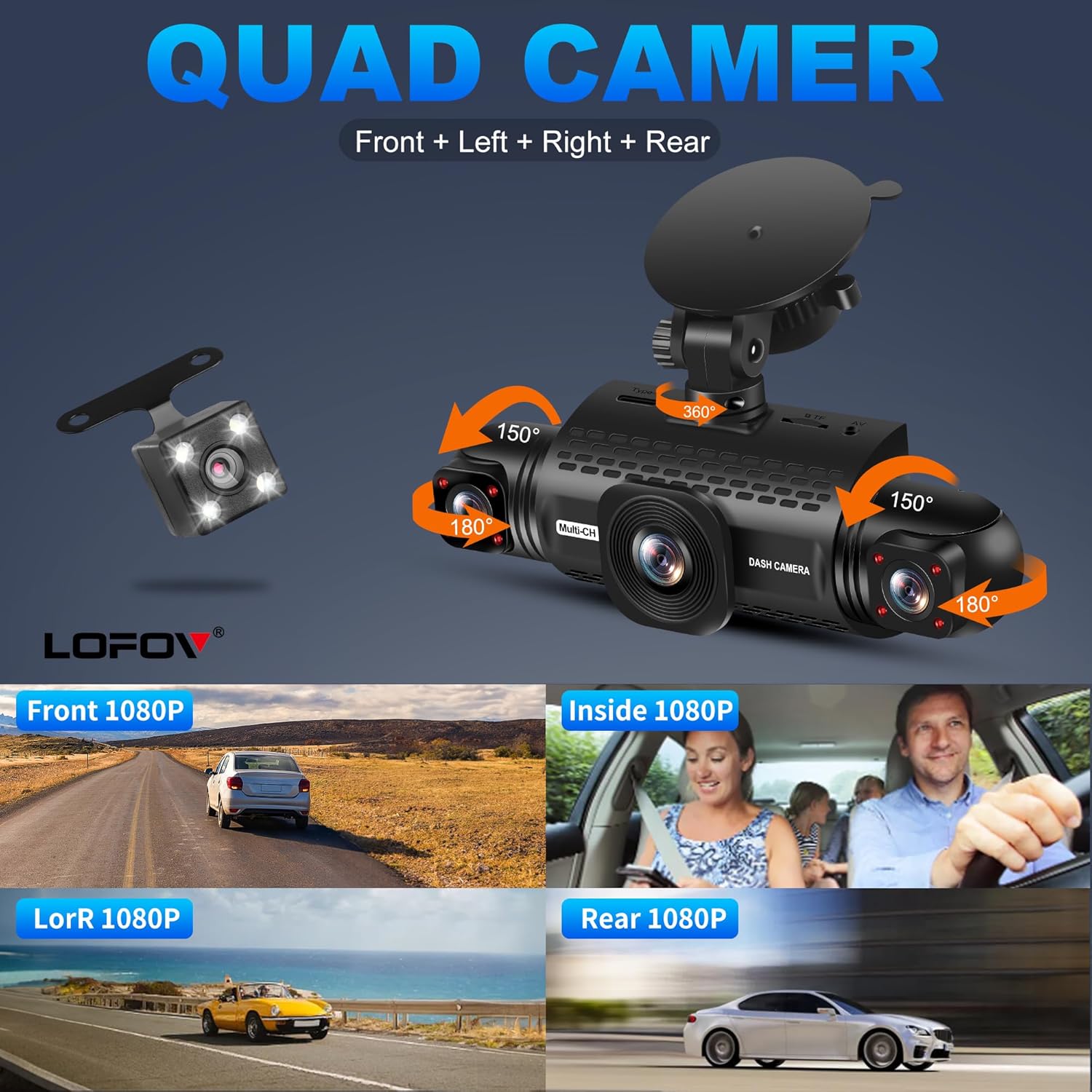
Image: The dash cam's 3-inch screen showing simultaneous feeds from the front, left, right, and rear cameras.
لوپ رڪارڊنگ
- The dash cam records video in 3-minute segments.
- When the SD card is full, the oldest unlocked video files خودڪار طريقي سان نئين رڪارڊنگ سان اوور رائٽ ٿي ويندا.
G-Sensor & Emergency Lock
- The built-in G-sensor detects sudden impacts or collisions.
- Upon detection, the current video segment is automatically locked and saved to a separate "Event" folder, preventing it from being overwritten by loop recording.
- The sensitivity of the G-sensor can be adjusted in the settings menu.

Image: Illustration of the G-Sensor activating during a collision, securing video evidence.
24 ڪلاڪ پارڪنگ موڊ
- When the vehicle is parked and turned off, the dash cam can automatically switch to parking mode.
- This feature requires the dash cam to be connected to a hardwire kit (not included) or a power bank for continuous power.
- In parking mode, the camera monitors the area around the vehicle. If motion or impact is detected, it will automatically record a 1-minute video.
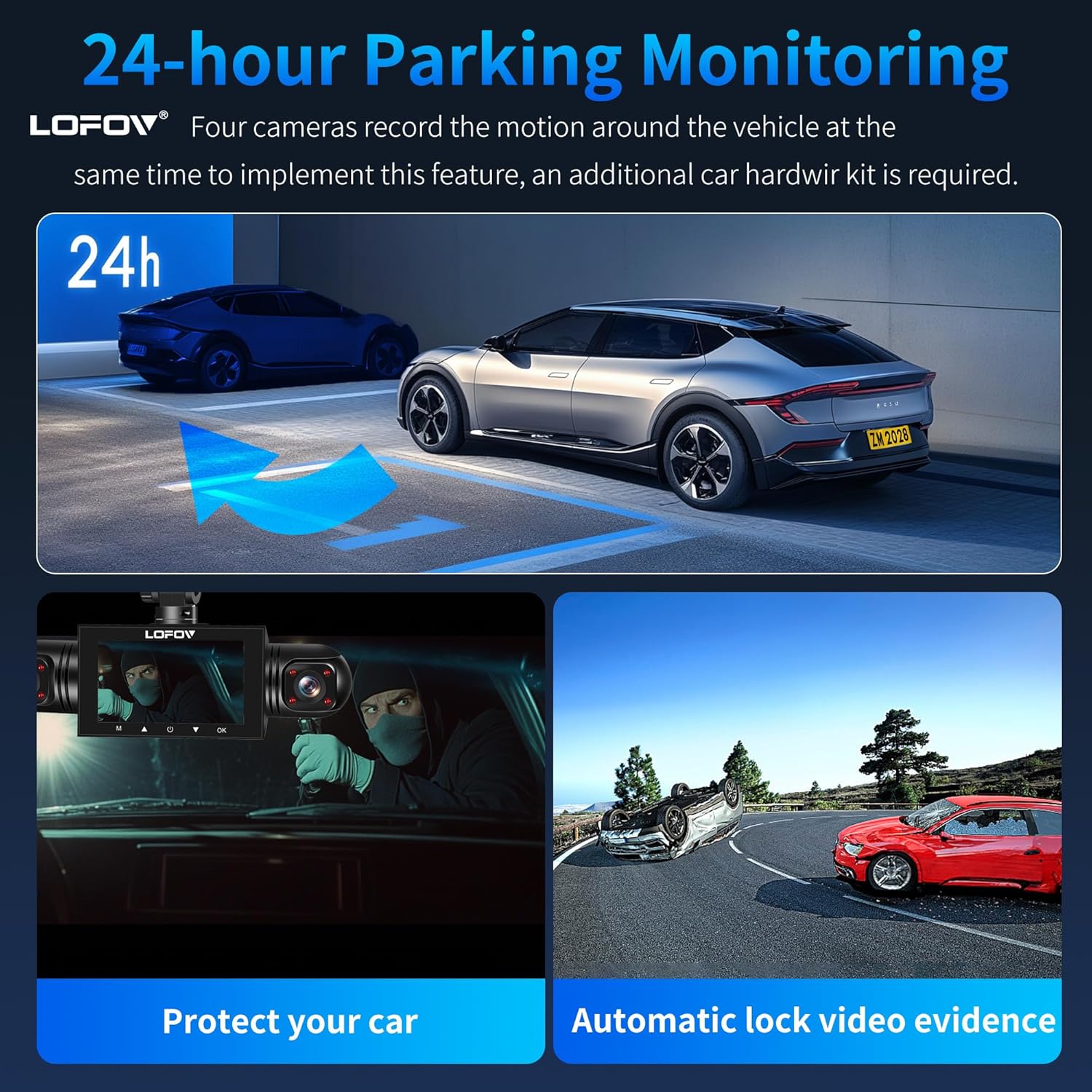
Image: Visual representation of the 24-hour parking monitoring feature, showing vehicle surveillance.
سپر نائيٽ ويزن
- Equipped with 8 infrared LEDs and Wide Dynamic Range (WDR) technology, the dash cam enhances video clarity in low-light conditions.
- It automatically adjusts brightness to prevent overexposure from headlights and ensures clear recording of the cabin and exterior at night.
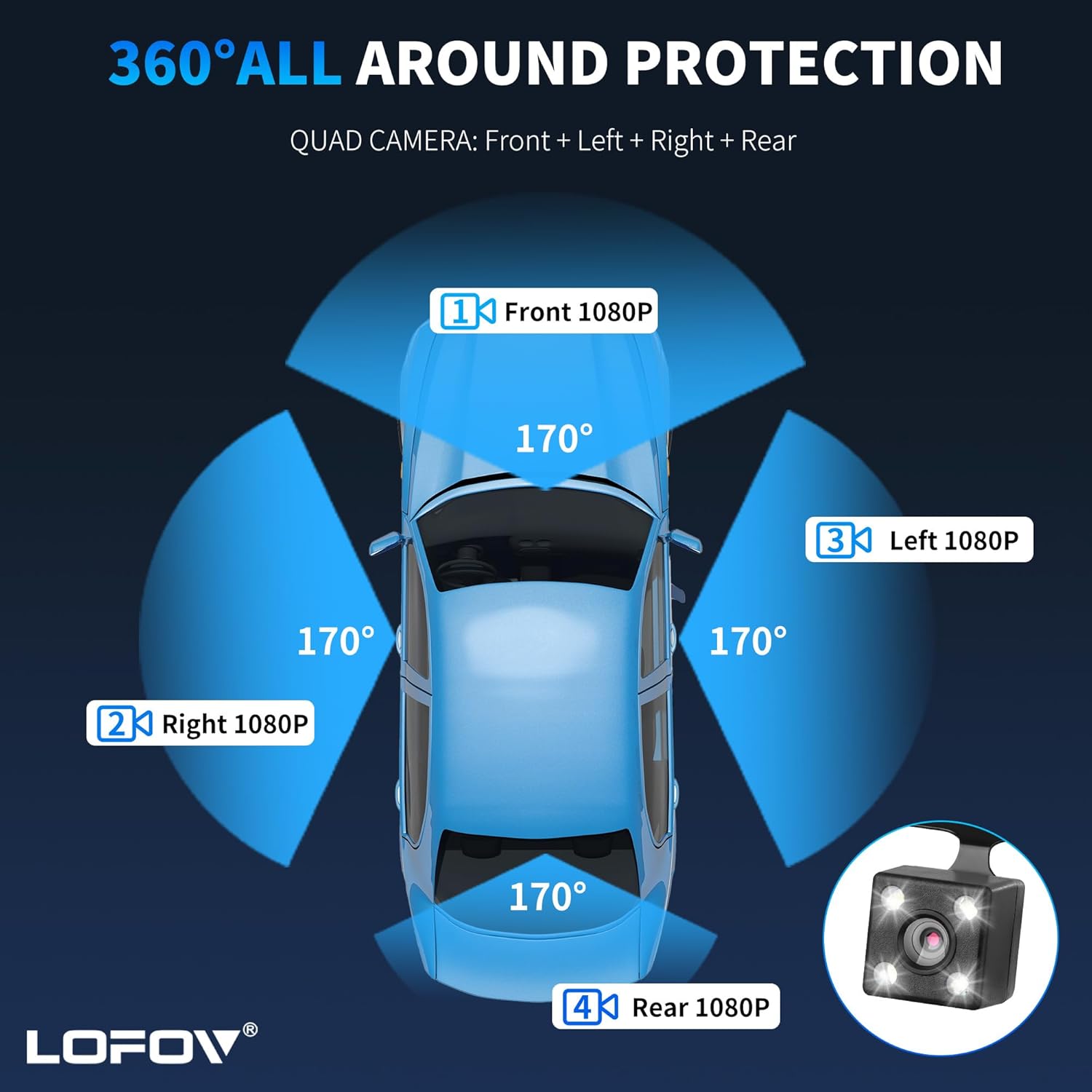
Image: Comparison of video quality in bright, WDR, and dark conditions, highlighting the Super Night Vision feature.
وائس ڪنٽرول
- The dash cam supports voice control for hands-free operation of certain functions. Refer to the Quick Guide for a list of supported voice commands.
سار سنڀال
- SD ڪارڊ فارميٽ: Regularly format the micro-SD card (at least once a month) to ensure optimal performance and prevent data corruption. This can typically be done through the dash cam's settings menu. If formatting on a computer, ensure it is formatted to FAT32.
- صفائي: Use a soft, dry cloth to clean the camera lenses and the display screen. Avoid using abrasive cleaners or solvents that could damage the device.
- فرم ويئر اپڊيٽس: Check the official LOFOV website periodically for any available firmware updates. Follow the instructions provided with the update carefully.
- اسٽوريج: جڏهن گهڻي عرصي تائين استعمال ۾ نه هجي، ته ڊيش ڪيم کي سڌي سج جي روشني کان پري ٿڌي، سڪل جاءِ تي رکو.
مشڪلاتون
- ڊيش ڪيم آن نه ٿي رهيو آهي:
- Ensure the power cable is securely connected to both the dash cam and the 12V car charger.
- Check if the vehicle's cigarette lighter socket is functioning correctly.
- رڪارڊنگ جا مسئلا (مثال طور، رڪارڊنگ نه ٿيڻ، خراب ٿيل) fileس):
- Format the micro-SD card.
- Ensure the SD card is a U3 Class 10 speed or higher.
- Try a different compatible micro-SD card.
- اسڪرين منجمد/غير جوابده:
- زبردستي ٻيهر شروع ڪرڻ لاءِ پاور بٽڻ کي دٻايو ۽ رکو.
- If the issue persists, try resetting the device to factory settings (refer to the settings menu).
- خراب رات جي نظر جي معيار:
- پڪ ڪريو ته ڪئميرا لينس صاف ۽ داغ يا مٽيءَ کان پاڪ آهن.
- Verify that WDR is enabled in the settings.
وضاحتون
| برانڊ | لوفوف |
| ماڊل نالو | 360° Dash Cam Front and Rear Inside |
| وڊيو ڪيپچر ريزوليوشن | 1080p (FHD) |
| چينلن جو تعداد | 4 (Front, Left, Right, Rear) |
| جو ميدان View | 360 Degrees (overall), 170 Degrees (individual cameras) |
| اسڪرين جي ماپ | 3 انچ |
| فليش ميموري سپورٽ ٿيل سائيز وڌ ۾ وڌ | 256 GB (64GB SD Card included) |
| فريم جي شرح | 30 ايف پي ايس |
| رابطي ٽيڪنالاجي | USB |
| ڪنٽرول جو طريقو | ٽچ، وائس ڪنٽرول |
| خاص خاصيتون | 360 degree dash cam, Voice Control, 24 Hour Parking Monitoring, G-Sensor, Loop Recording, Super Night Vision, WDR Technology |
| شيون طول و عرض (D x W x H) | 3.15"ڊي x 8.66"ڊي x 4.33"ايڇ |
| بيٽريون شامل آهن | ها |
| بيٽري سيل جو قسم | ليتيم آئن |
وارنٽي ۽ سپورٽ
Specific warranty information for the LOFOV 360° 4-Channel 1080P Dash Cam is not provided in the product details. For warranty claims, technical support, or further assistance, please refer to the contact information provided in the Quick Guide or visit the official LOFOV webسائيٽ.