
Udreamer UD006-Marron
يوڊريمر ٽرنٽيبل يوزر دستياب
Model: UD006-Marron
تعارف
خريد ڪرڻ لاءِ مهربانيasing the Udreamer Turntable with Integrated Preamplifier. This Hi-Fi system features 40W bookshelf speakers, Bluetooth connectivity, an aluminum platter, and a 2-speed belt drive. Designed for vinyl enthusiasts, it delivers high-fidelity sound reproduction close to the original recording. This manual provides detailed instructions for setup, operation, maintenance, and troubleshooting to ensure optimal performance and longevity of your device.

Image: The Udreamer Turntable system, featuring the main unit with a record on the platter, a clear dust cover, and two accompanying bookshelf speakers. The turntable and speakers are finished in a brown wood grain.
دٻي ۾ ڇا آهي
مھرباني ڪري پنھنجي پيڪيج جي مواد کي چيڪ ڪريو ته جيئن پڪ ڪري سگھجي ته سڀئي شيون موجود آھن:
- ٽرنٽيبل يونٽ
- Bookshelf Speakers (2x)
- AT-3600L Cartridge (pre-installed or separate)
- Solid Platter
- هٽائڻ وارو مٽي ڍڪ
- USB ڪيبل پي سي ڪنيڪشن لاءِ
- استعمال ڪندڙ دستي
- آر سي سي ڪيبل
- 45 آر پي ايم اڊاپٽر
- ضد وزن
- تختي جي چٽ
- 9V 2A پاور اڊاپٽر
سيٽ اپ گائيڊ
1. Unpacking ۽ لڳائڻ
Carefully remove all components from the packaging. Place the turntable on a stable, level surface away from direct sunlight, heat sources, and excessive vibration. Ensure adequate ventilation around the unit and speakers.
2. Assembling the Turntable
- پليٽر انسٽال ڪريو: Gently place the solid aluminum platter onto the spindle. Ensure it sits securely.
- Install the Belt: Locate the drive belt (usually pre-installed or in a separate bag). Carefully stretch the belt around the inner rim of the platter and hook it onto the motor pulley.
- پليٽر ميٽ رکو: Lay the felt platter mat on top of the platter.
- Install the Counterweight: Slide the counterweight onto the rear of the tonearm. Rotate it to adjust tracking force later.
- Install the Dust Cover: Attach the removable dust cover to the hinges at the back of the turntable.

تصوير: ڌماڪو ٿيو view of the Udreamer Turntable components, showing the main unit, platter, belt, and dust cover, illustrating how they fit together.
3. اسپيڪر کي ڳنڍڻ
Connect the included bookshelf speakers to the passive speaker jacks on the rear of the turntable using the provided speaker wires. Ensure correct polarity (positive to positive, negative to negative) for optimal sound.

Image: The Udreamer Turntable with its two bookshelf speakers, highlighting the internal speaker components and the 40W powerful listening experience.
4. پاور ڪنيڪشن
Connect the 9V 2A power adapter to the DC IN port on the back of the turntable, then plug it into a wall outlet.
5. Tonearm Balance and Tracking Force Adjustment
Properly balancing the tonearm and setting the tracking force is crucial for sound quality and record longevity.
- صفر بيلنس: With the stylus guard on, release the tonearm clamp. Rotate the counterweight until the tonearm floats freely and is perfectly level.
- ٽريڪنگ فورس مقرر ڪريو: Once balanced, hold the counterweight steady and rotate the numbered ring to '0'. Then, rotate the entire counterweight (including the numbered ring) counter-clockwise to the recommended tracking force for the AT-3600L cartridge, which is typically 3.5 grams.

تصوير: ويجهو تصوير view of the AT-3600L cartridge on the Udreamer Turntable, emphasizing its design for delicate and outstanding sound quality.

تصوير: تفصيلي views of the Udreamer Turntable's tonearm, showing the cartridge for accuracy, the counterweight for adjustment, and the control knobs for balance and overall control.
آپريٽنگ هدايتون
1. رڪارڊ کيڏڻ
- پليٽ تي رڪارڊ رکو.
- Select the appropriate speed (33 1/3 or 45 RPM) using the speed selector switch. For 45 RPM records, place the 45 RPM adapter on the spindle if needed.
- ڪارٽريج مان اسٽائلس گارڊ هٽايو.
- ڪيونگ ليور استعمال ڪندي نرميءَ سان ٽوني بازو مٿي ڪريو.
- ٽوني آرم کي رڪارڊ جي گهربل شروعاتي نالي تي منتقل ڪريو.
- Slowly lower the cueing lever to gently drop the stylus onto the record.
- Adjust the volume using the main volume knob.
- To stop playback, lift the tonearm using the cueing lever, return it to the tonearm rest, and secure it with the clamp.
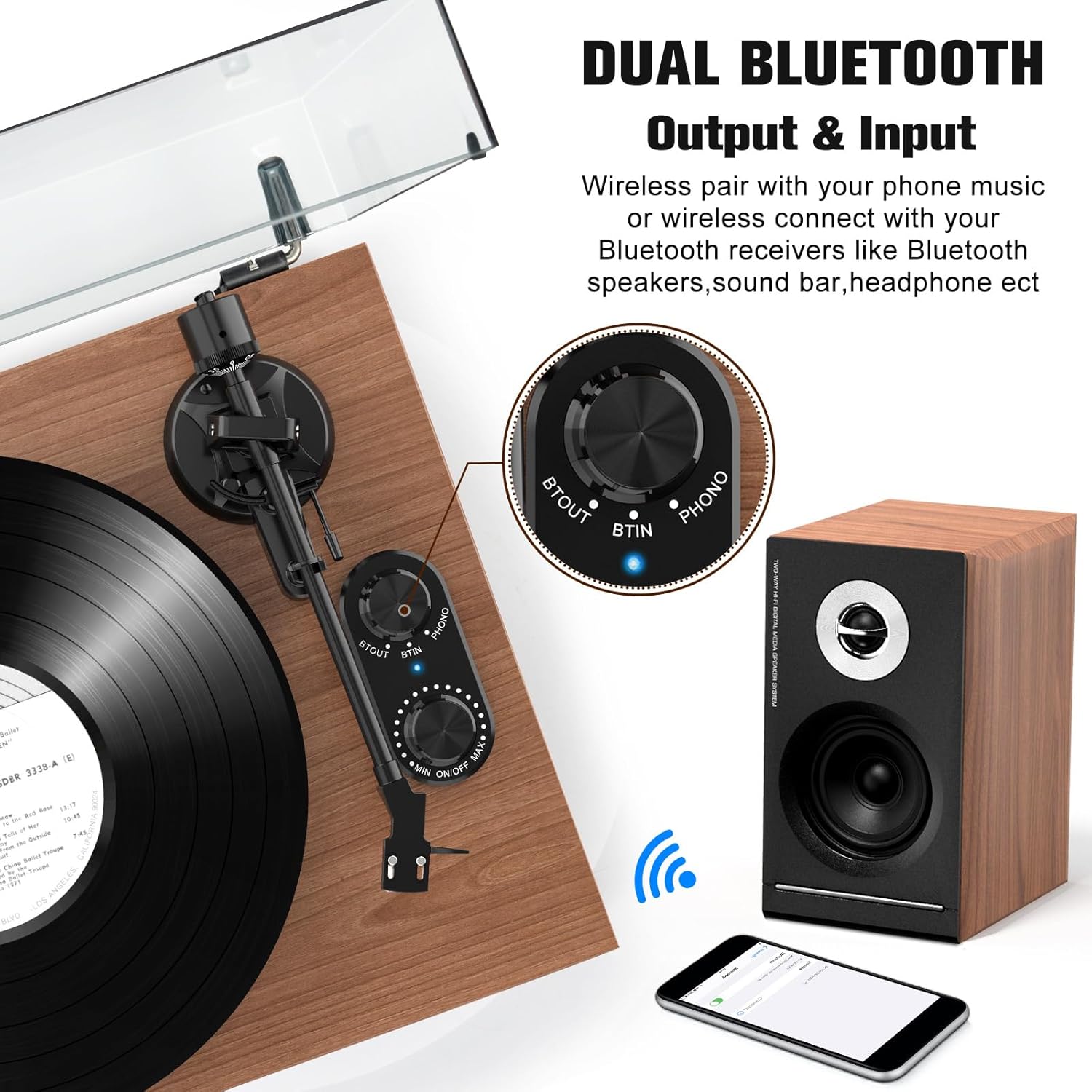
Image: The Udreamer Turntable showcasing its belt drive with 2 speeds (33 1/3 or 45 RPM) and compatibility with 7", 10", and 12" vinyl records.
2. Bluetooth Connectivity (Input & Output)
The Udreamer turntable supports both Bluetooth input and output.
Bluetooth Output (Connecting to Bluetooth Speakers/Headphones)
- Ensure your Bluetooth receiver (speaker, headphones) is in pairing mode.
- Turn the "BT OUT" knob on the turntable to activate Bluetooth output. The indicator light will flash.
- The turntable will automatically search for and connect to nearby Bluetooth devices. Once connected, the indicator light will become solid.
- You can now play records, and the audio will be streamed to your connected Bluetooth device.
Bluetooth Input (Playing Music from Phone/Tablet)
- Turn the "BT IN" knob on the turntable to activate Bluetooth input. The indicator light will flash.
- On your smartphone or tablet, search for Bluetooth devices and select "Udreamer Turntable" (or similar name).
- هڪ ڀيرو ڳنڍيل، اشاري جي روشني مضبوط ٿي ويندي.
- You can now play music from your phone/tablet through the turntable's speakers.

Image: The Udreamer Turntable demonstrating its dual Bluetooth output and input capabilities, showing wireless pairing with a phone and connection to Bluetooth speakers.
3. USB-PC Recording
You can convert your vinyl records into MP3 files for digital storage and playback.
- فراهم ڪيل USB ڪيبل استعمال ڪندي ٽرن ٽيبل کي پنهنجي ڪمپيوٽر سان ڳنڍيو.
- Install audio recording software on your computer (e.g., Audacity, available for free online).
- Follow the software's instructions to select the turntable as the input device and begin recording.
- Play your vinyl record to record the audio.
- Save the recorded audio as an MP3 file.

Image: The Udreamer Turntable connected to a laptop via USB, illustrating the process of converting vinyl audio to MP3 format for transfer to a computer.
4. آر سي اي آئوٽ
ٽرن ٽيبل ۾ ٻاهرين سان ڳنڍڻ لاءِ آر سي اي آئوٽ پُٽ موجود آهي ampلائفائر يا فعال ڳالهائيندڙ.
- Connect the RCA cable from the "AUDIO OUTPUT" ports on the turntable to the corresponding input ports on your ampلائفيئر يا فعال ڳالهائيندڙ.
- Ensure the "PHONO LINE SWITCH" is set correctly based on your amplifier's input type (Phono or Line).

Image: Rear panel of the Udreamer Turntable, detailing the RCA output, Phono Line Switch, USB-PC recording port, and Passive Speaker Jacks with numerical labels for easy identification.
سار سنڀال
1. ٽرن ٽيبل کي صاف ڪرڻ
- Always unplug the turntable before cleaning.
- Use a soft, dry, lint-free cloth to wipe the dust cover and cabinet.
- For the platter and tonearm, use a slightly damp cloth, then dry immediately. Avoid harsh chemicals or abrasive cleaners.
2. اسٽائلس ڪيئر
- Clean the stylus regularly using a soft brush designed for stylus cleaning, brushing gently from back to front.
- پنھنجن آڱرين سان اسٽائلس کي ڇھڻ کان پاسو ڪريو.
- Replace the stylus (AT-3600L compatible) every 300-500 hours of playback or if you notice a degradation in sound quality.
3. Record Care
- Handle records by their edges or label.
- وارپنگ کي روڪڻ لاءِ رڪارڊ کي انهن جي آستين ۾ عمودي طور تي محفوظ ڪريو.
- هر راند کان اڳ مٽي ۽ جامد کي هٽائڻ لاءِ وقف ٿيل رڪارڊ برش سان رڪارڊ صاف ڪريو.
مشڪلاتون
| مسئلو | ممڪن سبب | حل |
|---|---|---|
| طاقت نه آهي | Power adapter not connected; outlet not working | Ensure power adapter is securely plugged in; try a different outlet. |
| .الهائيندڙن مان آواز ڪونهي | Speakers not connected; volume too low; Phono/Line switch incorrect | Check speaker connections and polarity; increase volume; ensure Phono/Line switch matches your setup. |
| آواز بگڙيل يا لڪجي وڃڻ | Stylus dirty or worn; tracking force incorrect; record dirty or damaged | Clean stylus; re-adjust tracking force; clean record or try a different one. |
| بلوٽوٿ ڳنڍي نه ٿو | Device not in pairing mode; too far from turntable; interference | Ensure device is in pairing mode; move closer to turntable; reduce other wireless interference. |
| پليٽ نه ڦري رهي آهي | Drive belt dislodged or broken; motor issue | Check and re-seat the drive belt; contact customer support if belt is broken or motor is faulty. |
وضاحتون
- ماڊل نالو: Udreamer Platine Vinyle Système Hi-FI (UD006-Marron)
- برانڊ: اُڀريندڙ
- رابطي ٽيڪنالاجي: بلوٽوٿ، يو ايس بي
- وڌ ۾ وڌ گھمڻ واري رفتار: 45 آر پي ايم (33 1/3 آر پي ايم کي سپورٽ ڪري ٿو)
- مواد: ڪاٺ
- رنگ: ناسي
- پيداوار جي ماپ: 47 x 41.5 x 37.5 سينٽي (18.5 x 16.3 x 14.8 انچ)
- وزن: 9.62 ڪلوگرام (21.2 پائونڊ)
- شامل اجزاء: Turntable, Bookshelf Speakers (2), AT-3600L Cartridge, Solid Platter, Removable Dust Cover, USB Cable, User Manual, RCA Cable, 45 RPM Adapter, Counterweight, Platter Mat, 9V 2A Power Adapter
- خاص خاصيتون: Detachable Speaker, Digital Recorder, Volume Control, Die-cast Aluminum Platter, Bluetooth Input and Output, Adjustable Counterweight, Adjustable Speed, Anti-resonance, Automatic Belt Drive Design, Built-in Preamplifier, Built-in Cartridge
- Power Consumption (On-state): 40 واٽ

Image: Diagram showing the dimensions of the Udreamer Turntable and its accompanying speakers in centimeters and inches.
وارنٽي ۽ سپورٽ
Udreamer products are designed for quality and reliability. For warranty information and technical support, please refer to the contact details provided on the product packaging or visit the official Udreamer webسائيٽ. وارنٽي دعوائن لاءِ خريداري جي ثبوت طور پنهنجي خريداري جي رسيد رکو.
واپسي جي پاليسي: This product typically has a 14-day return policy for refund or replacement, subject to retailer terms.
For further assistance, you may contact the seller directly through the platform where you purchased the product.
Ask a question about this manual
Ask about setup, troubleshooting, compatibility, parts, safety, or missing instructions. Manuals+ will review the question and use this page’s manual context to help answer it.