
تعارف
The Wireless Express Sing-Along Bling Karaoke Microphone and Stereo Speaker is a versatile 2-in-1 device designed for entertainment. It combines a microphone with a Bluetooth speaker, allowing users to sing along to music from various compatible devices. This manual provides essential information for setup, operation, and maintenance of your device.
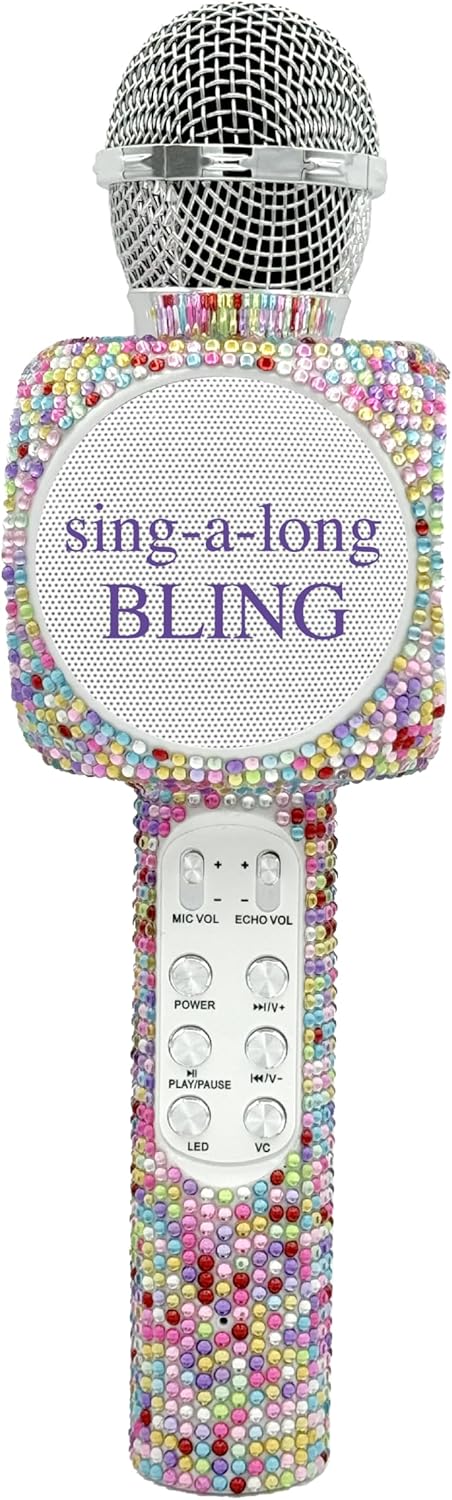
The Sing-Along Bling Karaoke Microphone, featuring its unique Confetti Bling design.
اهم خاصيتون
- 2-ان-1 ڊيزائن: Combines a microphone and a Bluetooth stereo speaker for integrated audio and vocal performance.
- بلوٽوت ڪنيڪشن: Easily connects wirelessly to smartphones, tablets, and computers (Android & Apple compatible) for streaming music.
- متحرڪ LED بتيون: Features dazzling LED lights that enhance the karaoke experience.
- صوتي اثرات: Includes echo effects and voice changers for varied vocal styles.
- مربوط ڪنٽرول: Offers convenient buttons for volume control, track skipping (previous/next), and recording.
- پورٽبل ڊيزائن: Compact and lightweight, suitable for both indoor and outdoor use.
- Rechargeable بيٽري: Powered by a battery for wireless operation.
- SD ڪارڊ سلاٽ: Allows for playback from an SD card.
- ائرفون جڪ: Provides an option for private listening or monitoring.

هڪ اوورview of the microphone's features, highlighting its Bluetooth capability, voice changer, LED lights, portability, and rechargeable battery.
سيٽ اپ گائيڊ
1. مائڪروفون چارج ڪرڻ
- Locate the Micro USB charging port on the microphone.
- Connect the provided charging cable to the microphone and a compatible USB power source (e.g., computer, USB wall adapter).
- The LED indicator will show charging status (refer to product-specific LED behavior for details, usually red for charging, off/blue for full).
- پهرين استعمال کان اڳ مڪمل چارج لاءِ ڪافي وقت ڏيو.
2. پاور آن/آف
- To power on, press and hold the Power button (usually marked with a power symbol) until the device activates and the LED lights illuminate.
- To power off, press and hold the Power button again until the device shuts down.
3. بلوٽوٽ جوئر
- Ensure the microphone is powered on and in pairing mode (indicated by a flashing LED light, often blue).
- پنهنجي اسمارٽ فون، ٽيبليٽ، يا ڪمپيوٽر تي، بلوٽوٿ کي فعال ڪريو ۽ موجود ڊوائيسز جي ڳولا ڪريو.
- Select "WE-BLING-MIC" or a similar device name from the list.
- Once paired, the microphone will usually emit an audible confirmation and the LED light will become solid.
آپريٽنگ هدايتون
1. بنيادي ڪنٽرول
- حجم ڪنٽرول: Use the "VOL+" and "VOL-" buttons to adjust the overall speaker volume.
- مائڪروفون حجم: Use the "MIC VOL" slider or buttons to adjust your vocal volume.
- گونج جو اثر: Use the "ECHO VOL" slider or buttons to add or reduce echo to your voice.
- ميوزڪ پلے بیک:
- راند/روڪ: Press the "PLAY/PAUSE" button.
- پويون ٽريڪ: Press the "PREV" button.
- اڳيون ٽريڪ: Press the "NEXT" button.
- LED بتيون: Press the "LED" button to cycle through different light modes or turn them off.
- آواز مٽائيندڙ: Press the "VC" button to activate and cycle through various voice changing effects.
2. Singing with Music
Once connected via Bluetooth, open your preferred karaoke app or music streaming service on your device. Play a song, and the music will stream through the microphone's speaker. You can then sing into the microphone, adjusting your vocal volume and echo as desired.
3. Recording Your Performance
The microphone supports recording. Connect an audio cable from the microphone's audio output to your recording device (e.g., smartphone with a recording app). Alternatively, some karaoke apps may allow direct recording through the Bluetooth connection.
4. Using the SD Card Slot
Insert a compatible SD card loaded with MP3 files into the designated slot. The microphone will automatically detect and begin playing music from the SD card. Use the music playback controls to manage tracks.
Demonstration of a similar wireless microphone's sound quality and features in a car environment, including FM radio connectivity and various sound modes. This video is provided by a seller and offers insights into potential usage scenarios and audio performance.
سار سنڀال
- صفائي: Use a soft, dry cloth to clean the exterior of the microphone. Do not use harsh chemicals or abrasive cleaners.
- اسٽوريج: Store the microphone in a cool, dry place away from direct sunlight and extreme temperatures. If a carrying case is provided, utilize it for protection during storage and transport.
- بيٽري جي سنڀال: بيٽري جي زندگي کي وڌائڻ لاءِ، بيٽري کي بار بار مڪمل طور تي چارج ڪرڻ کان پاسو ڪريو. ڊوائيس کي باقاعدي طور تي چارج ڪريو، جيتوڻيڪ ڊگهي عرصي تائين استعمال ۾ نه هجي.
مشڪلاتون
| مسئلو | حل |
|---|---|
| مائڪروفون آن نٿو ٿئي. | پڪ ڪريو ته بيٽري چارج ٿيل آهي. چارجنگ ڪيبل جوڙيو ۽ ٻيهر ڪوشش ڪريو. |
| بلوٽوٿ ذريعي جوڙي نه ٿو سگهجي. | Make sure the microphone is in pairing mode (flashing LED). Ensure Bluetooth is enabled on your device and it's within range. Try restarting both devices. |
| اسپيڪر کان ڪوبه آواز نه. | Check the volume levels on both the microphone and your connected device. Ensure the microphone is properly paired. |
| Echo/Voice Changer not working. | Ensure the "ECHO VOL" or "VC" functions are activated and adjusted to an audible level. |
وضاحتون
| خاصيت | تفصيل |
|---|---|
| برانڊ | وائرليس ايڪسپريس |
| ماڊل نمبر | WE-BLING-MIC |
| رابطي ٽيڪنالاجي | بلوٽوٿ |
| طاقت جو ذريعو | بيٽري سان هلندڙ |
| مواد | Plastic And Metal |
| هارڊويئر پليٽ فارم | Karaoke Machine, Smartphone, Tablet |
| شيءِ جو وزن | 1.46 پائونڊ |
| پيڪيج جي ماپ | 15.04 x 5.71 x 3.7 انچ |
| پولر نمونو | اڻ سڌي |
| مائڪروفون فارم فيڪٽر | هٿ سان |
| خاص خصوصيت | حجم ڪنٽرول |
| ڪنيڪٽر جو قسم | مائڪرو USB |
دٻي ۾ ڇا آهي
- سنگ سان گڏ بلوٽوت ڪاراوڪي مائڪروفون
- چارج ڪيبل
وارنٽي ۽ سپورٽ
For warranty information or technical support, please refer to the product packaging or contact Wireless Express customer service directly. Contact details can typically be found on the manufacturer's official webسائيٽ يا پراڊڪٽ دستاويزن جي اندر.