
1. تعارف
The FLEXISPOT E6 Pro Oval Dual Motor Standing Desk Frame (Model E8) is designed to provide a versatile and ergonomic workspace. This height-adjustable electric desk frame features a robust 3-stage oval leg system and powerful dual motors, allowing for smooth and quiet transitions between sitting and standing positions. The intuitive LED control panel includes memory presets and a convenient USB charging port, enhancing user experience and productivity. This manual provides essential information for the safe assembly, operation, and maintenance of your desk frame.

Figure 1: FLEXISPOT E6 Pro Oval Dual Motor Standing Desk Frame (Black)
2. حفاظت جي ڄاڻ
To ensure safe operation and prevent damage, please adhere to the following guidelines:
- Ensure the desk is securely assembled according to the provided instructions.
- Do not exceed the maximum weight capacity of 330 lbs (150 kg) to prevent tipping or instability.
- Keep hands and objects clear of moving parts during height adjustments.
- مائع کي سڌو سنئون ڪنٽرول پينل تي يا بجلي جي حصن جي ويجهو رکڻ کان پاسو ڪريو.
- Regularly inspect all connections and fasteners to ensure they are tight and secure.
- The desk is equipped with an anti-collision system. However, always exercise caution when adjusting height to prevent accidental contact with objects or persons.
3. اسيمبلي
The FLEXISPOT E6 Pro desk frame is designed for straightforward assembly. Please follow the detailed instructions provided in the separate user manual included with your product. Ensure all components are present before beginning assembly.
3.1 اهم اجزاء
- Lifting Columns (Legs)
- پير
- ڪراس بيم
- ڪنٽرول باڪس
- Handset (Control Panel)
- پاور اڊاپٽر
- لڳائڻ هارڊويئر
3.2 اسيمبلي ختمview
Typically, assembly involves attaching the feet to the lifting columns, connecting the crossbeam, mounting the control box and handset, and finally securing your chosen desktop (sold separately) to the frame. All necessary tools are usually included. Refer to the specific step-by-step diagrams in your product manual for precise instructions.

شڪل 2: ڌماڪو ٿيو view of the FLEXISPOT E6 Pro desk frame components.
4. آپريٽنگ هدايتون
4.1 اونچائي جي ترتيب
The E6 Pro features a 3-stage oval leg system, offering a broad height adjustment range from 23.6 inches to 48.8 inches. This allows users of various heights, from children to tall adults, to find their optimal ergonomic position.
- ڊيسڪ اٿارڻ: کي دٻايو ۽ رکو مٿي تير ڪنٽرول پينل تي بٽڻ.
- هيٺيون ڊيسڪ: کي دٻايو ۽ رکو هيٺيون تير ڪنٽرول پينل تي بٽڻ.
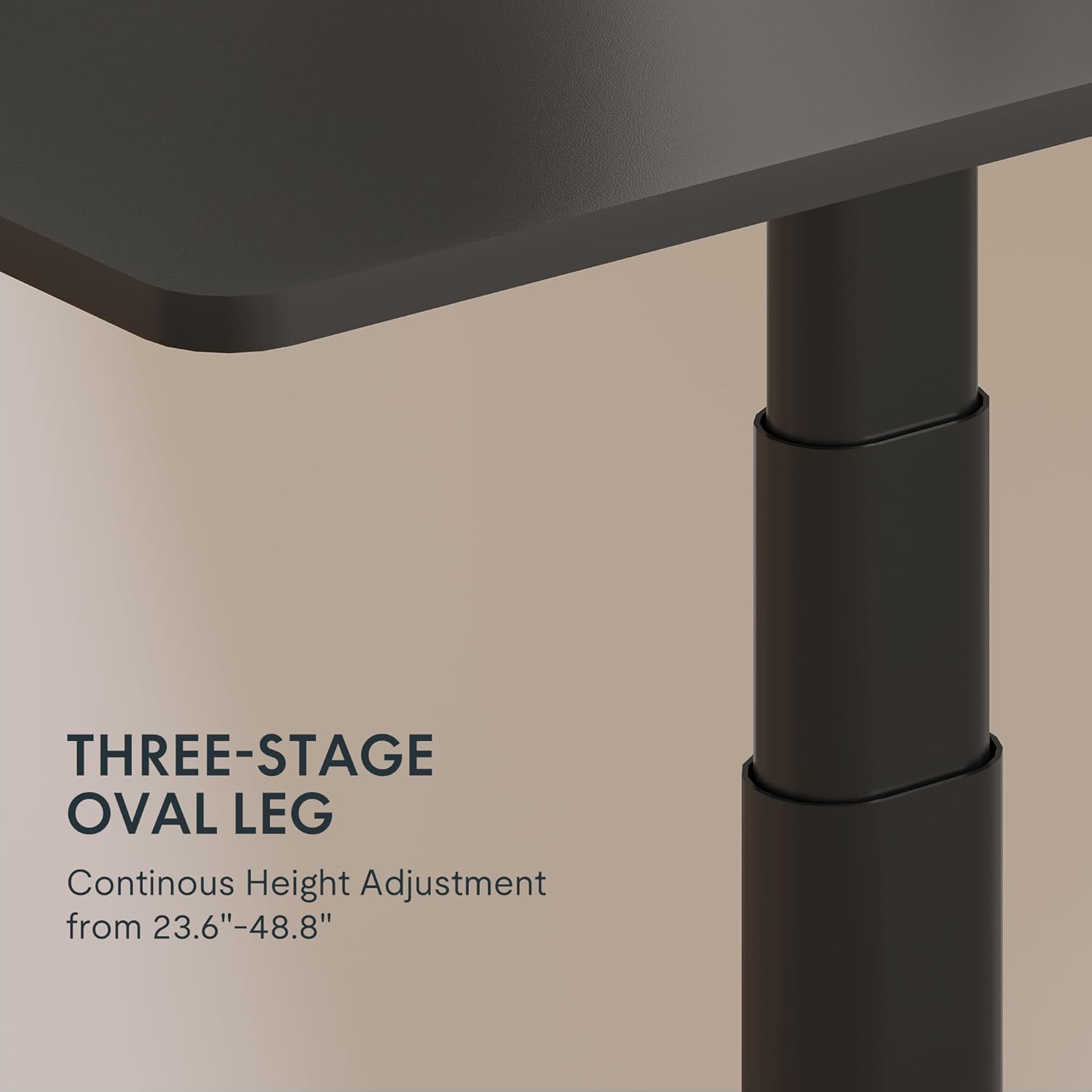
Figure 3: Close-up of the 3-stage oval leg mechanism.
4.2 LED Control Panel with Memory Presets and USB Port
The intuitive LED control panel allows for easy height adjustments and includes programmable memory presets for your preferred sitting and standing heights. It also features a convenient USB port for charging devices.
- ميموري پري سيٽ سيٽ ڪرڻ: Adjust the desk to your desired height using the Up/Down arrows. Press the 'م' button, then press one of the numbered preset buttons ('1', '2', '3'، يا '4') to save the current height.
- ياداشت جي اڳواٽ ياد ڪرڻ: Press any of the numbered preset buttons ('1', '2', '3'، يا '4') ڊيسڪ کي خودڪار طريقي سان محفوظ ڪيل اوچائي تي منتقل ڪرڻ لاءِ.
- USB چارجنگ پورٽ: Use the integrated USB port to conveniently charge your electronic devices.
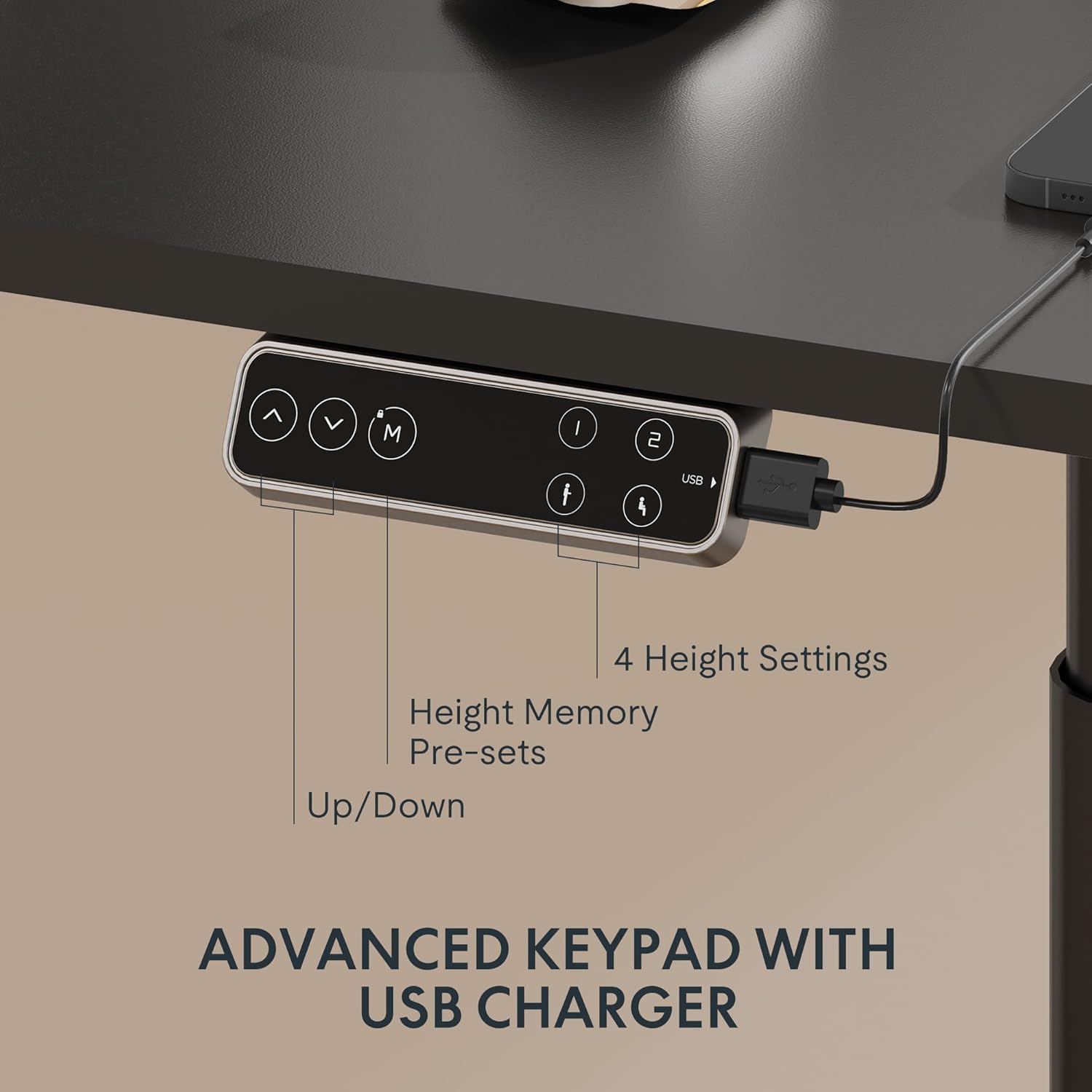
Figure 4: LED Control Panel with memory presets and USB port.
4.3 Dual Motor System
The E6 Pro is equipped with quiet dual motors that operate at less than 45dB, ensuring minimal disturbance in your workspace. These powerful motors can handle up to 330 lbs (150 kg) of weight, providing stable and reliable performance.
4.4 اينٽي ڪوليشن سسٽم
For enhanced safety, the desk features an anti-collision system. If the desk encounters an obstruction during height adjustment, it will automatically stop and reverse slightly to prevent damage or injury. This system is designed to protect both the desk and its surroundings.
5. وضاحتون
| خاصيت | تفصيل |
|---|---|
| برانڊ | FLEXISPOT |
| ماڊل نمبر | E8 |
| ڊيسڪ ڊيزائن | اسٽينڊنگ ڊيسڪ فريم |
| پير ايسtages | 3 ايسtages Oval Leg |
| اونچائي جي ترتيب جي حد | 23.6" کان 48.8" تائين |
| موٽر جو قسم | ٻٽي موٽر |
| وزن جي گنجائش | 330 پائونڊ تائين (150 ڪلوگرام) |
| شور جي سطح | 45dB کان گھٽ |
| ڪنٽرول پينل | LED with 4 Memory Presets & USB Port |
| خاص خصوصيت | Anti-Collision System |
| بنيادي مواد | ڌاتو |
| رنگ | ڪارو فريم |
| گهربل اسيمبلي | ها |
6. سار سنڀال
To ensure the longevity and optimal performance of your FLEXISPOT E6 Pro desk frame, regular maintenance is recommended:
- صفائي: ڊيسڪ فريم کي نرم، ڊي سان صاف ڪريوamp ڪپڙو. سخت ڪيميڪلز يا رگڙيندڙ ڪلينر استعمال ڪرڻ کان پاسو ڪريو جيڪي ختم کي نقصان پهچائي سگهن ٿا.
- ڪيبل جو انتظام: وقتي طور تي ڪيبل چيڪ ڪريو ۽ ترتيب ڏيو ته جيئن الجھڻ يا نقصان کان بچي سگهجي، خاص طور تي اوچائي جي ترتيب دوران.
- فاسٽنر چيڪ: Every few months, inspect all screws and bolts to ensure they are tight. Re-tighten if necessary.
- وزن جي تقسيم: Distribute weight evenly across the desktop to prevent undue stress on the frame and motors.
7. مسئلا حل ڪرڻ
If you encounter any issues with your desk frame, please refer to the following common troubleshooting steps:
- ڊيسڪ نه حرڪت: Check all cable connections to ensure they are securely plugged into the control box and power outlet. Verify the power adapter is functioning.
- غير معمولي تحريڪ: Ensure the desk is not overloaded and that weight is evenly distributed. Perform a reset procedure (refer to your specific user manual for reset instructions).
- ڊسپلي تي غلطي ڪوڊ: Consult your user manual for a list of error codes and their corresponding solutions.
- ٽڪراءُ مخالف نظام جو بار بار شروع ٿيڻ: Ensure there are no obstructions in the desk's path during movement.
If the problem persists after attempting these steps, please contact FLEXISPOT customer support for further assistance.
8. وارنٽي ۽ سپورٽ
FLEXISPOT provides a comprehensive warranty for your peace of mind:
- 5 سالن جي ڪوريج: ڊيسڪ فريم ۽ موٽر تي لاڳو ٿئي ٿو.
- 2 سالن جي ڪوريج: ڪنٽرول پينل ۽ اليڪٽرانڪس تي لاڳو ٿئي ٿو.
For warranty claims, technical support, or any questions regarding your FLEXISPOT E6 Pro desk frame, please visit the official FLEXISPOT webسائيٽ تي وڃو يا سڌو سنئون انهن جي ڪسٽمر سروس سان رابطو ڪريو. خريداري جي ثبوت طور پنهنجي خريداري جي رسيد رکو.
9. پراڊڪٽ وڊيوز
9.1 Why Choose FLEXISPOT E6
Video 1: This official FLEXISPOT video highlights the key features and benefits of the E6 series, including its robust construction and smooth operation.
9.2 Welcome to FLEXISPOT'S Mega Factory
Video 2: An inside look at the FLEXISPOT manufacturing facility, showcasing the precision and quality control involved in producing their products.