
1. تعارف
The MageGee Moon104 is a versatile 104-key wireless mechanical keyboard designed for office and general use. It features triple-mode connectivity (2.4GHz wireless, Bluetooth, and USB-C wired), RGB backlighting, and an ergonomic design for comfortable typing. This manual provides detailed instructions for setup, operation, maintenance, and troubleshooting to ensure optimal performance of your keyboard.

Image: The MageGee Moon104 keyboard in a grey and black color scheme, featuring RGB backlighting, positioned on a desk with a laptop and other office accessories.
2. پيڪيج مواد
مھرباني ڪري ھيٺ ڏنل شين لاءِ پيڪيج چيڪ ڪريو:
- MageGee Moon104 وائرليس ميڪيڪل ڪي بورڊ
- USB-سي ڪيبل
- 2.4GHz USB Receiver (Dongle)
- استعمال ڪندڙ جو دستياب (ھي دستاويز)
3. پراڊڪٽ ختمview
The Moon104 keyboard features a full-size 104-key layout with low-profile mechanical brown switches, designed for a responsive and quiet typing experience. It includes dedicated function keys, a numeric keypad, and adjustable tilt feet for ergonomic comfort.

Image: A full-size view of the MageGee Moon104 keyboard, highlighting its 104-key layout including the numeric pad and function row.
اهم خاصيتون:
- ٽرپل موڊ ڪنيڪٽوٽي: Switch between USB-C wired, 2.4GHz wireless, and Bluetooth 3.0/5.0.
- آر جي بي بيڪ لائيٽنگ: Customizable seven-color breathing backlight system.
- Ergonomic ڊيزائن: گھٽ پروfile keys, adjustable tilt feet, and a comfortable layout to reduce wrist strain.
- پائيدار تعمير: High-quality materials and brown mechanical switches for extended lifespan.
- N-ڪي رول اوور: Ensures all key presses are registered accurately, even during rapid typing.

Image: A visual representation of the N-key rollover feature, showing multiple keys being pressed simultaneously and registered.
4. سيٽ اپ ۽ ڪنيڪشن
The Moon104 keyboard supports three connection modes: USB-C wired, 2.4GHz wireless, and Bluetooth. You can switch between these modes using the function keys.
4.1. USB-C وائرڊ ڪنيڪشن
- ڪيبورڊ تي USB-C پورٽ ڳوليو، عام طور تي مٿين ڪنڊ تي.
- مهيا ڪيل USB-C ڪيبل جي هڪ پڇاڙي کي ڪيبورڊ سان ڳنڍيو.
- USB-C ڪيبل جي ٻئي ڇيڙي کي پنهنجي ڪمپيوٽر تي موجود USB پورٽ سان ڳنڍيو.
- ڪيبورڊ پاڻمرادو سڃاڻي ويندو ۽ استعمال لاءِ تيار ٿي ويندو.

تصوير: هڪ ويجهو تصوير view of the keyboard's side, illustrating the detachable USB-C cable connected to the port.
4.2. 2.4GHz وائرليس ڪنيڪشن
- Locate the 2.4GHz USB receiver (dongle) in the package.
- 2.4GHz USB رسيور کي پلگ ان ڪريو توهان جي ڪمپيوٽر تي موجود USB پورٽ ۾.
- ڪيبورڊ تي، دٻايو Fn + Q to switch to 2.4GHz wireless mode. The indicator light will confirm the mode.
- The keyboard should automatically connect. If not, ensure the receiver is properly inserted and the keyboard is in 2.4GHz mode.
4.3. بلوٽوٽ ڪنيڪشن
The keyboard supports two Bluetooth channels (BT1 and BT2).
- ڪيبورڊ تي، دٻايو Fn + W for Bluetooth channel 1 or Fn + E for Bluetooth channel 2. The corresponding indicator light will flash rapidly, indicating pairing mode.
- پنهنجي ڊوائيس (ڪمپيوٽر، ليپ ٽاپ، ٽيبليٽ، وغيره) تي، بلوٽوٿ کي فعال ڪريو ۽ نوان ڊوائيسز ڳوليو.
- Select "MageGee Moon104" (or similar name) from the list of available devices to pair.
- Once paired, the indicator light on the keyboard will stop flashing and remain solid.
- To connect another device, repeat steps 1-3 using the other Bluetooth channel (Fn + W or Fn + E).
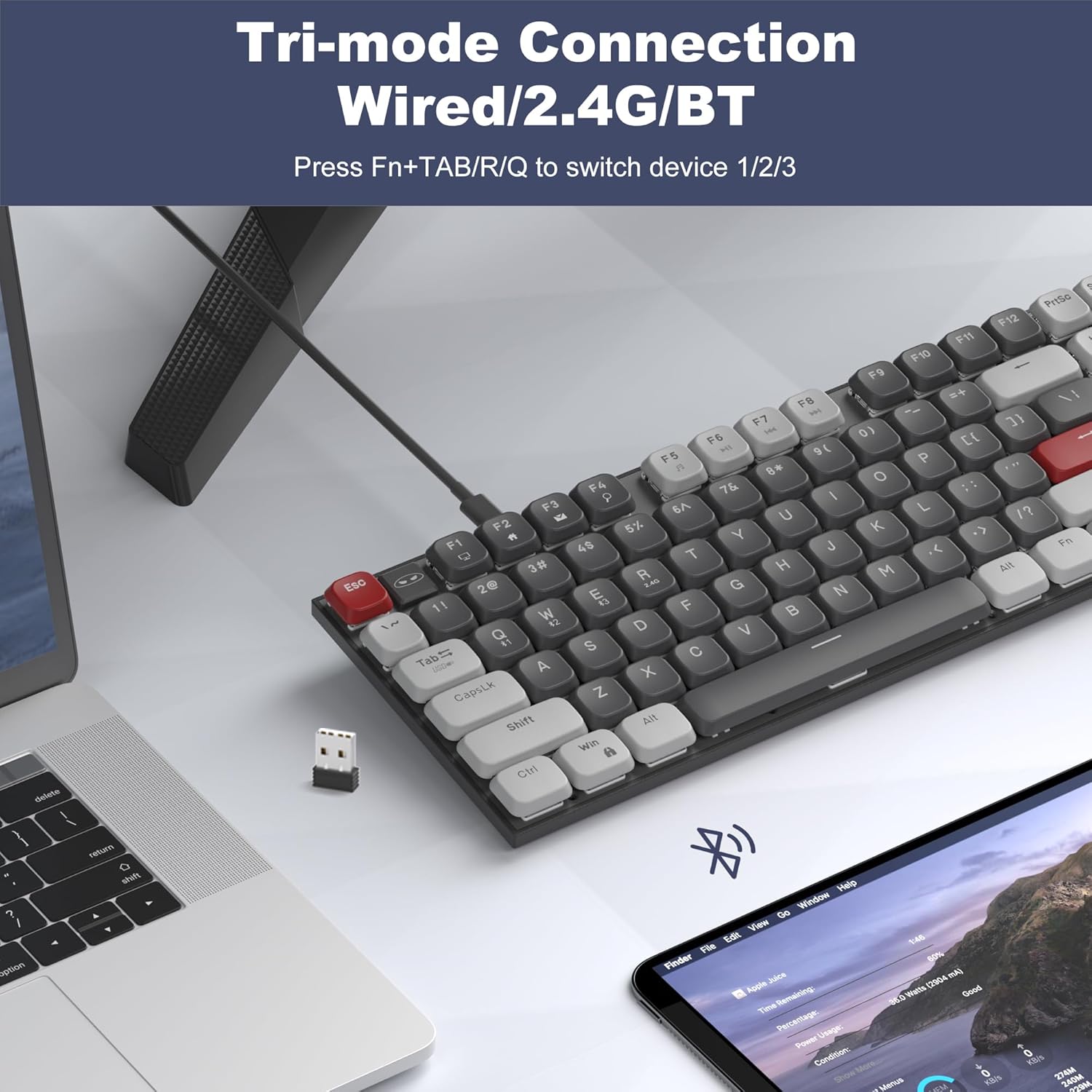
Image: The MageGee Moon104 keyboard shown with a 2.4GHz USB receiver plugged into a laptop, illustrating its wireless connectivity options.
5. آپريٽنگ موڊس ۽ ڪم
5.1. موڊز جي وچ ۾ سوئچنگ
To switch between the connected devices or modes:
- دٻايو Fn + TAB for USB-C Wired Mode.
- دٻايو Fn + Q for 2.4GHz Wireless Mode.
- دٻايو Fn + W for Bluetooth Channel 1.
- دٻايو Fn + E for Bluetooth Channel 2.
5.2. آر جي بي بيڪ لائيٽ ڪنٽرول
The Moon104 keyboard features a seven-color breathing RGB backlight system. Use the following key combinations to control the lighting:
- دٻايو Fn + Ins مختلف بيڪ لائيٽ موڊس ذريعي سائيڪل هلائڻ لاءِ.
- دٻايو Fn + Del to change backlight colors within certain modes.
- دٻايو Fn + ↑ (Up Arrow) to increase backlight brightness.
- دٻايو Fn + ↓ (Down Arrow) to decrease backlight brightness.
- دٻايو Fn + ← (Left Arrow) to decrease backlight speed.
- دٻايو Fn + → (Right Arrow) to increase backlight speed.
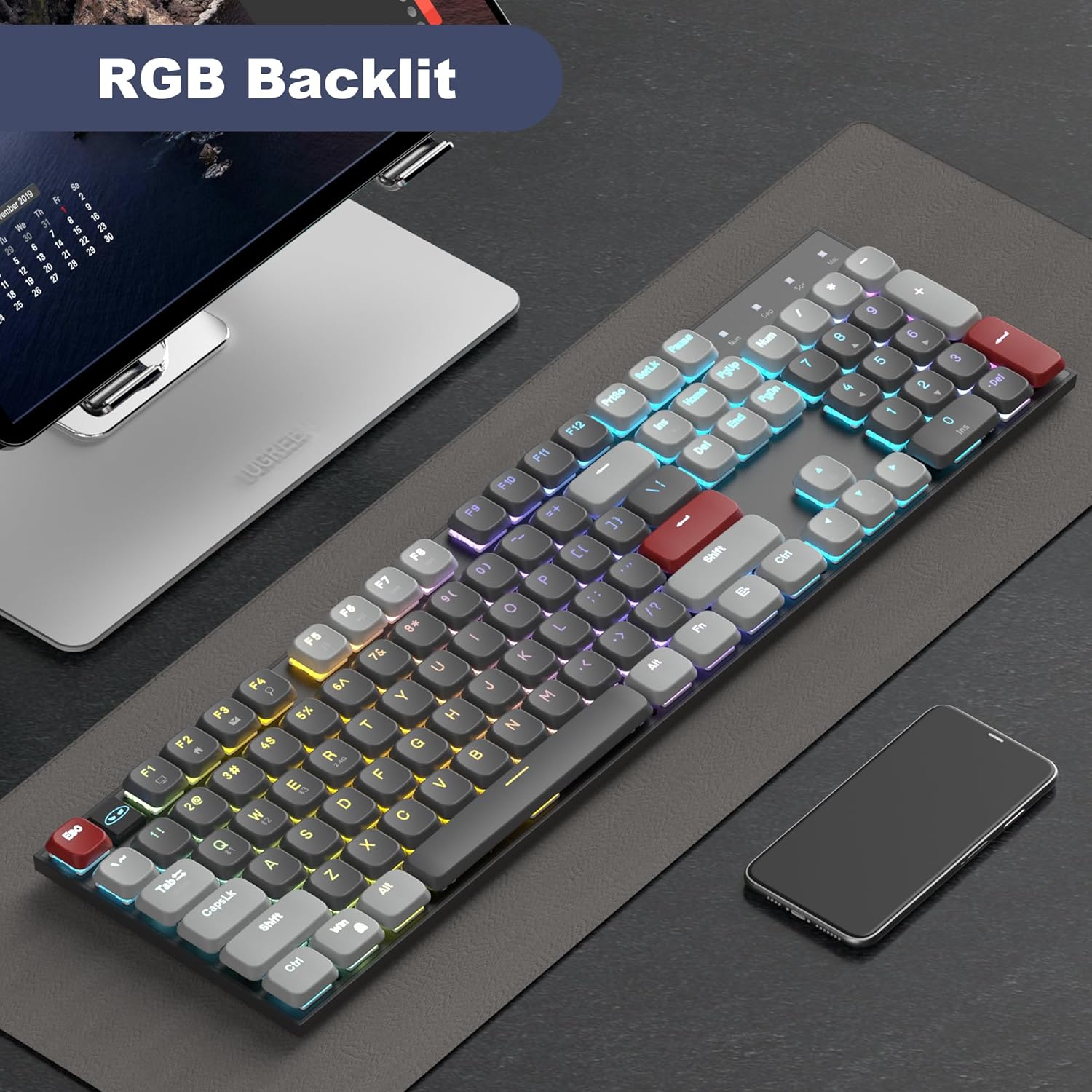
Image: The MageGee Moon104 keyboard displaying its RGB backlighting in a colorful pattern, enhancing visibility in low-light conditions.
5.3. Multimedia and Function Keys
The keyboard includes dedicated function keys (F1-F12) that can be combined with the Fn key for multimedia controls and other shortcuts. Refer to the keycap legends for specific functions.
- ايف اين + ايف 1-ايف 12: Various multimedia and system functions (e.g., volume control, media playback, web برائوزر).
- Caps Lock اشارو: An indicator light shows when Caps Lock is active.
- بيٽري جو اشارو: An indicator light provides information on battery status.
6. مطابقت
The MageGee Moon104 keyboard is compatible with a wide range of operating systems and devices:
- آپريٽنگ سسٽم: Windows 10/8/7, macOS.
- ڊوائيسز: Computers, desktops, PCs, laptops, Surface devices, Smart TVs, gaming consoles.
A dedicated switch on the side of the keyboard allows you to toggle between Windows and Mac compatibility modes for optimal key mapping.
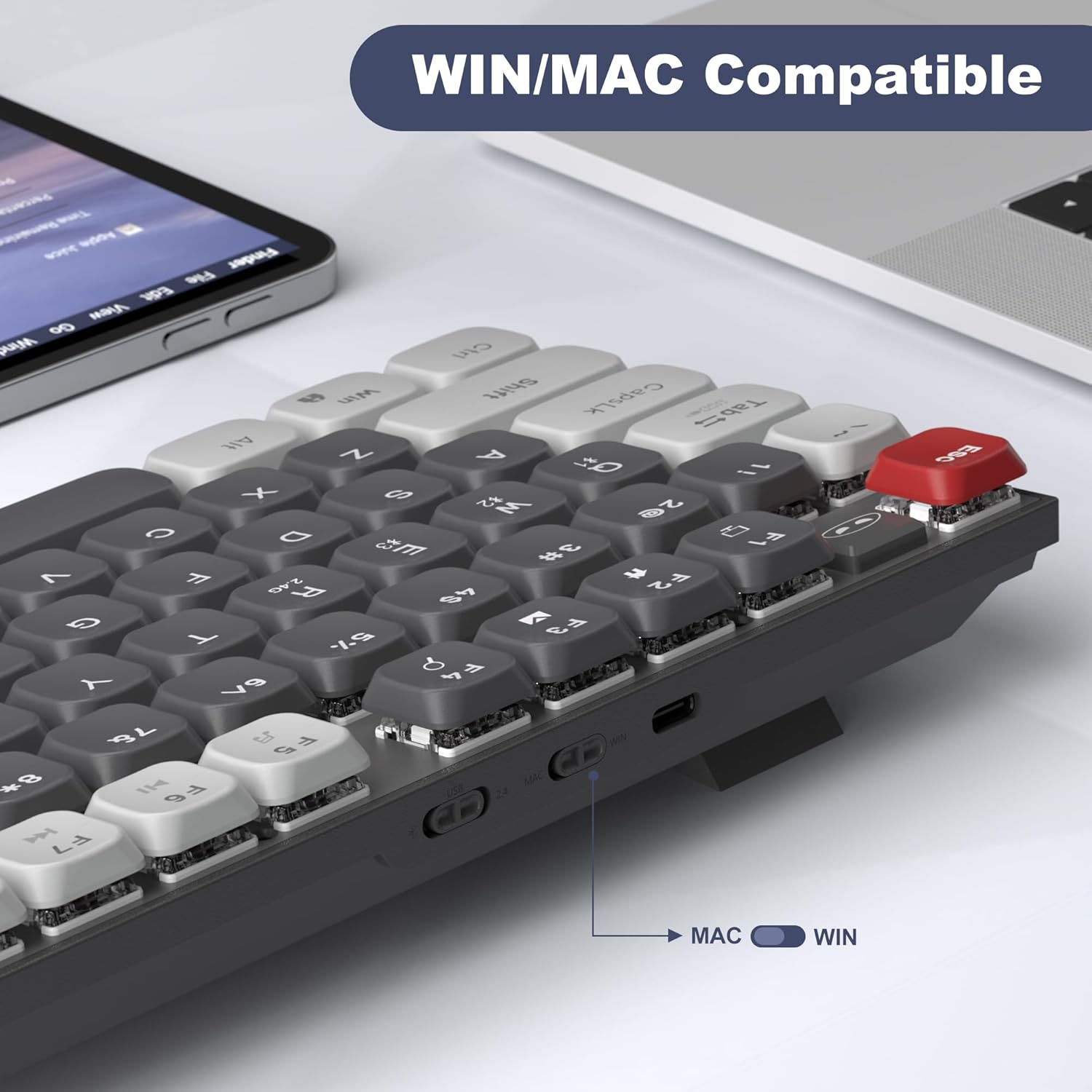
تصوير: هڪ تفصيلي view of the keyboard's side, showing the physical switch to select between WIN (Windows) and MAC operating system modes.
7. سار سنڀال
مناسب سار سنڀال توهان جي ڪيبورڊ جي ڊگهي عمر ۽ ڪارڪردگي کي يقيني بڻائي ٿي:
- صفائي: ڪيبورڊ جي مٿاڇري کي صاف ڪرڻ لاءِ نرم، سڪل ڪپڙو استعمال ڪريو. وڌيڪ گهري صفائي لاءِ، ڪي ڪيپس جي وچ مان مٽي ۽ ملبہ هٽائڻ لاءِ دٻيل هوا استعمال ڪريو. سخت ڪيميڪلز يا رگڙيندڙ مواد استعمال ڪرڻ کان پاسو ڪريو.
- اسٽوريج: ڪيبورڊ کي سڌي سج جي روشني ۽ انتهائي گرمي پد کان پري ٿڌي، سڪل جاءِ تي رکو.
- بيٽري جي سنڀال: For wireless modes, ensure the keyboard is charged regularly using the provided USB-C cable. Avoid completely draining the battery frequently to prolong its lifespan.
- مائع جي نمائش: Avoid spilling liquids on the keyboard. If accidental spills occur, immediately disconnect the keyboard, power it off, and allow it to dry completely before attempting to use it again.
8. مسئلا حل ڪرڻ
If you encounter issues with your MageGee Moon104 keyboard, please refer to the following troubleshooting steps:
8.1. Keyboard Not Responding (Wired Mode)
- پڪ ڪريو ته USB-C ڪيبل ڪيبورڊ ۽ توهان جي ڪمپيوٽر ٻنهي سان محفوظ طور تي ڳنڍيل آهي.
- ڪيبورڊ کي پنهنجي ڪمپيوٽر تي ڪنهن ٻئي USB پورٽ سان ڳنڍڻ جي ڪوشش ڪريو.
- Test the cable with another device or use a different USB-C cable if available.
- Ensure the keyboard is set to wired mode (Fn + TAB).
8.2. Keyboard Not Responding (2.4GHz Wireless Mode)
- Ensure the 2.4GHz USB receiver is securely plugged into a USB port on your computer.
- Ensure the keyboard is set to 2.4GHz mode (Fn + Q).
- ڪيبورڊ جي بيٽري ليول چيڪ ڪريو ۽ جيڪڏهن ضروري هجي ته چارج ڪريو.
- Try plugging the receiver into a different USB port, preferably directly into the computer rather than a USB hub.
- Move the keyboard closer to the receiver to rule out interference.
8.3. Keyboard Not Responding (Bluetooth Mode)
- پڪ ڪريو ته توهان جي ڊوائيس تي بلوٽوت فعال آهي.
- Ensure the keyboard is set to the correct Bluetooth channel (Fn + W or Fn + E) and is in pairing mode (flashing indicator).
- If previously paired, try unpairing the keyboard from your device's Bluetooth settings and then re-pairing it.
- ڪيبورڊ جي بيٽري ليول چيڪ ڪريو ۽ جيڪڏهن ضروري هجي ته چارج ڪريو.
- Restart your device's Bluetooth function or restart the device itself.
8.4. Function Keys (e.g., Volume Control) Not Working
- پڪ ڪريو ته توهان دٻايو ٿا Fn key in combination with the desired function key (e.g., Fn + F1 for media functions).
- Verify the keyboard's operating system switch (WIN/MAC) is set correctly for your system.
- Check your computer's operating system settings for any conflicting hotkey assignments or driver issues.
8.5. Backlight Not Working or Incorrect
- Ensure the backlight is not turned off or set to minimum brightness (Fn + ↑).
- استعمال ڪندي بيڪ لائيٽ موڊ ذريعي سائيڪل ڪريو Fn + Ins.
- Check battery level; low battery might affect backlight performance.
8.6. Keyboard Enters Sleep Mode Too Quickly
- The keyboard is designed to enter sleep mode to conserve battery. Press any key to wake it up.
- There is no user-adjustable setting to change the sleep timer.
9. وضاحتون
| خاصيت | تفصيل |
|---|---|
| ماڊل | چنڊ 104 |
| برانڊ | ميج گي |
| رابطي | USB-C وائرڊ، 2.4GHz وائرليس، بلوٽوٿ 3.0/5.0 |
| ڪنجي جو تعداد | 104 |
| ڪي بورڊ لي آئوٽ | QWERTY |
| سوئچ جو قسم | Brown Mechanical Switches (Tactile) |
| پٺڀرائي | RGB (7-color breathing backlight system) |
| مطابقت رکندڙ آپريٽنگ سسٽم | ونڊوز، macOS |
| مواد | پلاسٽڪ |
| طاقت جو ذريعو | USB پاور |
10. وارنٽي ۽ سپورٽ
The MageGee Moon104 keyboard comes with a 1 سال وارنٽي خريداري جي تاريخ کان.
If you encounter any issues or have questions regarding your product, please contact MageGee customer support. We aim to reply to all inquiries within 24 hours and provide a satisfactory solution.
رابطي جي حمايت: Please reach out to us via Amazon email for assistance.
Note: This warranty covers manufacturing defects. Damage caused by misuse, accidents, unauthorized modifications, or normal wear and tear is not covered.