
تعارف
Welcome to your RCA Wave-68 True Wireless Earbuds. This manual provides detailed instructions on how to set up, operate, maintain, and troubleshoot your earbuds to ensure optimal performance and a seamless audio experience. Please read this manual thoroughly before using your device.
پيڪيج مواد
- آر سي اي ويو-68 ٽرو وائرليس ائربڊس (کاٻي ۽ ساڄي)
- چارج ڪيس
- USB چارجنگ ڪيبل
- استعمال ڪندڙ دستي
پيداوار ختمview
Familiarize yourself with the components of your RCA Wave-68 earbuds and charging case.

تصوير: The RCA Wave-68 earbuds are shown inside their open charging case. The case features a digital display indicating the battery levels of both the case and individual earbuds.
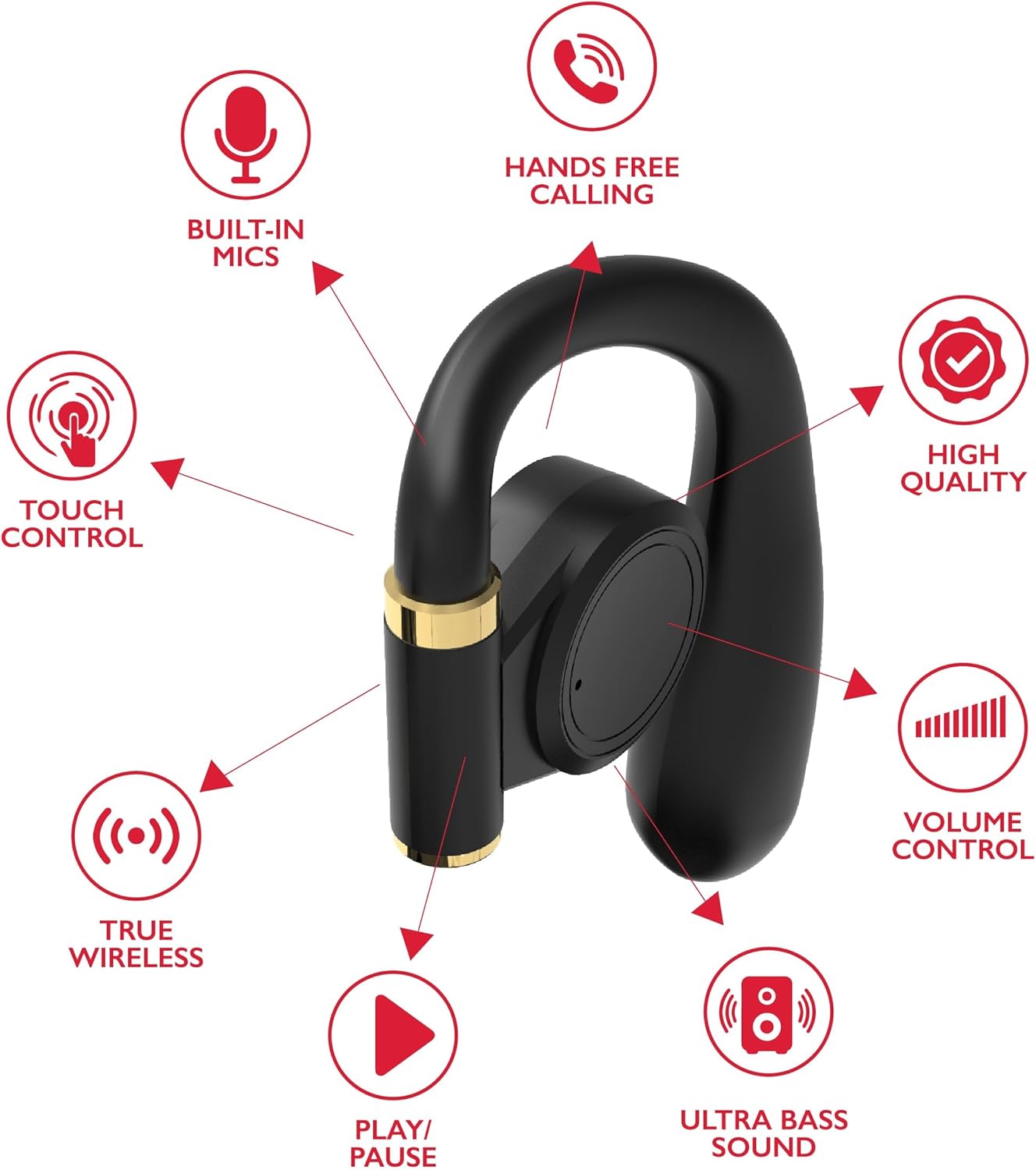
تصوير: A diagram highlights key features of a single RCA Wave-68 earbud, including built-in mics, hands-free calling, touch control, true wireless connectivity, play/pause function, ultra bass sound, volume control, and high-quality audio.
سيٽ اپ ڪريو
1. ائربڊس ۽ ڪيس کي چارج ڪرڻ
Before first use, fully charge the earbuds and charging case. Place the earbuds into the charging case. Connect the USB charging cable to the charging port on the case and to a power source. The digital display on the case will show the charging status. A full charge provides approximately 20 hours of total playtime with the charging case.
2. بلوٽوٽ جوئر
- پاور آن: Open the charging case. The earbuds will automatically power on and enter pairing mode. You may see a blinking light indicator on the earbuds.
- بلوٽوت کي فعال ڪريو: پنهنجي ڊوائيس (اسمارٽ فون، ٽيبليٽ، وغيره) تي، بلوٽوٿ کي فعال ڪريو.
- ڊوائيس چونڊيو: ڳولھيو "RCA Wave-68" موجود بلوٽوٿ ڊوائيسز جي فهرست ۾ ۽ ان کي ڳنڍڻ لاءِ چونڊيو.
- تصديق: Once connected, the earbuds will indicate successful pairing, and the light indicator may stop blinking or turn off.
If pairing fails, ensure the earbuds are charged and within range of your device. Turn off Bluetooth on other nearby devices to avoid interference.
آپريٽنگ هدايتون
پاور آن / آف
- پاور آن: چارجنگ ڪيس کوليو، ۽ ائربڊس پاڻمرادو آن ٿي ويندا. متبادل طور تي، ٻنهي ائربڊس تي ٽچ ڪنٽرول ايريا کي 3 سيڪنڊن لاءِ دٻايو ۽ رکو.
- بجلي بند: ائربڊس کي واپس چارجنگ ڪيس ۾ رکو ۽ ڍڪ بند ڪريو. اهي خودڪار طريقي سان بند ٿي ويندا. متبادل طور تي، ٻنهي ائربڊس تي ٽچ ڪنٽرول ايريا کي 5 سيڪنڊن لاءِ دٻايو ۽ رکو.
ٽچ ڪنٽرول
The RCA Wave-68 earbuds feature intuitive touch controls for managing audio playback, calls, and voice assistant functions.
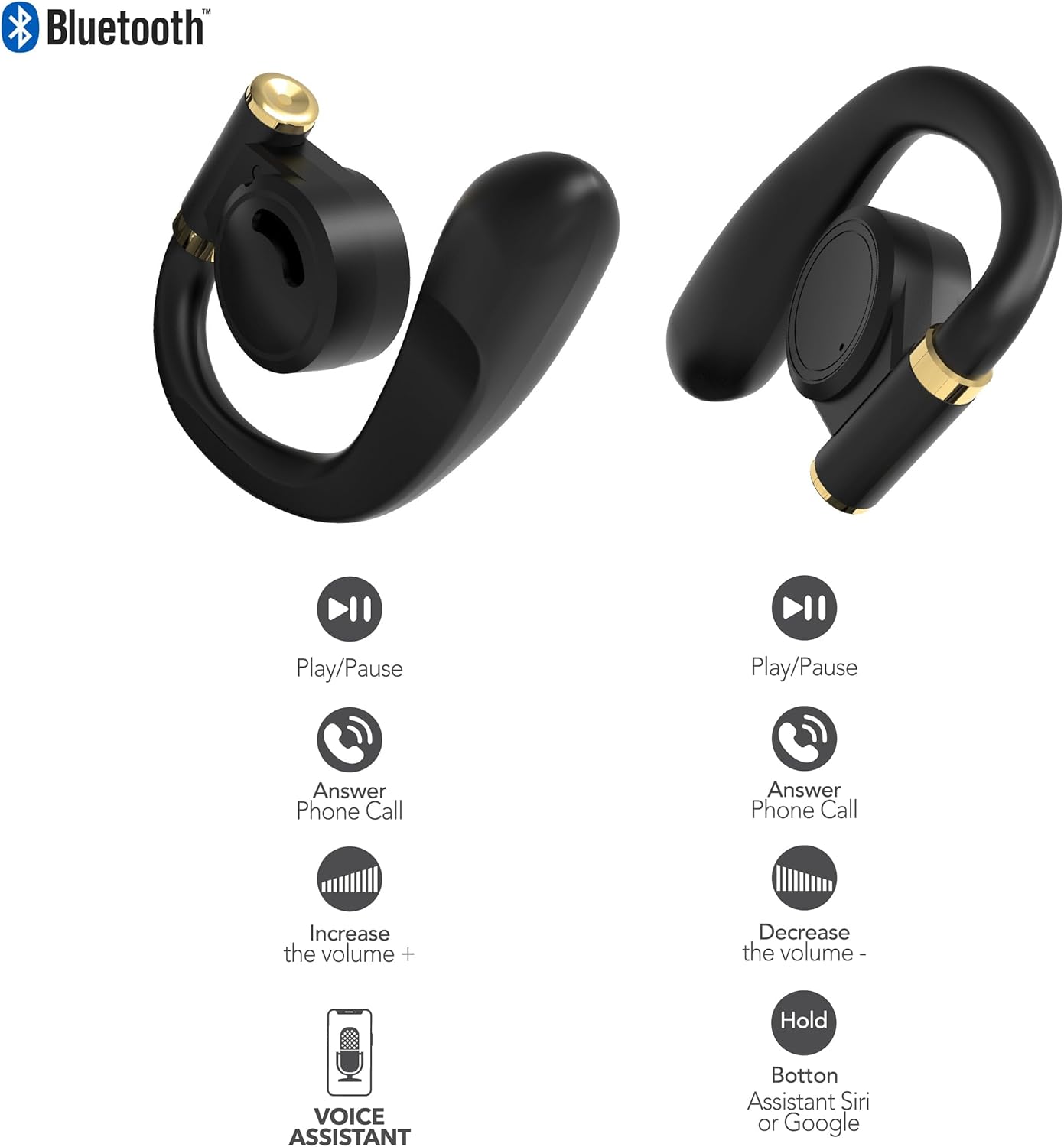
تصوير: This diagram illustrates the touch control functions for both the left and right RCA Wave-68 earbuds, including play/pause, answer phone call, volume increase/decrease, and activating the voice assistant.
- راند/روڪ: ٻنهي ائربڊ تي هڪ ڀيرو ٽيپ ڪريو.
- اڳيون ٽريڪ: ساڄي ائربڊ کي ٻه ڀيرا ٽيپ ڪريو.
- پويون ٽريڪ: کاٻي ائربڊ کي ٻه ڀيرا ٽيپ ڪريو.
- حجم مٿي ساڄي ائربڊ کي ٽي ڀيرا ٽيپ ڪريو.
- حجم ھيٺ کاٻي ائربڊ کي ٽي ڀيرا ٽيپ ڪريو.
- جواب/آخر ڪال: ايندڙ ڪال يا فعال ڪال دوران ٻنهي ائربڊ تي هڪ ڀيرو ٽيپ ڪريو.
- ڪال رد ڪريو: ايندڙ ڪال دوران ڪنهن به ائربڊ کي 2 سيڪنڊن لاءِ دٻايو ۽ رکو.
- وائيس اسسٽنٽ (سري/گوگل اسسٽنٽ) کي چالو ڪريو: 3 سيڪنڊن لاءِ ٻئي ائربڊ کي دٻايو ۽ رکو.
شفافيت موڊ
The Transparency Mode allows you to hear your surroundings while still enjoying your audio. This feature is useful for awareness in environments like busy streets or public transport.
- Activate/Deactivate Transparency Mode: Consult your device's Bluetooth settings or specific app if available, or refer to the product's quick start guide for a specific touch control gesture if not listed above.
سار سنڀال
صفائي
باقاعده صفائي آواز جي معيار ۽ صفائي کي برقرار رکڻ ۾ مدد ڪري ٿي.
- ائربڊس ۽ چارجنگ ڪيس کي صاف ڪرڻ لاءِ نرم، سڪل، لِنٽ فري ڪپڙو استعمال ڪريو.
- گھڙڻ وارا صاف ڪندڙ، الڪوحل، يا ڪيميائي محلول استعمال نه ڪريو.
- Gently remove any earwax or debris from the earbud tips and speaker mesh using a small, clean brush or cotton swab.
ذخيرو
جڏهن استعمال ۾ نه هجي، ته ائربڊس کي انهن جي چارجنگ ڪيس ۾ رکو ته جيئن انهن کي مٽي ۽ نقصان کان بچائي سگهجي.
- سخت گرمي پد کان پري ٿڌي، سڪل جاءِ تي ذخيرو ڪريو.
- سڌي سج جي روشني يا نمي جي ڊگهي نمائش کان پاسو ڪريو.
مشڪلاتون
If you encounter issues with your RCA Wave-68 earbuds, refer to the following common solutions:
- Earbuds not powering on automatically: Ensure the charging case is charged. Place earbuds back in the case, close the lid, then open it again. If issues persist, manually power on by pressing and holding the touch control area for 3 seconds.
- ائربڊس جوڙو نه پيا لڳن: Make sure both earbuds are fully charged. Turn off Bluetooth on your device, then turn it back on. Forget "RCA Wave-68" from your device's Bluetooth list and attempt to pair again. Ensure no other devices are actively connected to the earbuds.
- هڪ ائربڊ مان آواز نه ٿو اچي: Place both earbuds back into the charging case, close the lid, and then take them out again. This often re-syncs them. Check your device's audio balance settings.
- Charging case not displaying battery info/not charging: Ensure the USB cable is securely connected to both the case and the power source. Try a different USB cable or power adapter. Clean the charging port on the case for any debris.
- گهٽ آواز يا خراب آواز جي معيار: Adjust the volume on both your device and the earbuds. Ensure the earbuds are properly seated in your ears for a good seal. Clean any debris from the earbud speaker mesh.
- ڪنن جا ڪري پوڻ: Ensure you are using the correct ear tip size for a secure and comfortable fit.
وضاحتون
| خاصيت | تفصيل |
|---|---|
| ماڊل نالو | لهر-68 |
| برانڊ | آر سي اي |
| رابطي ٽيڪنالاجي | وائرليس (بلوٽوت) |
| بلوٽوت ورزن | 5.3 |
| بيٽري جي زندگي | 20 ڪلاڪن تائين (چارجنگ ڪيس سان) |
| ڪنٽرول جو طريقو | ڇڪڻ |
| ڪن جي جڳهه | ڪن ۾ |
| فارم فيڪٽر | ڪن ۾ |
| مواد | پلاسٽڪ، سلڪون |
| خاص خاصيتون | Built-In Voice Assistant, Transparency Mode |
| يو پي سي | 850068964468 |
حفاظت جي ڄاڻ
- ائربڊس يا چارجنگ ڪيس کي ڌار يا تبديل نه ڪريو.
- ڊوائيس کي انتهائي گرمي پد، نمي، يا مائعات جي سامهون آڻڻ کان پاسو ڪريو.
- ٻڌڻ جي نقصان کي روڪڻ لاءِ ائربڊس کي گهڻي وقت تائين وڏي آواز ۾ استعمال نه ڪريو.
- ٻارن ۽ پالتو جانورن جي پهچ کان پري رکو.
- مقامي ضابطن جي مطابق ذميواري سان ڊوائيس کي ختم ڪريو.
وارنٽي ۽ سپورٽ
RCA products are designed for reliability and performance. For warranty information or technical support, please refer to the warranty card included in your package or visit the official RCA support webسائيٽ. مھرباني ڪري وارنٽي دعوائن لاءِ خريداري جو ثبوت رکو.