
1. تعارف
Thank you for choosing the FLEXISPOT 28-Inch Height Adjustable Standing Desk Converter. This product is designed to transform your existing desk into an active sit-stand workstation, promoting a healthier and more dynamic work environment. Its unique two-tier design provides ample space for your monitor, keyboard, and mouse, allowing for seamless transitions between sitting and standing positions.
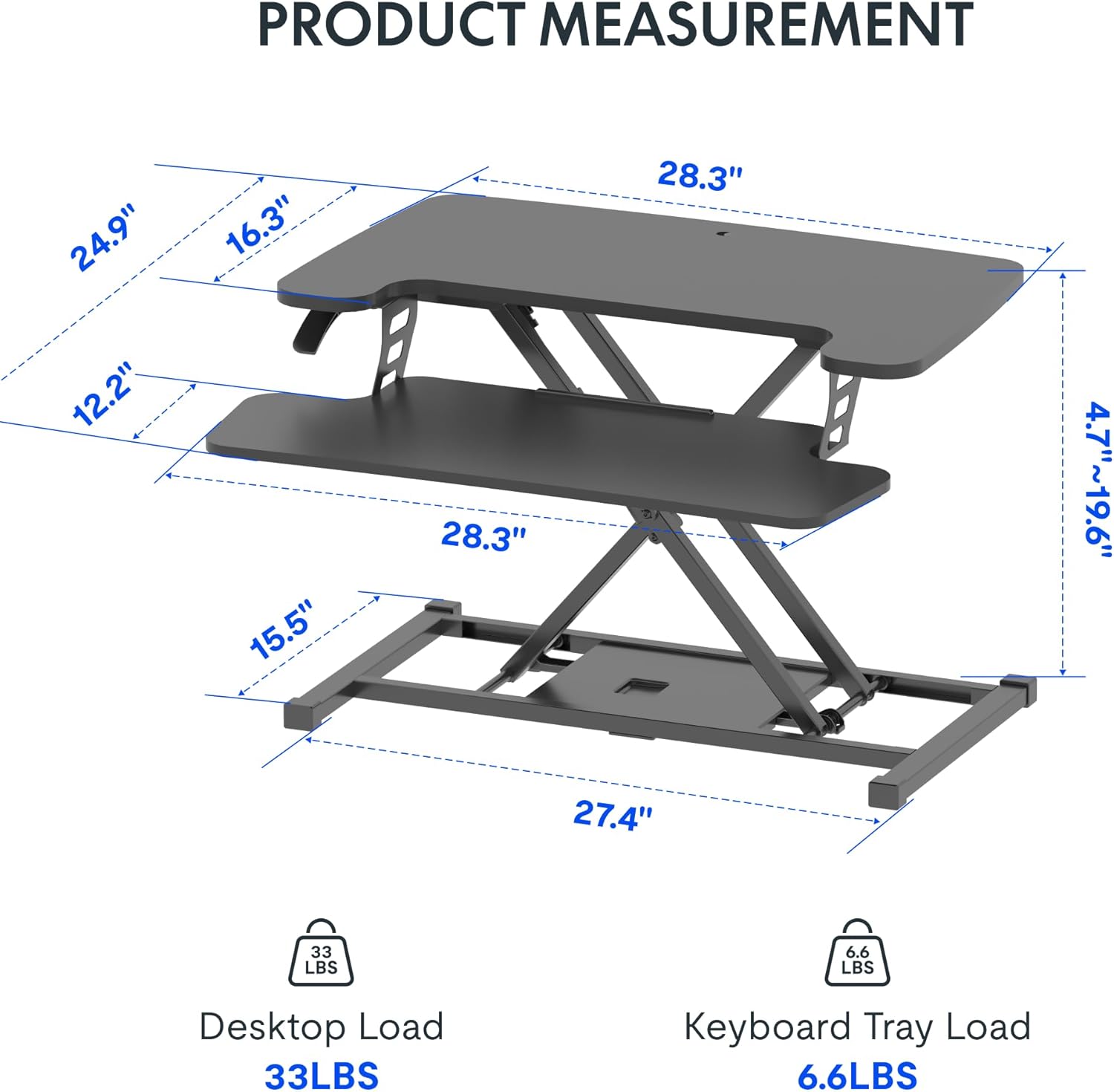
Image: The FLEXISPOT 28-Inch Height Adjustable Standing Desk Converter in a typical office setup, showcasing its two-tier design and compact footprint.
2. حفاظت جي ڄاڻ
- اسيمبليءَ ۽ استعمال کان اڳ سڀ هدايتون احتياط سان پڙهو.
- Ensure all components are securely fastened before placing items on the desk converter.
- Do not exceed the maximum weight capacity: 33 lbs for the desktop and 6.6 lbs for the keyboard tray.
- زخم کان بچڻ لاءِ اوچائي جي ترتيب دوران هٿن ۽ آڱرين کي حرڪت ڪندڙ حصن کان پري رکو.
- Place the desk converter on a stable, level surface.
- Avoid placing liquids directly on the surface to prevent spills and potential damage to electronic devices.
3. پيڪيج مواد
Upon opening your package, verify that all the following components are present:
- FLEXISPOT 28-Inch Height Adjustable Standing Desk Converter (main unit)
- ڪي بورڊ ٽري
- اسيمبلي هارڊويئر (اسڪرو، ايلن رنچ)
- هدايت نامو (هي دستاويز)
4. سيٽ اپ ۽ اسيمبلي
The FLEXISPOT 28-Inch Height Adjustable Standing Desk Converter comes largely pre-assembled. The primary step required is attaching the keyboard tray.
- پيڪ ڪريو: احتياط سان پيڪنگنگ مان سڀني اجزاء کي هٽايو.
- Position the Main Unit: Place the main desk converter unit on your existing desk in the desired location.
- ڪي بورڊ ٽري لڳايو: Align the keyboard tray with the pre-drilled holes on the underside of the main unit's lower platform. Secure it using the provided screws and Allen wrench. Ensure it is firmly attached.
- ڪيبل منظم ڪريو: Route any monitor or peripheral cables to prevent interference with the height adjustment mechanism.
No complex steps are required for assembly. A Phillips screwdriver may be needed for some keyboard tray attachments, though an Allen wrench is typically included for the main connections.
5. آپريٽنگ هدايتون
اوچائي کي ترتيب ڏيڻ:
The desk converter features a powerful gas spring system for smooth and effortless height adjustment. It allows you to transition between sitting and standing positions with a single lever.
- اڀارڻ: Gently lift the adjustment lever located on the side of the desk converter. While holding the lever, apply slight upward pressure to the desktop. The gas spring will assist in raising the unit. Release the lever once the desired height (between 4.7" and 19.7") is reached.
- هيٺ ڪرڻ: Gently lift the adjustment lever. While holding the lever, apply downward pressure to the desktop. The unit will smoothly lower. Release the lever once the desired height is reached.
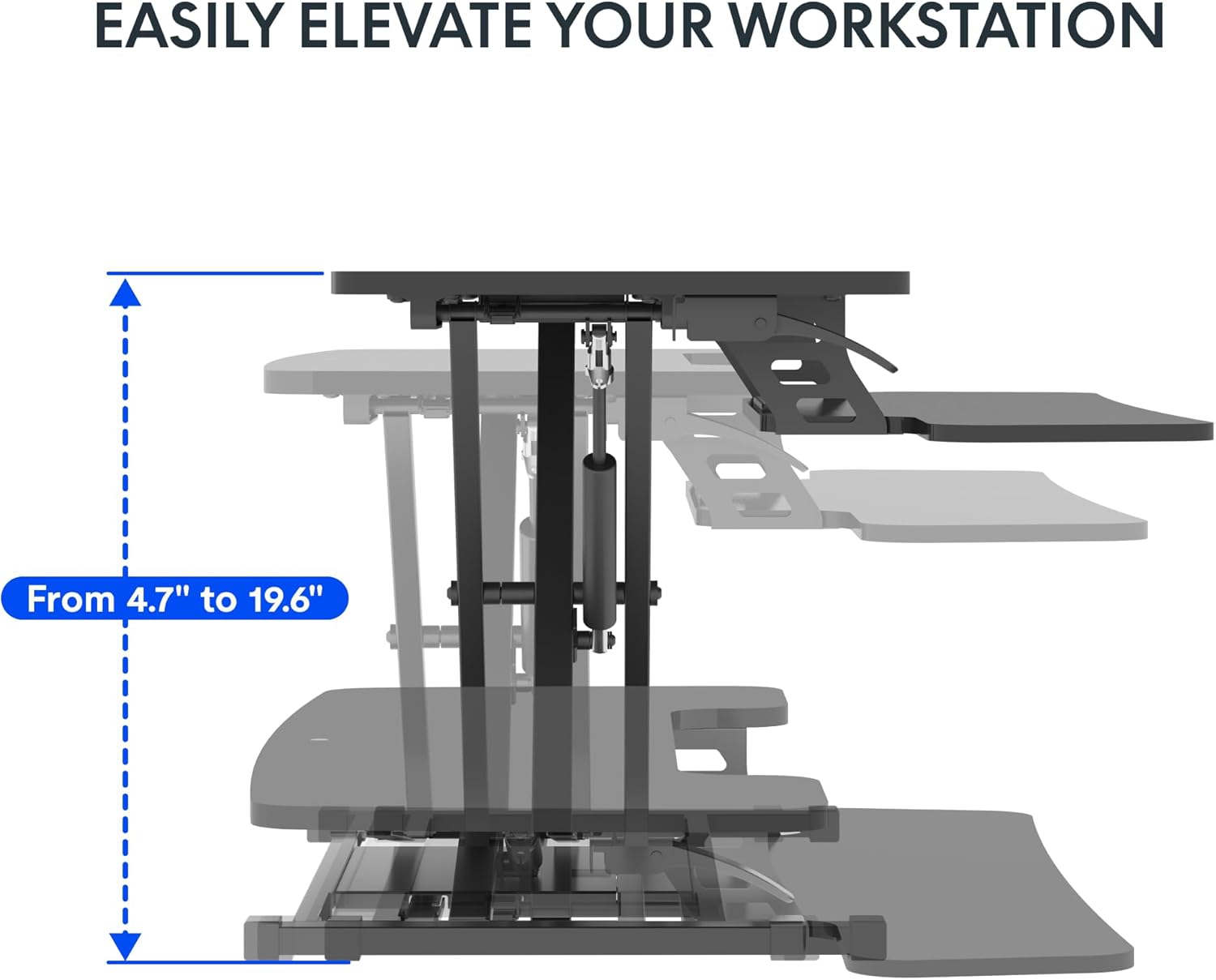
Image: Visual representation of the desk converter's height adjustment range, showing the smooth transition from minimum to maximum height.
Keyboard Tray Angle Adjustment (if applicable):
Some models may offer an adjustable angle for the keyboard tray. Consult your specific model's features for details on how to adjust if this functionality is present.
6. سار سنڀال
- صفائي: مٿاڇري کي نرم سان صاف ڪريو، ڊيamp ڪپڙو. گھڙڻ وارا صاف ڪندڙ يا سخت ڪيميڪلز کان پاسو ڪريو جيڪي ختم کي نقصان پهچائي سگھن ٿا.
- چڪاس: وقت بوقت سڀني پيچرن ۽ ڪنيڪشنن کي چيڪ ڪريو ته جيئن اهي تنگ رهن. جيڪڏهن ضروري هجي ته ٻيهر مضبوط ڪريو.
- حرڪت: When moving the desk converter, ensure it is in its lowest position and lift it carefully to avoid strain or damage.
7. مسئلا حل ڪرڻ
| مسئلو | ممڪن سبب | حل |
|---|---|---|
| Desk converter is difficult to raise or lower. | Excessive weight on the desktop; mechanism not fully engaged. | Reduce weight on the desktop. Ensure the adjustment lever is fully engaged when attempting to move the unit. Apply even pressure. |
| Unit feels wobbly. | Loose connections; uneven surface. | Check and tighten all assembly screws. Ensure the desk converter is placed on a flat, stable surface. |
| Keyboard tray is not stable. | Keyboard tray not securely attached. | Verify that the keyboard tray is correctly installed and all screws are tightened. |
8. وضاحتون
- ماڊل: 28-Inch Height Adjustable Standing Desk Converter
- برانڊ: FLEXISPOT
- ڊيسڪ ٽاپ جا طول و عرض: 28.3" x 16.3"
- Keyboard Tray Dimensions: 28.3" x 12.2"
- بنيادي طول و عرض 27.4" x 15.5"
- اونچائي جي ترتيب جي حد: 4.7 "- 19.6"
- ڊيسڪ ٽاپ وزن جي گنجائش: 33 پائونڊ
- Keyboard Tray Weight Capacity: 6.6 پائونڊ
- مواد: ڌاتو ، ڪاٺ
- رنگ: ڪلاسيڪل ڳاڙهو
- شيء جو وزن: 23.2 پائونڊ
- گهربل اسيمبلي: ها (گهٽ ۾ گهٽ)
- UPC: 840460420143
- ASIN: B0DMSHH497

Image: Detailed product measurements for the FLEXISPOT 28-Inch Height Adjustable Standing Desk Converter, including desktop, keyboard tray, base, and height range.
9. وارنٽي ۽ سپورٽ
For warranty information, technical support, or to inquire about replacement parts, please contact FLEXISPOT customer service. Refer to the official FLEXISPOT webتازي رابطي جي تفصيل ۽ وارنٽي جي شرطن لاءِ سائيٽ يا توهان جي خريداري دستاويز.
You can visit the official FLEXISPOT store for more information: فليڪس اسپاٽ اسٽور