
1. تعارف
Thank you for choosing the GEARit Portable Bluetooth Wireless Speaker. This manual provides essential information for setting up, operating, and maintaining your speaker. Designed for versatility, this 40W speaker delivers crystal clear sound with deep bass, features IPX6 water resistance, and offers multiple connectivity options, making it ideal for both indoor and outdoor use.

Image: The GEARit Portable Bluetooth Speaker highlighting its powerful sound and IPX6 water resistance.
2. پيڪيج مواد
- GEARit Portable Bluetooth Wireless Speaker
- USB-C کان USB-A چارجنگ ڪيبل
- 3.5 ملي ويڪس ڪيبل
- استعمال ڪندڙ دستي

Image: The GEARit speaker shown with its USB-C charging cable and AUX cable, illustrating the complete package.
3. پراڊڪٽ ختمview
3.1 ڪنٽرول ۽ بندرگاهون
Familiarize yourself with the speaker's buttons and connection ports for optimal use.
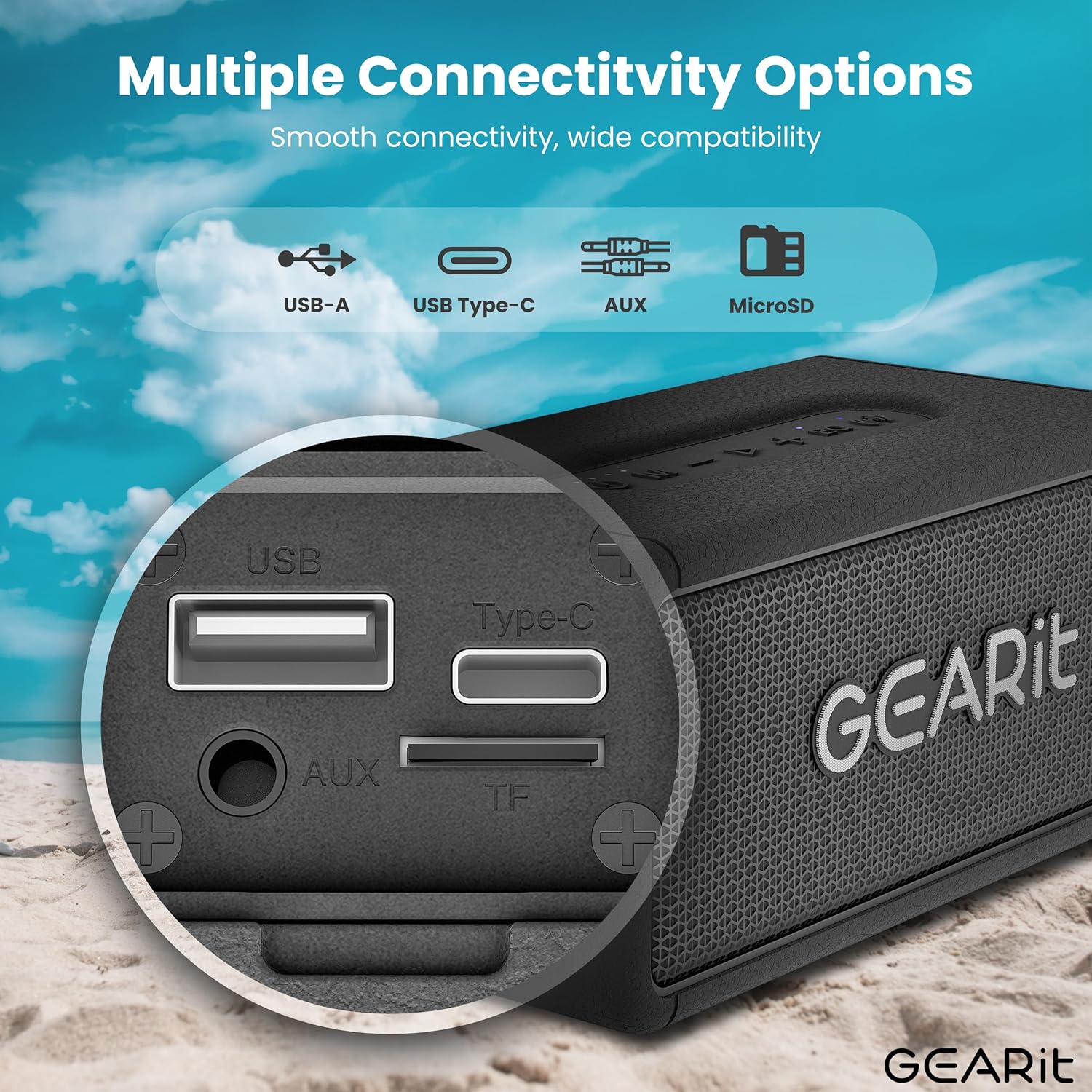
تصوير: هڪ تفصيلي view of the speaker's connectivity panel, showing the USB-A, USB Type-C, AUX, and MicroSD card slots.
- پاور بٽڻ: پاور آن/آف ڪرڻ لاءِ دٻايو ۽ رکو. بيٽري جي حالت چيڪ ڪرڻ لاءِ مختصر دٻايو.
- موڊ بٽڻ (M): Short press to switch between Bluetooth, AUX, and MicroSD modes.
- حجم گھٽ (-): حجم گهٽائڻ لاءِ مختصر دٻايو. پوئين ٽريڪ لاءِ ڊگهو دٻايو.
- هلائڻ/روڪڻ جو بٽڻ (>): موسيقي هلائڻ/روڪ ڪرڻ لاءِ مختصر دٻايو. ڪالن جو جواب ڏيڻ/ختم ڪرڻ لاءِ مختصر دٻايو. ڪالن کي رد ڪرڻ لاءِ ڊگهو دٻايو.
- حجم وڌايو (+): حجم وڌائڻ لاءِ مختصر دٻايو. ايندڙ ٽريڪ لاءِ ڊگهو دٻايو.
- EQ بٽڻ (EQ): Short press to cycle through EQ modes (Indoor/Outdoor).
- TWS Button (Wireless Icon): Short press to initiate TWS pairing.
- USB-C پورٽ: اسپيڪر چارج ڪرڻ لاء.
- AUX-ان پورٽ: وائرڊ آڊيو ڪنيڪشن لاءِ.
- MicroSD Card Slot (TF): مائڪرو ايس ڊي ڪارڊ مان سڌو سنئون موسيقي هلائڻ لاءِ.
- USB-A پورٽ: USB پلے بیک لاءِ.
4. سيٽ اپ
4.1 اسپيڪر کي چارج ڪرڻ
- مهيا ڪيل USB-C چارجنگ ڪيبل کي اسپيڪر جي USB-C پورٽ سان ڳنڍيو.
- ڪيبل جي ٻئي ڇيڙي کي USB پاور اڊاپٽر (شامل نه آهي) يا ڪمپيوٽر جي USB پورٽ سان ڳنڍيو.
- ايل اي ڊي انڊيڪيٽر چارجنگ اسٽيٽس ڏيکاريندو. مڪمل چارج ٿيڻ ۾ عام طور تي لڳ ڀڳ 3-4 ڪلاڪ لڳن ٿا.
4.2 پاور آن/آف
- پاور آن ڪرڻ لاءِ، پاور بٽڻ کي دٻايو ۽ رکو جيستائين توهان کي ٻڌڻ وارو اشارو نه ٻڌي.
- پاور آف ڪرڻ لاءِ، پاور بٽڻ کي ٻيهر دٻايو ۽ رکو جيستائين اسپيڪر بند نه ٿئي.
4.3 بلوٽوٽ جوڙي
اسپيڪر خودڪار طريقي سان بلوٽوٿ پيئرنگ موڊ ۾ داخل ٿيندو جڏهن پهريون ڀيرو پاور آن ڪيو ويندو يا جيڪڏهن ڪو به ڊوائيس ڳنڍيل نه هوندو.
- Ensure the speaker is powered on and in Bluetooth mode (blue LED blinking).
- پنهنجي ڊوائيس (اسمارٽ فون، ٽيبليٽ، وغيره) تي، بلوٽوٿ کي فعال ڪريو ۽ موجود ڊوائيسز جي ڳولا ڪريو.
- Select "GEARit Speaker" from the list.
- Once connected, the blue LED will remain solid, and you will hear a confirmation tone.

Image: An illustration of the Bluetooth 5.3 chip, emphasizing stable and fast connectivity.
4.4 ٽرو وائرليس اسٽيريو (TWS) پيئرنگ
For an enhanced stereo experience, you can pair two GEARit Portable Bluetooth Wireless Speakers together.
- پڪ ڪريو ته ٻئي اسپيڪر آن آهن ۽ ڪنهن ٻئي بلوٽوٿ ڊوائيس سان ڳنڍيل نه آهن.
- On one speaker (this will be the primary speaker), short press the TWS button (wireless icon). It will emit a pairing tone.
- پرائمري اسپيڪر خودڪار طريقي سان سيڪنڊري اسپيڪر جي ڳولا ڪندو ۽ ان سان ڳنڍجي ويندو.
- Once paired, both speakers will emit a confirmation tone, and the TWS indicator on both speakers will light up.
- هاڻي، پنهنجي ڊوائيس کي بلوٽوٿ ذريعي پرائمري اسپيڪر سان ڳنڍيو جيئن سيڪشن 4.3 ۾ بيان ڪيو ويو آهي.

Image: Two GEARit speakers set up for True Wireless Stereo (TWS) pairing, providing an immersive audio experience for a group.
4.5 ٻيا ڪنيڪٽوٽي آپشن
- AUX-in: Connect an audio device using the 3.5mm AUX cable to the AUX-in port. The speaker will automatically switch to AUX mode.
- MicroSD ڪارڊ: Insert a MicroSD card with music files into the TF slot. The speaker will automatically switch to MicroSD mode and begin playback.
- USB پلے بیک: موسيقي سان گڏ هڪ USB ڊرائيو داخل ڪريو fileUSB-A پورٽ ۾ داخل ٿئي ٿو. اسپيڪر خودڪار طريقي سان USB موڊ ۾ سوئچ ڪندو ۽ پلے بیک شروع ڪندو.

Image: The speaker's versatile input options, including USB-A, USB Type-C, MicroSD, and AUX, for broad compatibility.
5. آپريٽنگ هدايتون
5.1 بنيادي پلے بیک
- راند/روڪ: Play/Pause بٽڻ کي مختصر دٻايو.
- حجم جي ترتيب: واليوم اپ (+) يا واليوم ڊائون (-) بٽڻن کي مختصر دٻايو.
- اڳيون / پويون ٽريڪ Long press the Volume Up (+) for the next track or Volume Down (-) for the previous track.
5.2 EQ موڊس
The speaker features two Equalizer (EQ) modes to optimize sound for different environments.
- Short press the EQ button to switch between اندريون ۽ ٻاھران طريقا.
- اندروني موڊ: هڪ متوازن آواز پرو مهيا ڪري ٿوfile suitable for enclosed spaces.
- ٻاهرين موڊ: Enhances bass and volume for better projection in open environments.

Image: Visual representation of DSP Technology, highlighting 40W peak power and the two EQ modes (Indoor & Outdoor).
5.3 هٿ کان سواءِ ڪالنگ
When connected via Bluetooth, you can manage phone calls directly from the speaker.
- جواب/آخر ڪال: Play/Pause بٽڻ کي مختصر دٻايو.
- ڪال رد ڪريو: پلي/پاز بٽڻ کي ڊگھو دٻايو.
5.4 پاڻي جي مزاحمت (IPX6)
The GEARit speaker is IPX6 water-resistant, meaning it can withstand powerful water jets. It is suitable for use outdoors, by the pool, or at the beach. اسپيڪر کي پاڻي ۾ نه ٻوڙيو. Ensure the port cover is securely closed before exposure to water.

Image: The GEARit speaker being splashed with water, showcasing its IPX6 water-resistant design.

Image: A graphic emphasizing the IPX6 water-resistant feature of the speaker, suitable for wet environments.
5.5 بيٽري جي زندگي
اسپيڪر هڪ ڀيرو چارج ڪرڻ تي 20 ڪلاڪن تائين راند جو وقت فراهم ڪري ٿو، جيڪو حجم جي سطح ۽ آڊيو مواد تي منحصر آهي.

Image: The GEARit speaker in a natural outdoor environment, symbolizing its long-lasting battery for extended use.
6. سار سنڀال
- صفائي: صاف ڪريو اسپيڪر کي نرميءَ سان ، ڊيamp ڪپڙو. استعمال نه ڪريو سخت ڪيميائي يا گھڻائي صاف ڪندڙ.
- اسٽوريج: اسپيڪر کي سڌي سج جي روشني ۽ انتهائي گرمي پد کان پري ٿڌي، سڪل جاءِ تي رکو.
- بيٽري جي سنڀال: To prolong battery life, fully charge the speaker before long periods of inactivity. Avoid completely draining the battery frequently.
- پورٽ ڪَوَر: Always ensure the port cover is securely closed to maintain water resistance.
7. مسئلا حل ڪرڻ
- Speaker not turning on: پڪ ڪريو ته بيٽري چارج ٿيل آهي. USB-C ڪيبل استعمال ڪندي اسپيڪر کي پاور سورس سان ڳنڍيو.
- بلوٽوٿ ذريعي جوڙي نه ٿو سگهجي:
- Ensure the speaker is in Bluetooth pairing mode (blue LED blinking).
- Make sure Bluetooth is enabled on your device and it is within range (up to 33 feet/10 meters).
- Forget "GEARit Speaker" from your device's Bluetooth list and try pairing again.
- If multiple Bluetooth devices are nearby, turn them off to avoid interference.
- آواز ڪونهي:
- اسپيڪر ۽ پنهنجي ڳنڍيل ڊوائيس ٻنهي تي واليوم ليول چيڪ ڪريو.
- Ensure the correct input mode (Bluetooth, AUX, MicroSD, USB) is selected.
- جيڪڏهن AUX استعمال ڪري رهيا آهيو، پڪ ڪريو ته ڪيبل مڪمل طور تي داخل ٿيل ۽ ڪم ڪندڙ آهي.
- TWS جوڙڻ ناڪام ٿيو:
- Ensure both speakers are not connected to any other Bluetooth device before initiating TWS pairing.
- جوڙڻ دوران اسپيڪرن کي هڪ ٻئي جي ويجهو رکو.
- ٻنهي اسپيڪرن کي ري سيٽ ڪرڻ ۽ TWS جوڙڻ واري عمل کي ورجائڻ جي ڪوشش ڪريو.
8. وضاحتون
| خاصيت | تفصيل |
|---|---|
| ماڊل نالو | Portable Bluetooth Speakers Wireless |
| شيون ماڊل نمبر | GI-SPKR-BT-IN-BK |
| برانڊ | GEARit |
| اسپيڪر جو قسم | ٻاھران |
| اسپيڪر وڌ ۾ وڌ آئوٽ پاور | 40 واٽ |
| رابطي ٽيڪنالاجي | معاون، بلوٽوٿ |
| وائرليس ڪميونيڪيشن ٽيڪنالاجي | بلوٽوٿ |
| آڊيو آئوٽ پٽ موڊ | اسٽيريو |
| ڪنٽرول جو طريقو | App (referring to general Bluetooth control) |
| پنروڪ درجه بندي | IPX6 |
| طاقت جو ذريعو | بيٽري سان هلندڙ (1 ليتيم پوليمر بيٽري گھربل) |
| شيءِ جو وزن | 1.61 پائونڊ |
| پيداوار جي ماپ | 2.95"ڊي x 6.61"ڊي x 3.39"ايڇ |
| شامل اجزاء | Power Cable (USB-C to USB-A), AUX Cable |

Image: The GEARit Portable Bluetooth Wireless Speaker, showcasing ان جي ڪمپيڪٽ ۽ پائيدار ڊيزائن.

Image: The GEARit speaker conveniently attached to a backpack, highlighting its portability for outdoor activities.
9. سرڪاري پراڊڪٽ وڊيو
وڊيو: هڪ سرڪاري پراڊڪٽ وڊيو شوڪasing the GEARit Portable Bluetooth Speaker, highlighting its IPX6 water resistance and 40W loud audio output.
10. وارنٽي ۽ سپورٽ
The GEARit Portable Bluetooth Wireless Speaker comes with a Limited Warranty. For detailed warranty information, please refer to the warranty card included in your package or visit the official GEARit webسائيٽ.
For technical support, troubleshooting assistance, or any product-related inquiries, please contact GEARit customer service through their official webسائيٽ يا توهان جي پراڊڪٽ دستاويزن ۾ ڏنل رابطي جي معلومات.
آن لائن سپورٽ: Visit the GEARit Store on Amazon