

1. پراڊڪٽ ختمview
The OWON HDS241 is a versatile 3-in-1 handheld device integrating a single-channel oscilloscope, a 24000-count digital multimeter, and a 100kHz signal generator. Designed for both outdoor and indoor use, it offers a compact form factor with powerful measurement capabilities for various electrical and electronic applications.

Image 1.1: The OWON HDS241 device, highlighting its oscilloscope, multimeter, and signal generator functions.
2. حفاظت جي ڄاڻ
Before using the OWON HDS241, please read and understand all safety instructions to prevent electric shock, injury, or damage to the device. Keep this manual for future reference.
- عام حفاظت: Always use the device within its specified voltage and current limits. Do not operate the device in wet or damp حالتون.
- تحقيق جي حفاظت: Ensure probes are correctly connected and rated for the measurement being performed. Avoid touching exposed wiring or components when the device is powered on.
- بيٽري جي حفاظت: Use only the specified battery type. Do not disassemble, crush, or expose the battery to extreme temperatures.
- سار سنڀال: Refer all servicing to qualified personnel. Do not attempt to repair the device yourself.
3. اهم خاصيتون
- ڊجيٽل ملٽي ميٽر: 4 1/2 digit True RMS digital multimeter for measuring AC/DC voltage/current, resistance, diode, capacitance, and continuity. Maximum input voltage is AC 750V, DC 1000V.
- Signal Waveform Generator: 1-channel 100 kHz generator supporting sine, square, ramp, and pulse wave outputs. Maximum output amplitude is 2.5 Vpp.
- آسيلو اسڪوپ: Waveform refresh rate up to 10,000 wfms/s, 40MHz bandwidth, and real-time sampling rate up to 250MSa/s. Features auto-setup, multiple measurement functions, 8K record length, cursor measurement, and slow scan mode for long-term signal monitoring.
- ڪمپيڪٽ ڊيزائن: Portable form factor with a 3.5-inch high-definition color LCD screen, suitable for various environments.
- ڊگھي بيٽري زندگي: Low-power design with a 2000 mAh high-capacity lithium battery and standard Type-C port for charging and power bank compatibility.
4. پيڪيج مواد
The standard package for the OWON HDS241 includes:
- OWON HDS241 Handheld Oscilloscope Unit
- Test Leads for Multimeter
- Oscilloscope تحقيق
- USB قسم-سي ڪيبل
- استعمال ڪندڙ جو دستياب (ھي دستاويز)
Note: Additional accessories such as a BNC-to-alligator clip cable or carrying case may need to be purchased separately.
5. ڊوائيس لي آئوٽ ۽ ڪنٽرول
Familiarize yourself with the physical components and controls of the HDS241.

تصوير 5.1: اڳيان ۽ پاسي view of the OWON HDS241 with key controls and ports labeled. Labels include: signal input connector, display area, multifunction keys, channel key, mode switching key, system settings, save settings, power button, relative value/activation menu key, multimeter input port, horizontal time base setting/signal adjustment, return key, range switch/measurement menu key, arrow keys, auto range/auto setting key, hold value/Stop/Run key, probe compensation output (2.5V/1kHz square wave or signal generator output), USB charging/communication interface, approximate weight (0.6 kg host, excluding battery), gross weight (1.2 kg).
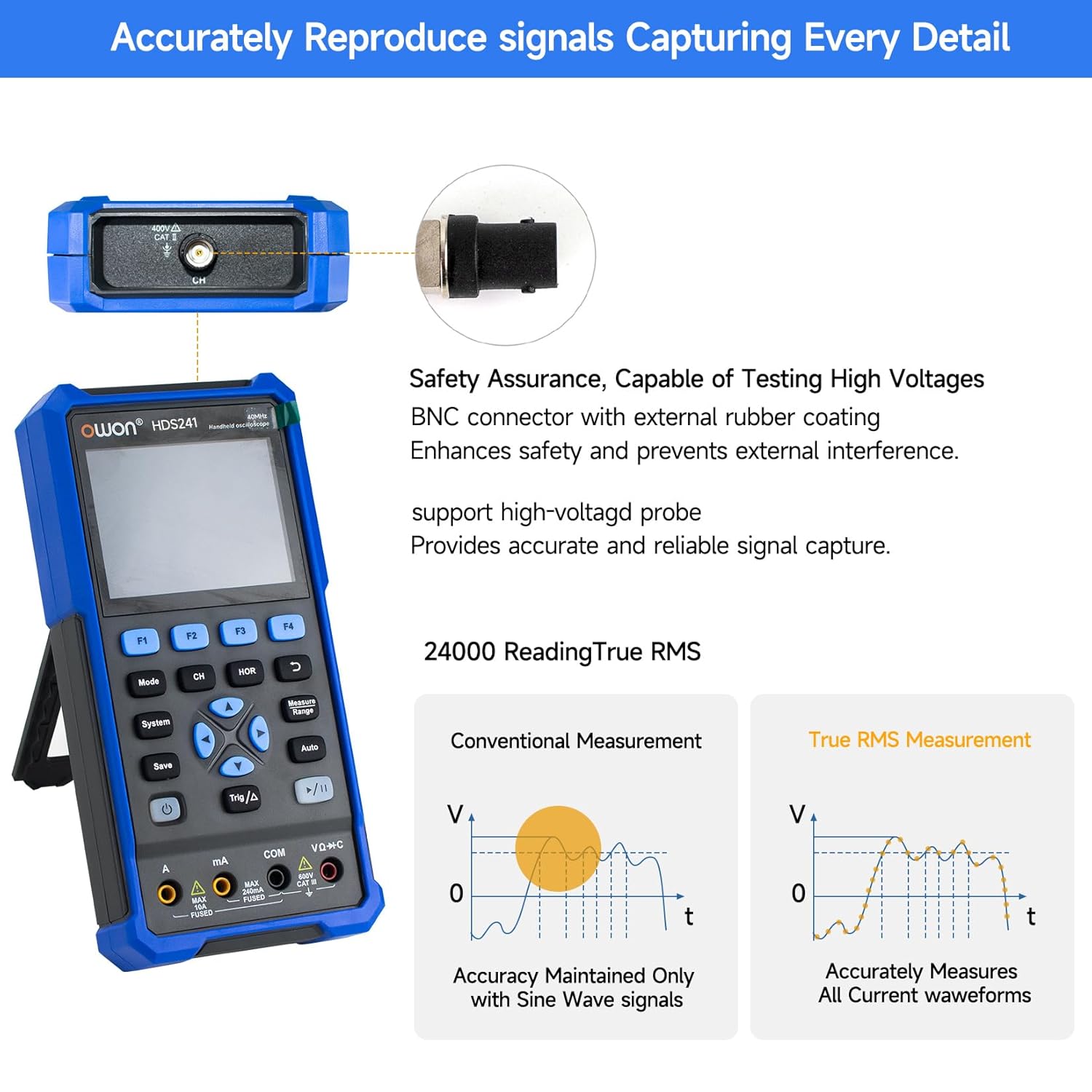
Image 5.2: Detail of the BNC connector, designed for safety and signal integrity, with external rubber coating.
6. شروعاتي سيٽ اپ
6.1 ڊوائيس چارج ڪرڻ
The HDS241 is equipped with a built-in 2000 mAh lithium battery. Before first use, fully charge the device using the provided USB Type-C cable and a compatible power adapter (not included) or a computer USB port.
- Connect the USB Type-C cable to the device's Type-C port.
- ڪيبل جي ٻئي پڇاڙي کي USB پاور ماخذ سان ڳنڍيو.
- چارجنگ اشارو ڏيکاريندو چارج جي حالت.

Image 6.1: The USB Type-C charging port and internal battery compartment, emphasizing long-lasting performance.
6.2 پاور آن/آف
کي دٻايو ۽ رکو طاقت ڊوائيس کي آن يا بند ڪرڻ لاءِ بٽڻ.
7. آپريٽنگ موڊس
The HDS241 features three primary operating modes: Oscilloscope, Multimeter, and Signal Generator. Press the موڊ button to switch between these functions.
7.1 آسيلو اسڪوپ موڊ
In Oscilloscope mode, the device displays real-time waveforms, allowing for detailed analysis of electrical signals. Connect the oscilloscope probe to the BNC connector on the top of the device.
- Auto-Setup: کي دٻايو خودڪار button for automatic scaling and positioning of the waveform.
- ماپون: استعمال ڪريو ماپ menu (accessed via F1) to select automatic measurements like Frequency, Period, Amplitude, Max, Min, Peak-to-Peak, and RMS.
- ڪرسر جي ماپ: Activate cursor measurements (accessed via F2) to manually measure voltage (ΔV) and time (ΔT) differences between points on the waveform.
- ٽرگر سيٽنگون: Adjust trigger type, level, and mode using the Trig/Δ بٽڻ
- Horizontal/Vertical Controls: Use the navigation arrows to adjust time base (horizontal) and voltage scale (vertical).

تصوير 7.1.1: اڳوڻيamples of oscilloscope display features including dual sampling mode, high refresh rate, 8 types of auto-measurements, and cursor measurements.

تصوير 7.1.2: اڳوڻيamples of actual measured waveforms, demonstrating the oscilloscope's signal capture capabilities for different signal types.
7.2 ملٽي ميٽر موڊ
In Multimeter mode, the HDS241 functions as a digital multimeter. Connect the test leads to the appropriate input ports (VΩ+C, COM, A, mA) at the bottom of the device.
- فنڪشن جي چونڊ: استعمال ڪريو موڊ button to cycle through measurement types (Voltage, Current, Resistance, Capacitance, Diode, Continuity).
- خودڪار رينجنگ: The device supports auto-ranging for convenient measurement.
- ڊيٽا هولڊ: استعمال ڪريو بچايو button or a dedicated hold function (if available) to freeze the current reading.
7.3 سگنل جنريٽر موڊ
The Signal Generator mode allows the device to output various waveforms. Connect the output to the circuit under test using the appropriate cable (e.g., BNC to alligator clips, not included).
- Waveform Selection: Use the F-keys to select sine, square, ramp, or pulse waveforms.
- پيٽرول جي ترتيب: Adjust frequency and amplitude using the navigation arrows. The maximum output amplitude is 2.5 Vpp.
8. ڊيٽا جو انتظام
The HDS241 supports data transfer to a computer via its USB Type-C port for further analysis and record-keeping.
- PC سان ڳنڍڻ: Use the provided USB Type-C cable to connect the device to your computer.
- سافٽ ويئر: Refer to the OWON website for any necessary drivers or software to facilitate data transfer and analysis.
- ڊيٽا محفوظ ڪرڻ: استعمال ڪريو بچايو button to store waveform images, settings, or measurement data directly on the device.
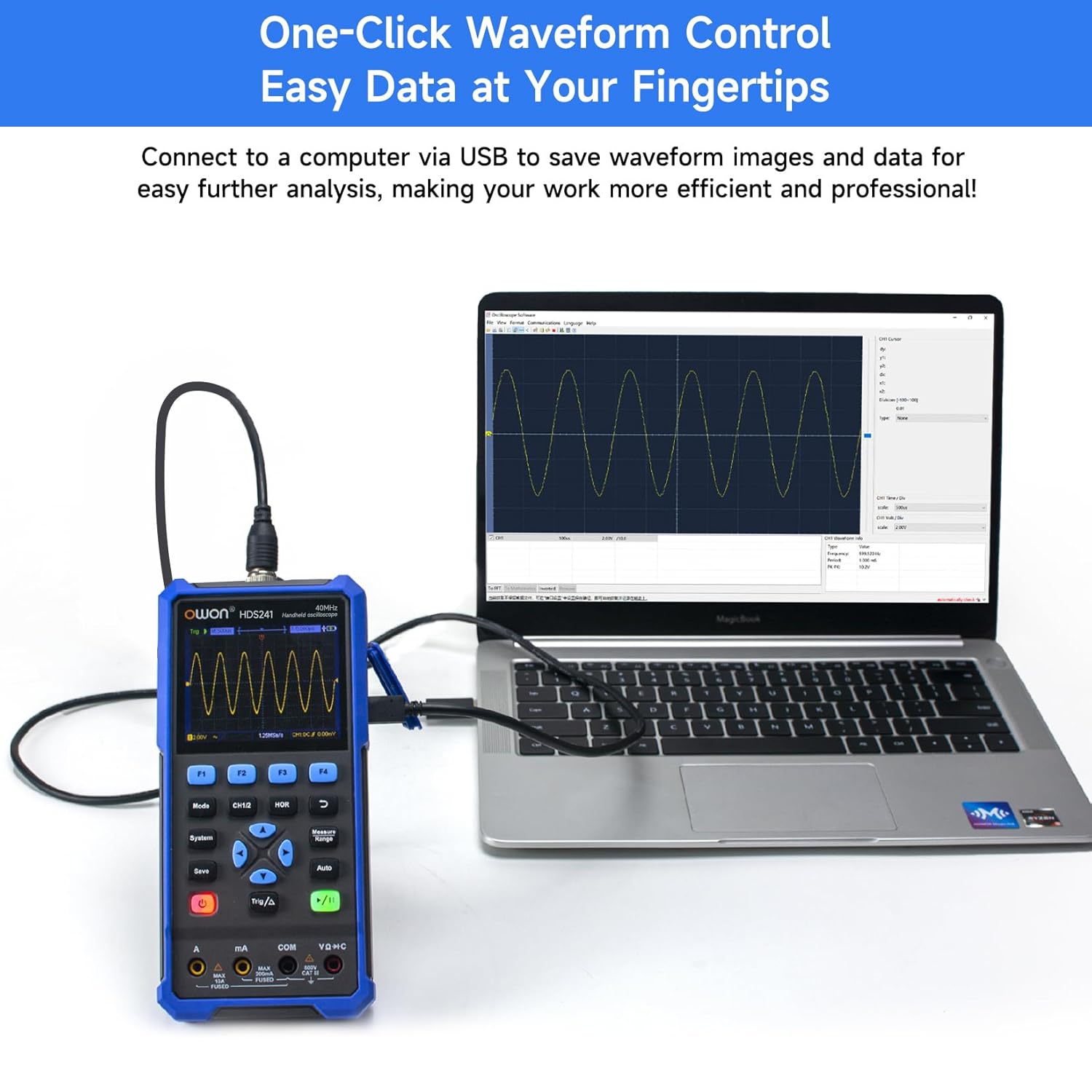
Image 8.1: The OWON HDS241 connected to a computer for data transfer and analysis, enabling easy waveform control.
9. سار سنڀال
- صفائي: ڊوائيس کي نرم، سڪل ڪپڙي سان صاف ڪريو. رگڙيندڙ صاف ڪندڙ يا محلول استعمال نه ڪريو.
- اسٽوريج: ڊوائيس کي سڌي سج جي روشني ۽ انتهائي گرمي پد کان پري ٿڌي، سڪل جاءِ تي رکو.
- بيٽري جي سنڀال: ڊگهي عرصي تائين رکڻ لاءِ، پڪ ڪريو ته بيٽري جزوي طور تي چارج ٿيل آهي (تقريبن 50٪) ۽ بيٽري جي صحت کي برقرار رکڻ لاءِ هر ڪجهه مهينن ۾ ان کي ري چارج ڪريو.
- جاچ ڪيليبريشن: Periodically calibrate the oscilloscope probe using the dedicated probe compensation output to ensure accurate measurements.
10. مسئلا حل ڪرڻ
| مسئلو | ممڪن سبب | حل |
|---|---|---|
| ڊوائيس تي طاقت نه آهي. | گھٽ يا ختم ٿيل بيٽري. | Connect the device to a power source using the USB Type-C cable and allow it to charge. |
| No waveform displayed in oscilloscope mode. | Probe not connected correctly; signal too small or too large; incorrect time base or voltage اسڪيل. | Ensure probe is securely connected. Press خودڪار for automatic setup. Adjust vertical and horizontal scales manually. Check trigger settings. |
| Multimeter readings are inaccurate. | Test leads not properly connected; incorrect measurement function selected; external interference. | Verify test lead connections. Ensure the correct measurement mode (voltage, current, resistance) is selected. Minimize external electrical noise. |
| Signal generator output is not as expected. | Incorrect waveform type, frequency, or amplitude set. | Check the selected waveform, frequency, and amplitude settings in the signal generator menu. |
11. ٽيڪنيڪل وضاحتون
Oscilloscope Specifications:
| پيرا ميٽر | قدر |
|---|---|
| بينڊوڊٿ | 40MHz |
| چينل | 1 |
| Sampلنگ جي شرح | 250MSa/s |
| حاصل ڪرڻ جو طريقو | Sampلي، چوٽي جي سڃاڻپ |
| رڪارڊ ڊگھائي | Max. 8K |
| ڏيکاريو | 3.5 انچ LCD |
| ويوفارم ريفريش ريٽ | 10,000 wfms/s |
| داخلا جوڙي | ڊي سي، اي سي، گرائونڊ |
| ان پٽ رڪاوٽ | 1 MΩ±2%، 16 pF±10 pF سان متوازي ۾ |
| جاچ پڙتال | 1X، 10X، 100X، 1000X |
| وڌ ۾ وڌ ان پٽ Voltage | 400V (DC + AC, PK-PK) |
| حساسيت جو حل | 10mV/div-10V/div |
| عمودي قرارداد | 8 بٽ |
| افقي اسڪيل | 5ns/div-1000s/div, step 1-2-5 |
| ٽرڪ جو قسم | کنڊ |
| ٽرگر موڊ | خودڪار ، عام ، اڪيلو |
| خودڪار ماپ | عرصو، فريڪوئنسي، اوسط، PK-PK، وڌ ۾ وڌ، منٽ، Amplitude, RMS |
| ڪرسر جي ماپ | ΔV, ΔT |

Image 11.1: Detailed oscilloscope specifications.
Digital Multimeter Specifications:
| پيرا ميٽر | قدر |
|---|---|
| ڏيکاريل ڳڻپ | 4½ digits (max 24000 counts) |
| ٽيسٽ موڊس | جلدtagاي، ڪرنٽ، مزاحمت، گنجائش، ڊاءِوڊ، تسلسل |
| وڌ ۾ وڌ ان پٽ Voltage | AC 750V، DC 1000V |
| وڌ ۾ وڌ ان پٽ ڪرنٽ | AC 10A، DC 10A |
| خودڪار رينج | ها |
| صحيح RMS | ها |

Image 11.2: Detailed digital multimeter specifications.
Signal Waveform Generator Specifications:
| پيرا ميٽر | قدر |
|---|---|
| موج | سين، اسڪوائر، آرamp، نبض |
| ٻاھر نڪرندڙ فريڪئنسي | 10Hz-100KHz |
| Ampروشني | 2Vpp-2.5Vpp |

Image 11.3: Detailed signal waveform generator specifications.
عام وضاحتون:
- طول و عرض: 9.6 x 3.8 x 19.8 سينٽي
- شيء جو وزن: 1.2 ڪلوگرام
- طاقت جو ذريعو: Battery Powered (2000 mAh Lithium Battery)
- رنگ: نيرو
- سرٽيفڪيشن: CE, True RMS
12. وارنٽي ۽ سپورٽ
OWON products are designed for reliability and performance. For warranty information, technical support, or service inquiries, please refer to the official OWON webسائيٽ تي وڃو يا پنهنجي مقامي ورهائيندڙ سان رابطو ڪريو.
- وارنٽي مدت: Standard manufacturer's warranty applies. Please check your purchase documentation for specific terms and duration.
- ٽيڪنيڪل سپورٽ: Visit the OWON official website for FAQs, software downloads, and contact information for technical assistance.
- واپسي: Refer to the retailer's return policy for details on product returns and exchanges.