
1. تعارف
Welcome to the user manual for your new XIAOMI Redmi Note 14 Pro+ 5G Smartphone. This guide provides essential information on setting up, operating, and maintaining your device. Please read it carefully to ensure optimal performance and longevity of your smartphone.
2. پيڪيج مواد
تصديق ڪريو ته توھان جي پيڪيج ۾ ھيٺيون شيون شامل آھن:
- XIAOMI Redmi Note 14 Pro+ 5G اسمارٽ فون
- USB ڪيبل
- تڪڙي شروعات جي ھدايت (علائقي جي لحاظ کان مختلف ٿي سگھي ٿي)
- سم ڪڍڻ وارو اوزار (علائقي جي لحاظ کان مختلف ٿي سگهي ٿو)
Note: A charger is not included in the package. Please use a compatible 120W HyperCharge adapter for optimal charging.
3. ڊوائيس اوورview
Familiarize yourself with the physical components of your Redmi Note 14 Pro+ 5G.
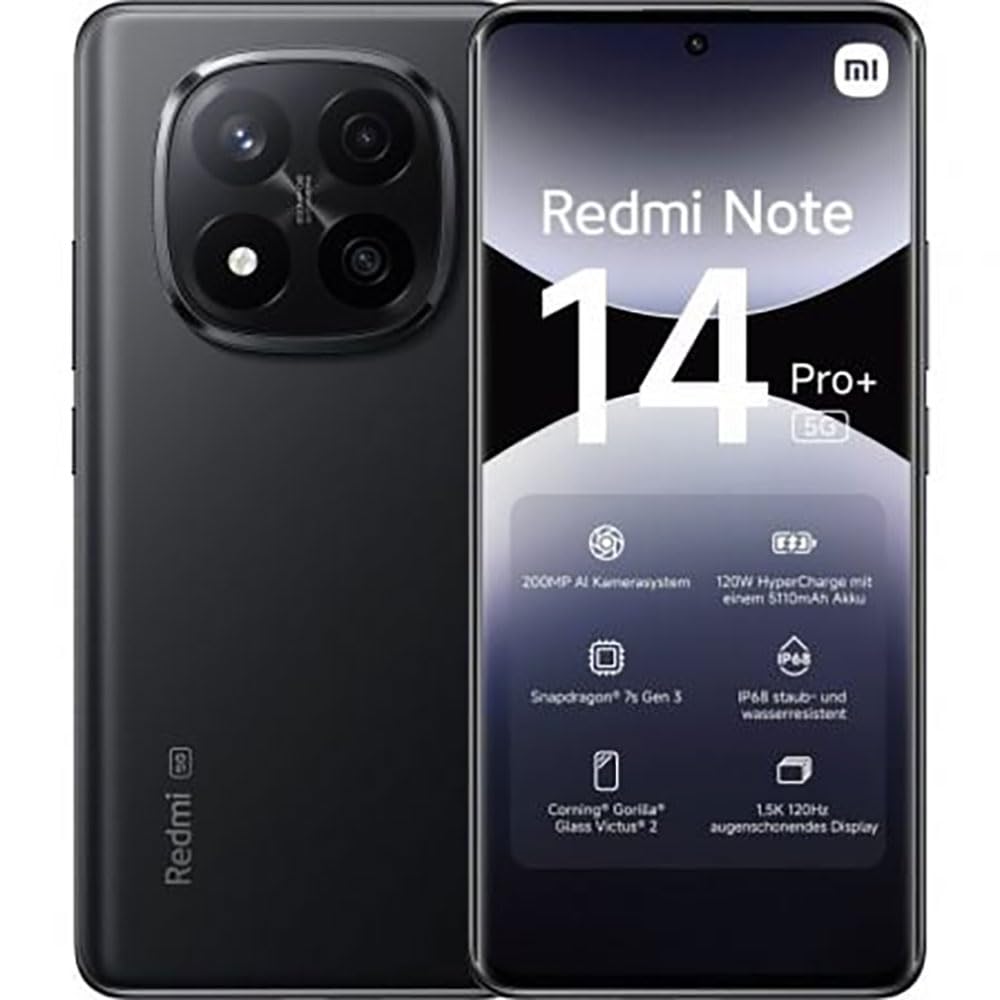
The image displays the front and back of the XIAOMI Redmi Note 14 Pro+ 5G smartphone. The front shows the display with 'Redmi Note 14 Pro+ 5G', '200 Megapixels', and '256 GB' text. The back features a prominent camera module with multiple lenses and the 'Redmi 5G' branding.
اهم اجزاء:
- سامهون واري ڊسپلي: 6.67-inch 1.5K 120Hz AMOLED display with Corning Gorilla Glass Victus 2.
- پوئين ڪئميرا ماڊل: Houses the 200MP Pro-Grade AI Camera system.
- پاور بٽڻ: پاسي تي واقع، ڊوائيس کي پاور آن/آف ۽ جاڳائڻ/سُلائڻ لاءِ استعمال ٿيندو آهي.
- حجم بٽڻ: پاسي تي واقع، ميڊيا ۽ ڪال جي مقدار کي ترتيب ڏيڻ لاءِ استعمال ڪيو ويندو آهي.
- USB قسم-سي پورٽ: چارج ڪرڻ ۽ ڊيٽا جي منتقلي لاء.
- سم ڪارڊ سلاٽ: Supports Dual SIM Nano SIM cards.
- ڳالهائيندڙ: Stereo speakers for audio output.
4. سيٽ اپ
4.1. سم ڪارڊ داخل ڪرڻ
- پنهنجي ڊوائيس جي پاسي تي سم ڪارڊ ٽري ڳوليو.
- Insert the SIM eject tool into the small hole next to the tray and press firmly until the tray pops out.
- پنهنجا نانو سم ڪارڊ (ن) کي ٽري ۾ سون جي رابطن کي هيٺئين طرف رکي رکو. صحيح رخ کي يقيني بڻايو.
- نرميءَ سان ٽري کي سلاٽ ۾ واپس دٻايو جيستائين اهو جاءِ تي ڪلڪ نه ڪري.
4.2. توهان جي ڊوائس تي پاور لڳائڻ
کي دٻايو ۽ رکو پاور بٽڻ on the side of the phone until the XIAOMI logo appears on the screen. Follow the on-screen instructions to complete the initial setup, including connecting to Wi-Fi, setting up your Google account, and configuring security features like fingerprint recognition.
4.3. شروعاتي چارج
It is recommended to fully charge your device before first use. Connect the USB Type-C cable to the phone and a compatible 120W HyperCharge adapter (not included) to a power outlet.
5. توهان جي اسمارٽ فون کي هلائڻ
5.1. بنيادي نيويگيشن
- ٽچ اسڪرين: چونڊڻ لاءِ ٽيپ ڪريو، اسڪرول ڪرڻ لاءِ سوائپ ڪريو، زوم ڪرڻ لاءِ پنچ ڪريو.
- گھر جي اسڪرين: ايپس ۽ ويجيٽس لاءِ توهان جو مرڪزي مرڪز.
- نوٽيفڪيشن پينل: اطلاعن ۽ تڪڙي سيٽنگن تائين رسائي حاصل ڪرڻ لاءِ اسڪرين جي چوٽي کان هيٺ سوائپ ڪريو.
- ايپ ڊراور: Swipe up from the bottom of the screen (or tap the app drawer icon) to view سڀ انسٽال ٿيل ايپليڪيشنون.
5.2. پاور آن/آف ۽ ريسٽارٽ ڪريو
- جي طرف بجلي بند: Press and hold the Power Button until the power menu appears, then select "Power off."
- جي طرف ٻيهر شروع ڪريو: Press and hold the Power Button until the power menu appears, then select "Restart."
5.3. سيڪيورٽي خاصيتون
Your device supports various security options:
- فنگر پرنٽ جي سڃاڻپ: جلدي ۽ محفوظ ان لاڪنگ لاءِ پنهنجا فنگر پرنٽس رجسٽر ڪريو.
- منهن جو تالو: ڊوائيس کي ان لاڪ ڪرڻ لاءِ پنهنجو چهرو استعمال ڪريو.
- پن/نمونہ/پاسورڊ: Standard security methods.
انهن سيٽنگن تائين رسائي حاصل ڪريو ذريعي سيٽنگون > سيڪيورٽي ۽ رازداري.
6. ڪئميرا جون خاصيتون
The Redmi Note 14 Pro+ 5G features a powerful 200MP Pro-Grade AI Camera system designed to enhance your photography experience.
- 200 ايم پي مين ڪيمرا: Capture highly detailed images with optical image stabilization (OIS).
- Multiple Camera Modes: Includes automatic, scene, portrait, and manual modes for versatile shooting.
- Dual LED Flash: Provides enhanced lighting in low-light conditions.
- سامهون ڪئميرا: A 20MP front sensor for high-quality selfies and video calls.
- وڊيو رڪارڊنگ: Supports up to 8K video capture at 120 fps.
7. AI خاصيتون
Leverage the integrated AI functionalities for a smarter user experience:
- AI Erase Pro: Intelligently remove unwanted objects or people from your photos.
- AI تصوير جي توسيع: Expand the boundaries of your images using AI.
- AI Notes: Smart note-taking capabilities.
- AI Subtitles: Generate subtitles for videos or audio in real-time.
- AI Recorder: Enhanced voice recording with AI features.
- AI Interpreter: حقيقي وقت ۾ ٻولي جو ترجمو.
- جوزا: Integrated AI assistant.
- Circle to Search by Google: پنهنجي اسڪرين تي شين جي چوڌاري گول ڪري جلدي معلومات جي ڳولا ڪريو.
8. چارج ڪرڻ
Your Redmi Note 14 Pro+ 5G supports 120W HyperCharge technology for rapid charging.
- بيٽري جي گنجائش: 5110mAh Lithium-polymer battery.
- چارج ڪرڻ: Use the provided USB Type-C cable with a compatible 120W power adapter (sold separately) for optimal charging speeds.
- بيٽري جي زندگي: Expect up to 20 hours of talk time. Actual battery life may vary based on usage.
Always use certified charging accessories to prevent damage to your device.
9. سار سنڀال
9.1. پاڻي ۽ مٽيءَ جي مزاحمت
ڊوائيس ۾ هڪ خاصيت آهي IP68 درجه بندي for dust and water resistance. This means it is protected against dust ingress and can withstand immersion in water up to 1.5 meters for 30 minutes. However, this resistance is not permanent and may decrease over time with normal wear. Avoid exposing the device to hot water, saltwater, or other liquids.
9.2. توهان جي ڊوائيس کي صاف ڪرڻ
- اسڪرين ۽ جسم کي صاف ڪرڻ لاءِ نرم، لِنٽ کان پاڪ ڪپڙو استعمال ڪريو.
- گھڙڻ وارا صاف ڪندڙ، سالوينٽس، يا ايروسول اسپري استعمال ڪرڻ کان پاسو ڪريو.
- If the device gets wet, wipe it thoroughly with a clean, dry cloth before charging or using ports.
9.3. سافٽ ويئر اپڊيٽ
باقاعدي طور تي سافٽ ويئر اپڊيٽس جي جانچ ڪريو ۽ انسٽال ڪريو ته جيئن پڪ ڪري سگهجي ته توهان جي ڊوائيس ۾ جديد خاصيتون، سيڪيورٽي پيچ، ۽ ڪارڪردگي بهتري آهي. ڏانهن وڃو سيٽنگون > فون بابت > MIUI ورجن اپڊيٽ لاء چيڪ ڪرڻ لاء.
10. مسئلا حل ڪرڻ
جيڪڏهن توهان کي پنهنجي ڊوائيس سان مسئلا درپيش اچن ٿا، ته هيٺ ڏنل عام حل آزمايو:
- ڊوائيس چالو نه آهي: پڪ ڪريو ته بيٽري چارج ٿيل آهي. گهٽ ۾ گهٽ 15 منٽن لاءِ چارجر سان ڳنڍيو، پوءِ پاور آن ڪرڻ جي ڪوشش ڪريو.
- ايپس جو ڪريش ٿيڻ يا منجمد ٿيڻ: مسئلو واري ايپ کي بند ڪريو ۽ ان کي ٻيهر کوليو. جيڪڏهن مسئلو برقرار رهي ته، پنهنجو فون ٻيهر شروع ڪريو.
- خراب نيٽ ورڪ ڪنيڪشن: Check your SIM card is correctly inserted. Try toggling Airplane Mode on and off. If the issue persists, contact your network provider.
- بيٽري جلدي ختم ٿيڻ: اسڪرين جي چمڪ گھٽايو، غير استعمال ٿيل ايپس بند ڪريو، ۽ استعمال ۾ نه هجڻ تي GPS يا بلوٽوٿ جهڙيون غير ضروري خاصيتون بند ڪريو.
- اسڪرين غير جوابده: Force restart your device by holding the Power Button for approximately 10-15 seconds.
وڌيڪ پيچيده مسئلن لاءِ، سرڪاري XIAOMI سپورٽ جو حوالو ڏيو. webسائيٽ يا ڪسٽمر سروس سان رابطو ڪريو.
11. وضاحتون
| خاصيت | تفصيل |
|---|---|
| برانڊ | XIAOMI |
| ماڊل نالو | ريڊمي نوٽ 14 پرو + 5G |
| آپريٽنگ سسٽم | Android 14 |
| سي پي يو ماڊل | سنيپراگن 7 جنرل 3 |
| رام | 8 جي بي |
| رکڻ جي گنجائش | 256 جي بي |
| اسڪرين جي ماپ | 6.67 انچ |
| ڊسپلي قرارداد | 2712 x 1220 پکسلز |
| ريفريش جي شرح | 120 هز |
| ريئر ڪئميرا ريزوليوشن | 200 Megapixels (with OIS) |
| سامهون ڪئميرا ريزوليوشن | 20 ميگا پکسل |
| بيٽري جي گنجائش | 5110 mAh |
| چارج ٽيڪنالاجي | 120W هائپر چارج |
| پاڻي جي مزاحمت | IP68 |
| سيلولر ٽيڪنالاجي | 5G |
| سم ڪارڊ جو قسم | Nano SIM (Dual SIM) |
| رابطي | USB قسم-سي |
12. وارنٽي ۽ سپورٽ
12.1. ٺاهيندڙ جي وارنٽي
Your XIAOMI Redmi Note 14 Pro+ 5G Smartphone comes with a 2 سالن جي ٺاهيندڙ جي وارنٽي. هي وارنٽي عام استعمال هيٺ مواد ۽ ڪاريگري ۾ خرابين کي ڍڪيندي آهي. وارنٽي دعوائن لاءِ مهرباني ڪري خريداري جو ثبوت رکو.
The warranty does not cover damage caused by accidents, misuse, unauthorized modifications, or normal wear and tear.
12.2. ڪسٽمر سپورٽ
For technical assistance, warranty claims, or further information, please visit the official XIAOMI support website or contact their customer service department. Contact details can typically be found on the XIAOMI webسائيٽ يا توهان جي پراڊڪٽ سان شامل وارنٽي ڪارڊ ۾.


