
تعارف
This manual provides essential information for the setup, operation, maintenance, and troubleshooting of your Onn 22 inch 1080P 100 Hz FHD LED Monitor. Please read this guide thoroughly before using the product to ensure optimal performance and safety.
The Onn 22 inch FHD LED Monitor is designed for a variety of applications, offering a vivid 1920x1080 resolution, a 100Hz refresh rate, and a 6.5ms response time for efficient performance. Its slim profile and T-shaped base are ideal for saving desk space.
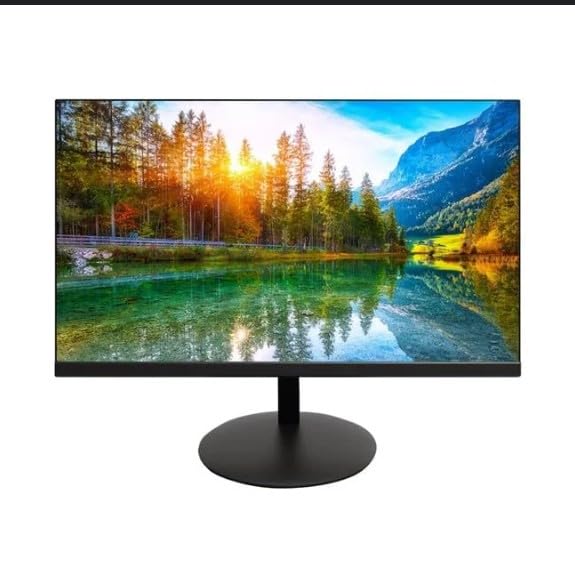
The image shows the Onn 22 inch FHD LED Monitor, highlighting its 100Hz refresh rate and 1080p resolution. The monitor features a slim design and a T-shaped base.
سيٽ اپ جون هدايتون
- پيڪنگ کولڻ: Carefully remove the monitor and all accessories from the packaging. Ensure all components are present: monitor, T-shaped base, HDMI cable, and power adapter.
- اسٽينڊ گڏ ڪرڻ: Attach the T-shaped base to the monitor. The design is screw-less for easy assembly. Ensure it is securely fastened.
- ڊوائيس سان ڳنڍڻ:
The monitor supports both HDMI and VGA inputs. Connect the provided HDMI cable from your computer's HDMI output to the HDMI IN port on the monitor. Alternatively, use a VGA cable for VGA input.

This image displays the rear panel of the Onn monitor, illustrating the available input ports: HDMI IN, VGA IN, and the DC 12V power input. These ports are essential for connecting the monitor to a computer or other devices.
- پاور ڪنيڪشن: Connect the power adapter to the DC 12V input port on the monitor, then plug the adapter into a power outlet.
- مانيٽر کي ترتيب ڏيڻ: The monitor is capable of swivel, tilt, rotation, and height adjustment. Adjust the screen to your preferred viewergonomic آرام لاء زاويه.
- ڊبل مانيٽر سيٽ اپ: This monitor is suitable for a fully functioning dual monitor setup. Connect a second monitor using the appropriate cables and configure your operating system's display settings.
آپريٽنگ هدايتون
- پاور آن / آف: Press the power button, usually located on the bottom or back of the monitor, to turn it on or off.
- ان پٽ چونڊ: If the monitor does not automatically detect the input source, use the On-Screen Display (OSD) menu buttons to manually select between HDMI and VGA inputs.
- او ايس ڊي مينيو نيويگيشن: Use the physical buttons on the monitor (typically on the back or bottom edge) to navigate the OSD menu. This allows you to adjust settings such as brightness, contrast, color temperature, and input source.
- ريزوليوشن ۽ ريفريش ريٽ: The monitor supports a native resolution of 1920x1080 at a 100Hz refresh rate. Ensure your computer's display settings are configured to these specifications for the best visual experience.
- موافقت واري هم وقت سازي: The monitor features Adaptive Sync for gaming, which helps to reduce screen tearing and stuttering. Ensure this feature is enabled in your graphics card settings if supported.
سار سنڀال
- اسڪرين جي صفائي: نرم، لِنٽ کان پاڪ ڪپڙي سان اسڪرين کي نرميءَ سان صاف ڪريو. ضدي نشانن لاءِ، هلڪو ڊيampen the cloth with water or a non-abrasive, monitor-specific cleaning solution. Avoid spraying liquids directly onto the screen.
- سي جي صفائيasing: مانيٽر کي صاف ڪرڻ لاءِ نرم، سڪل ڪپڙو استعمال ڪريو casing. Do not use strong detergents or solvents, as they may damage the finish.
- وينٽيليشن: پڪ ڪريو ته مانيٽر جي وينٽيليشن جا سوراخ بند نه آهن ته جيئن وڌيڪ گرم ٿيڻ کان بچي سگهجي.
- اسٽوريج: جڏهن گهڻي عرصي تائين استعمال ۾ نه هجي، ته مانيٽر کي ٿڌي، سڪل جاءِ تي، سڌي سج جي روشني ۽ انتهائي گرمي پد کان پري رکو.
مشڪلاتون
- طاقت ناهي:
- چيڪ ڪريو ته پاور ڪيبل محفوظ طور تي ٻنهي مانيٽر ۽ پاور آئوٽ سان ڳنڍيل آهي.
- پڪ ڪريو ته پاور آئوٽ صحيح ڪم ڪري رهيو آهي.
- ڪوبه سگنل:
- Ensure the video cable (HDMI or VGA) is firmly connected to both the monitor and the computer.
- Select the correct input source using the monitor's OSD menu.
- چيڪ ڪريو ته توهان جو ڪمپيوٽر آن آهي ۽ سليپ موڊ ۾ نه آهي.
- Flickering Screen or Poor Image Quality:
- نقصان يا ڍلو ڪنيڪشن لاءِ وڊيو ڪيبل چيڪ ڪريو.
- پنهنجي ڪمپيوٽر تي ريزوليوشن ۽ ريفريش ريٽ سيٽنگز کي مانيٽر جي وضاحتن (1920x1080، 100Hz) سان ملائڻ لاءِ ترتيب ڏيو.
- او ايس ڊي مينيو ذريعي مانيٽر سيٽنگز کي فيڪٽري ڊفالٽ تي ري سيٽ ڪريو.
- جواب نه ڏيڻ وارا بٽڻ:
- Unplug the monitor from the power outlet, wait for 30 seconds, and then plug it back in.
If problems persist, please refer to the support information provided in the "Support and Warranty" section.
وضاحتون
| برانڊ | اون |
| ماڊل نمبر | 100140681 |
| ماڊل نالو | او ٽي او |
| اسڪرين جي ماپ | 21.5 انچ |
| ڊسپلي جو قسم | ايل اي ڊي، ايل سي ڊي |
| قرارداد | 1920 x 1080 (ايف ايڇ ڊي 1080 پي) |
| ريفريش جي شرح | 100 هز |
| جوابي وقت | 6.5 ملي سيڪنڊ |
| ھارڊويئر انٽرفيس | ايم ڊي ايم، ويگا |
| خاص خاصيتون | اونچائي جي ترتيب |
| Viewزاويه | 160 درجا |
| اسپيڪٽ ريشو | 16:9 |
| پيداوار جي ماپ | 49.2 x 20 x 37.2 سينٽي ميٽر؛ 3.24 ڪلوگرام |
سپورٽ ۽ وارنٽي
For technical support, product inquiries, or warranty information, please visit the official Onn support webسائيٽ يا انهن جي ڪسٽمر سروس سان رابطو ڪريو.
- سرڪاري حمايت Webسائيٽ: onnsupport.ca
- وارنٽي: Specific warranty details may vary by region and purchase date. Please refer to the documentation included with your product or visit the support webتازي وارنٽي معلومات لاءِ سائيٽ.