
1. تعارف
Thank you for choosing the POYBPCY CS112-Single 4K Dash Cam. This manual provides detailed instructions for installation, operation, and maintenance to ensure optimal performance and a safe driving experience. This dash cam is designed to capture high-resolution video footage of your journeys, offering advanced features like Wi-Fi connectivity, parking monitoring, and enhanced night vision.
1.1. پيڪيج مواد
پڪ ڪريو ته هيٺ ڏنل سڀئي شيون توهان جي پيڪيج ۾ شامل آهن:
- Dash Camera (POYBPCY CS112-Single)
- ڪار چارجر
- ڪار جبل
- چارجنگ ڪيبل (قسم-سي)
- استعمال ڪندڙ دستي
- ڪروبار (ڪيبل روٽنگ لاءِ)
- جامد اسٽيڪر
- ٻيھر سيٽ ڪريو
- Card Reader (USB 2.0)
- Cable Concealment Clips
- 3M اسٽيڪر
- 64GB ايس ڊي ڪارڊ (اڳ ۾ نصب ٿيل يا شامل)

This image displays all components included in the POYBPCY CS112-Single Dash Cam package.
2. پراڊڪٽ ختمview
2.1. اهم حصا

The POYBPCY CS112-Single dash cam features a compact design with a 1.47-inch display, a 4K UHD lens, and a removable CPL filter. It includes a Type-C power port, a Micro SD card slot, and a multi-function side button for easy operation. The camera supports 360° rotation for flexible viewing angles.

This image illustrates the main components of the dash cam, including the camera unit, the CPL filter, the included 64GB SD card, and a representation of the mobile application interface.
2.2. بنيادي خاصيتون
4K الٽرا ايڇ ڊي رڪارڊنگ
The dash cam records in stunning 4K (3840x2160P) resolution at 30 frames per second, ensuring clear and detailed footage. The 170° ultra-wide-angle lens captures a broad view روڊ جي، بلائنڊ اسپاٽس کي گھٽ ڪرڻ.

This image demonstrates the wide 170° field of view and the clarity of 4K UHD resolution, allowing for precise identification of details like license plates.
Built-in 5GHz WiFi & App Control
Connect your dash cam to your smartphone via 5GHz Wi-Fi using the dedicated BOBO CAM or Viidure app (available for Android and iOS). This allows for easy viewing, downloading, and sharing of recorded videos and photos.

This visual highlights the seamless connectivity and control offered by the 5GHz Wi-Fi and mobile application, enabling quick access to footage and sharing capabilities.
CPL Filter and Super Night Vision
Equipped with a CPL (Circular Polarizing Lens) filter, the dash cam reduces glare and reflections from the windshield and road, enhancing color and contrast for clearer images. The F2.0 aperture and 6-layer lens, combined with WDR (Wide Dynamic Range) technology, provide superior night vision, ensuring clear recordings even in low-light conditions by balancing exposure and filtering out headlight halos.

This image illustrates the effectiveness of the CPL filter in reducing glare and improving image clarity compared to footage without the filter.
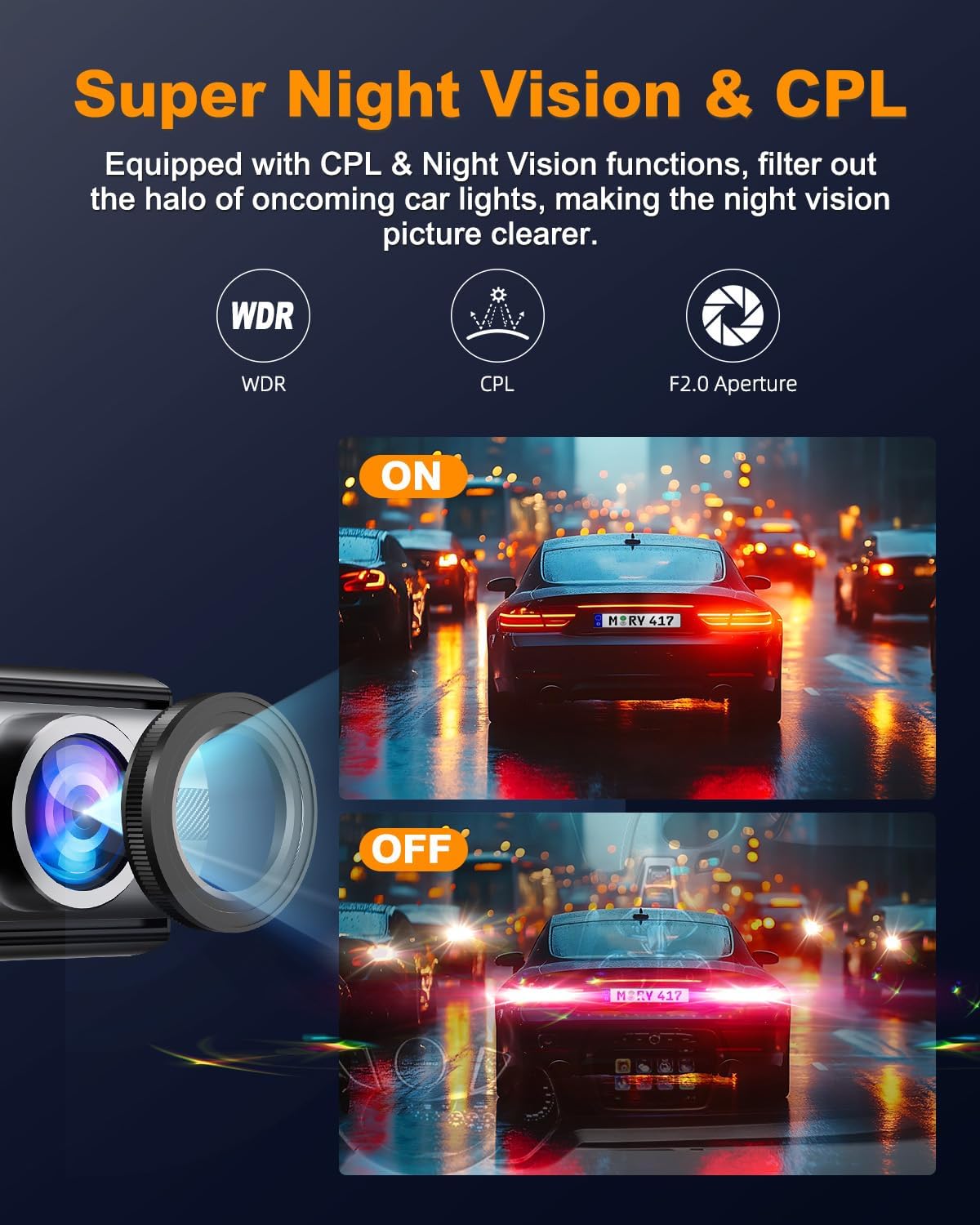
This visual demonstrates the enhanced clarity and reduced headlight interference provided by the Super Night Vision and CPL features during nighttime recording.
لوپ رڪارڊنگ ۽ جي-سينسر
The loop recording function automatically overwrites the oldest video files when the SD card is full, ensuring continuous recording. You can set recording intervals to 1, 3, or 5 minutes. The built-in G-Sensor detects sudden impacts or vibrations, automatically locking the current video file to prevent it from being overwritten, serving as crucial evidence in case of an incident.

This image visually explains the G-Sensor's role in locking important footage during collisions and the continuous nature of seamless loop recording.
24 ڪلاڪ پارڪنگ موڊ
For continuous surveillance when your vehicle is parked, the 24-hour parking mode records key video evidence of theft or accidents. نوٽ: This feature requires a separate hardwire kit (not included) for continuous power supply.
هي وڊيو هڪ جامع اوور مهيا ڪري ٿيview of the POYBPCY 4K WiFi Front Dash Cam's features and functionalities.
3. سيٽ اپ ۽ انسٽاليشن
3.1. پھرين استعمال کان پھريائين
- Format the Micro SD Card: Before initial use, format the included 64GB Micro SD card (or any new card up to 256GB) within the dash cam's settings for optimal performance.
- SD ڪارڊ داخل ڪريو: Ensure the Micro SD card is inserted correctly into the designated slot.
3.2. ڊيش ڪيم لڳائڻ
- جڳھ چونڊيو: Select a location on your windshield that does not obstruct your view، عام طور تي پوئين پٺيانview آئينو.
- صاف سطح: Clean the chosen area on the windshield thoroughly to ensure proper adhesion of the static sticker and car mount.
- Apply Static Sticker: Apply the static sticker to the cleaned windshield area. This helps in easy removal and repositioning without leaving residue.
- Attach Car Mount: Securely attach the car mount to the static sticker.
- ماؤنٽ ڊيش ڪيم: Slide the dash cam onto the car mount until it clicks into place. The 360° rotatable design allows you to adjust the camera angle for optimal road coverage or even to face inside the cabin.

This diagram illustrates the recommended placement of the dash cam on the windshield and the general path for routing the power cable for a neat installation.
3.3. پاور ڪنيڪشن
- Connect Car Charger: Insert the Type-C end of the charging cable into the dash cam's power port.
- Plug into Car Power Outlet: ڪار چارجر کي پنهنجي گاڏي جي 12V پاور آئوٽليٽ (سگريٽ لائٽر ساڪٽ) ۾ لڳايو.
- روٽ ڪيبل: Use the provided crowbar and cable concealment clips to neatly route the power cable along the windshield trim and dashboard to avoid obstructing your view يا ڊرائيونگ ۾ مداخلت ڪرڻ.
4. آپريٽنگ هدايتون
4.1. بنيادي آپريشن
The dash cam will automatically power on and begin recording when your vehicle's ignition is turned on. It will automatically power off when the ignition is turned off.
- پاور آن / آف: Press and hold the power button (usually on the side) to manually turn the device on or off.
- رڪارڊنگ اشارو: A light indicator (often red) will show when the camera is actively recording.
- اسڪرين ڊسپلي: The 1.47-inch screen displays the live view، رڪارڊنگ اسٽيٽس، ۽ مينيو آپشن.
4.2. Using the Mobile App (BOBO CAM / Viidure)
- ايپ ڊائون لوڊ ڪريو ڳولھيو "BOBO CAM" or "Viidure" in your smartphone's app store (Google Play Store for Android, Apple App Store for iOS) and install it.
- ڊيش ڪيم تي وائي فائي فعال ڪريو: Access the dash cam's settings to enable its Wi-Fi hotspot. The Wi-Fi name (SSID) and password will be displayed on the dash cam screen.
- فون کي ڊيش ڪيم وائي فائي سان ڳنڍيو: On your smartphone, go to Wi-Fi settings and connect to the dash cam's Wi-Fi network using the provided password.
- ايپ کوليو: Launch the BOBO CAM or Viidure app. The app should automatically connect to the dash cam.
- جيئڻ View ۽ پلے بیک: ايپ اندر، توهان ڪري سگهو ٿا view زنده فوtagاي، رڪارڊ ٿيل وڊيوز براؤز ڪريو، ڊائون لوڊ ڪريو files to your phone, and adjust camera settings.
- حصيداري: Easily share downloaded videos or photos to social media platforms directly from the app.

This image demonstrates the user interface of the mobile application and its connectivity with the dash cam, allowing for remote control and media management.
5. سار سنڀال
- لينس صاف ڪريو: Regularly clean the camera lens with a soft, lint-free cloth to ensure clear video quality. Avoid abrasive materials that could scratch the lens.
- ايس ڊي ڪارڊ فارميٽ ڪريو. It is recommended to format the Micro SD card once a month to prevent data corruption and ensure optimal recording performance. This can usually be done through the dash cam's settings menu or the mobile app.
- انتهائي گرمي پد کان بچاء: While designed for automotive use, prolonged exposure to extreme high temperatures can affect the device's lifespan. Mild heating during operation is normal.
- محفوظ لڳائڻ: Periodically check that the dash cam is securely mounted to avoid vibrations that could affect video quality or cause the device to fall.
6. مسئلا حل ڪرڻ
| مسئلو | ممڪن سبب | حل |
|---|---|---|
| Dash cam not turning on. | بجلي جي فراهمي نه آهي؛ ڪنيڪشن ڍلو آهي؛ ڪار چارجر ۾ خرابي آهي. | Check power connection; ensure car charger is working; try a different USB-C cable/charger. |
| وڊيو فوtage is blurry/unclear. | Protective film on lens; dirty lens; incorrect focus (unlikely for fixed focus); low resolution setting. | Remove protective film; clean lens with soft cloth; ensure 4K resolution is selected in settings. |
| وائي فائي ڪنيڪشن جا مسئلا. | غلط وائي فائي پاسورڊ؛ ڊيش ڪيم کان تمام پري؛ ايپ جا مسئلا. | Verify password; ensure phone is close to dash cam; restart app/phone/dash cam. |
| SD card error/not recognized. | Improperly inserted card; incompatible card; corrupted card. | Reinsert card; ensure it's a Class 10 Micro SD (up to 256GB); format card; try a new card. |
| پارڪنگ موڊ ڪم نه ڪري رهيو آهي. | Hardwire kit not installed; incorrect settings. | Install a hardwire kit (sold separately); check parking mode settings in the menu. |
| ڊيش ڪيم جمي يا ڪريش ٿئي ٿو. | Firmware issue; corrupted SD card; overheating. | Press the reset button (use reset pin); format SD card; ensure proper ventilation. |
7. وضاحتون
- ماڊل: CS112-Single
- برانڊ: POYBPCY
- وڊيو قرارداد: 4K UHD (3840x2160P)
- فريم جي شرح: 30fps
- لينس ايپرچر: F2.0
- Lens Layers: 6-layer glass lens
- جو ميدان View: 170° وائڊ اينگل
- ڏيکاريو: 1.47 انچ اسڪرين
- رابطي: Built-in 5GHz Wi-Fi
- اسٽوريج: Supports Micro SD card up to 256GB (64GB card included)
- خاص خاصيتون: CPL Filter, WDR Night Vision, Loop Recording, G-Sensor, 24H Parking Monitor (requires hardwire kit)
- پاور پورٽ: ٽائپ-سي
- پيداوار جي ماپ: 8.62 x 5.31 x 2.24 انچ
- شيء جو وزن: 10.6 اونس
- بيٽريون: 1 ليتيم ڌاتو جي بيٽري (شامل)
- اصليت جو ملڪ: چين
8. وارنٽي ۽ سپورٽ
POYBPCY is committed to providing reliable products and excellent customer service.
- وارنٽي: This product comes with a 36-month warranty service.
- ٽيڪنيڪل سپورٽ: هن پراڊڪٽ لاءِ تاحيات ٽيڪنيڪل سپورٽ فراهم ڪئي وئي آهي.
- آن لائن سپورٽ: Expect a 24-hour online support response for any inquiries or assistance.
Please feel free to contact us if you have any questions about the product or require assistance.

Our dedicated customer support team is available to assist you with any product-related questions or technical issues.