
Eonon UX6K-PRO-MAX-U
Eonon UX6K Pro Max Double Din Car Radio User Manual
Model: UX6K-PRO-MAX-U | Brand: Eonon
1. تعارف
This manual provides detailed instructions for the installation, operation, and maintenance of your Eonon UX6K Pro Max Double Din Car Radio. Please read this manual thoroughly before using the product to ensure proper functionality and safety. Keep this manual for future reference.

Image: Eonon UX6K Pro Max Car Radio with included accessories.
2. پيڪيج مواد
تصديق ڪريو ته هيٺ ڏنل سڀئي شيون توهان جي پراڊڪٽ پيڪيج ۾ شامل آهن:
- Eonon UX6K Pro Max Headunit
- پاور ڪنڊ (x1)
- GPS Antenna (x1)
- 4G اينٽينا (x1)
- USB ڪيبل (x1)
- CarPlay USB cable (x1)
- Reversing input cable (x1)
- Audio cable (x1)
- AV conversion cable (x1)
- Spare Fuse (x1)
- SIM card holder (x1)
- External microphone (x1)
- اسڪرو (x8)
- ھدايت وارو دستور (x1)
- A0125 Backup Camera (x1)

Image: Visual representation of all items included in the box.
3. سيٽ اپ ۽ تنصيب
3.1. انسٽاليشن کان اڳ جي چڪاس
Before beginning installation, ensure your vehicle's dashboard size is compatible. This car stereo is designed to fit a dashboard size of 178*100mm (double din). If your car has a single din factory stereo, this product is not compatible.

Image: Dashboard compatibility guide.
3.2. وائرنگ ڊاگرام
مناسب وائرنگ ڪنيڪشن لاءِ هيٺ ڏنل ڊاگرام ڏسو. يونٽ کي پاور ڏيڻ کان اڳ پڪ ڪريو ته سڀئي ڪنيڪشن محفوظ آهن.

Image: Comprehensive wiring diagram for the headunit.
3.3. Installation Kit (If Needed)
If your car's dashboard size is not 178*100mm, an additional installation kit (not included) may be required. The power cable of your factory car radio must have an ISO standard interface. If not, a compatible ISO wiring harness will be needed.

Image: Installation process with an optional kit and ISO harness.
4. آپريٽنگ هدايتون
4.1. سسٽم اوورview (اينڊرائيڊ 13)
The Eonon UX6K Pro Max operates on Android 13, offering a modern and flexible user experience. It features a Qualcomm QCM6225 8-Core processor for high performance and efficiency.

Image: Qualcomm QCM6225 Processor details.

Image: Android 13 interface.
4.2. ڪنيڪشن
- Wireless & Wired CarPlay/Android Auto: Connect your smartphone for navigation, music, and communication.
- بلوٽوٽ 5.1: Provides fast and stable connections for hands-free calling and audio streaming.
- Wi-Fi 6 & Built-in 4G Module: Offers high-speed internet access via Wi-Fi or by inserting a SIM card (not included).

تصوير: ڪار پلي ۽ اينڊرائيڊ آٽو انٽيگريشن.

Image: Bluetooth 5.1 module.

Image: Wi-Fi and 4G connectivity.
4.3. آڊيو خاصيتون
The unit includes a built-in DSP (Digital Signal Processing) with a RHOM 32107 DSP chip and a 48-band graphic equalizer for precise sound customization. The ST TDA7851 amplifier delivers 4x48W max output power. Optical and coaxial audio outputs are available for professional audio setups.

Image: Built-in DSP interface.

Image: Optical and Coaxial audio outputs.
4.4. ڊسپلي ۽ يوزر انٽرفيس
The 10.1-inch QLED HD display (1280x720 resolution) offers vibrant colors and sharp visuals. The multi-touch capacitive touchscreen ensures effortless interaction. The panel is adjustable for optimal viewing angles.

Image: 10.1-inch QLED Display features.

Image: Adjustable viewing angle options.
The system supports split-screen multitasking, allowing two applications to run simultaneously. The UI is customizable with various themes and adjustable button lights.

Image: Split-screen multitasking.

Image: UI customization options.
4.5. Physical Controls
The unit features large physical buttons and a rotary knob for tactile feedback and ease of use while driving.

Image: Physical buttons and rotary knob.
4.6. Accessories Support
- بيڪ اپ ڪئميرا: Includes a 1080P AHD rearview camera (A0125) for enhanced safety during reversing.
- Dash Cam (Not Included): Supports external dash cams like the A100 for recording driving footage.
- OBD2 (Not Included): Compatible with OBD2 devices (e.g., V0056) for vehicle fault diagnosis and real-time status monitoring.

Image: Backup camera functionality.

Image: Dash cam support.

Image: OBD2 support.
5. سار سنڀال
- اسڪرين جي صفائي: Use a soft, lint-free cloth to gently wipe the QLED screen. Avoid abrasive cleaners or solvents.
- سافٽ ويئر اپڊيٽ: Keep your car stereo up-to-date through Over-the-Air (OTA) firmware updates to fix software issues and enhance security. Note: Android system upgrades are not supported via OTA.

Image: Over-the-air firmware update process.
6. مسئلا حل ڪرڻ
- Volume Creep: If the volume increases by itself, check for any external interference or software glitches. A system restart may resolve this.
- Low RCA Output Voltage: Ensure proper grounding and check all audio connections. If the issue persists, consult technical support.
- Screen Brightness at Night: The unit may not offer automatic night dimming. Manually adjust the screen brightness to night mode for comfortable viewing during nighttime driving.
- منجمد اسڪرين: If the screen becomes unresponsive, perform a cold reboot by temporarily disconnecting the car battery.
- General Software Issues: Ensure the firmware is up-to-date via OTA updates. If problems persist, contact Eonon support.
7. وضاحتون
| خاصيت | تفصيل |
|---|---|
| ماڊل نالو | UX6K-PRO-MAX-U |
| پروسيسر | Qualcomm QCM6225 8-Core (Quad-core ARM Cortex-A73 2.4GHz + Quad-core ARM Cortex-A53 1.9GHz) |
| Process Node | Samsung 6nm LPP |
| رام | 8GB LPDDR4 |
| روم | 128 جي بي |
| آپريٽنگ سسٽم | Android 13 (API level 33) |
| ڊسپلي سائيز | 10.1 انچ |
| ڊسپلي جو قسم | QLED HD |
| ڊسپلي قرارداد | 1280x720 |
| جي پي يو | Adreno 610 |
| بلوٽوٿ | Bluetooth 5.1 (Qualcomm WCN3988) |
| وائي فائي معيار | Wi-Fi 6 ready, Wi-Fi 2.4/5 GHz ready |
| 4 جي LTE | Built-in 4G module (SIM card not included) |
| ڊي ايس پي چپ | روم 32107 |
| برابر ڪندڙ | 48-بند |
| Ampزندگي گذاريندڙ | ST TDA7851 (4x48W surround sound output) |
| ريڊيو ماڊل | ST TDA7708 (FM/AM/RDS Support) |
| آڊيو آئوٽٽ | Optical, Coaxial, RCA |
| USB بندرگاهن | 3 |
| طول و عرض | 25.65 x 25.65 x 25.65 سينٽي |
| وزن | 2.51 ڪلو |
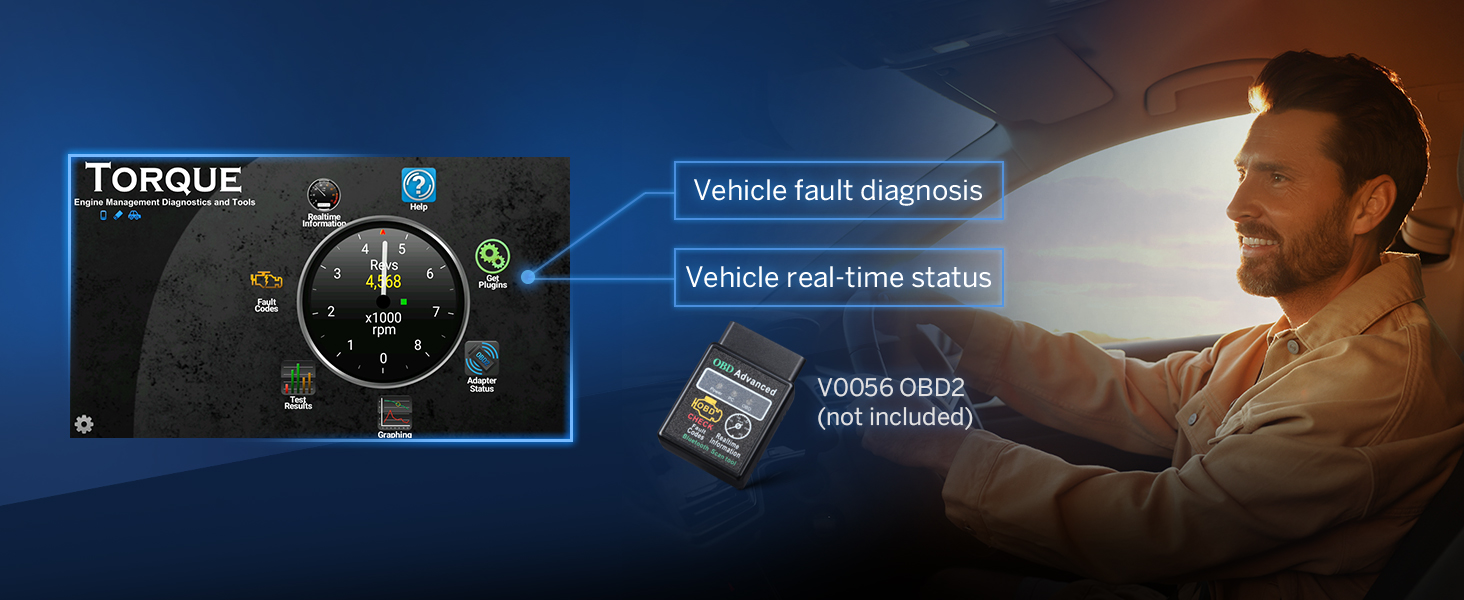
Image: Model comparison table.
8. وارنٽي ۽ سپورٽ
8.1. وارنٽي ڄاڻ
Eonon provides a 2-year warranty for this product. Please retain your proof of purchase for warranty claims.
8.2. ڪسٽمر سپورٽ
For technical assistance, troubleshooting, or any product-related inquiries, please contact Eonon customer support. Eonon offers:
- Quick reply within 24 hours (excluding weekends)
- 30-ڏينهن مفت واپسي
- Replacement within 90 days
- Lifelong after-sales service
You can find more support resources and contact information on the official Eonon support webسائيٽ: fit.eononsupport.com