
1. تعارف
Thank you for choosing the FLEXISPOT L-Shaped Electric Standing Desk. This manual provides essential information for the safe assembly, operation, and maintenance of your new desk. Please read it thoroughly before use and retain it for future reference.
The FLEXISPOT L-Shaped Electric Standing Desk offers a spacious 63.0" x 55.1" work surface with electric height adjustment, allowing seamless transitions between sitting and standing positions. It features a robust 3-legged frame, a preset controller for personalized height settings, and a versatile orientation to fit various office layouts.
2. حفاظت جي ڄاڻ
Always ensure the desk is properly assembled and anchored to the floor to prevent tipping. Do not exceed the maximum weight capacity of 220 lbs (100 kg) to maintain stability. Be cautious when adjusting the desk height to avoid injury. Keep children and pets away from the desk during operation. Ensure all cables are managed to prevent tripping hazards or damage during height adjustments.
3. پيڪيج مواد
Your FLEXISPOT L-Shaped Electric Standing Desk ships in two separate packages, which may arrive on different days. Please verify all components against the included packing list before beginning assembly. If any parts are missing or damaged, contact FLEXISPOT customer support immediately.
4. سيٽ اپ ۽ اسيمبلي
Assembly of the FLEXISPOT L-Shaped Electric Standing Desk requires careful attention to detail. It is recommended to have two people for certain steps, especially when handling the desktop and flipping the assembled unit. The desk features a flexible design, allowing the wider desktop section to be positioned on either the left or right side to best suit your workspace.
4.1 پيڪنگ ۽ تياري
- Carefully unpack all components from both boxes.
- سڀني حصن کي صاف، نرم مٿاڇري تي (مثال طور، ڪمبل يا قالين) رکو ته جيئن ڇڪڻ کان بچي سگهجي.
- Identify all components using the provided parts list.
4.2 فريم اسيمبلي
Follow the detailed instructions in the separate assembly guide provided with your desk. Ensure all screws are tightened securely. The robust industrial-grade steel frame provides stability for your workstation.
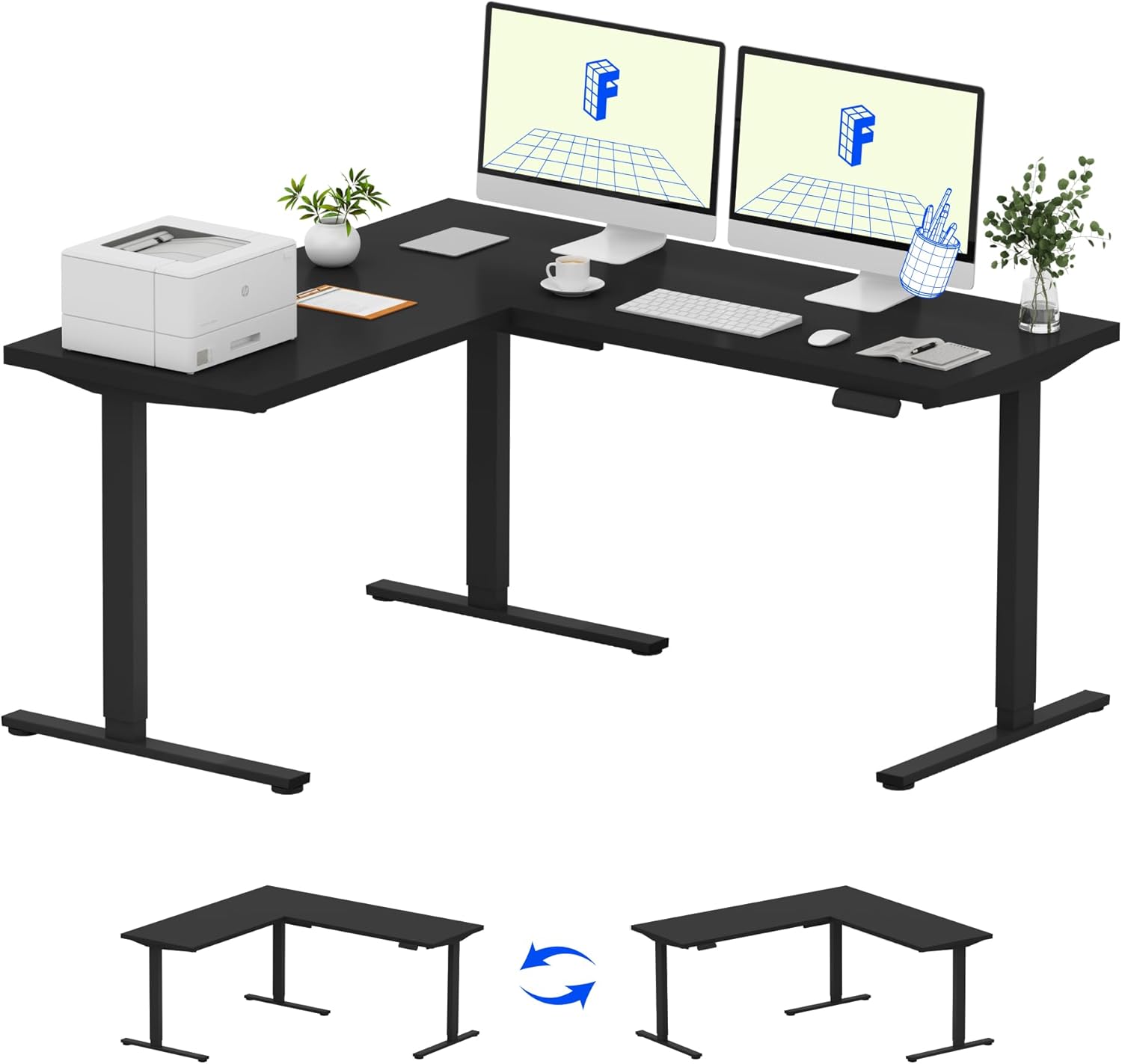
Image: Assembled FLEXISPOT L-Shaped Electric Standing Desk.
4.3 Desktop Attachment and Orientation
The expansive L-shaped desktop can be configured for either a left-hand or right-hand setup. Decide on your preferred orientation before attaching the desktop to the frame. The desktop is crafted from environmentally sourced splice board, measuring 63.0" x 55.1".

Image: Flexible right/left orientation options for the L-shaped desk.
4.4 ڪيبل مينيجمينٽ
Utilize the included cable management tools to keep your workspace tidy and prevent cables from interfering with the desk's movement.

Image: The desk ships in two packages and has a 220 lbs weight capacity.
5. آپريٽنگ هدايتون
Your FLEXISPOT L-Shaped Electric Standing Desk is equipped with an intuitive LED control panel for easy height adjustments and memory presets.
5.1 ڊيسڪ جي اوچائي کي ترتيب ڏيڻ
- استعمال ڪريو مٿي (▲) ۽ هيٺ (▼) buttons on the control panel to manually adjust the desk to your desired height.
- The desk offers a large adjustable range, from a minimum height of 28.3 inches to a maximum height of 45.9 inches.

Image: Large adjustable height range of the desk.
5.2 ميموري پري سيٽ استعمال ڪندي
The LED control panel allows you to save up to four preferred height settings for quick transitions.
- مٿي/هيٺ بٽڻن کي استعمال ڪندي ڊيسڪ کي پنهنجي گهربل اوچائي تي ترتيب ڏيو.
- کي دٻايو M button (Memory) followed by one of the numbered preset buttons (1، 2، 3، يا 4) to save the current height.
- محفوظ ڪيل اوچائي کي ياد ڪرڻ لاءِ، صرف لاڳاپيل نمبر واري پري سيٽ بٽڻ کي دٻايو.

Image: Smart LED control panel with memory presets.
5.3 ٽڪراءُ مخالف خصوصيت
The desk is equipped with an anti-collision system. If the desk encounters an obstacle during height adjustment, it will automatically stop and rebound slightly to prevent damage or injury.

Image: Anti-collision feature in action.
6. سار سنڀال
باقاعده سار سنڀال توهان جي اسٽينڊنگ ڊيسڪ جي ڊگهي عمر ۽ بهترين ڪارڪردگي کي يقيني بڻائي ٿي.
- صفائي: ڊيسڪ ٽاپ ۽ فريم کي نرم، ڊي سان صاف ڪريوamp ڪپڙو. سخت ڪيميڪلز يا رگڙيندڙ صاف ڪندڙن کان پاسو ڪريو جيڪي ختم کي نقصان پهچائي سگهن ٿا.
- معائنو: وقت بوقت سڀني اسڪرو ۽ بولٽن کي چيڪ ڪريو ته جيئن پڪ ڪري سگهجي ته اهي تنگ آهن. جيڪڏهن ضروري هجي ته ٻيهر سخت ڪريو.
- ڪيبل جو انتظام: Ensure power cords and other cables are not pinched or tangled, especially during height adjustments.
- وزن جي گنجائش: Do not exceed the maximum weight capacity of 220 lbs to prevent strain on the motor and frame.
7. مسئلا حل ڪرڻ
If you encounter issues with your FLEXISPOT L-Shaped Electric Standing Desk, refer to the following common troubleshooting steps:
- ڊيسڪ نه حرڪت:
- چيڪ ڪريو ته ڇا پاور ڪنڊ ڊيسڪ ۽ ڪم ڪندڙ پاور آئوٽليٽ ٻنهي ۾ محفوظ طور تي لڳل آهي.
- Ensure no objects are obstructing the desk's movement.
- ڊيسڪ کي 30 سيڪنڊن لاءِ ان پلگ ان ڪري ۽ پوءِ ان کي واپس پلگ ان ڪري ري سيٽ ڪرڻ جي ڪوشش ڪريو.
- Uneven Movement/Wobbling:
- پڪ ڪريو ته سڀئي اسيمبلي اسڪرو سخت آهن.
- Ensure the desk is on a level surface. Adjust the leveling feet if necessary.
- Confirm that the weight distribution on the desktop is balanced and within the maximum capacity.
- ڪنٽرول پينل جواب نه ڏنو:
- پاور سائيڪل انجام ڏيو (ان پلگ ۽ ري پلگ).
- Check for any visible damage to the control panel or its cable.
جيڪڏهن انهن قدمن سان مسئلو حل نه ٿيو ته مهرباني ڪري FLEXISPOT ڪسٽمر سپورٽ سان رابطو ڪريو.
8. وضاحتون
| برانڊ | FLEXISPOT |
| ماڊل | B0DV54QLX4 |
| پيداوار جي ماپ | 55.1"ڊي x 63"ڊي x 45.9"ايڇ |
| رنگ | Black Frame + Black Top |
| انداز | جديد |
| بنيادي مواد | مصر جو اسٽيل |
| مٿين مواد جو قسم | ڪاٺ |
| ٽيبل جي ٿلهي | 1 انچ |
| گھٽ ۾ گھٽ اونچائي | 28 انچ |
| وڌ ۾ وڌ اوچائي | 45.9 انچ |
| وڌ ۾ وڌ وزن جي سفارش | 220 پائونڊ |
| خاص خصوصيت | Corded, Preset Controller, Anti-collision |
| گهربل اسيمبلي | ها |
| يو پي سي | 840460438384 |
9. وارنٽي ۽ سپورٽ
9.1 وارنٽي ڄاڻ
FLEXISPOT provides the following warranty coverage for your L-Shaped Electric Standing Desk:
- 5 سالن جي ڪوريج: ڊيسڪ فريم ۽ موٽر تي لاڳو ٿئي ٿو.
- 2 سالن جو تحفظ: ڪنٽرول پينل ۽ اليڪٽرانڪس تي لاڳو ٿئي ٿو.
Please retain your proof of purchase for warranty claims. The warranty covers manufacturing defects under normal use.
9.2 ڪسٽمر سپورٽ
For any questions, assistance with assembly, troubleshooting, or warranty inquiries, please contact FLEXISPOT customer support. You can find contact information on the official FLEXISPOT webسائيٽ يا توهان جي خريداري پليٽ فارم ذريعي.