
1. تعارف
This manual provides detailed instructions for the installation, operation, and maintenance of your ANNKE AU-DT81DX200-V1 4K 8-Channel Digital Video Recorder (DVR). This DVR is designed for security surveillance systems, offering 4K (8MP) high-definition live viewing and recording capabilities. It features advanced H.265+ video compression, AI human/vehicle detection, and supports various camera types for flexible integration.

Image 1.1: The ANNKE 4K 8CH DVR connected to a display, illustrating its 4K Ultra HD video capability.
2. پيڪيج مواد
Verify that all items listed below are included in your package. If any items are missing or damaged, contact ANNKE customer support.
- 1x ANNKE 4K 8CH DVR with 2TB Hard Drive
- 1x 5.9 فوٽ/1.8 ميٽر HDMI ڪيبل
- 1x 3.2 فوٽ/1 ميٽر ايٿرنيٽ ڪيبل
- 1x پاور اڊاپٽر
- 1x USB ماؤس
- 1x استعمال ڪندڙ دستياب (هي دستاويز)
- 1x وال اسٽيڪر

Image 2.1: Visual representation of all components included in the ANNKE 4K 8CH DVR package.
3. سسٽم اوورview
The ANNKE AU-DT81DX200-V1 DVR is a hybrid 5-in-1 system, supporting various camera technologies. It can operate in two primary modes:
- DVR موڊ: Supports up to 8 BNC (TVI/AHD/CVI/CVBS) cameras and an additional 4 IP cameras.
- NVR Mode: Can be configured to support up to 12 IP cameras exclusively.
This flexibility allows for integration with existing analog systems while providing options for future IP camera expansion.
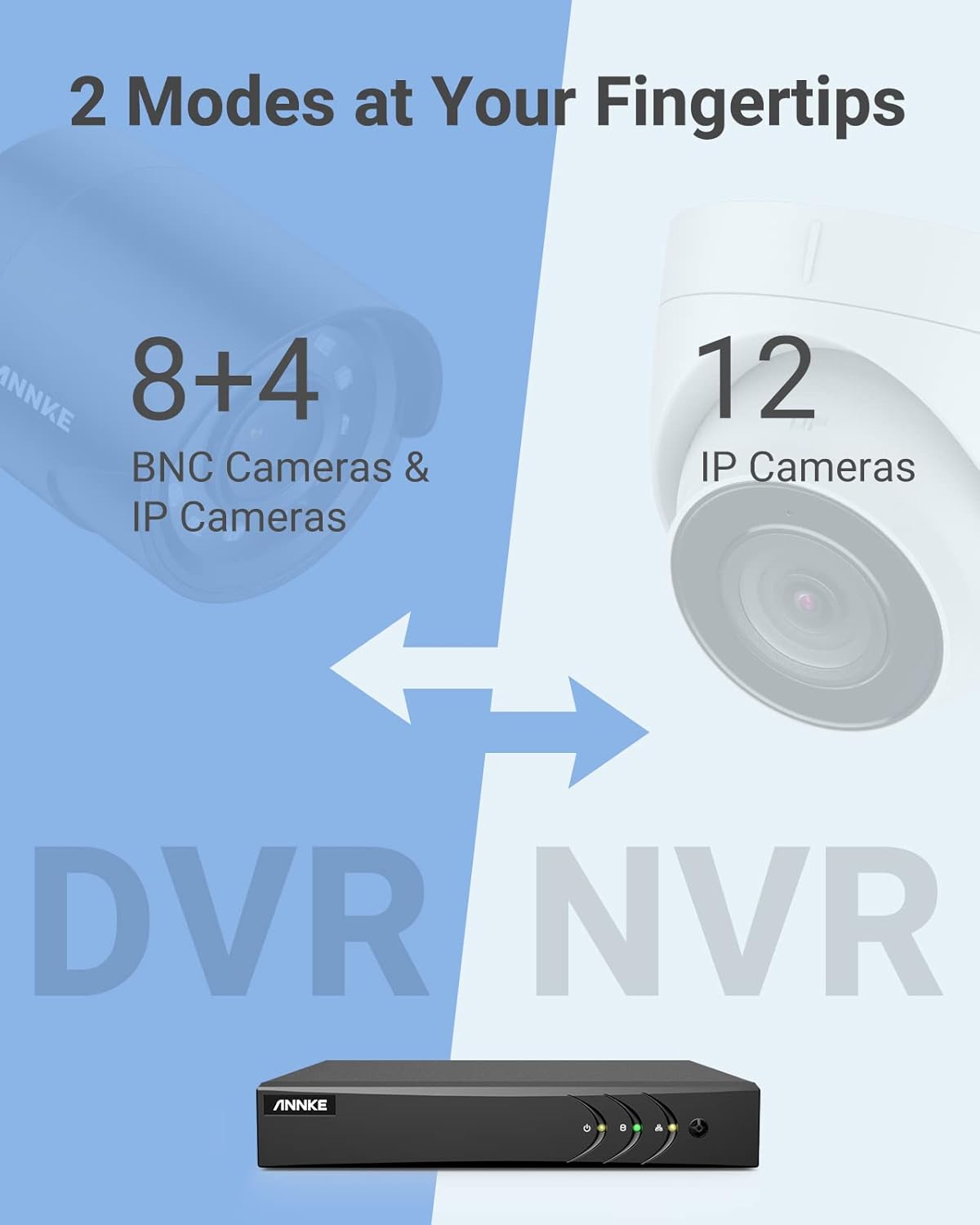
Image 3.1: Illustration of the DVR's dual operational modes, supporting both BNC and IP cameras or IP cameras exclusively.
4. انسٽاليشن گائيڊ
4.1 جسماني سيٽ اپ
- ڪئميرا ڳنڍيو: Connect your security cameras to the BNC video input ports on the back of the DVR. For IP cameras, connect them to your network switch/router, and ensure the DVR is also connected to the same network via the Ethernet cable.
- مانيٽر ڳنڍيو: Connect a monitor to the DVR's HDMI or VGA output port using the provided HDMI cable or a VGA cable (not included).
- USB ماؤس ڳنڍيو: Plug the USB mouse into one of the USB ports on the DVR.
- پاور Connectنيو: پاور اڊاپٽر کي DVR جي پاور ان پٽ سان ڳنڍيو ۽ پوءِ ان کي پاور آئوٽليٽ ۾ لڳايو. DVR پاڻمرادو آن ٿيندو.
4.2 شروعاتي ترتيب
Upon first boot, the DVR will guide you through an initial setup wizard. Follow the on-screen prompts to:
- Set up a strong password for the administrator account.
- Configure network settings (DHCP is recommended for most users).
- تاريخ ۽ وقت مقرر ڪريو.
- Scan and add IP cameras if applicable.
5. ڊي وي آر کي هلائڻ
5.1 زنده View
شروعاتي سيٽ اپ کان پوءِ، DVR لائيو ڏيکاريندو view from connected cameras. Use the USB mouse to navigate the interface. Right-click to access the main menu.
5.2 رڪارڊنگ
The DVR is pre-configured for continuous recording. You can customize recording schedules, motion-triggered recording, or alarm-triggered recording via the main menu under Record > Schedule.
5.3 پلے بیک
Toيهر ڪرڻview رڪارڊ ٿيل footage:
- زنده مان view، ساڄي ڪلڪ ڪريو ۽ چونڊيو پلئه بیک.
- Select the desired camera(s) and date.
- Use the timeline to navigate through recordings. Events (like motion detection) are often marked on the timeline for quick access.

Image 5.1: The DVR's playback interface, demonstrating how to locate and review recorded events on a timeline.
6. ترقي يافته خاصيتون
6.1 AI انسان/گاڏي جي سڃاڻپ
The DVR incorporates deep learning-based motion detection 2.0, which can differentiate between human and vehicle movements. This significantly reduces false alarms caused by environmental factors such as leaves or light changes.
- ٺاھ جوڙ: Enable and configure AI detection for each analog channel via the main menu under AI > Motion Detection 2.0.
- Smart Events: Supports line crossing and intrusion detection for specific areas.
- الرٽ: Configure the DVR to send app push notifications, email alerts, or trigger a buzzer when human or vehicle motion is detected.
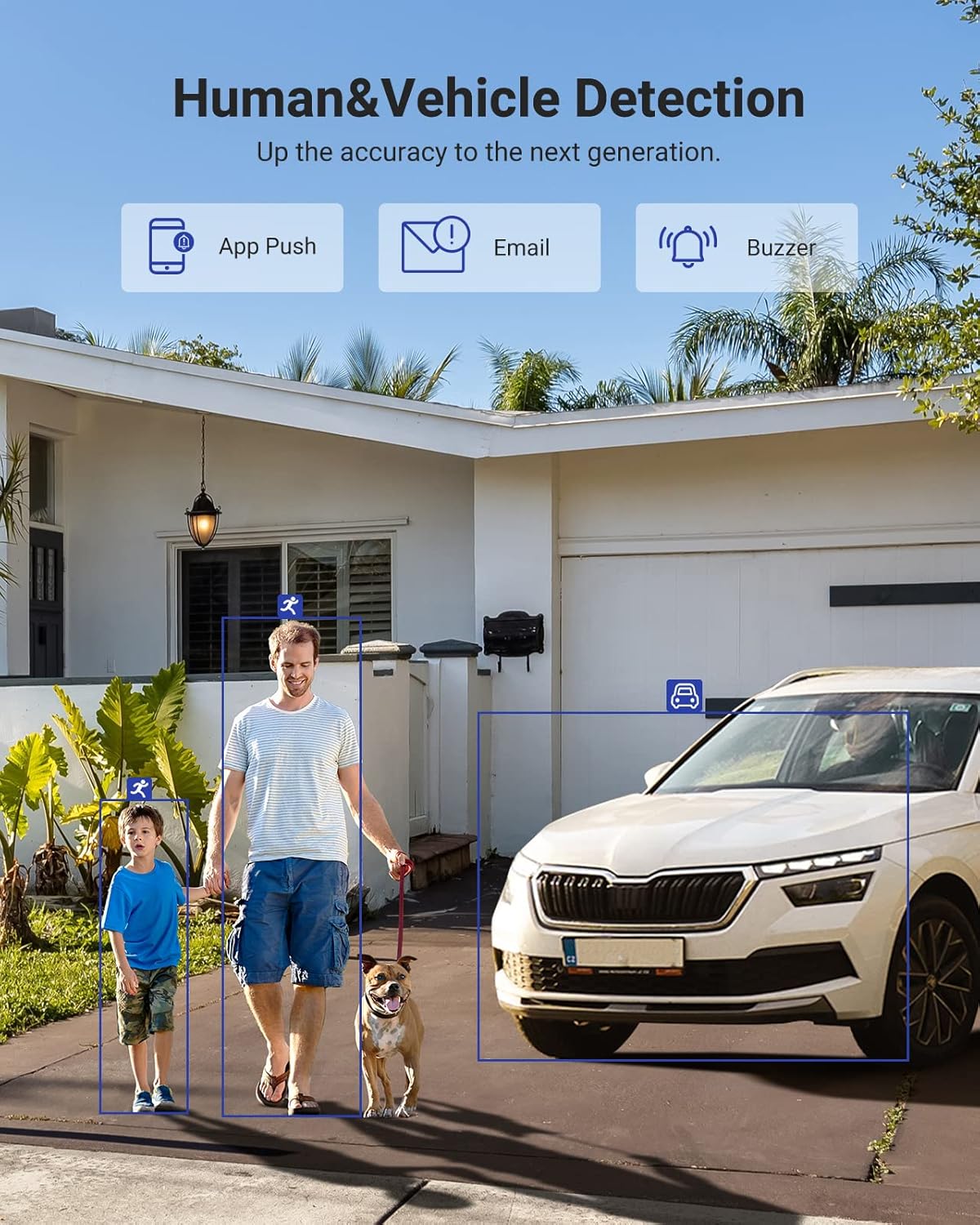
Image 6.1: Visual demonstration of the AI human and vehicle detection capability, showing how the system identifies and distinguishes between people and vehicles.
6.2 ريموٽ رسائي
Access your DVR remotely from anywhere using the ANNKE Vision App or a web برائوزر.
- ANNKE Vision App: Download the app from the App Store (iOS) or Google Play Store (Android). Register an account and add your DVR by scanning the QR code or entering its serial number.
- Web برائوزر: Access the DVR's web انٽرفيس ان جي IP پتي ۾ داخل ڪندي a web توهان جي ڪمپيوٽر تي برائوزر.
- مطابقت: The system is compatible with various devices including smartphones, tablets, laptops, and personal computers. It also supports integration with Alexa for voice control.

Image 6.2: Remote access via the ANNKE Vision App, showing compatibility with mobile devices and Alexa.
7. وڊيو انتظام
7.1 H.265+ وڊيو ڪمپريشن
The DVR utilizes advanced H.265+ video compression technology. This technology significantly reduces file sizes, saving up to 80% of storage space compared to H.264 compression, while maintaining video quality. This allows for longer recording durations on the same 2TB hard drive.

Image 7.1: Comparison illustrating the storage efficiency of H.265+ compression versus H.264.
8. مطابقت
The ANNKE AU-DT81DX200-V1 is a versatile 5-in-1 hybrid DVR, designed to be compatible with a wide range of security cameras:
- HD TVI Input: Supports 8 MP@15 fps, 5 MP@20 fps, 3K@20 fps, 4 MP@30 fps.
- AHD Input: Supports 5 MP@20 fps, 4 MP@30 fps, 1080p@25 fps, 1080p@30 fps.
- HD CVI Input: Supports 4 MP@30 fps, 4 MP@25 fps, 1080p@25 fps, 1080p@30 fps.
- CVBS ان پٽ: Supports PAL/NTSC standards.
- IPC Input: Supports up to 8MP IP cameras.
This broad compatibility ensures that the DVR can integrate with both older analog cameras and modern IP cameras, providing a flexible upgrade path for existing surveillance systems.

Image 8.1: The DVR's compatibility with various camera technologies, including TVI, CVI, AHD, and IP cameras.
9. وضاحتون
| خاصيت | تفصيل |
|---|---|
| برانڊ | اينڪي |
| ماڊل نمبر | AU-DT81DX200-V1 |
| رابطي ٽيڪنالاجي | وائرڊ |
| وڊيو ڪيپچر ريزوليوشن | 4K (8MP) |
| چينلن جو تعداد | 8 (Analog) + 4 (IP) or 12 (IP) |
| وڊيو ڪمپريشن | H.265 Pro+/H.265 Pro/H.265/H.264+/H.264 |
| سپورٽ ٿيل ڪئميرا جا قسم | TVI, AHD, CVI, CVBS, IPC |
| AI خاصيتون | Human Detection, Vehicle Detection, Line Crossing, Intrusion Detection |
| ميموري رکڻ جي صلاحيت | 2 TB HDD (Up to 10 TB supported) |
| ريموٽ رسائي | ANNKE Vision App, Web برائوزر |
| مطابقت رکندڙ ڊوائيسز | ڪئميرا، ليپ ٽاپ، ذاتي ڪمپيوٽر، اسمارٽ فون، ٽيبليٽ |
| طاقت جو ذريعو | تار ٿيل برقي |
| رنگ | ڪارو |
| شيون طول و عرض | 17.13 x 12.4 x 3.86 انچ |
10. سار سنڀال
باقاعده سار سنڀال توهان جي DVR سسٽم جي بهترين ڪارڪردگي ۽ ڊگهي عمر کي يقيني بڻائي ٿي.
- صفائي: Keep the DVR free from dust. Use a soft, dry cloth to clean the exterior. Do not use liquid cleaners.
- وينٽيليشن: پڪ ڪريو ته DVR کي وڌيڪ گرم ٿيڻ کان روڪڻ لاءِ سٺي هوادار علائقي ۾ رکيو ويو آهي. وينٽيليشن جي سوراخن کي بند نه ڪريو.
- فرم ويئر اپڊيٽس: وقت بوقت ANNKE آفيسر کي چيڪ ڪريو website for firmware updates. Keeping your DVR's firmware updated can improve performance, add new features, and enhance security.
- ڊيٽا بيڪ اپ: اهم وڊيوز جو باقاعدي بيڪ اپ وٺو.tage هڪ خارجي اسٽوريج ڊوائيس ڏانهن.
- هارڊ ڊرائيو جي صحت: The DVR's menu may offer options to check the health status of the installed hard drive. Monitor this periodically.
11. مسئلا حل ڪرڻ
This section addresses common issues you might encounter with your DVR.
- ڪابه وڊيو آئوٽ:
- DVR ۽ مانيٽر ٻنهي سان HDMI/VGA ڪيبل ڪنيڪشن چيڪ ڪريو.
- پڪ ڪريو ته مانيٽر صحيح ان پٽ سورس تي سيٽ ٿيل آهي.
- Verify the DVR is powered on (power indicator light should be active).
- ڪئميرا ڊسپلي ناهي:
- Check camera power supply and video cable connections.
- For IP cameras, ensure they are on the same network as the DVR and properly added in the DVR's camera management settings.
- Verify camera compatibility with the DVR (refer to Section 8).
- ريموٽ رسائي ڪم نه ڪندي:
- پڪ ڪريو ته DVR انٽرنيٽ سان ڳنڍيل آهي.
- Check network settings on the DVR (e.g., DHCP enabled, correct IP address).
- تصديق ڪريو ته ANNKE Vision ايپ جديد ورزن تي اپڊيٽ ٿيل آهي.
- Ensure the DVR is properly added to your ANNKE Vision account.
- غلط حرڪت جا الارم:
- Adjust the sensitivity of motion detection in the DVR settings.
- Utilize the AI Human/Vehicle Detection feature (Section 6.1) to filter out irrelevant movements.
- Define specific detection zones to exclude areas with frequent non-threatening movement.
If you continue to experience issues, please contact ANNKE customer support.
12. وارنٽي ۽ سپورٽ
ANNKE جون شيون عام طور تي محدود وارنٽي سان گڏ اينديون آهن. مھرباني ڪري پنھنجي پيڪيج ۾ شامل وارنٽي ڪارڊ جو حوالو ڏيو يا سرڪاري ANNKE جو دورو ڪريو. webتوهان جي علائقي لاءِ مخصوص تفصيلي وارنٽي شرطن ۽ ضابطن لاءِ سائيٽ.
ٽيڪنيڪل سپورٽ، پراڊڪٽ جي پڇا ڳاڇا، يا وارنٽي دعوائن لاءِ، مھرباني ڪري ANNKE ڪسٽمر سروس سان انھن جي سرڪاري ذريعي رابطو ڪريو. website or the contact information provided in your product documentation. Have your model number (AU-DT81DX200-V1) and purchase details ready when contacting support.
اينڪي آفيشل Webسائيٽ: www.annke.com