1. تعارف
Thank you for choosing the Generic M100 Clip on Ear Headphones. These open-ear earbuds are designed to provide a comfortable audio experience with advanced features. This manual will guide you through the setup, operation, and maintenance of your new headphones.
اهم خاصيتون:
- هڏن جي وهڪري ٽيڪنالاجي: Delivers sound through cheekbones, maintaining environmental awareness.
- LCD ٽچ اسڪرين: Intuitive control for music and calls.
- بلوٽوٽ 5.4: تيز ۽ مستحڪم وائرليس ڪنيڪشن.
- شور منسوخ ڪرڻ: Minimizes background noise for clear audio.
- پنروڪ ۽ پسڻ کان بچاءُ: Durable design for active use.
2. پراڊڪٽ ختمview
The M100 Clip on Ear Headphones come with a charging case that features an LCD touch screen. The package includes the M100 Clip on Ear Headphones themselves.

Image: The M100 Clip on Ear Headphones shown with their charging case, highlighting the sleek design.

Image: Close-up of the M100 charging case's LCD touch screen, displaying various control options.
3. سيٽ اپ
3.1 هيڊفون ۽ ڪيس کي چارج ڪرڻ
Before first use, fully charge the headphones and the charging case. The charging case has a capacity of 500mAh, and each headphone has a 30mAh capacity. A full charge for the headphones typically takes 1 hour, providing approximately 5 hours of battery life.
- Place the headphones into the charging case. Ensure they are correctly seated to initiate charging.
- Connect the charging case to a power source using a compatible USB-C cable (not always included).
- The LCD screen on the charging case will display the charging status.

Image: Diagram illustrating the ultra-long battery life of the M100 headphones, showing headphone usage time (4-5h), shutdown standby time (2000h), and charging time of charging case (2-3h).
3.2 بلوٽوٽ جوڙي
The M100 headphones utilize Bluetooth 5.4 for a stable and efficient connection.
- چارجنگ ڪيس کوليو. هيڊفون پاڻمرادو پيئرنگ موڊ ۾ داخل ٿيندا.
- On your device (e.g., smartphone, tablet), go to Bluetooth settings.
- ڳولھيو دستياب ڊوائيسز ۽ فهرست مان "M100" چونڊيو.
- Once connected, the LCD screen on the case may indicate a successful pairing.
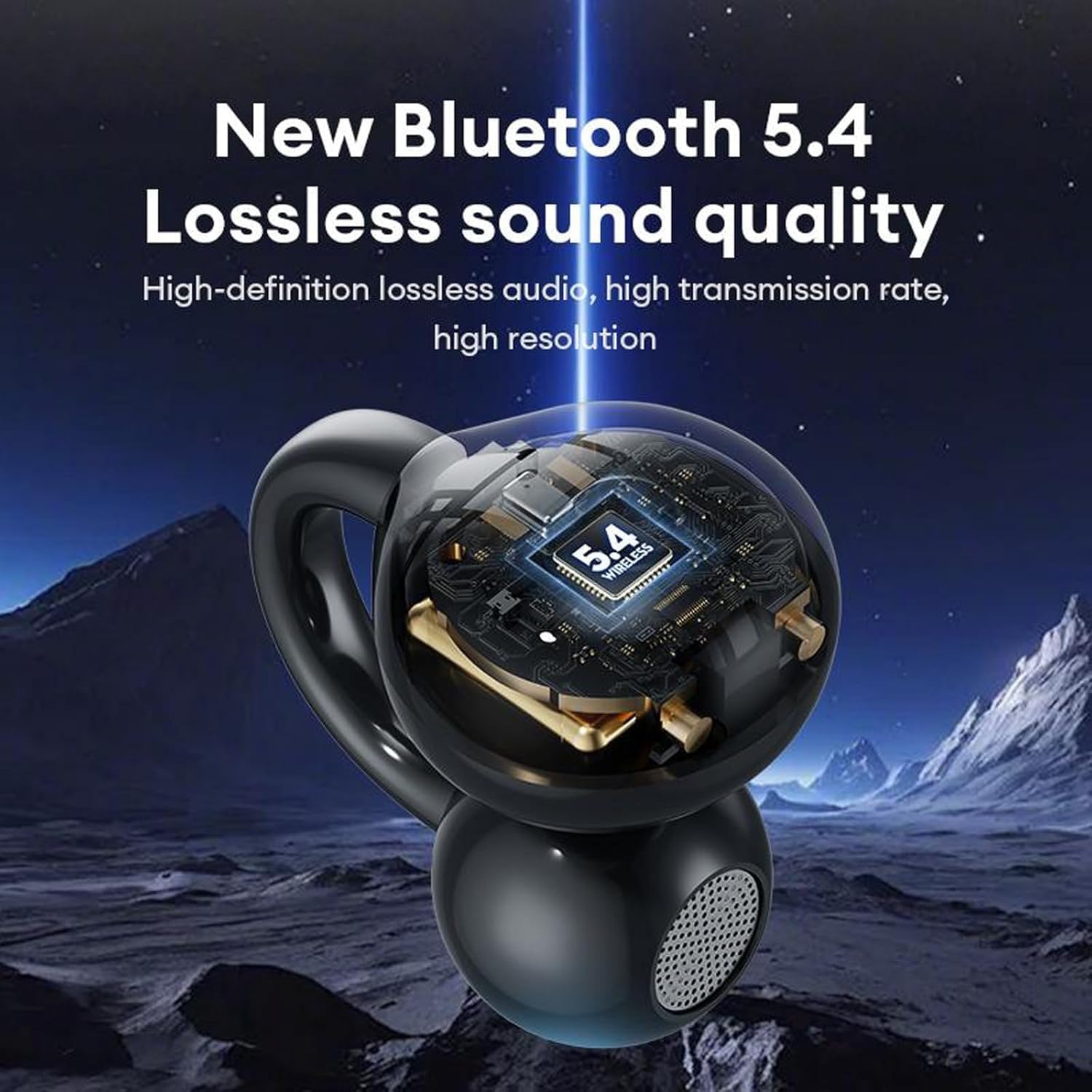
Image: A visual representation of the M100 headphone's internal structure, highlighting the Bluetooth 5.4 chip for lossless sound quality.
4. آپريٽنگ هدايتون
4.1 بنيادي ٽچ ڪنٽرول
The M100 headphones feature touch-sensitive controls on each earbud.
- راند/روڪ: Single click on either earbud.
- اڳيون گيت: Double click on the right earbud.
- اڳيون گيت: Double click on the left earbud.
- حجم مٿي Three clicks on the right earbud.
- حجم ھيٺ Three clicks on the left earbud.
- جواب/آخر ڪال: ڪنهن به ائربڊ تي ڊبل ڪلڪ ڪريو.
- ايندڙ ڪال رد ڪريو: ٻنهي ائربڊ تي 2 سيڪنڊن لاءِ ڊگهو دٻايو.
- وائس اسسٽنٽ کي فعال ڪريو. ٻنهي ائربڊ تي ڊگهو دٻايو.

Image: A diagram illustrating the various touch operations for the M100 headphones, including song switching, call management, volume control, and voice assistant activation.
4.2 LCD ٽچ اسڪرين جا ڪم
The charging case's LCD touch screen provides additional control and information.

Image: A grid of icons and screens demonstrating the various functions accessible via the M100's LCD touch screen, such as music control, volume, noise reduction, equalizer, alarm, screen brightness, language, wallpaper, find headphones, time settings, flashlight, and camera features.
- موسيقي ڪنٽرول: Play, pause, skip tracks directly from the screen.
- حجم ڪنٽرول: آڊيو جي مقدار کي ترتيب ڏيو.
- شور گهٽائڻ جو طريقو: Toggle between noise reduction and transparency modes.
- Equalizer موڊ: مختلف آڊيو برابر ڪندڙ پري سيٽ چونڊيو.
- الارم سيٽنگ: الارم مقرر ڪريو.
- اسڪرين جي روشني جي ترتيب: Modify the screen's luminosity.
- ٻولي مٽائڻ: ڊسپلي ٻولي تبديل ڪريو.
- Wallpaper Switcher: اسڪرين جي پس منظر کي ترتيب ڏيو.
- هيڊفون ڳوليو: گم ٿيل ائربڊس ڳوليو (جيڪڏهن سپورٽ هجي).
- وقت سيٽنگون: ترتيب ڏيو تاريخ ۽ وقت.
- ٽارچ فنڪشن: هڪ ننڍڙي روشني چالو ڪريو.
- ڪئميرا خاصيتون: Potentially control a connected device's camera (functionality may vary).
4.3 هيڊفون پائڻ
The M100 headphones are designed for open-ear wear, providing comfort and situational awareness.
- Gently clip each earbud onto your ear, ensuring the sound outlet is positioned near your ear canal without blocking it.
- Adjust for a secure and comfortable fit. The bone conduction technology allows sound to transmit effectively without needing to be inserted into the ear canal.

Image: A composite image detailing the M100's features, including high-resolution sound quality, noise reduction, open-ear design, HD Voice, and Bluetooth 5.4 version.
وڊيو: هڪ سرڪاري پراڊڪٽ وڊيو شوڪasing the M100 Clip on Ear Headphones, demonstrating their design and smart screen touch functionality.
5. سار سنڀال
5.1 صفائي
باقاعده صفائي توهان جي هيڊفونز جي ڪارڪردگي ۽ ڊگهي عمر کي برقرار رکڻ ۾ مدد ڪري ٿي.
- Use a soft, dry, lint-free cloth to wipe the headphones and charging case.
- گھڙڻ وارا صاف ڪندڙ، محلول، يا ايروسول اسپري استعمال نه ڪريو.
- ڪنهن به سوراخ ۾ نمي حاصل ڪرڻ کان پاسو ڪريو.
5.2 پاڻي ۽ پسين جي مزاحمت
The M100 headphones are designed to be waterproof and sweatproof, making them suitable for sports and outdoor activities.

Image: A visual demonstrating the waterproof and sweatproof capabilities of the M100 headphones, showing them in a water environment.
- While resistant to water and sweat, they are not intended for submersion.
- پڪ ڪريو ته چارجنگ پورٽ سڪي ويو آهي چارج ڪرڻ کان پهريان نقصان کان بچڻ لاءِ.
5.3 اسٽوريج
جڏهن هيڊفون استعمال ۾ نه هجن ته انهن کي انهن جي چارجنگ ڪيس ۾ رکو ته جيئن انهن جي حفاظت ڪري سگهجي ۽ انهن کي چارج رکيو وڃي.
6. مسئلا حل ڪرڻ
If you encounter issues with your M100 headphones, refer to the following common solutions:
| مسئلو | ممڪن حل |
|---|---|
| هيڊفون جوڙي نه رهيا آهن |
|
| آواز ڪونهي |
|
| چارج ڪرڻ جا مسئلا |
|
| ٽچ ڪنٽرول غير جوابي |
|
7. وضاحتون
Key technical specifications for the M100 Clip on Ear Headphones:
- ماڊل نالو: M100 Clip on Ear Headphones
- رابطي ٽيڪنالاجي: وائرليس (بلوٽوت)
- بلوٽوت ورزن: 5.4
- آڊيو ڊرائيور جو قسم: هڏن جي ڪنڊڪشن ڊرائيور
- ڪنٽرول جو طريقو: ڇڪڻ
- شور ڪنٽرول: فعال شور منسوخي
- پاڻي جي مزاحمت جي سطح: پنروڪ
- بيٽري جي زندگي: 5 Hours (Headphones)
- چارج ڪرڻ وقت: 1 Hour (Headphones)
- چارج ڪرڻ جي صلاحيت: 500mAh
- هيڊ فون جي گنجائش: 30mAh
- مواد: Plastic Or Silicone
- مطابقت رکندڙ ڊوائيسز: سيل فون
- شامل اجزاء: M100 Clip on Ear Headphones
8. وارنٽي ۽ سپورٽ
وارنٽي جي معلومات ۽ ڪسٽمر سپورٽ لاءِ، مھرباني ڪري پنھنجي خريداري سان گڏ ڏنل دستاويز ڏسو يا پرچون ڪندڙ سان رابطو ڪريو. ڪنھن به وارنٽي دعوائن لاءِ پنھنجي خريداري جو ثبوت رکو.


