
1. تعارف
Welcome to the user manual for your new FLEXISPOT 63x28 Inch Dual Motor Electric Standing Desk. This manual provides essential information for the safe assembly, operation, maintenance, and troubleshooting of your desk. Please read it thoroughly before use and retain it for future reference.
2. حفاظتي هدايتون
- Ensure all components are present and undamaged before assembly. Do not use if any parts are missing or damaged.
- زخم کان بچڻ لاءِ آپريشن دوران ٻارن ۽ پالتو جانورن کي ڊيسڪ کان پري رکو.
- Do not place hands or other body parts near moving parts of the desk during height adjustment.
- Ensure the desk is placed on a level surface to prevent tipping.
- ڊيسڪ کي اوورلوڊ نه ڪريو. وڌ ۾ وڌ وزن جي گنجائش لاءِ وضاحتن جو حوالو ڏيو.
- Keep all electrical cords organized and away from moving parts to prevent damage or entanglement.
- Unplug the desk from the power outlet before cleaning or performing any maintenance.
- Only use the desk for its intended purpose as a workstation.
3. پيڪيج مواد
پڪ ڪريو ته هيٺ ڏنل سڀئي شيون توهان جي پيڪيج ۾ شامل آهن:
- Desktop Surface (Black)
- Desk Frame (Black, including dual motors and lifting columns)
- Control Panel with Memory Controller
- پاور اڊاپٽر ۽ ڪيبل
- اسيمبلي هارڊويئر (اسڪرو، اوزار، وغيره)
- ھدايت وارو دستور

تصوير: مٿانview of the FLEXISPOT 63x28 Inch Dual Motor Electric Standing Desk, showing the desktop, frame, and control panel.
4. سيٽ اپ جون هدايتون
4.1 کولڻ
Carefully remove all components from the packaging. Place them on a soft, clean surface to prevent scratches or damage during assembly. Keep all packaging materials until assembly is complete and you are satisfied with the product.
4.2 فريم کي گڏ ڪرڻ
Follow the detailed diagrams provided in the separate assembly guide to connect the lifting columns to the crossbar and attach the footings. Ensure all screws are tightened securely.
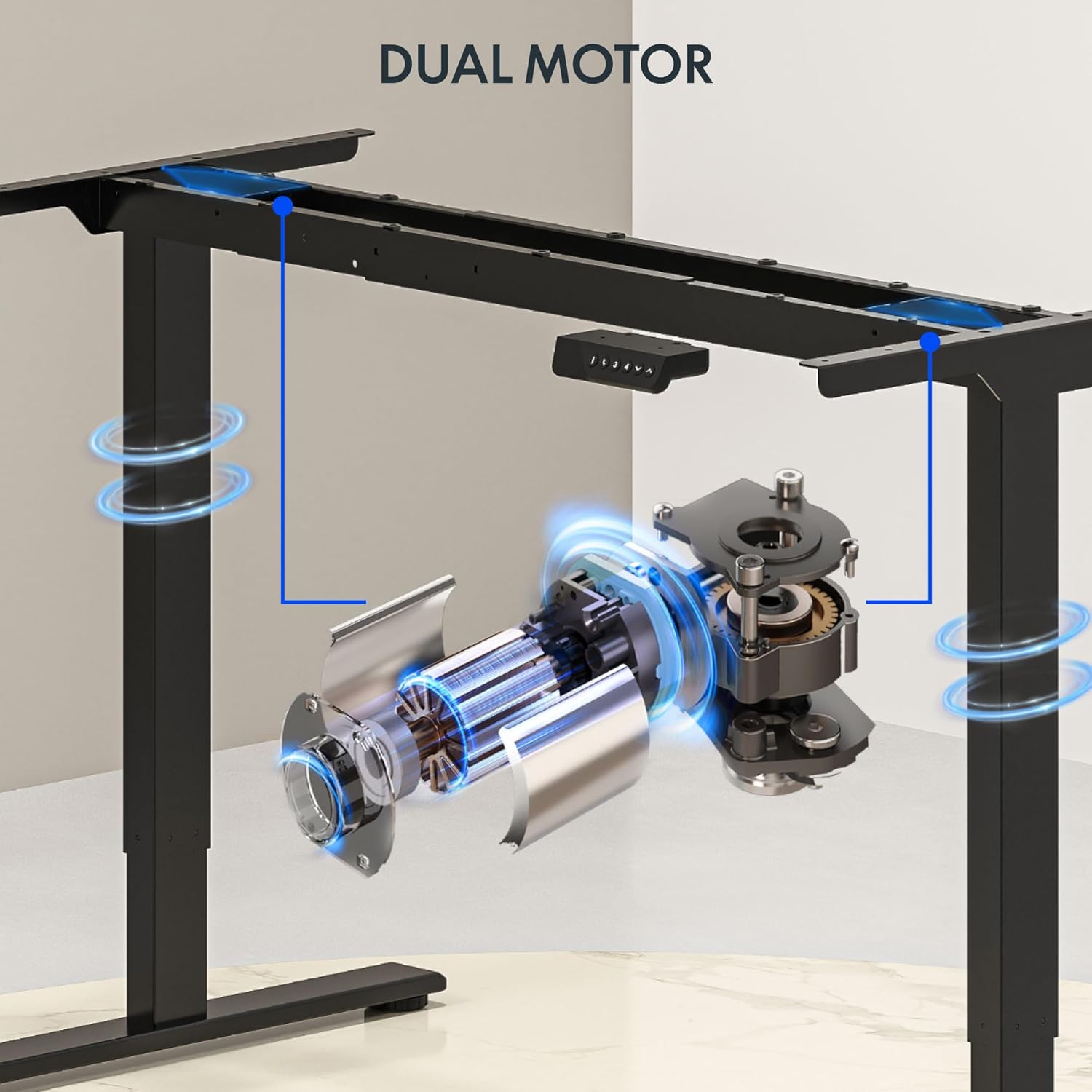
تصوير: تفصيلي view of the dual motor desk frame, illustrating the motor placement and structural components.
4.3 Attaching the Desktop
Carefully place the desktop upside down on a soft surface. Align the assembled frame with the pre-drilled holes on the desktop. Secure the desktop to the frame using the provided screws. Once secured, carefully flip the desk upright with assistance.
4.4 Connecting the Control Panel and Power
Connect the control panel cable to the control box, and then connect the power adapter to the control box. Plug the power cable into a standard electrical outlet. The desk is now ready for initial operation.

Image: Close-up of the desk's control panel, showing the LED display and buttons for height adjustment and memory presets.
Video: Demonstrates the dual-motor strength and smooth operation of the FLEXISPOT standing desk, highlighting its robust design and functionality.
5. آپريٽنگ هدايتون
5.1 اوچائي کي ترتيب ڏيڻ
- کي دٻايو مٿي (∧) ڊيسڪ کي مٿي ڪرڻ لاءِ بٽڻ.
- کي دٻايو هيٺ (∨) ڊيسڪ کي هيٺ ڪرڻ لاءِ بٽڻ.
- Release the button at your desired height. The LED display will show the current height.
5.2 ميموري پري سيٽ استعمال ڪندي
The control panel features four memory presets (1, 2, 3, 4) to save and recall your preferred sitting and standing heights.
- مٿي/هيٺ بٽڻن کي استعمال ڪندي ڊيسڪ کي پنهنجي گهربل اوچائي تي ترتيب ڏيو.
- کي دٻايو "م" button (or similar memory set button, indicated by 'i' on some models) once. The display will flash.
- Immediately press one of the number buttons (1, 2, 3, or 4) to save the current height to that preset.
- محفوظ ڪيل اوچائي کي ياد ڪرڻ لاءِ، صرف لاڳاپيل نمبر بٽڻ کي دٻايو (1، 2، 3، يا 4). ڊيسڪ خودڪار طريقي سان محفوظ ڪيل پوزيشن ڏانهن منتقل ٿي ويندي.

Image: Close-up of the memory controller, highlighting the numbered preset buttons and the up/down controls for precise height adjustments.
5.3 اينٽي ڪوليشن سسٽم
The desk is equipped with an anti-collision system. If the desk encounters an obstacle during height adjustment, it will automatically stop and reverse slightly to prevent damage. This feature enhances safety during operation.
6. سار سنڀال
- صفائي: ڊيسڪ جي مٿاڇري ۽ فريم کي نرم، ڊي سان صاف ڪريوamp ڪپڙو. گھڙڻ وارا صاف ڪندڙ يا سخت ڪيميڪلز کان پاسو ڪريو جيڪي ختم کي نقصان پهچائي سگھن ٿا.
- چڪاس: Regularly check all screws and connections to ensure they are tight. Re-tighten if necessary.
- ڪيبل جو انتظام: Ensure all cables are neatly organized and not pinched or tangled, especially during height adjustments.
- پاور ڪنڊ: ڪنهن به نقصان جي نشانين لاءِ بجلي جي تار جو معائنو ڪريو. جيڪڏهن خراب ٿئي ته استعمال بند ڪريو ۽ ڪسٽمر سپورٽ سان رابطو ڪريو.
7. مسئلا حل ڪرڻ
| مسئلو | ممڪن سبب | حل |
|---|---|---|
| ڊيسڪ حرڪت نٿي ڪري. | Power cable disconnected; motor cable loose; overload. | Check power connection; ensure all cables are securely plugged in; reduce weight on desk. |
| ڊيسڪ غير مساوي طور تي هلي ٿي يا غير معمولي شور ڪري ٿي. | اڻ برابر لوڊ؛ ڍلو ڳنڍ؛ رڪاوٽ. | Distribute weight evenly; check and tighten all screws; remove any obstructions. |
| اوچائي پري سيٽ ڪم نه ڪري رهيا آهن. | Presets not properly set. | Re-program the memory presets following section 5.2. |
| ٽڪراءُ مخالف نظام اڪثر ڪري چالو ٿئي ٿو. | Obstacles in the path of movement; sensitivity setting too high. | Clear the area around the desk; consult the full manual for adjusting anti-collision sensitivity if available. |
If you encounter issues not listed here or if the solutions do not resolve the problem, please contact FLEXISPOT customer support.
8. وضاحتون
| خاصيت | تفصيل |
|---|---|
| برانڊ | FLEXISPOT |
| ماڊل | 63x28 Inch Dual Motor Electric Standing Desk |
| ڊيسڪ ٽاپ جي ماپ | 63"ڊبليو x 28"ڊبليو |
| اونچائي جي حد | 28.3" کان 47.6" تائين |
| وڌ ۾ وڌ وزن جي گنجائش | 198 پائونڊ |
| موٽر جو قسم | ٻٽي موٽر |
| ڪنٽرول پينل | Memory Controller with 4 Presets |
| ڊيسڪ ٽاپ مواد | Engineered Wood (Black Top) |
| فريم مواد | Alloy Steel (Black Frame) |
| خاص خاصيتون | Dual Motor, 198 lbs Heavy-Duty Capacity, Memory Controller, 63"x28" Large Desktop |

Image: Diagram illustrating the dimensions of the FLEXISPOT 63x28 Inch Electric Standing Desk, including height range, width, and depth.
9. وارنٽي ۽ سپورٽ
9.1 محدود وارنٽي
This FLEXISPOT product comes with a limited warranty against defects in materials and workmanship. The specific terms and duration of the warranty may vary. Please refer to the warranty card included in your package or visit the official FLEXISPOT webتفصيلي وارنٽي معلومات لاءِ سائيٽ.
The warranty typically covers the desk frame, motors, and control panel under normal use conditions. Damage resulting from misuse, accidents, unauthorized modifications, or improper assembly is not covered.
9.2 ڪسٽمر سپورٽ
For technical assistance, warranty claims, or any questions regarding your FLEXISPOT standing desk, please contact our customer support team:
- Webسائيٽ: www.flexispot.com
- اي ميل: support@flexispot.com
- فون: (Refer to your product packaging or website for regional contact numbers)
Please have your model number (B0F29ZD4DN) and purchase date ready when contacting support.