
1. تعارف
This manual provides detailed instructions for the proper use and care of your Altec Lansing Nanophones ANC 2.0 Wireless Over-Ear Bluetooth Headphones. Please read this manual thoroughly before using the product to ensure optimal performance and longevity.

Image 1.1: Altec Lansing Nanophones ANC 2.0 in Silver.
2. پيڪيج مواد
پڪ ڪريو ته سڀئي شيون توهان جي پيڪيج ۾ موجود آهن:
- Altec Lansing Nanophones ANC 2.0 Wireless Over-Ear Headphones
- USB-C چارجنگ ڪيبل
- 3.5mm آڊيو ڪيبل
- استعمال ڪندڙ جو دستياب (ھي دستاويز)

Image 2.1: Included USB-C charging cable and 3.5mm audio cable.
3. پراڊڪٽ ختمview
Familiarize yourself with the headphone components and controls.
3.1 Headphone Features
- فعال شور منسوخي (ANC): هڪ عميق ٻڌڻ جي تجربي لاءِ ماحول جي شور کي گھٽائي ٿو.
- فولبل ڊيزائن: ڪمپيڪٽ اسٽوريج ۽ پورٽيبلٽي جي اجازت ڏئي ٿو.
- Adjustable Headband & Soft Ear Cushions: Ensures a comfortable fit for extended wear.
- مربوط مائڪروفون: هينڊز فري ڪالز ۽ وائس اسسٽنٽ ڪمانڊز لاءِ.
- USB-C چارج ڪرڻ: For fast and convenient power replenishment.
- وائس اسسٽنٽ مطابقت: Access Siri or Google Voice with ease.

Image 3.1: Key features of the Nanophones ANC 2.0 headphones.
3.2 ڪنٽرول ۽ بندرگاهون
Locate the following controls on your headphones:
- پاور بٽڻ: آن/آف، هلايو/روڪ ڪريو، ڪال جو جواب ڏيو/ختم ڪريو.
- واليوم اپ/اڳيون ٽريڪ بٽڻ: حجم وڌائڻ لاءِ مختصر پريس، ايندڙ ٽريڪ لاءِ ڊگهو پريس.
- آواز گھٽائڻ/پوئين ٽريڪ بٽڻ: حجم گهٽائڻ لاءِ مختصر پريس، پوئين ٽريڪ لاءِ ڊگهو پريس.
- ANC بٽڻ: Activates/Deactivates Active Noise Cancellation.
- USB-C چارجنگ پورٽ: چارجنگ ڪيبل کي ڳنڍڻ لاءِ.
- 3.5mm آڊيو جيڪ: وائرڊ ڪنيڪشن لاءِ.
- LED اشارو: پاور، پيئرنگ، ۽ چارجنگ اسٽيٽس ڏيکاري ٿو.

تصوير 3.2: پاسي view illustrating the location of controls and ports.
4. سيٽ اپ
4.1 هيڊفون چارج ڪرڻ
- Connect the small end of the USB-C charging cable to the USB-C port on the headphones.
- Connect the large end of the USB-C charging cable to a USB power source (e.g., wall adapter, computer USB port).
- LED انڊيڪيٽر چارجنگ دوران ڳاڙهي رنگ ۾ چمڪندو ۽ مڪمل چارج ٿيڻ تي بند ٿي ويندو.
- مڪمل چارج لڳ ڀڳ 2-3 ڪلاڪ لڳن ٿا.
نوٽ: بهترين بيٽري جي زندگي لاءِ پهرين استعمال کان اڳ پڪ ڪريو ته هيڊفون مڪمل طور تي چارج ٿيل آهن.
4.2 پاور آن/آف
- پاور آن ڪرڻ: پاور بٽڻ کي 3 سيڪنڊن لاءِ دٻايو ۽ رکو. LED اشارو نيرو چمڪيندو.
- پاور آف ڪرڻ: پاور بٽڻ کي 3 سيڪنڊن لاءِ دٻايو ۽ رکو. LED اشارو بند ٿي ويندو.
4.3 بلوٽوٽ جوڙي
- پڪ ڪريو ته هيڊفون بند ٿيل آهن.
- Press and hold the Power Button for 5-7 seconds until the LED indicator flashes red and blue alternately. This indicates pairing mode.
- پنهنجي ڊوائيس (اسمارٽ فون، ٽيبليٽ، ڪمپيوٽر) تي، بلوٽوٿ کي فعال ڪريو ۽ موجود ڊوائيسز جي ڳولا ڪريو.
- Select "Nanophones ANC 2.0" from the list of devices.
- هڪ ڀيرو جوڙيو ويو، LED اشارو آهستي آهستي نيرو چمڪيندو.
- جيڪڏهن پاسورڊ لاءِ چيو وڃي ته، "0000" داخل ڪريو.
نوٽ: هيڊفونز خودڪار طريقي سان آخري جوڙيل ڊوائيس سان ٻيهر ڳنڍڻ جي ڪوشش ڪندا جڏهن پاور آن ٿيندي.
5. آپريٽنگ هدايتون
5.1 ميوزڪ پلے بیک
- راند/روڪ: پاور بٽڻ کي مختصر دٻايو.
- حجم مٿي واليوم اپ بٽڻ کي مختصر دٻايو.
- حجم ھيٺ واليوم ڊائون بٽڻ کي مختصر دٻايو.
- اڳيون ٽريڪ: واليوم اپ بٽڻ کي ڊگھو دٻايو.
- پويون ٽريڪ: واليوم ڊائون بٽڻ کي ڊگھو دٻايو.
5.2 فون ڪالز
- جواب/آخر ڪال: پاور بٽڻ کي مختصر دٻايو.
- ڪال رد ڪريو: پاور بٽڻ کي ڊگھو دٻايو.
- ريڊل آخري نمبر: پاور بٽڻ کي ٻٽي دٻايو.
5.3 فعال شور منسوخي (ANC)
- ANC چالو ڪريو: Press the ANC Button. The ANC LED indicator will light up.
- ANC کي غير فعال ڪريو: Press the ANC Button again. The ANC LED indicator will turn off.
نوٽ: Using ANC will reduce battery life. The headphones provide up to 20 hours of playtime with ANC active, and up to 30 hours without ANC.
5.4 وائس اسسٽنٽ
- وائس اسسٽنٽ کي فعال ڪريو. Triple-press the Power Button to activate Siri or Google Voice (depending on your connected device).
- You can then issue commands through the headphone's microphone.
5.5 وائرڊ ڪنيڪشن
- 3.5 ايم ايم آڊيو ڪيبل جو هڪ پاسو هيڊ فون جي آڊيو جيڪ ۾ داخل ڪريو.
- Insert the other end into your audio device's 3.5mm output.
- The headphones can be used in wired mode even if the battery is depleted.
6. سار سنڀال
6.1 صفائي
- هيڊفونز کي نرم، سڪل ڪپڙي سان صاف ڪريو.
- گھڙڻ وارا صاف ڪندڙ، الڪوحل، يا ڪيميائي محلول استعمال نه ڪريو.
- ڪنهن به سوراخ ۾ نمي حاصل ڪرڻ کان پاسو ڪريو.
6.2 اسٽوريج
- هيڊفونز کي انتهائي گرمي پد کان پري ٿڌي، سڪل جاءِ تي رکو.
- When not in use, fold the headphones to protect them and save space.
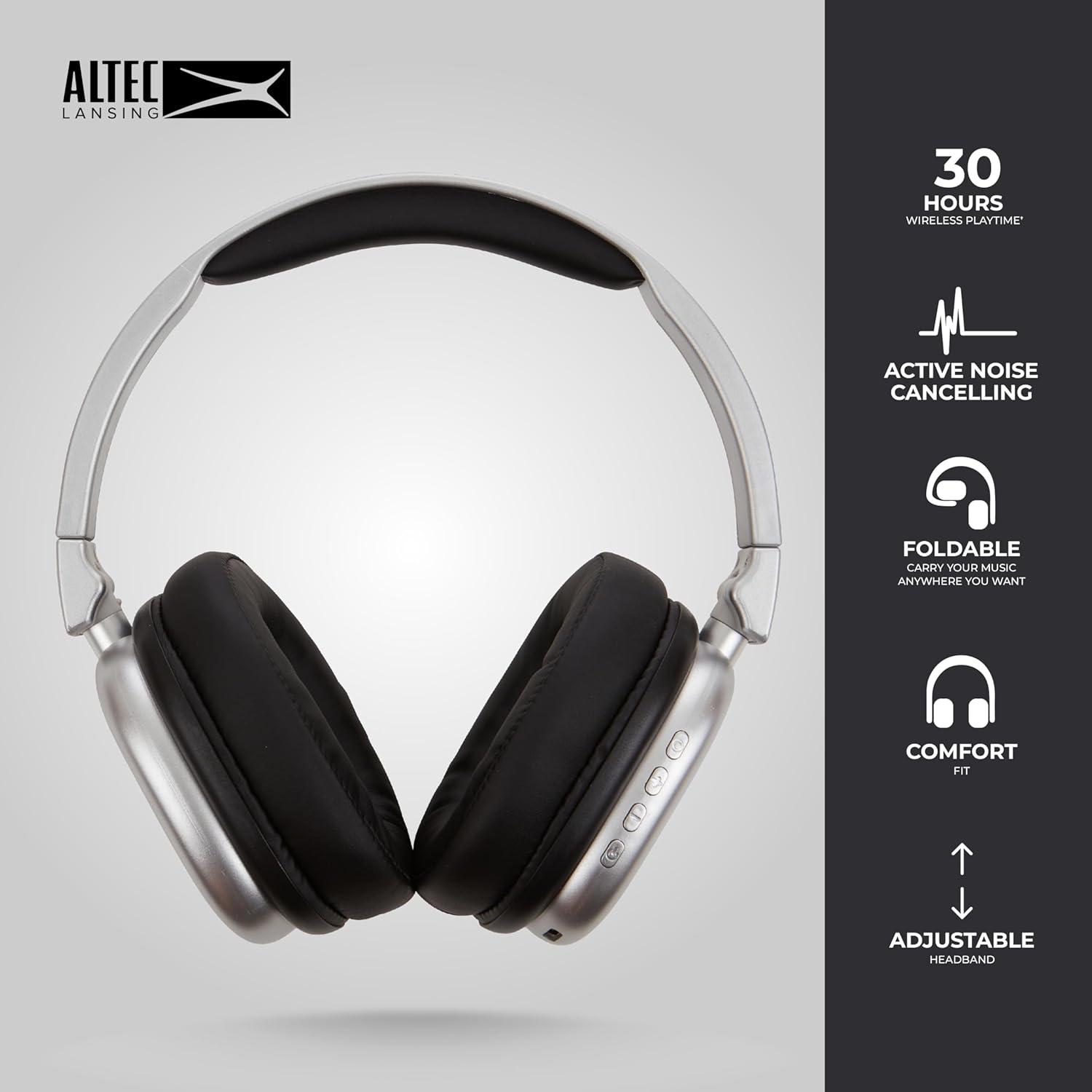
Image 6.1: The foldable design aids in compact storage.
7. مسئلا حل ڪرڻ
| مسئلو | حل |
|---|---|
| هيڊفون آن نه ٿا ٿين. | پڪ ڪريو ته هيڊفون چارج ٿيل آهن. USB-C ڪيبل استعمال ڪندي پاور سورس سان ڳنڍيو. |
| بلوٽوٿ ذريعي جوڙي نه ٿو سگهجي. |
|
| ڪابه آواز يا گهٽ آواز ناهي. |
|
| Active Noise Cancellation not working. | Ensure the ANC button has been pressed and the ANC LED indicator is lit. |
8. وضاحتون
| ماڊل نالو | Nanophones ANC 2.0 |
| ماڊل نمبر | MZX5501-MSIL-STK-6 |
| برانڊ | Altec Lansing |
| رابطي | Wireless (Bluetooth 4.1), Wired (3.5mm) |
| ڪن جي جڳهه | ڪن کان مٿانهون |
| شور ڪنٽرول | فعال شور منسوخي |
| بيٽري جي زندگي | Up to 30 hours (wireless), Up to 20 hours (with ANC) |
| چارجنگ پورٽ | USB-C |
| آڊيو ڊرائيور جو قسم | Dynamic Driver (1.5" Neodymium) |
| تعدد جي حد | 20Hz - 20,000Hz |
| وزن | 7.05 آونس |
| مواد | پلاسٽڪ |
9. وارنٽي ۽ سپورٽ
9.1 ٺاهيندڙ وارنٽي
This product is covered by a manufacturer's warranty. Please refer to the warranty card included in your package or visit the official Altec Lansing webتفصيلي وارنٽي شرطن ۽ ضابطن لاءِ سائيٽ.
9.2 ڪسٽمر سپورٽ
For technical assistance, troubleshooting, or product inquiries, please contact Altec Lansing customer support through their official webسائيٽ يا توهان جي پراڊڪٽ پيڪنگنگ ۾ ڏنل رابطي جي معلومات.
Webسائيٽ: www.alteclansing.com