
1. تعارف
This manual provides detailed instructions for the setup, operation, and maintenance of your Frontech FT-1602A Wireless Rechargeable Keyboard and Mouse Combo. This combo offers dual-mode connectivity, supporting both 2.4 GHz wireless and Bluetooth 5.0, allowing seamless switching between multiple devices. Please read this manual thoroughly before using the product to ensure optimal performance and longevity.

Image 1.1: The Frontech FT-1602A Wireless Rechargeable Keyboard and Mouse Combo.
2. پيڪيج مواد
پڪ ڪريو ته سڀئي شيون توهان جي پيڪيج ۾ موجود آهن:
- Frontech 100-Key Wireless Keyboard
- Frontech Wireless Mouse
- USB-C Nano Receiver (for 2.4 GHz connection)
- USB-C چارجنگ ڪيبل
- استعمال ڪندڙ جو دستياب (ھي دستاويز)
3. پراڊڪٽ ختمview
3.1 ڪي بورڊ جون خاصيتون
- 100-Key Slim Design: Compact layout with essential keys.
- قينچي-سوئچ ڪيز: Provides a quiet and responsive typing experience.
- ڊبل موڊ ڪنيڪٽوٽي: Supports 2.4 GHz wireless and Bluetooth 5.0 (BT1, BT2, BT3).
- Rechargeable بيٽري: Integrated 500 mAh Li-ion battery.
- USB-C چارجنگ پورٽ: For convenient recharging.
- Height Adjustable Clip: For ergonomic typing angle.

Image 3.1: Keyboard features including the Type-C charging port, ON/OFF switch, and height adjustable clip.
3.2 مائوس جون خاصيتون
- Ergonomic ڊيزائن: Contoured for comfortable use.
- 1000 ڊي پي آءِ آپٽيڪل سينسر: For precise and smooth cursor control.
- ڊبل موڊ ڪنيڪٽوٽي: Supports 2.4 GHz wireless and Bluetooth.
- Rechargeable بيٽري: Integrated 500 mAh Li-ion battery.
- USB-C چارجنگ پورٽ: For convenient recharging.

Image 3.2: Mouse features including the Type-C charging port, left/right click, scroll wheel, and ergonomic design.
4. سيٽ اپ
4.1 ڊوائيسز کي چارج ڪرڻ
Both the keyboard and mouse are equipped with built-in rechargeable batteries. Before first use, it is recommended to fully charge both devices.
- Connect the supplied USB-C charging cable to the charging port on the keyboard and mouse.
- ڪيبل جي ٻئي ڇيڙي کي USB پاور سورس سان ڳنڍيو (مثال طور، ڪمپيوٽر USB پورٽ، USB وال اڊاپٽر).
- چارجنگ انڊيڪيٽر لائيٽ چارجنگ دوران روشن ٿيندي ۽ مڪمل چارج ٿيڻ تي بند ٿي ويندي.
4.2 2.4 GHz Wireless Connection
This mode uses the included USB-C nano receiver for a stable wireless connection.
- Locate the USB-C nano receiver. It is typically stored in the mouse or keyboard for convenience.
- Insert the USB-C nano receiver into an available USB-C port on your computer or device.
- For the keyboard, ensure the mode switch (usually on the back or side) is set to '2.4G'.
- For the mouse, ensure the mode switch (usually on the bottom) is set to '2.4G'.
- The devices should connect automatically. If not, press and hold the '2.4G' key on the keyboard for 2 seconds until the red light flickers, then the keyboard should be ready to type.
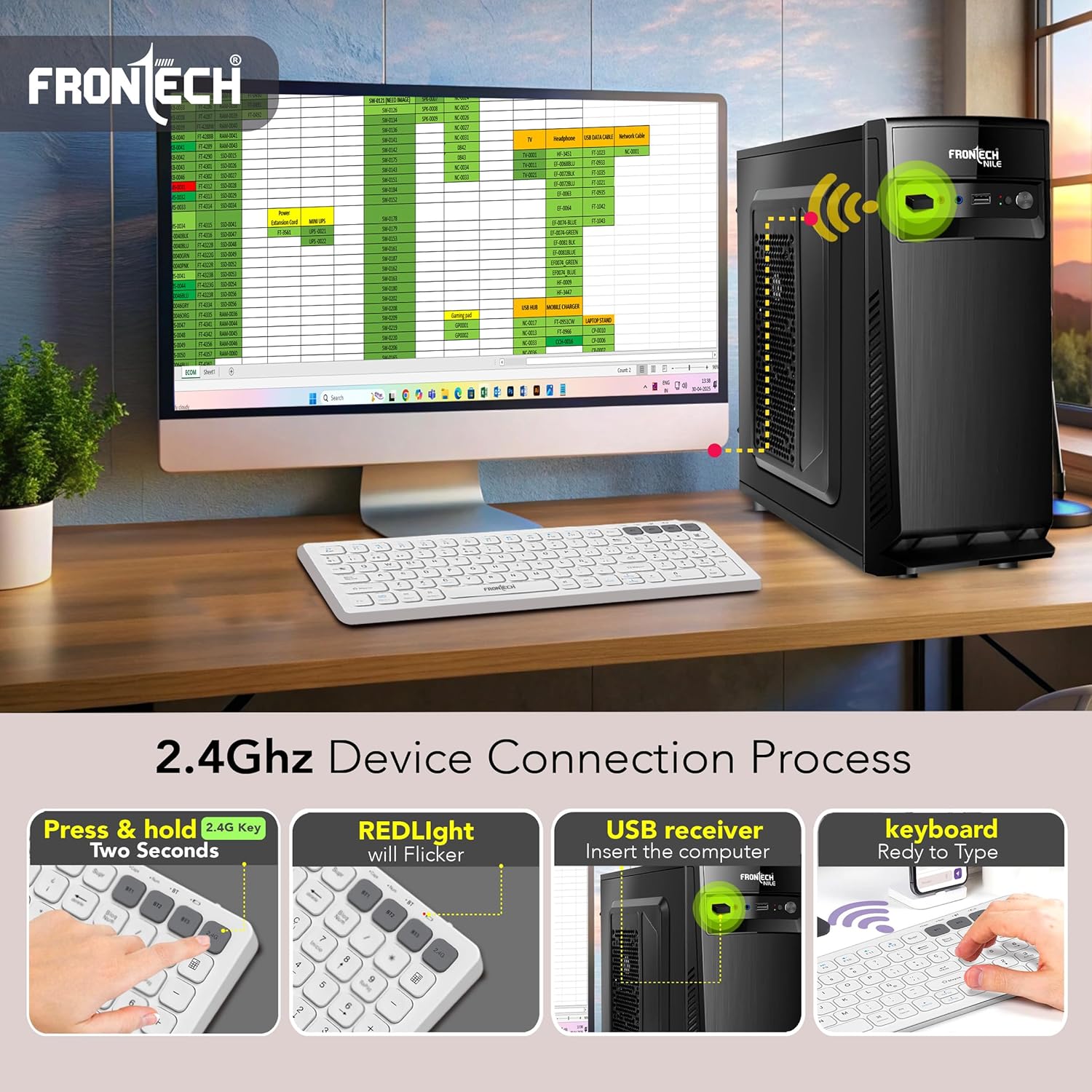
Image 4.1: Steps for connecting the keyboard via 2.4 GHz wireless mode.

Image 4.2: Switch on the mouse to select between 2.4 GHz, OFF, and Bluetooth modes.
4.3 بلوٽوٿ ڪنيڪشن
The keyboard supports up to three Bluetooth devices (BT1, BT2, BT3), and the mouse supports one Bluetooth connection.
4.3.1 ڪي بورڊ بلوٽوٿ پيئرنگ
- پڪ ڪريو ته ڪيبورڊ فعال آهي.
- Press and hold one of the Bluetooth keys (BT1, BT2, or BT3) for 2 seconds. The corresponding blue indicator light will flicker, indicating pairing mode.
- پنهنجي ڊوائيس (ڪمپيوٽر، ٽيبليٽ، اسمارٽ فون) تي، بلوٽوٿ کي فعال ڪريو ۽ نوان ڊوائيسز ڳوليو.
- Select the keyboard name (e.g., "Frontech Keyboard") from the list of available devices.
- If prompted, enter the pairing code displayed on your screen using the keyboard and press Enter.
- Once connected, the blue indicator light will stop flickering.
- To pair additional Bluetooth devices, repeat steps 2-6 using BT2 or BT3.
4.3.2 ماؤس بلوٽوٿ پيئرنگ
- پڪ ڪريو ته مائوس تي طاقت آهي.
- Set the mode switch on the bottom of the mouse to 'BT'.
- پنهنجي ڊوائيس تي، بلوٽوٿ کي فعال ڪريو ۽ نوان ڊوائيسز ڳوليو.
- Select the mouse name (e.g., "Frontech Mouse") from the list of available devices.
- هڪ ڀيرو ڳنڍيل، مائوس استعمال لاءِ تيار آهي.
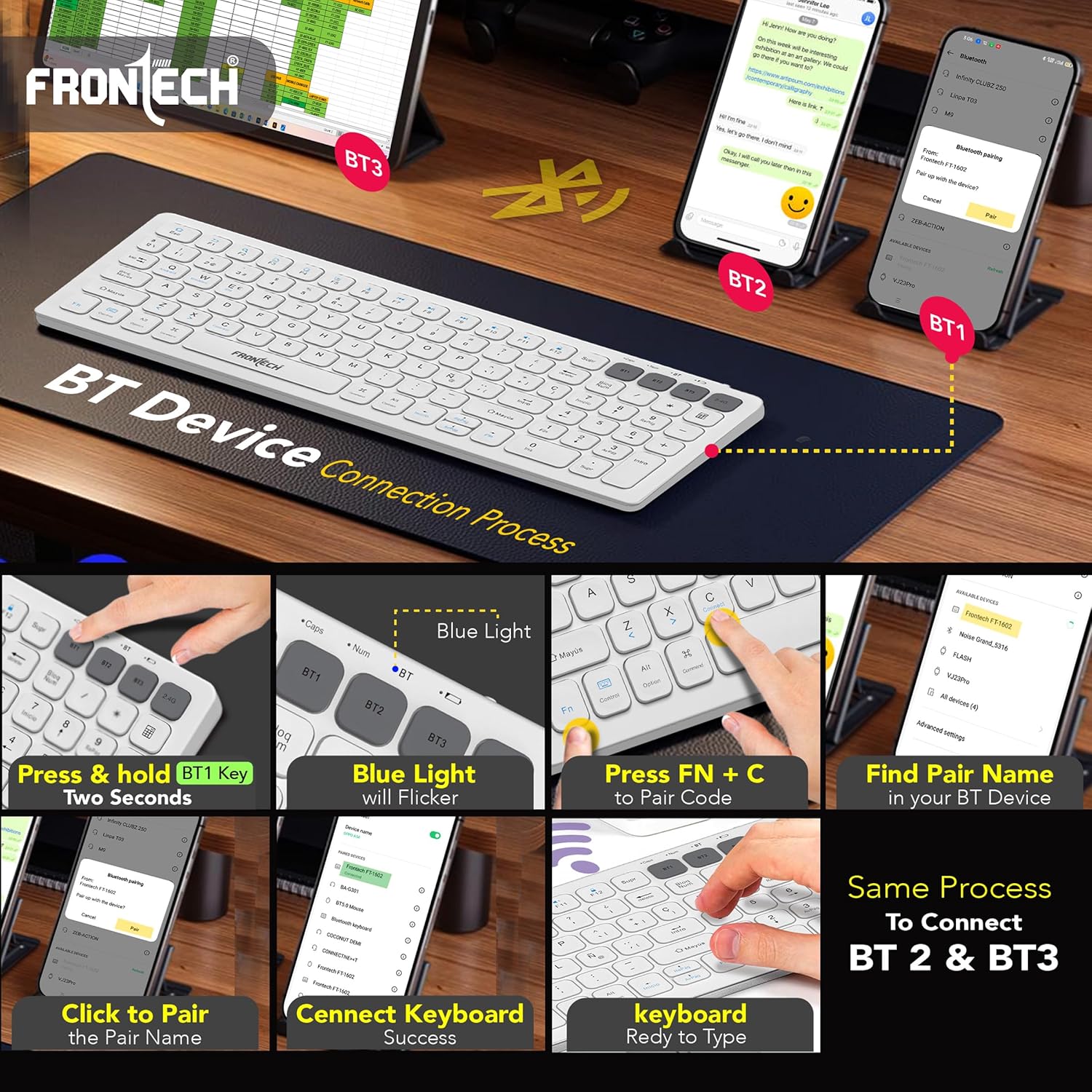
Image 4.3: Detailed steps for connecting the keyboard via Bluetooth.
5. آپريشن
5.1 Switching Between Devices (Keyboard)
To switch between connected devices, simply press the corresponding Bluetooth key (BT1, BT2, or BT3) or the 2.4G key. The keyboard will connect to the selected device automatically.

Image 5.1: Illustration of multi-device connectivity, showing 2.4 GHz and three Bluetooth channels.
5.2 ڪي بورڊ جا ڪم
The keyboard features standard keys along with function keys (F1-F12) that can perform multimedia and system control actions when pressed in combination with the Fn key. Refer to the keycap legends for specific functions.
- ايف اين + ايف 1-ايف 12: Access multimedia controls (e.g., volume, play/pause, brightness) or system functions.
- Fn + C: Used for Bluetooth pairing mode activation (as described in setup).
- آپريٽنگ سسٽم مطابقت: The keyboard is compatible with Windows, macOS, Android, and iOS. Some function keys may behave differently depending on the operating system.
5.3 مائوس جا ڪم
- کاٻي ڪلڪ ڪريو: بنيادي ڪارروائي.
- ساڄي ڪلڪ ڪريو: ثانوي عمل، عام طور تي حوالي مينيو کوليندو آهي.
- اسڪرول ويل: مواد کي عمودي طور تي اسڪرول ڪري ٿو. وچين ڪلڪ جي ڪارڪردگي لاءِ پڻ دٻائي سگھجي ٿو.
- DPI: The mouse operates at 1000 DPI for precise tracking.
6. سار سنڀال
- صفائي: ڪيبورڊ ۽ مائوس جي مٿاڇري کي صاف ڪرڻ لاءِ نرم، سڪل ڪپڙو استعمال ڪريو. ضدي مٽيءَ لاءِ، ٿورو ڊيamp هلڪي صابڻ سان ڪپڙو استعمال ڪري سگهجي ٿو، انهي ڳالهه کي يقيني بڻائي ته ڪو به مائع ڊوائيس ۾ داخل نه ٿئي.
- بيٽري جي سنڀال: To prolong battery life, avoid fully discharging the devices frequently. Recharge them when the battery low indicator appears. Store in a cool, dry place if not used for extended periods.
- اسٽوريج: When not in use, turn off both the keyboard and mouse to conserve battery life.
7. مسئلا حل ڪرڻ
| مسئلو | حل |
|---|---|
| Device not connecting via 2.4 GHz |
|
| ڊوائيس بلوٽوت ذريعي ڳنڍي نه ٿي |
|
| ڪي بورڊ/ماؤس جواب نه ڏئي رهيو آهي |
|
| دير يا وقفي وقفي سان ڪنيڪشن |
|
8. وضاحتون
| خاصيت | تفصيل |
|---|---|
| برانڊ | فرونٽيڪ |
| ماڊل نمبر | FT-1602A |
| رابطي ٽيڪنالاجي | 2.4 GHz وائرليس، بلوٽوٿ 5.0 |
| ڪي بورڊ لي آئوٽ | 100-Key Slim Design |
| اهم قسم | اسڪيسر سوئچ |
| ماؤس DPI | 1000 ڊي پي آئي |
| بيٽري جي گنجائش | 500 mAh (Keyboard & Mouse, each) |
| چارجنگ پورٽ | USB-C |
| آپريٽنگ سسٽم مطابقت | ونڊوز، MacOS، Android، iOS |
| پراڊڪٽ جي ماپ (ڪي بورڊ) | 32 x 12.6 x 1.7 سينٽي |
| شيءِ جو وزن | 460 g (Combo) |
| رنگ | اڇو |
9. وارنٽي ۽ سپورٽ
The Frontech FT-1602A Wireless Rechargeable Keyboard & Mouse Combo comes with a 1 سال وارنٽي خريداري جي تاريخ کان. هي وارنٽي عام استعمال هيٺ پيداوار جي خرابين کي ڍڪيندي آهي.
For technical support, warranty claims, or further assistance, please contact Frontech customer service. Refer to the product packaging or the official Frontech webجديد ترين رابطي جي معلومات لاءِ سائيٽ.