
1. تعارف
Thank you for choosing the FLEXISPOT H5 Laptop Support Table. This manual provides essential information for the safe assembly, operation, and maintenance of your new adjustable mobile desk. Please read these instructions carefully before use and retain them for future reference.
The FLEXISPOT H5 is designed for versatile use, offering manual height adjustment and a tilting tabletop to enhance comfort while working, reading, or dining from your sofa, bed, or armchair.
2. حفاظت جي ڄاڻ
خبردار:
- وڌ ۾ وڌ لوڊ گنجائش کان وڌيڪ نه ڪريو 7 ڪلوگرام (15.4 پائونڊ). Overloading can cause instability and damage.
- Avoid placing heavy or unstable objects near the edge of the tabletop to prevent them from falling.
- استعمال کان اڳ پڪ ڪريو ته سڀئي اسڪرو ۽ فاسٽنرز محفوظ طور تي مضبوط ڪيا ويا آهن. وقتي طور تي ڍلو ڪنيڪشن چيڪ ڪريو.
- Keep hands and fingers clear of moving parts during height adjustment and tabletop tilting to prevent pinching.
- Do not allow children to play with or climb on the table.
- Use the table on a flat, stable surface to prevent tipping.
3. پيڪيج مواد
اسيمبلي شروع ڪرڻ کان اڳ پڪ ڪريو ته سڀئي حصا موجود آهن ۽ انهن کي ڪو نقصان نه پهتو آهي. جيڪڏهن ڪو به حصو غائب يا خراب آهي، مهرباني ڪري ڪسٽمر سپورٽ سان رابطو ڪريو.
- Tabletop (Maple + White Frame)
- مکيه سپورٽ ڪالمن
- بيس فٽ (2 ٽڪرا)
- Safety Bar for Tilting Tabletop
- اسيمبلي هارڊويئر (اسڪرو، رنچ، وغيره)
- ھدايت وارو دستور
4. سيٽ اپ ۽ اسيمبلي
The FLEXISPOT H5 table is designed for quick and easy assembly. A screwdriver is recommended, and all necessary tools are included.
- Attach the Base Feet: Securely attach the two base feet to the bottom of the main support column using the provided screws. Ensure they are oriented correctly for stability.
- Connect the Tabletop: Attach the tabletop to the top of the main support column. Align the pre-drilled holes and fasten with the appropriate screws.
- Install the Safety Bar: If desired, install the removable safety bar along the bottom edge of the tabletop. This prevents items from sliding off when the tabletop is tilted.
- فائنل چيڪ: Once assembled, gently shake the table to ensure all connections are secure and the table is stable.

Image: FLEXISPOT H5 table showing its dimensions (60 cm x 40 cm) and maximum load capacity (7 kg).
5. آپريٽنگ هدايتون
5.1. اونچائي جي ترتيب
The table's height can be manually adjusted between 65 cm and 105 cm to suit various sitting or standing positions.
- اڀارڻ: Pull the adjustment lever (handle) upwards. The tabletop will rise. Release the lever at the desired height.
- هيٺ ڪرڻ: Pull the adjustment lever (handle) upwards and gently push the tabletop downwards. Release the lever at the desired height.

Image: Demonstrating the height adjustment feature, allowing use while sitting or standing. The table can be adjusted between 65 cm and 105 cm.
5.2. Tabletop Tilting
The tabletop can be tilted to provide an ergonomic angle for reading, writing, or using a laptop.
- جھڪائڻ لاءِ: Locate the tilting mechanism (often a lever or knob) beneath the tabletop. Engage the mechanism and adjust the tabletop to your preferred angle.
- محفوظ ڪرڻ لاءِ: Release the tilting mechanism to lock the tabletop in place.
- Using the Safety Bar: If you plan to tilt the tabletop, ensure the removable safety bar is installed to prevent items from sliding off.

Image: The tilting tabletop feature, demonstrating how to adjust the angle for ergonomic use. An inset shows the simple lever for angle adjustment.
5.3. حرڪت
The C-shaped design and hidden casters allow for easy movement and placement of the table, making it suitable for various locations like beside a sofa, bed, or as a mobile workstation.
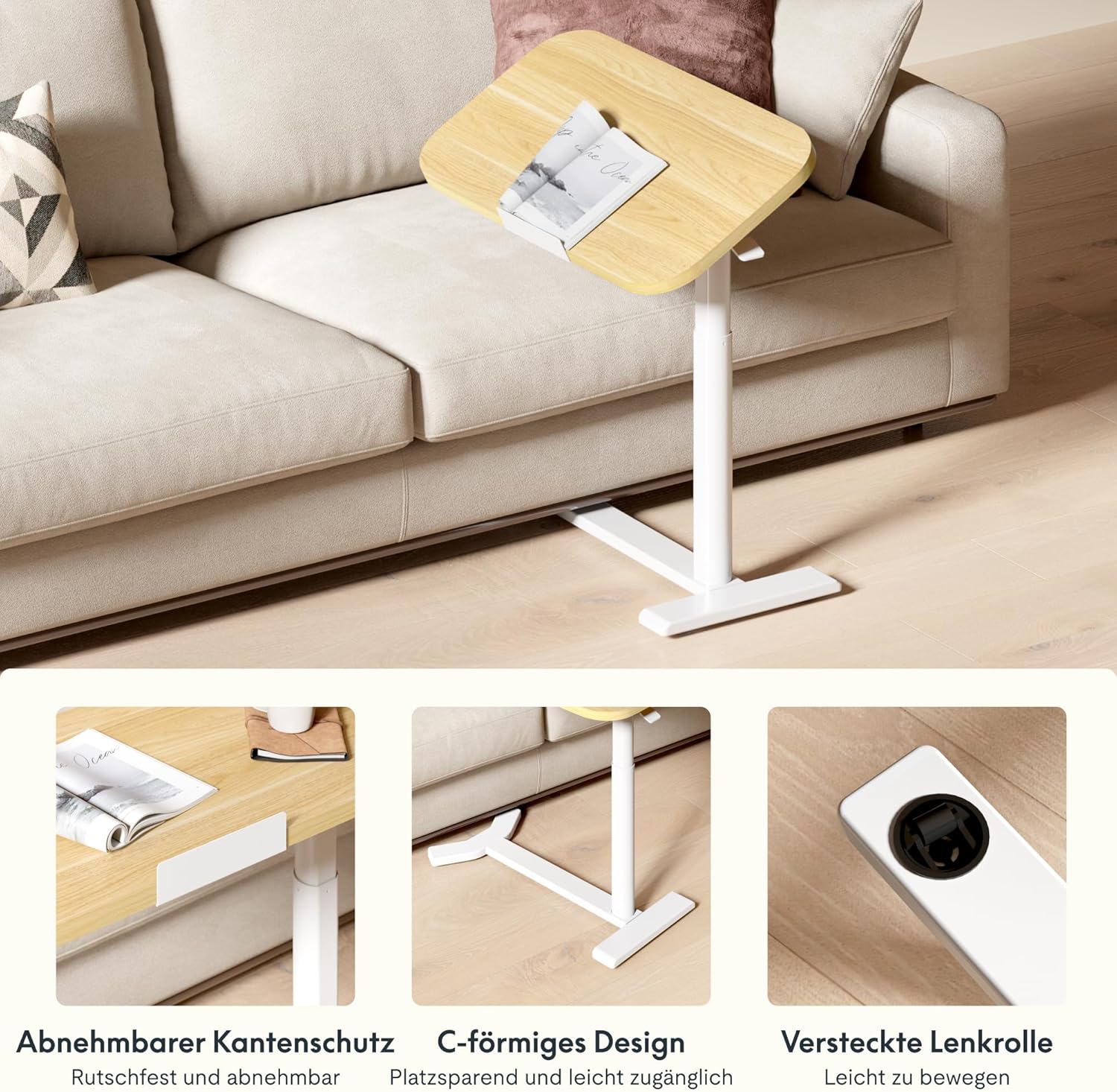
Image: Key design features including removable edge protection, the C-shaped base for easy access, and hidden casters for effortless movement.
6. سار سنڀال
- صفائي: ٽيبل ٽاپ ۽ فريم کي نرم، ڊي سان صاف ڪريوamp cloth. Avoid abrasive cleaners or harsh chemicals that could damage the finish. The water-repellent surface allows for easy cleaning.
- معائنو: وقت بوقت سڀني پيچرن ۽ ڪنيڪشنن کي چيڪ ڪريو ته جيئن اهي تنگ رهن. جيڪڏهن ضروري هجي ته ٻيهر مضبوط ڪريو.
- لوڊ گنجائش: Always adhere to the maximum load capacity of 7 kg to prevent structural damage.
- اسٽوريج: When not in use, store the table in a dry environment away from extreme temperatures or direct sunlight.

Image: The tabletop features rounded corners for safety and a water-repellent surface for easy cleaning.
7. مسئلا حل ڪرڻ
| مسئلو | ممڪن سبب | حل |
|---|---|---|
| ٽيبل لڏپلاڻ وارو يا غير مستحڪم آهي. | Loose assembly screws; uneven floor surface. | Check and tighten all assembly screws. Move the table to a flat, even surface. |
| Height adjustment is difficult or stuck. | Mechanism obstruction; excessive weight on tabletop. | Ensure no objects are obstructing the lifting mechanism. Reduce weight on the tabletop. If issues persist, contact support. |
| Tabletop does not tilt smoothly. | Tilting mechanism obstruction or damage. | Check for any debris or obstruction in the tilting mechanism. Do not force the tilt. Contact support if damaged. |
| Items slide off tilted tabletop. | Safety bar not installed or improperly installed. | Ensure the removable safety bar is correctly installed along the bottom edge of the tabletop when tilting. |
8. وضاحتون
| ماڊل نمبر: | H5-6040 |
| برانڊ: | FLEXISPOT |
| طول و عرض (L x W x H): | 60 x 40 x 65-105 cm (23.6 x 15.7 x 25.6-41.3 inches) |
| Adjustable قد جي حد: | 65 سينٽي ميٽر - 105 سينٽي ميٽر (25.6 انچ - 41.3 انچ) |
| Tabletop Dimensions: | 60 سينٽي x 40 سينٽي (23.6 انچ x 15.7 انچ) |
| ٽيبل جي ٿلهي: | 16 ملي ميٽر (0.63 انچ) |
| وزن: | 9 ڪلوگرام (19.8 پائونڊ) |
| وڌ ۾ وڌ لوڊ گنجائش: | 7 ڪلوگرام (15.4 پائونڊ) |
| مواد: | Engineered Wood (Tabletop), Wood (Frame), Metal (Base) |
| رنگ: | Maple + White Frame |
| اسيمبلي جي ضرورت آهي: | ها (اوزار شامل آهن) |
| GTIN/UPC: | 840460424028 |
9. وارنٽي ڄاڻ
FLEXISPOT products typically come with a limited warranty covering manufacturing defects. Please refer to the warranty card included with your product or visit the official FLEXISPOT webتوهان جي علائقي لاءِ مخصوص تفصيلي وارنٽي شرطن ۽ ضابطن لاءِ سائيٽ.
ڪنهن به وارنٽي دعوائن لاءِ خريداري جي ثبوت طور پنهنجي خريداري جي رسيد رکو.
10. ڪسٽمر سپورٽ
If you have any questions, require assistance with assembly, or encounter any issues with your FLEXISPOT H5 Laptop Support Table, please contact FLEXISPOT customer service.
- آن لائن سپورٽ: سرڪاري FLEXISPOT جو دورو ڪريو webاڪثر پڇيا ويندڙ سوالن، سپورٽ آرٽيڪلز، ۽ رابطي جي فارمن لاءِ سائيٽ.
- اي ميل: پنهنجي پراڊڪٽ پيڪنگنگ يا FLEXISPOT جو حوالو ڏيو webمناسب ڪسٽمر سروس اي ميل ايڊريس لاءِ سائيٽ.
- فون: Contact numbers for your region can be found on the FLEXISPOT official webسائيٽ.
When contacting support, please have your model number (H5-6040) and purchase information readily available.