
1. حفاظتي هدايتون
Please read all instructions carefully before assembly and use to ensure safe operation and prevent injury or damage. Keep this manual for future reference.
- اسيمبليءَ کان اڳ پڪ ڪريو ته سڀئي حصا موجود آهن ۽ انهن کي نقصان نه پهتو آهي. جيڪڏهن ڪو به پرزو غائب يا خراب آهي ته استعمال نه ڪريو.
- حادثن کان بچڻ لاءِ آپريشن دوران ٻارن ۽ پالتو جانورن کي ڊيسڪ کان پري رکو.
- Ensure there are no obstructions (walls, furniture, cables, etc.) in the desk's path during height adjustment.
- Do not place heavy or unstable objects on the desk that exceed its maximum load capacity of 100 kg.
- Avoid placing the desk near heat sources, open flames, or in excessively humid environments.
- Unplug the desk from the power outlet before cleaning, maintenance, or if it will be unused for an extended period.
- صرف مهيا ڪيل پاور اڊاپٽر ۽ ڪيبل استعمال ڪريو.
- Do not attempt to modify or disassemble the desk's electrical components. Contact qualified service personnel for repairs.
2. پراڊڪٽ ختمview
The FLEXISPOT EC5 Lite is an electric height-adjustable desk frame designed for ergonomic workspaces. It features a robust dual-motor system and a stable 3-column leg design.
اهم خاصيتون:
- Dual-Motor Lifting System: Provides smooth, quiet (<50 dB) and stable height adjustments.
- Wide Height Range: Adjustable from 60 cm to 125 cm to accommodate various user preferences and activities.
- وڏي لوڊ گنجائش: Supports up to 100 kg, suitable for multiple monitors and office equipment.
- Smart Memory Panel: Allows saving and recalling up to 4 preferred height settings.
- مخالف تصادم ٽيڪنالاجي: Automatically stops and retracts the desk if an obstacle is detected during movement, ensuring safety.
- مضبوط تعمير: Made with reinforced steel for durability and stability.

Figure 2.1: Ultra-High Load Capacity (100 kg)

Figure 2.2: Large Height Adjustment Range (60-125 cm)

Figure 2.3: Powerful Dual Motors
3. سيٽ اپ ۽ اسيمبلي
The FLEXISPOT EC5 Lite desk frame is designed for straightforward assembly, typically completed in under 25 minutes. A detailed instruction manual is included with the product for step-by-step guidance.
اسيمبلي جي صلاح:
- اسيمبليءَ لاءِ هڪ وسيع علائقو صاف ڪريو.
- Lay out all parts and hardware according to the included manual.
- پڪ ڪريو ته سڀئي پيچ محفوظ طور تي مضبوط ڪيا ويا آهن، پر وڌيڪ تنگ نه ڪريو.
- The frame's width is adjustable to fit various tabletop sizes.

Figure 3.1: Wide Adjustable Frame Width
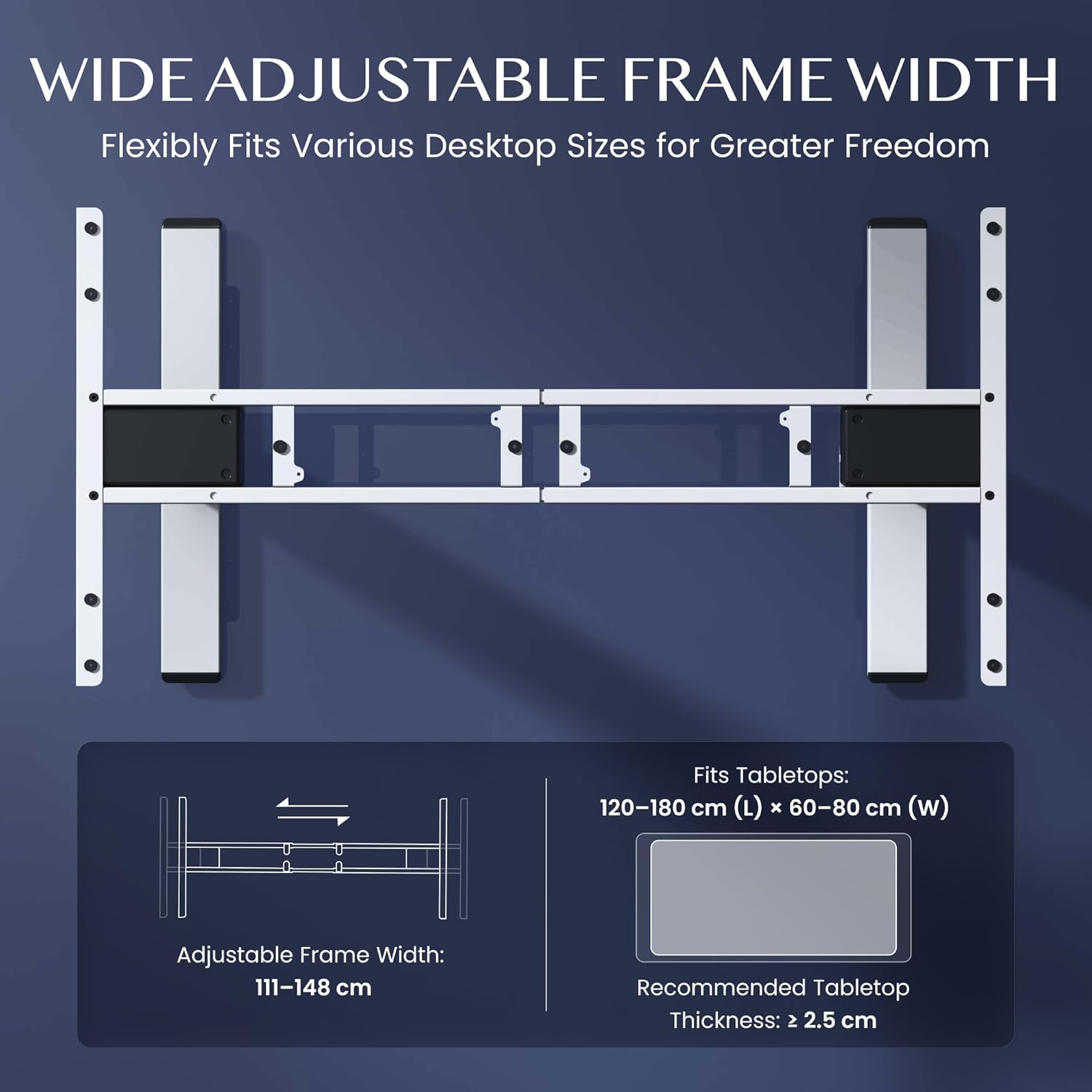
Figure 3.2: Easy Installation Components
4. آپريٽنگ هدايتون
The FLEXISPOT EC5 Lite desk is operated via a digital control panel, offering intuitive height adjustment and memory functions.
ڊجيٽل ڪنٽرول پينل:

شڪل 4.1: ڊجيٽل ڪنٽرول پينل
اونچائي جي ترتيب:
- استعمال ڪريو مٿي (^) ۽ هيٺ (v) arrow buttons on the control panel to manually adjust the desk height.
- The current height will be displayed on the LED screen.
ياداشت جي اڳڪٿي:
The desk allows you to save up to 4 preferred height settings for quick adjustments.
- مٿي/هيٺ بٽڻن کي استعمال ڪندي ڊيسڪ کي پنهنجي گهربل اوچائي تي ترتيب ڏيو.
- کي دٻايو 'م' بٽڻ. ڊسپلي 'S-' ڏيکاريندي.
- فوري طور تي نمبر بٽڻن مان هڪ کي دٻايو (1، 2، 3، يا 4) to save the current height to that preset. The display will show 'S-1', 'S-2', etc., to confirm.
- To recall a saved height, simply press the corresponding number button (1، 2، 3، يا 4). ڊيسڪ خودڪار طريقي سان محفوظ ڪيل پوزيشن ڏانهن منتقل ٿي ويندي.
ٽڪراءُ مخالف نظام:
The desk is equipped with an anti-collision sensor. If the desk encounters an obstacle during upward or downward movement, it will automatically stop and retract slightly to prevent damage or injury.
5. سار سنڀال
Regular maintenance ensures the longevity and optimal performance of your FLEXISPOT EC5 Lite desk.
- صفائي: Wipe the desk frame and control panel with a soft, damp cloth. Avoid using harsh chemicals, abrasive cleaners, or excessive moisture.
- معائنو: وقت بوقت سڀني اسڪرو ۽ بولٽن کي چيڪ ڪريو ته جيئن پڪ ڪري سگهجي ته اهي تنگ آهن. جيڪڏهن ضروري هجي ته ٻيهر مضبوط ڪريو.
- ڪيبل جو انتظام: Ensure all cables are neatly organized and not pinched or tangled, especially during height adjustments.
- پاور ڪنڊ: ڪنهن به نقصان جي نشانين لاءِ بجلي جي تار جو معائنو ڪريو. جيڪڏهن خراب ٿئي ته استعمال بند ڪريو ۽ ڪسٽمر سپورٽ سان رابطو ڪريو.
6. مسئلا حل ڪرڻ
If you encounter issues with your FLEXISPOT EC5 Lite desk, refer to the following common troubleshooting steps:
- ڊيسڪ نه حرڪت:
- چيڪ ڪريو ته ڇا پاور ڪنڊ ڊيسڪ ۽ ڪم ڪندڙ پاور آئوٽليٽ ٻنهي ۾ محفوظ طور تي لڳل آهي.
- Ensure no objects are obstructing the desk's movement, triggering the anti-collision system.
- Uneven Movement or Error Codes:
- Perform a reset: Lower the desk to its lowest position and hold the 'Down' button for approximately 5-10 seconds until the desk slightly lowers further or an 'RST' message appears, then releases. The desk should then reset to its lowest point.
- If an error code persists, consult the full product manual or contact customer support.
- آپريشن دوران شور:
- A slight motor hum is normal. If the noise is excessive or unusual, check for loose components or contact support.
Video 6.1: Crash Test Demonstration. This video illustrates the desk's stability and durability under impact, showing minimal disturbance to items on the FlexiSpot desk compared to others.
7. وضاحتون
Detailed technical specifications for the FLEXISPOT EC5 Lite Electric Standing Desk frame.

Figure 7.1: Desk Dimensions and Specifications
| خاصيت | تفصيل |
|---|---|
| برانڊ | FLEXISPOT |
| ماڊل | EC5 لائيٽ |
| رنگ | اڇو |
| پيداوار جي ماپ (L x W x H) | 68 x 148.6 x 125 cm (frame) |
| مواد | مصر جو اسٽيل |
| اونچائي جي ترتيب جي حد | 60 - 125 سينٽي ميٽر |
| وڌ ۾ وڌ لوڊ گنجائش | 100 ڪلو |
| وڌ ۾ وڌ رفتار | 25mm/s |
| شور جي سطح | <50 ڊي بي |
| فريم ويڪر جي ترتيب | 111 - 148 سينٽي ميٽر |
| Recommended Tabletop Size | 120-180 cm (L) x 60-80 cm (W) |
| Recommended Tabletop Thickness | ≥ 2.5 سينٽ |
| خاص خاصيتون | Electric, Height Adjustable, Smart Memory, Anti-collision Safety |
8. وارنٽي ۽ سپورٽ
FLEXISPOT stands behind the quality of its products with comprehensive warranty coverage.
- Frame and Motors: 5 سال وارنٽي.
- اليڪٽرانڪ اجزاء: 2 سال وارنٽي.
For warranty claims, technical assistance, or any questions regarding your FLEXISPOT EC5 Lite desk, please contact FLEXISPOT customer support through their official website or your point of purchase. Please have your purchase receipt and product model information ready.