
1. پراڊڪٽ ختمview
The BOTSLAB G980H is a sophisticated 3-channel 4K dash camera designed to provide comprehensive vehicle surveillance. It features front, rear, and interior recording capabilities, ensuring a 360° view around and within your vehicle. Equipped with a 3.18-inch touchscreen, night vision, voice control, 24/7 parking mode, 5.8GHz WiFi, and built-in GPS, this dash cam offers advanced safety and convenience features for drivers.
2. دٻي ۾ ڇا آهي
- G980H Multi-Channel Dash Cam (Main Unit)
- Rear Camera (6.5M cable)
- 3M Tape (x2)
- Car Charger (3.5M cable)
- 128GB TF ڪارڊ
- Electrostatic Film (x2)
- استعمال ڪندڙ دستي
- تڪڙو شروع ھدايت
- ڊيڄاريندڙ ڪارڊ
- Installation Pry Bar

Image: All components included in the BOTSLAB G980H Dash Cam package.
3. مصنوعات جون خاصيتون
3-Channel 4K Recording
The dash cam offers comprehensive 3-channel recording with a 170° front camera (4K), 120° side camera, and 150° rear camera (1080P). This setup provides a total 440° field of view, capturing all critical angles around your vehicle.

Image: Visual representation of the 4K front, 1080P cabin, and 1080P rear camera views.
24/7 Parking Mode
For continuous surveillance, the dash cam supports 24/7 parking mode (requires optional hardwire kit ASIN: B0DT1633D2). Features include Time-Lapse Recording (1 frame per second), Sentry Mode (1-minute emergency video if motion is detected within 5 meters), and Collision Lock (1-minute critical video upon impact).

Image: Illustration of Sentry Mode, Collision-Detected Recording, and Time-Lapse Recording for parking surveillance.
Video: A short demonstration of the 24/7 parking mode feature, highlighting enhanced vehicle safety.
Night Vision + 8s Pre-Recording
The 4K dash cam features an F1.8 aperture, 6-element all-glass lens, and 940nm infrared fill light for enhanced night brightness. WDR ensures balanced exposure in various lighting conditions. The built-in G-sensor automatically triggers emergency locking upon impact, saving 8 seconds before and 52 seconds after the incident.

Image: Demonstrates the dash cam's ability to capture clear footage in low-light conditions using night vision technology.

Image: Illustrates the G-sensor's emergency recording feature, capturing 8 seconds before and 52 seconds after an incident.
Voice Control + 3.18" Touchscreen
Operate the dash cam hands-free with voice commands like "Start Recording" or "Take Photo." The 3.18-inch touchscreen allows for quick parameter adjustments and triple-view playback, enhancing safety and convenience.
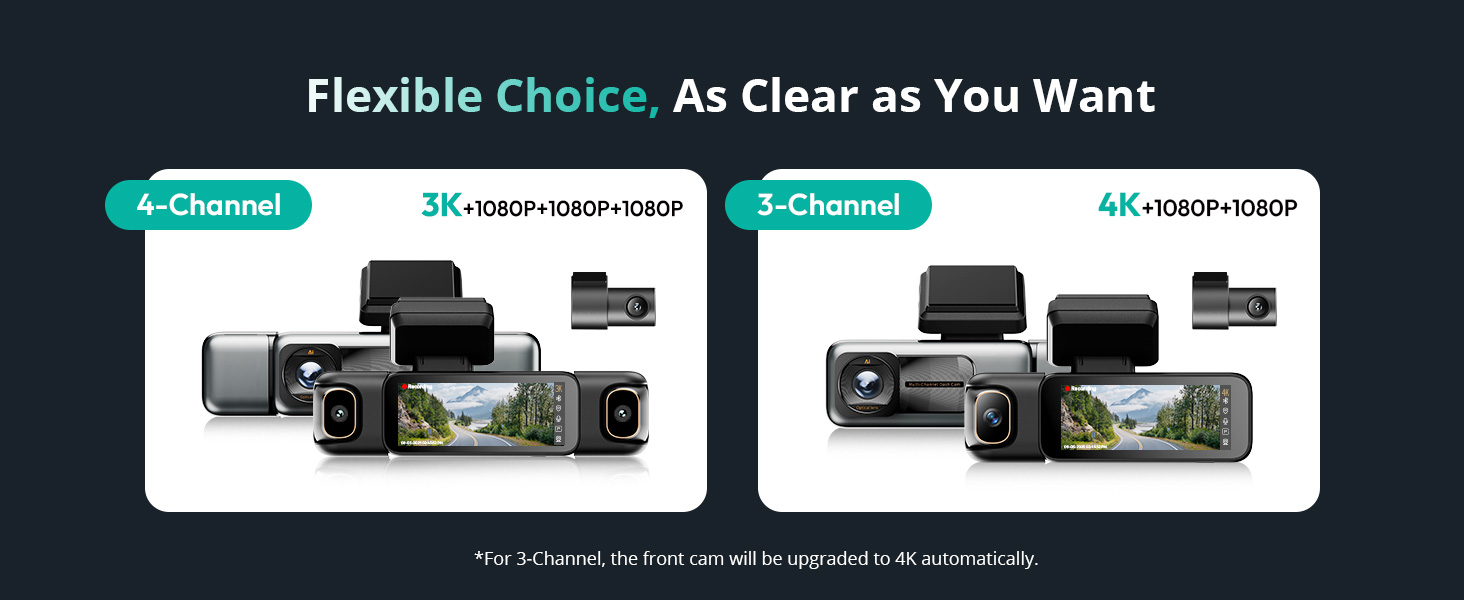
Image: Shows various voice commands supported by the dash cam for hands-free operation.

Image: Highlights the 3.18-inch touchscreen for easy navigation and control.
Smart Tracking (GPS) & 5.8GHz Wi-Fi
A built-in high-sensitivity GPS chip records location and movement trajectory. Paired with DVplayer software, it generates animated driving routes. The 5.8GHz Wi-Fi chip enables fast transfer speeds (up to 10 MB/s) for instant video transfer to your smartphone and one-tap footage export.

Image: Shows GPS tracking capabilities with Google Maps integration and animated driving routes.

Image: Illustrates the 5.8GHz Wi-Fi for quick video transfer and app connectivity.
سپر ڪئپسيٽر
The dash cam utilizes a high-temperature-resistant super capacitor, offering an ultra-wide operating range (-20℃ to 70℃) and a 10x longer lifespan than traditional batteries, ensuring reliable operation in extreme weather conditions.
4. سيٽ اپ ۽ تنصيب
Follow these steps for proper installation of your BOTSLAB G980H Dash Cam:
- ونڊشيلڊ تيار ڪريو: پنهنجي ونڊ شيلڊ تي ان حصي کي صاف ڪريو جتي ڊيش ڪيم لڳل هوندو. پڪ ڪريو ته اهو مٽي ۽ چکنائي کان پاڪ هجي.
- اليڪٽرو اسٽيٽڪ فلم لاڳو ڪريو: Apply the provided electrostatic film to the cleaned area of the windshield. This helps protect your windshield and makes removal easier.
- ڊيش ڪيم کي ڳنڍيو: Peel off the protective film from the 3M adhesive on the dash cam mount and firmly press it onto the electrostatic film.
- پاور Connectنيو: Connect the car charger cable to the dash cam and plug the other end into your vehicle's 12V power outlet.
- ريئر ڪئميرا ڳنڍيو: Connect the rear camera cable to the main unit and route it to the rear of your vehicle. Attach the rear camera to the rear windshield using its adhesive.
- رستا ڪيبل: Use the installation pry bar to neatly tuck all cables along the vehicle's trim or headliner to conceal them and prevent obstruction.

Image: Diagram illustrating the easy installation process of the dash cam and its components.
Video: A step-by-step guide on how to install the BOTSLAB Multi Channel Dash Camera in a vehicle.
Hardwire Kit Installation (Optional)
For 24/7 parking mode functionality, a dedicated hardwire kit (ASIN: B0DT1633D2) is required. Refer to the hardwire kit's manual for detailed installation instructions, which typically involves connecting to your vehicle's fuse box.
Video: Instructions on how to install the Botslab dashcam Hardwired Kit for continuous power.
5. آپريٽنگ هدايتون
پاور آن / آف
The dash cam will automatically power on and begin recording when connected to your vehicle's power source and the ignition is turned on. To power off, simply turn off your vehicle's ignition or disconnect the power source.
ٽچ اسڪرين نيويگيشن
The 3.18-inch touchscreen allows for intuitive control. Swipe, tap, and adjust settings directly on the screen. You can switch between different camera views (front, interior, rear) and access various menus for playback and configuration.
وائس حڪم
Utilize voice commands for hands-free operation. Common commands include "Start Recording," "Take Photo," "Turn on Screen," "Turn off Screen," "Show Front Camera," "Show Rear Camera," "Turn on Audio," and "Turn off Audio."
App Connection (5.8GHz Wi-Fi)
Download the Botslab APP to connect your smartphone to the dash cam via 5.8GHz Wi-Fi. This allows for instant transfer of 4K videos, real-time viewing, parameter adjustments, and sharing of footage.
لوپ رڪارڊنگ
ڊيش ڪيم مسلسل رڪارڊ ڪري ٿو، پراڻي ترين فو کي اوور رائٽ ڪري ٿوtage when the memory card is full. Emergency videos are locked and protected from being overwritten.
ايمرجنسي رڪارڊنگ
The built-in G-sensor detects sudden impacts or collisions. When an event is detected, the dash cam automatically locks the current footage (8 seconds before and 52 seconds after the impact) to prevent it from being overwritten.
پارڪنگ موڊ
With the optional hardwire kit, the 24/7 parking mode offers:
- وقت گذرڻ جي رڪارڊنگ: Records at 1 frame per second to save storage space while monitoring.
- Sentry Mode: Automatically records a 1-minute emergency video if motion is detected within 5 meters of the front camera.
- Collision Lock: Instantly locks a 1-minute critical video upon detecting a collision.
وڊيو: هڪ اوورview of the Botslab 3-channel dash cam's features and operation.
6. وضاحتون
| پيداوار جي ماپ | 6.74 x 2.19 x 2.75 انچ |
| شيءِ جو وزن | 1.69 پائونڊ |
| شيون ماڊل نمبر | G980H 3 Channel |
| رابطي ٽيڪنالاجي | وائرليس (5.8GHz وائي فائي) |
| جي پي ايس | GPS فعال |
| خاص خصوصيت | 3 Channel Recording, Night Vision, Voice Control, Parking Mode |
| وڊيو ڪيپچر ريزوليوشن | 4K (Front) |
| چڙهڻ جو قسم | ونڊ شيڊ جو جبل |
| جو ميدان View | 360 Degrees (Combined) |
| شامل اجزاء | 128GB MicroSD card, 3M Tape, Car Charger, Front & Rear Inside Camera, Installation pry bar |
7. مسئلا حل ڪرڻ
If you encounter any issues with your BOTSLAB G980H Dash Cam, please try the following:
- طاقت ناهي: Ensure the car charger is securely plugged into both the dash cam and the vehicle's 12V outlet. Check your vehicle's fuse for the 12V outlet.
- رڪارڊنگ جا مسئلا: Format the 128GB MicroSD card within the dash cam's settings. Ensure the card is properly inserted. If issues persist, try a different compatible MicroSD card.
- وائي فائي ڪنيڪشن جا مسئلا: Ensure the Botslab APP is updated to the latest version. Restart both your smartphone and the dash cam. Check your phone's Wi-Fi settings to ensure it's connected to the dash cam's network.
- جي پي ايس ڪم نه ڪري رهيو آهي: پڪ ڪريو ته ڊيش ڪيم صاف آهي view of the sky for GPS signal acquisition. This may take a few minutes after startup.
- اسڪرين غير جوابده: Try restarting the dash cam by disconnecting and reconnecting the power.
For further assistance, refer to the detailed user manual or contact customer support.
8. وارنٽي ۽ سپورٽ
The BOTSLAB G980H Dash Cam comes with a 30-day return policy. For any product-related inquiries, technical support, or warranty claims, please contact BOTSLAB customer service.
- ڪسٽمر سپورٽ: دستياب 24/7
- ٽيڪنيڪل مدد: حياتياتي ٽيڪنيڪل سپورٽ
- پيشه ورانه خدمت: 365-Day Professional Service

Image: Contact information for BOTSLAB customer support, including webسائيٽ ۽ اي ميل.