1. تعارف
The Generic RHT20 is an environmental test equipment designed for accurately measuring and logging humidity and temperature data. This datalogger features an integrated LCD for real-time display of readings and provides reliable data collection for various applications. This manual provides essential information for the proper setup, operation, maintenance, and troubleshooting of your RHT20 device.
2. حفاظت جي ڄاڻ
- ڊوائيس هلائڻ کان اڳ سڀ هدايتون احتياط سان پڙهو.
- ڊوائيس کي انتهائي گرمي پد، سڌي سج جي روشني، يا وڌيڪ نمي جي سامهون نه رکو.
- ڊوائيس کي ڇڏڻ يا سخت اثر کان پاسو ڪريو.
- ڊوائيس کي کولڻ يا تبديل ڪرڻ جي ڪوشش نه ڪريو. سڀني سروسنگ کي قابل اهلڪارن جي حوالي ڪريو.
- مقامي ضابطن جي مطابق بيٽرين کي ختم ڪريو.
3. پيڪيج مواد
پيڪنگ کولڻ وقت پڪ ڪريو ته سڀئي شيون موجود آهن ۽ سٺي حالت ۾ آهن:
- RHT20 Humidity & Temperature Datalogger Unit
- استعمال ڪندڙ دستي
- USB Cable (for data transfer and power, if applicable)
- سافٽ ويئر سي ڊي (جيڪڏهن لاڳو ٿئي ٿي)
4. ڊوائيس اوورview
Familiarize yourself with the components of your RHT20 datalogger:
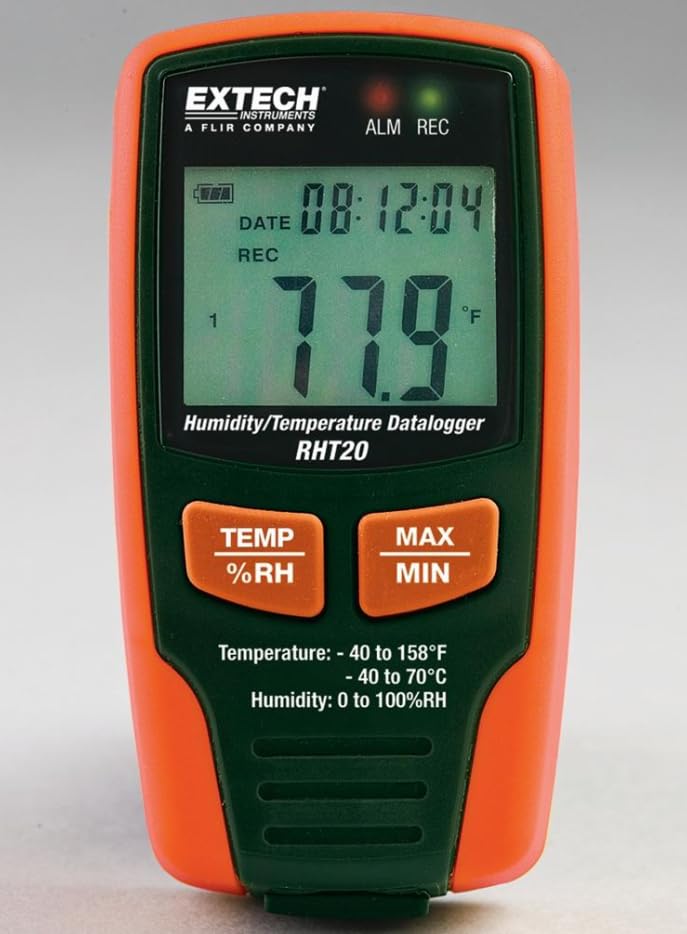
شڪل 1: سامهون view of the RHT20 Datalogger. This image displays the device's main body, featuring a prominent LCD screen for displaying real-time humidity and temperature readings, along with control buttons located below the screen.
4.1. جزا
- LCD ڊسپلي: Shows current temperature, humidity, battery status, and logging indicators.
- موڊ بٽڻ: Cycles through display modes or menu options.
- سيٽ بٽڻ: Enters settings menu or confirms selections.
- START/STOP بٽڻ: Initiates or terminates data logging.
- USB پورٽ: For connecting to a computer for data download and configuration.
- سينسر: Integrated humidity and temperature sensor (typically located at the top or side).
- بيٽري جو خانو: Located at the rear of the device.
5. سيٽ اپ
5.1. بيٽري لڳائڻ
- Locate the battery compartment cover on the back of the RHT20.
- Slide or unscrew the cover to open it.
- Insert the required batteries (e.g., AAA batteries) observing the correct polarity (+/-) as indicated inside the compartment.
- بيٽري جي ڪمري واري ڍڪ کي محفوظ طور تي تبديل ڪريو.
5.2. پاور آن/آف
- پاور آن ڪرڻ: کي دٻايو ۽ رکو START/STOP button for approximately 3 seconds until the LCD illuminates.
- پاور آف ڪرڻ: کي دٻايو ۽ رکو START/STOP button for approximately 3 seconds until the LCD turns off.
5.3. سافٽ ويئر انسٽاليشن (اختياري)
If your application requires advanced configuration or data analysis, install the provided software (if applicable) on your computer by following the on-screen instructions from the installation CD or downloaded file.
6. آپريٽنگ هدايتون
6.1. بنيادي ماپ
Upon powering on, the RHT20 will immediately display the current ambient temperature and humidity readings on the LCD. Ensure the device is placed in the environment you wish to monitor.
6.2. سيٽنگون ترتيب ڏيڻ
To adjust settings such as logging interval, alarm thresholds, or time/date:
- کي دٻايو ۽ رکو سيٽ سيٽنگون مينيو داخل ڪرڻ لاءِ بٽڻ.
- استعمال ڪريو موڊ button to navigate through different parameters.
- استعمال ڪريو سيٽ button to select a parameter and adjust its value.
- دٻايو موڊ to confirm the value and move to the next setting, or press START/STOP سيٽنگون مينيو مان نڪرڻ لاء.
6.3. Starting Data Logging
To begin recording data:
- Ensure the device is powered on and configured as desired.
- کي دٻايو START/STOP button briefly. A logging indicator (e.g., a blinking REC icon) will appear on the LCD, confirming that data logging has started.
6.4. Stopping Data Logging
To cease recording data:
- کي دٻايو START/STOP button briefly. The logging indicator will disappear from the LCD, indicating that data logging has stopped.
6.5. Data Download
To retrieve logged data:
- Connect the RHT20 to your computer using the provided USB cable.
- Launch the RHT20 software (if applicable).
- Follow the software's instructions to download and analyze the recorded data.
7. سار سنڀال
7.1. صفائي
- ڊيوائس کي نرم ، سڪل ڪپڙي سان مسح ڪريو.
- گھڙڻ وارا صاف ڪندڙ، محلول، يا سخت ڪيميڪل استعمال نه ڪريو.
- Ensure no liquid enters the sensor area or USB port.
7.2. اسٽوريج
- جڏهن گهڻي عرصي تائين استعمال ۾ نه هجي، ته بيٽريون ڪڍي ڇڏيون ته جيئن ليڪيج کي روڪي سگهجي.
- ڊوائيس کي ٿڌي، سڪل جاءِ تي، سڌي سج جي روشني ۽ انتهائي گرمي پد کان پري رکو.
8. مسئلا حل ڪرڻ
- ڊوائيس آن نه ٿي رهي آهي: بيٽري جي انسٽاليشن چيڪ ڪريو ۽ پڪ ڪريو ته بيٽريون تازيون آهن.
- غلط پڙهڻ: Ensure the sensor is clean and unobstructed. Allow the device to stabilize in the environment for a few minutes.
- Data not logging: Verify that logging was initiated correctly (check for the logging indicator on the LCD). Ensure sufficient memory is available.
- ڪمپيوٽر سان ڳنڍجي نه ٿو سگهي: Check USB cable connection. Ensure software drivers are installed correctly. Try a different USB port.
9. وضاحتون
| تفصيل | قدر |
|---|---|
| برانڊ | عام |
| ماڊل | رڇ 20 |
| شيءِ جو وزن | 7 پائونڊ (تقريبن 3.17 ڪلوگرام) |
| ٺاهيندڙ | Extech |
| ASIN | B0FB7Y8MPX |
| تاريخ پهرين دستياب | مئي 29، 2025 |
10. وارنٽي ۽ سپورٽ
For warranty information, technical support, or service inquiries, please refer to the documentation provided with your purchase or contact the manufacturer directly. Keep your proof of purchase for warranty claims.


