
1. تعارف
This manual provides detailed instructions for the installation, operation, and maintenance of your BOTSLAB W510 4K Wireless Outdoor Security Camera System. Please read this manual thoroughly before using the product to ensure proper functionality and safety.
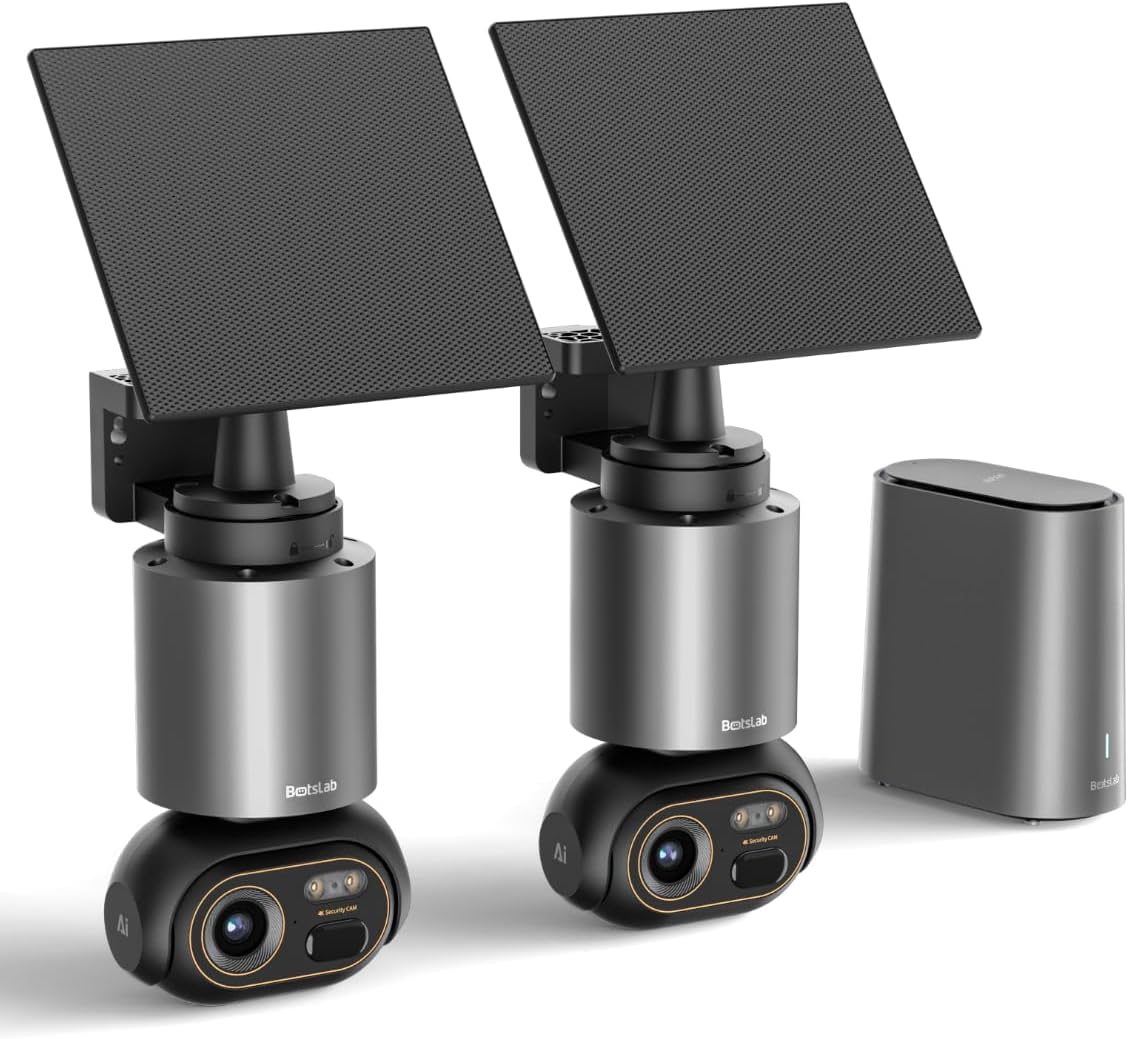
Image 1.1: The BOTSLAB W510 4K Wireless Outdoor Security Camera System, including two cameras with solar panels and the HomeBase unit.
2. دٻي ۾ ڇا آهي
پڪ ڪريو ته سڀئي جزا توهان جي پيڪيج ۾ موجود آهن:
- W510 Camera body *2
- چڙهڻ واري بریکٹ *2
- شمسي پينل *2
- H200 HomeBase *1
- Camera Mounting Brackets / Wall Stickers *2
- Wall Mounting Screws Package *2
- Solar Panel Mounting Bracket / Wall Stickers *2
- Solar Panel Installation Screws (for mounting) *2
- ٽائپ-سي چارجنگ ڪيبل *2
- User Manual (Quick Guide + Certification) *1
- ڊيڄاريندڙ اسٽيڪر *2
- Base Station Adapter *1
- Hard Drive Mounting Screws *1
- Ethernet ڪيبل *1
- User Guide Card *1

Image 2.1: All included components of the BOTSLAB W510 2-Cam Kit.
3. پراڊڪٽ ختمview
The BOTSLAB W510 system offers advanced security features for outdoor surveillance.
3.1 اهم خاصيتون
- 4K الٽرا HD قرارداد: واضح ۽ تفصيلي وڊيو فوٽو ڪڍوtage.
- رنگين رات جو نظارو: Provides vivid, full-color images even in low-light conditions.
- شمسي توانائي: Equipped with a 5W external solar panel and a 10,000mAh built-in battery for continuous operation.
- 360° Pan & Tilt: Offers a comprehensive panoramic view بغير ڪنهن انڌا داغ سان.
- BOTSLAB IQ (AI-Powered): Features intelligent notifications, customized warnings, quick search, and auto-tracking for people, vehicles, and pets.
- ڪابه ماهوار فيس: Utilizes local storage via the H200 HomeBase (32GB internal, expandable up to 16TB with HDD).
- IP66 موسم کان بچاءُ: مختلف ٻاهرين موسمي حالتن کي منهن ڏيڻ لاءِ ٺهيل.
- 2.4G Wi-Fi Connectivity: Ensures stable and long-distance wireless communication.

Image 3.1: Demonstrates the clarity of 4K Ultra HD resolution.

Image 3.2: Illustrates the effectiveness of Color Night Vision.
4. سيٽ اپ گائيڊ
4.1 ڪئميرا ۽ سولر پينل لڳائڻ
The camera and solar panel can be mounted together or separately, offering flexibility for optimal solar exposure and camera placement.
- پنهنجي ڪئميرا لاءِ هڪ مناسب جڳهه چونڊيو، پڪ ڪريو ته ان ۾ صاف روشني هجي view of the area you wish to monitor and is within Wi-Fi range of the HomeBase.
- ڪئميرا کي ڀت يا ڇت سان محفوظ طور تي ڳنڍڻ لاءِ مهيا ڪيل ماؤنٽنگ بریکٹ ۽ اسڪرو استعمال ڪريو.
- If mounting the solar panel separately, select a location that receives ample direct sunlight throughout the day. The solar panel can be adjusted 360° horizontally and 180° vertically.
- Connect the solar panel's USB-C cable to the camera's charging port. Ensure the port cover is securely closed after connection to maintain weather resistance.

Image 4.1: Various mounting options for the camera and solar panel.
4.2 Connecting to HomeBase
The H200 HomeBase acts as the central hub for your security system, providing local storage and managing camera connections.
- Place the HomeBase in a central location within your home, ensuring it is connected to your router via the provided Ethernet cable and powered on.
- The HomeBase will automatically connect to your cameras once they are powered on and within range.
4.3 ايپ جي انسٽاليشن ۽ جوڙو ٺاهڻ
Manage your cameras and access features through the Botslab app.
- Download the 'Botslab' app from your smartphone's app store (available on Google Play and Apple App Store).
- هڪ اڪائونٽ ٺاهيو يا لاگ ان ڪريو جيڪڏهن توهان وٽ پهريان ئي آهي.
- Follow the in-app instructions to add your HomeBase and cameras. This typically involves scanning a QR code on the device or manually selecting the model.
- Ensure your smartphone is connected to a 2.4GHz Wi-Fi network during the initial setup process.

Image 4.2: The Botslab mobile application for device management.
5. آپريٽنگ هدايتون
5.1 زنده View ۽ ڪنٽرول
Access real-time video feed and control camera movement via the Botslab app.
- Open the Botslab app and select the desired camera to view ان جو لائيو فيڊ.
- Use the on-screen controls to pan (horizontal movement) and tilt (vertical movement) the camera for a 360° view.
- Digital zoom allows you to magnify specific areas of the live feed or recorded video.

Image 5.1: Illustrates the 360° pan and tilt capabilities and PIR detection range.
5.2 حرڪت جي ڳولا ۽ اطلاع
The system uses advanced AI to provide intelligent alerts.
- Intelligent Notification: Receive detailed, descriptive notifications on your smartphone, identifying visitors or events without needing to open the app.
- Customized Warnings: The camera analyzes the scene and can send tailored warnings to suspicious individuals based on the perceived threat level.
- Adjust detection sensitivity and set activity zones within the app to minimize false alarms.

تصوير 5.2: اڳوڻيample of intelligent notifications from the Botslab app.
5.3 رڪارڊنگ ۽ اسٽوريج
سڀ فوtage is stored locally without monthly fees.
- The H200 HomeBase includes 32GB of internal local storage, automatically looping and saving footage for up to two months.
- Storage can be expanded up to 16TB by adding a hard disk drive (not included).
- رسائي رڪارڊ ٿيل footage through the app's timeline or use the Intelligent Search feature.

Image 5.3: HomeBase H200 with local and expandable storage options.
5.4 ٻه طرفي آڊيو
Communicate with individuals near your camera using the two-way audio feature.
- زنده مان view ايپ ۾، ڪئميرا جي اسپيڪر ذريعي ڳالهائڻ لاءِ مائڪروفون آئڪن تي ٽيپ ڪريو.
- ڪئميرا جو بلٽ ان مائڪروفون توهان کي ڪئميرا جي جڳهه کان آڊيو ٻڌڻ جي اجازت ڏئي ٿو.
5.5 AI خاصيتون
Leverage BOTSLAB IQ for enhanced surveillance capabilities:
- Human Recognition: Identifies human figures and filters videos.
- گاڏين جي چڪاس: Recognizes vehicles in the camera's view.
- پالتو جانورن جي ڳولا: Identifies pets (cats and dogs supported).
- خودڪار ٽريڪنگ: The camera automatically tracks the movement of detected subjects (people, vehicles, pets) within its 360° field of view.
- ذهين ڳولا: Quickly find specific events, people, vehicles, or objects in historical footage.

Image 5.4: Intelligent Search feature in the Botslab app.
6. سار سنڀال
6.1 بيٽري چارج ڪرڻ
The camera is designed for minimal power intervention.
- The 5W solar panel continuously charges the built-in 10,000mAh battery. Approximately 30 minutes of direct sunlight can power the camera for a full day.
- In periods of low sunlight, the large battery capacity ensures stable operation for extended durations.
- If manual charging is required, detach the camera from its mount and use the provided Type-C charging cable.
6.2 صفائي
To maintain optimal performance, periodically clean the camera lens and solar panel.
- نرم استعمال ڪريو، ڊيamp cloth to gently wipe the lens and solar panel.
- Avoid using harsh chemicals or abrasive materials that could scratch the surfaces.
6.3 فرم ويئر اپڊيٽس (OTA)
The system supports Over-The-Air (OTA) firmware updates to improve performance and add new features.
- Ensure your camera and HomeBase are connected to the internet.
- The Botslab app will notify you when a new firmware update is available. Follow the in-app instructions to initiate the update.
7. مسئلا حل ڪرڻ
If you encounter issues with your BOTSLAB W510 system, refer to the following common solutions:
- نه لائيو View/Offline Device: Check the HomeBase's internet connection (Ethernet cable, router status). Ensure the camera is powered on and within range of the HomeBase. Restart the HomeBase and camera if necessary.
- خراب وڊيو معيار: Verify your Wi-Fi signal strength. Ensure the camera lens is clean and free from obstructions. Adjust the camera's position if there are strong light sources directly facing the lens.
- بيٽري جلدي ختم ٿيڻ: Ensure the solar panel is positioned to receive maximum direct sunlight. Reduce motion detection sensitivity or frequency of recordings if not critical.
- غلط الارم: Adjust the motion detection sensitivity in the app. Define specific activity zones to monitor only relevant areas.
- ايپ ڪنيڪشن جا مسئلا: Ensure your smartphone has a stable internet connection. Restart the Botslab app.
8. وضاحتون
| خاصيت | تفصيل |
|---|---|
| اندروني / ٻاهران استعمال | ٻاھران |
| مطابقت رکندڙ ڊوائيسز | اسمارٽ فون (Android) |
| طاقت جو ذريعو | شمسي توانائي |
| ڪنيڪشن پروٽوڪول | وائي فائي (2.4G) |
| چڙهڻ جو قسم | ڀت جبل |
| وڊيو ڪيپچر ريزوليوشن | 4K |
| شين جو تعداد | 2 (2-Cam Kit) |
| Viewزاويه | 360 درجا (پين ۽ ٽِلٽ) |
| شيون طول و عرض L x W x H | 4.72 x 3.8 x 7.54 انچ |
| فليش ميموري انسٽال ٿيل سائيز | 32 GB (HomeBase) |
| فليش ميموري سپورٽ ٿيل سائيز وڌ ۾ وڌ | 16 TB (with external HDD) |
| بيٽرين جي ضرورت آهي؟ | Yes (1 12V battery included) |
| فوڪس جو قسم | خودڪار فوڪس |
| گھٽ روشني ٽيڪنالاجي | رات جو رنگ |
| زوم جو قسم | ڊجيٽل زوم (8x) |
| وڊيو ڪيپچر فارميٽ | AVI |
| پيداوار لاءِ مخصوص استعمال | 360 درجا ڪوريج، نگراني |
| ڪنٽرول جو طريقو | ايپ |
| شيءِ جو وزن | 9.13 پائونڊ |
| ماڊل نالو | W510 |
| خاص خصوصيت | 10000mAh Battery, 4K/8MP, No Monthly Fee, 32G Local Storage, Intelligent Notification, Intelligent Alarm, Intelligent Search, Cross-camera Tracking, Facial Detection, Human Detection, Vehicle Detection, Night Vision |
9. وارنٽي ۽ سپورٽ
BOTSLAB is committed to providing reliable products and customer satisfaction.
- 12-مهيني جي گارنٽي: Your BOTSLAB W510 system is covered by a 12-month warranty from the date of purchase.
- 24/7 ٽيڪنيڪل سپورٽ: For any questions or technical assistance, please contact BOTSLAB customer support.
- رابطي جي ڄاڻ: You can reach support via Amazon Messages or through the contact details provided in the Botslab app.