
تعارف
This manual provides essential information for setting up, operating, maintaining, and troubleshooting your NIMO 15.6" FHD IPS Student-Laptop-Computer. Please read this guide thoroughly to ensure optimal performance and longevity of your device.

The NIMO 15.6" FHD IPS Student-Laptop-Computer, featuring a vibrant display and sleek design.
ڇا شامل آهي
پڪ ڪريو ته سڀئي شيون پيڪنگ ۾ موجود آهن:
- 1 x نيمو N157 ليپ ٽاپ
- 1 x ٽائپ-سي 65W GaN PD فاسٽ چارجر
- 1 x استعمال ڪندڙ دستياب
- ونڊوز 11 هوم (پري انسٽال ٿيل)
- 2 Years Warranty, 90 Days Return Information
اهم خاصيتون
Your NIMO laptop is equipped with advanced features designed for productivity and convenience:
Vibrant FHD IPS Display
Experience stunning visuals on the 15.6" FHD IPS (1920x1080) Anti-Glare Display. With an 85% screen-to-body ratio and 16:9 aspect ratio, enjoy precise color accuracy and sharp detail for all your tasks.

The 15.6-inch FHD IPS display provides a bright and clear visual experience.
طاقتور ڪارڪردگي
Equipped with a 13th Gen Intel N150 processor (up to 3.6GHz), 16GB DDR4 RAM, and a 512GB PCIe SSD, this laptop delivers lightning-fast performance, rapid startup times, and accelerated data transfer for seamless multitasking and storage.
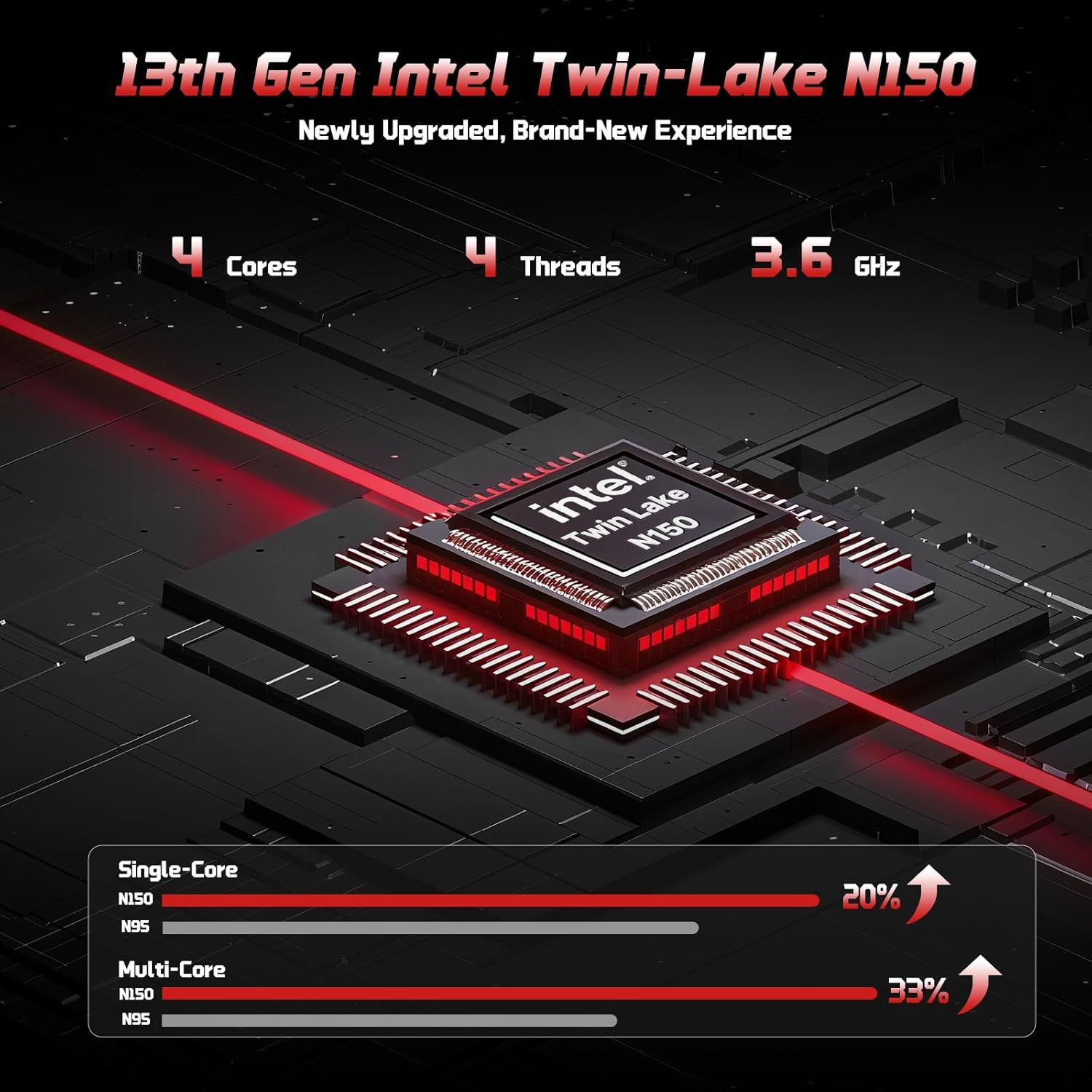
The 13th Gen Intel Twin-Lake N150 processor ensures efficient performance.

The laptop supports user-upgradable RAM and SSD for future expansion.
Fast Charging with GaN PD Charger
The included 65W GaN PD fast charger and 6.56ft USB-C to USB-C cable allow for quick power-ups. Charge for 15 minutes to get 2 hours of standby time. This versatile charger can also power your iPad, phone, and other compatible devices.

The 65W GaN PD charger provides fast and convenient charging for multiple devices.
Humanized Design & Security
Features a built-in fingerprint reader on the touchpad for secure, one-touch login. The backlit keyboard allows for easy typing in dim or dark environments, with adjustable brightness. The touchpad supports scroll and multi-touch gestures.

Secure fingerprint login and a comfortable backlit keyboard enhance usability.
جامع رابطي
The laptop includes a variety of ports for all your peripheral needs, including USB 3.0, USB 2.0, HDMI, and multiple Type-C ports (one for PD Charge Only, one for Multifunction). It also features Wi-Fi 6 and Bluetooth 5.2 for robust wireless connections.

تفصيلي view of the laptop's ample ports for various connections.
رازداري Webڪئميرا
A 720p HD camera with a physical privacy switch ensures your personal space is always secure. Easily slide the switch to cover the camera when not in use.

The physical privacy switch on the webcam provides enhanced security.
سيٽ اپ گائيڊ
1. شروعاتي پاور آن
- Unpack your NIMO laptop and all accessories.
- Connect the Type-C 65W GaN PD Fast Charger to the laptop's Type-C PD Charge Only port and plug it into a power outlet.
- Open the laptop lid. The laptop may power on automatically, or you may need to press the power button (located on the top-right of the keyboard).
- ونڊوز 11 هوم سيٽ اپ مڪمل ڪرڻ لاءِ اسڪرين تي ڏنل هدايتن تي عمل ڪريو، جنهن ۾ ٻولي، علائقو، نيٽ ورڪ ڪنيڪشن، ۽ يوزر اڪائونٽ ٺاهڻ شامل آهن.
2. پردي کي ڳنڍڻ
ٻاهرين ڊوائيسز کي ڳنڍڻ لاءِ موجود پورٽ استعمال ڪريو:
- USB ڊوائيسز: Connect USB drives, external keyboards, or mice to the USB 3.0 or USB 2.0 ports.
- Disاهرين ڊسپلي: Use an HDMI cable to connect to an external monitor or projector via the HDMI port.
- آڊيو ڊوائيسز: Plug in headphones or external speakers into the 3.5mm headphone jack.
- MicroSD ڪارڊ: Insert a MicroSD card into the dedicated slot for expanded storage.
آپريٽنگ هدايتون
ڪيبورڊ ۽ ٽچ پيڊ استعمال ڪندي
- بيڪ لِٽ ڪي بورڊ: دٻايو Fn + F10 (or the key with the keyboard backlight icon) to cycle through backlight brightness levels or turn it off.
- عددي ڪي پيڊ: مربوط عددي ڪي پيڊ آسان ڊيٽا انٽري فراهم ڪري ٿو.
- ٽچ پيڊ: Supports standard Windows gestures, including two-finger scroll, pinch-to-zoom, and multi-finger taps for various functions.
فنگر پرنٽ لاگ ان
To set up fingerprint login for enhanced security:
- ونڊوز سيٽنگون > اڪائونٽس > سائن ان آپشنز ڏانهن وڃو.
- Select "Fingerprint Recognition (Windows Hello)" and follow the on-screen prompts to register your fingerprint.
- Once registered, you can simply touch the fingerprint sensor on the touchpad to log in.
ڊسپلي سيٽنگون
بهتر لاءِ ڊسپلي سيٽنگون ترتيب ڏيو viewing:
- قرارداد: Right-click on the desktop, select "Display settings", and choose "1920 x 1080" for the best resolution.
- روشني: Adjust screen brightness using the function keys (Fn + F5/F6) or through Display settings.
آڊيو ۽ وڊيو
- حجم ڪنٽرول: Use the function keys (ايف اين + ايف 2/ايف 3/ايف 4) or the Windows volume mixer to adjust audio levels.
- Webcam Privacy: Slide the physical switch next to the webcam to cover or uncover the camera lens for privacy.
سار سنڀال
حصو 1 جو 2: پنهنجي ليپ ٽاپ کي صاف ڪرڻ
- نرم، لِنٽ کان خالي ڪپڙو استعمال ڪريو ٿورڙو ڊيampڊسپلي کي صاف ڪرڻ لاءِ پاڻي يا اسڪرين ڪلينر سان ٻوڙيو وڃي.
- ڪيبورڊ ۽ چيسس لاءِ، نرم، سڪل ڪپڙو استعمال ڪريو. سخت ڪيميڪلز يا رگڙيندڙ مواد کان پاسو ڪريو.
- Periodically use compressed air to clear dust from the vents to ensure proper heat dissipation.
بيٽري جي سنڀال
To maximize your laptop's battery life and health:
- بيٽري کي بار بار مڪمل طور تي چارج ڪرڻ کان پاسو ڪريو.
- جڏهن ڊگهي عرصي تائين استعمال ۾ نه هجي ته ليپ ٽاپ کي ٿڌي، سڪل جاءِ تي رکو.
- Use the provided NIMO 65W GaN PD Fast Charger for optimal charging performance.

The laptop features smart battery optimization for extended lifespan and safe charging.
RAM and SSD Upgrades
Your NIMO laptop supports detachable RAM and SSD, allowing for user upgrades. Consult a qualified technician or refer to detailed upgrade guides on the NIMO support website before attempting any internal component changes.
عام مسئلن کي حل ڪرڻ
If you encounter problems with your laptop, try the following solutions:
- طاقت ناهي: Ensure the charger is securely connected to both the laptop and a working power outlet. Try a different outlet. If the battery is completely drained, allow it to charge for at least 30 minutes before attempting to power on.
- ڊسپلي مسئلا: جيڪڏهن اسڪرين خالي آهي، ته دٻائڻ جي ڪوشش ڪريو Fn + F7 (or the display toggle key) to switch display outputs. Check external monitor connections if applicable.
- سست ڪارڪردگي: Close unnecessary applications. Check for Windows updates. Ensure sufficient free space on the SSD. Restarting the laptop can often resolve temporary slowdowns.
- Wi-Fi/Bluetooth Connectivity: Ensure Wi-Fi and Bluetooth are enabled in Windows settings. Restart your router/modem. Update network drivers if necessary.
- ڪي بورڊ/ٽچ پيڊ غير جوابده: ليپ ٽاپ کي ريسٽارٽ ڪريو. ڊيوائس مئنيجر ۾ ڊرائيور اپڊيٽس جي جانچ ڪريو.
If problems persist, please contact NIMO customer support for further assistance.
ٽيڪنيڪل وضاحتون
| خاصيت | تفصيل |
|---|---|
| برانڊ | اين آءِ ايم او |
| ماڊل نالو | نيمو اين 157 |
| اسڪرين جي ماپ | 15.6 انچ |
| اسڪرين جي قرارداد | 1920 x 1080 پڪسل (FHD IPS) |
| پروسيسر | 13هين نسل جو انٽيل اين 150 (3.6 گيگا هرٽز تائين) |
| رام | 16 جي بي ڊي ڊي آر 4 (3200 ميگا هرٽز) |
| هارڊ ڊرائيو | 512 GB PCIe SSD |
| گرافڪس ڪوپروسيسر | انٽيگريٽيڊ گرافڪس (انٽيل) |
| آپريٽنگ سسٽم | ونڊوز 11 گهر |
| وائرليس جو قسم | 802.11a/b/g/n/ac (وائي فائي 6)، بلوٽوٿ 5.2 |
| USB بندرگاهن | 3 x USB 3.0, 1 x USB 2.0, 2 x Type-C (1 PD Charge Only, 1 Multifunction) |
| HDMI پورٽ | ها |
| سراسري بيٽري جي زندگي | 5 ڪلاڪ |
| شيءِ جو وزن | 3.8 پائونڊ |
| پيداوار جي ماپ | 14.07 x 8.98 x 0.76 انچ |
| خاص خاصيتون | Backlit Keyboard, Fingerprint Reader, HD Audio, Numeric Keypad, Privacy Webڪئميرا |
وارنٽي ۽ سپورٽ
NIMO is committed to providing excellent customer service and support for your product.
ٺاهيندڙ جي وارنٽي
توهان جو NIMO ليپ ٽاپ هڪ جامع سان ڍڪيل آهي 2 سالن جي ٺاهيندڙ جي وارنٽي. This warranty ensures that your device is free from defects in materials and workmanship under normal use.

NIMO products are covered by a 2-year support period.
90 ڏينهن جي تڪليف کان پاڪ واپسي
NIMO پيش ڪري ٿو هڪ 90-day hassle-free return and exchange service. If you have any concerns or are not satisfied with your product within 90 days of purchase, you may return it for any reason.

You may return any NIMO product for any reason within 90 days of purchase.
مدد سان رابطو ڪريو
Our dedicated support team is ready to assist you. If any concerns arise or you have product-related questions, you can contact us through our official website, email, or telephone. We strive to swiftly resolve issues or facilitate replacements.

Contact our professional after-sales team via phone and live chat.
NIMO Direct Inc. is a family-owned small business founded in New Castle DE. We are committed to providing affordable, high-quality, and innovative products, while also supporting US manufacturing and local employment.