
تعارف
The Nanlite Pico Portable LED Fill Light is a compact and versatile lighting solution designed for photographers, videographers, and content creators. Weighing only 130g, its palm-sized design allows for easy portability, fitting into a pocket for on-the-go shooting. This light offers full-color RGB capabilities, adjustable color temperature, and various special effects to enhance your creative projects. Its intuitive controls and multiple mounting options make it an essential tool for diverse lighting needs.
دٻي ۾ ڇا آهي
- Pico Portable LED Fill Light x1
- Magnetic Attraction Diffuser x1
- Cold Shoe Adapter x1

Image: The Nanlite Pico Portable LED Fill Light, a magnetic diffuser, and a cold shoe adapter are included in the product packaging.
اهم خاصيتون
- ڪمپيڪٽ ۽ هلڪو وزن: Weighs only 130g, making it highly portable for outdoor shooting and easy to carry in a pocket.
- وجداني ڪنٽرول: Features a single knob and double button design for one-handed parameter adjustment and mode switching.
- 1.28-inch Round Screen: Provides a clear and intuitive display for monitoring settings and battery life.
- مقناطيسي بنياد: Allows for convenient magnetic adsorption to metal surfaces for flexible placement.
- Flexible Flipping U-Frame: Offers 12 pitch adjustment angles (30° increments) for precise light positioning.
- بلٽ ان بيٽري: Integrated 1500mAh lithium battery provides 1.3 to 6.5 hours of battery life depending on brightness.
- Full Color RGB: Supports 0-360 hues and 0-100% saturation adjustment with 36,000 rich colors.
- خاص اثر: Includes 14 built-in effects to unlock creative lighting possibilities.
سيٽ اپ ڪريو
ڊوائيس چارج ڪرڻ
The Nanlite Pico features a built-in 1500mAh lithium battery. To charge, connect a USB Type-C cable (not included) to the charging port on the side of the device. The 1.28-inch round screen will display the charging status and estimated battery life. For continuous power during extended shoots, the device can be powered via USB-C.
ڊفيوزر کي ڳنڍڻ
The included magnetic diffuser can be easily attached to the front of the light. Simply align the diffuser with the light panel, and the magnets will secure it in place. This diffuser helps to soften the light output, providing a more even and flattering illumination.

Image: The Nanlite Pico LED light with its magnetic diffuser attached, demonstrating how the diffuser softens the light output.
چڙهڻ جا اختيار
The Pico light offers multiple mounting solutions:
- ٿڌي جوتن جو اڊاپٽر: Attach the included cold shoe adapter to the 1/4"-20 mount on the light's base. This allows you to mount the Pico directly onto a camera's hot shoe or any accessory with a cold shoe receiver.
- 1/4"-20 موضوع: The light features a standard 1/4"-20 thread on its base, enabling direct attachment to tripods, light stands, or ball heads.
- مقناطيسي جذب: The light's base is magnetic, allowing it to be securely attached to any suitable metal surface for quick and flexible positioning.
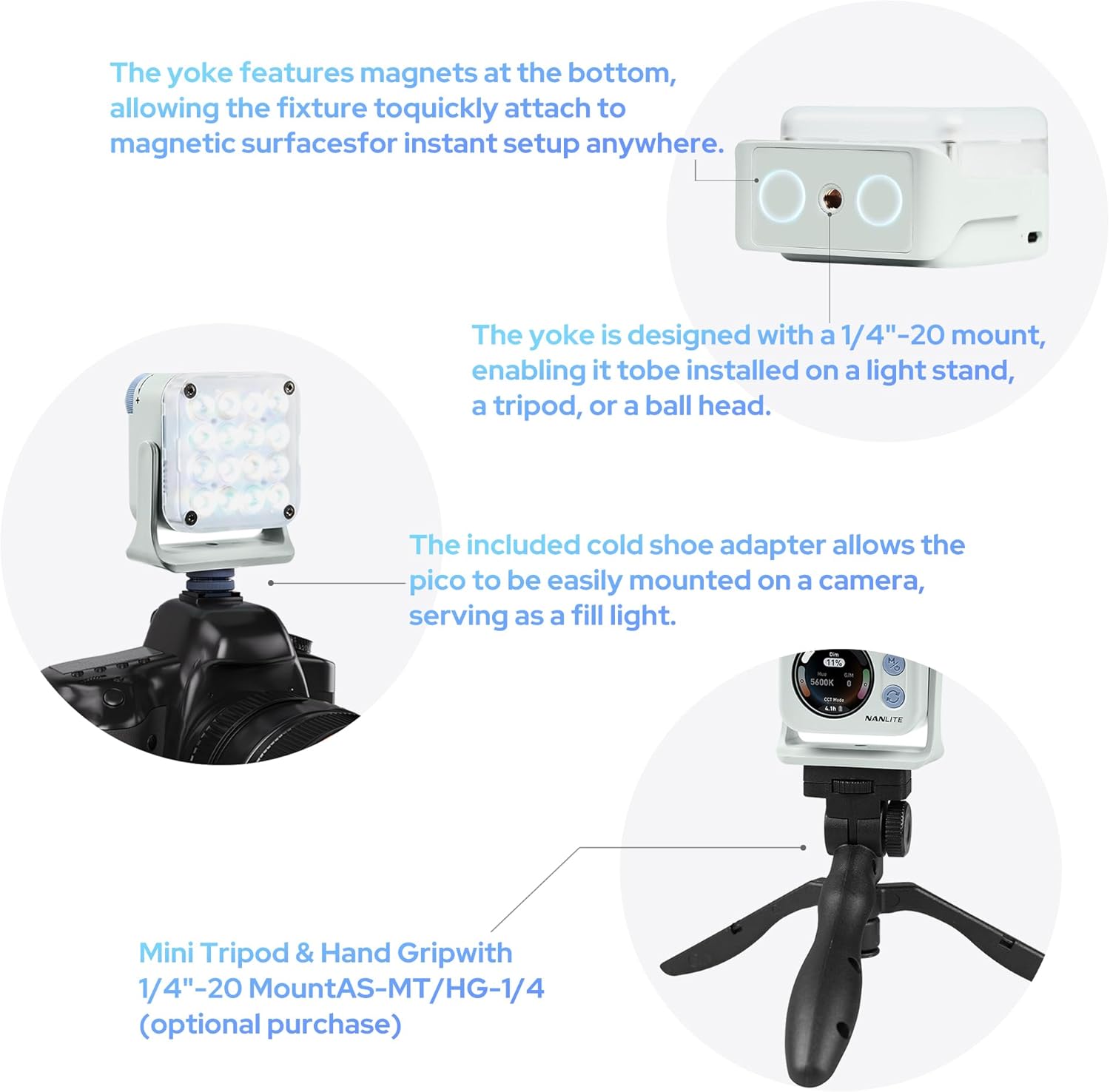
Image: The Nanlite Pico light shown mounted on a camera using the cold shoe adapter and also on a mini tripod, illustrating its versatile attachment options.
آپريٽنگ هدايتون
پاور آن / آف
To power on the device, press and hold the power button (usually combined with the 'M' mode button) for a few seconds until the screen illuminates. To power off, repeat the process.
موڊ جي چونڊ
The Nanlite Pico offers multiple operating modes:
- سي سي ٽي موڊ: Adjusts color temperature from 2700K to 7500K, allowing for warm to cool lighting.
- RGB/HSI Mode: Provides full control over hue (0-360°), saturation (0-100%), and intensity for custom color lighting.
- FX موڊ: Access 14 built-in special effects like Police Car, Fire, Lightning, Paparazzi, and more.
Use the mode button to cycle through these main modes. The 1.28-inch round screen will display the current mode and settings.
سيٽنگون ترتيب ڏيڻ
Use the control knob to adjust parameters within each mode. For example, in CCT mode, rotate the knob to change the color temperature. In RGB/HSI mode, rotate to adjust hue, saturation, or intensity after selecting the parameter with the secondary button.
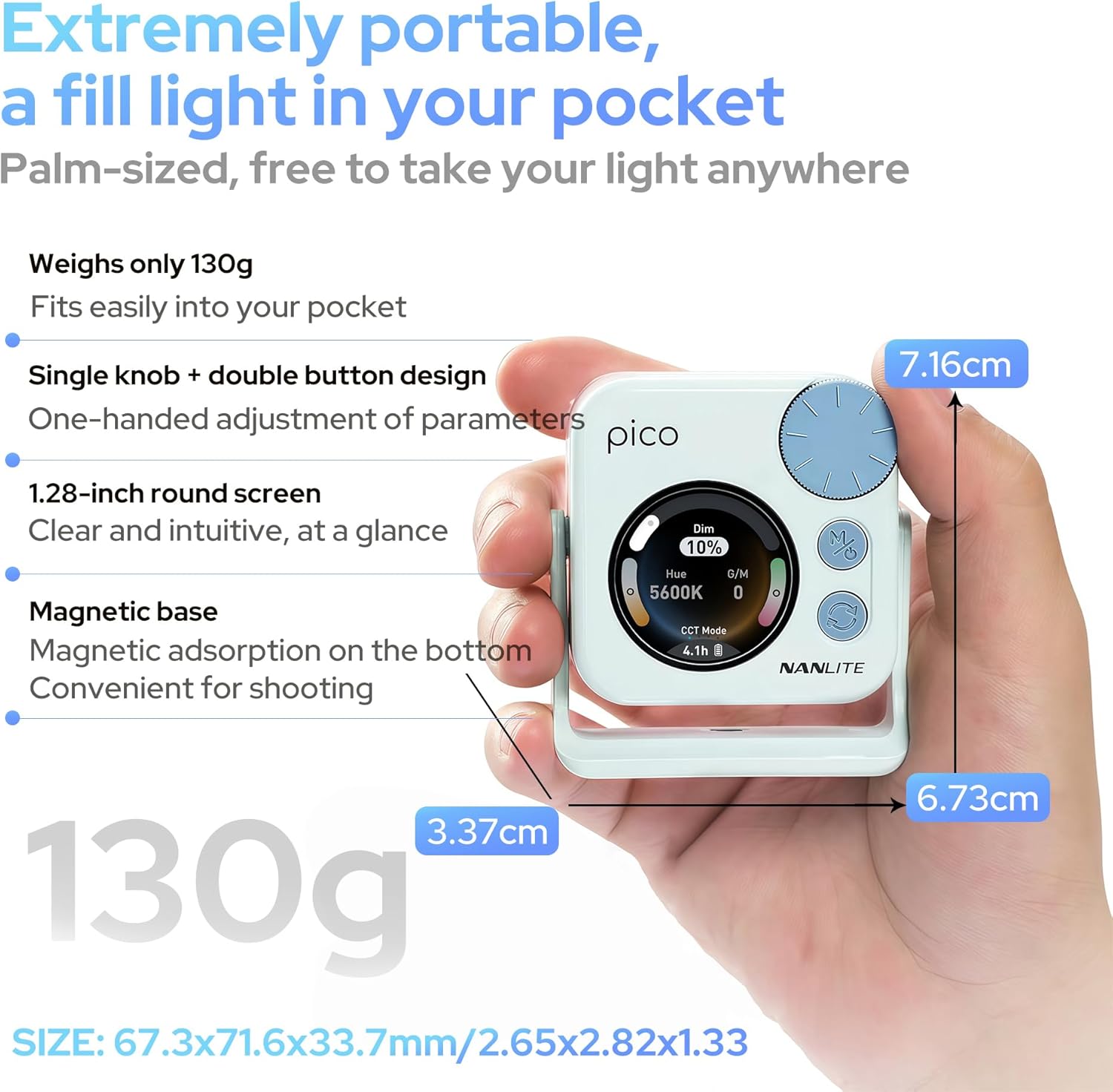
Image: A hand holding the Nanlite Pico light, with a clear view of its 1.28-inch round screen displaying current settings and the control knob for adjustments.
موبائل ايپ ڪنٽرول
The Nanlite Pico supports Bluetooth connectivity for control via a mobile application. Download the official Nanlite app to access advanced features, remote control, and precise adjustments from your smartphone or tablet.
Video: A demonstration of the Nanlite Pico LED Video Light, highlighting its pocket-sized design, ease of use, and bright output for various creative applications.
وضاحتون
| برانڊ | نان لائيٽ |
| ماڊل نمبر | Pico Light |
| پيڪيج جي ماپ | 3.94 x 2.76 x 1.93 انچ |
| شيءِ جو وزن | 5.9 اونس |
| بيٽريون | 1 Lithium Ion بيٽريون گھربل (شامل) |
| رابطي ٽيڪنالاجي | بلوٽوٿ |
| ھارڊويئر انٽرفيس | USB قسم سي |
سار سنڀال
- ڊوائيس کي صاف رکو ان کي نرم، سڪل ڪپڙي سان ڌوء.
- انتهائي گرمي يا نمي کي روشني کي ظاهر ڪرڻ کان بچاء.
- جڏهن استعمال ۾ نه هجي ته ڊوائيس کي ٿڌي، سڪل جڳهه ۾ ذخيرو ڪريو.
- ڊوائيس کي پاڻ ڌار ڪرڻ يا مرمت ڪرڻ جي ڪوشش نه ڪريو، ڇاڪاڻ ته اهو وارنٽي کي رد ڪري سگهي ٿو.
مشڪلاتون
- روشني نه پئي هلي: Ensure the battery is charged. Connect to a USB-C power source to check.
- Controls unresponsive: Try powering the device off and on again. If using the app, ensure Bluetooth is enabled and the device is paired.
- غير مطابقت واري روشني جي پيداوار: Check for any obstructions on the light panel or diffuser. Ensure the device is not overheating.
وارنٽي ۽ سپورٽ
For warranty information, technical support, or service inquiries, please refer to the official Nanlite webسائيٽ تي وڃو يا سڌو سنئون انهن جي ڪسٽمر سروس سان رابطو ڪريو. ڪنهن به وارنٽي دعوائن لاءِ خريداري جو ثبوت رکو.