
1. پراڊڪٽ ختمview
The ARES WING GDT1006 is a heavy-duty single monitor arm designed for large and ultrawide displays. It features a gas spring system for smooth adjustments and offers versatile mounting options to optimize your workspace.
- Ultrawide Monitor Support: Compatible with 24-inch to 57-inch displays, supporting up to 66 lbs for flat screens and 52.8 lbs for curved screens. Includes VESA adapter kit for 75x75 mm, 100x100 mm, 100x200 mm, 200x100 mm, and 200x200 mm VESA patterns. Note: Non-VESA displays require a separate VESA adapter, typically included with your monitor package.
- مضبوط تعمير: Engineered with premium aluminum and steel for enhanced stability and durability. The gas spring system is tested for 20,000 cycles to ensure consistent performance and reduce screen wobble.
- Full-Range Adjustability: Offers extensive positioning flexibility with +70° to -45° tilt, ±90° swivel, and 360° rotation. The height is adjustable up to 22.4 inches via the gas spring system.
- ٻٽي انسٽاليشن جا آپشن: Provides both C-clamp mounting for desktops between 0.47 inches and 1.77 inches (1.2-4.5 cm) thick, and grommet mounting.
- خلائي بچت ڊيزائن: Frees up valuable desk space and includes an integrated cable management system to keep wires organized.
2. سيٽ اپ ۽ تنصيب
Before beginning installation, ensure all parts are present and refer to the included hardware list. It is recommended to install the arm to the desk before attaching the monitor.
2.1 Check Monitor Compatibility
Verify your monitor has VESA mounting holes. If your monitor does not have built-in VESA compatibility or requires a specific adapter (e.g., for Samsung G9), ensure you have the necessary adapter before proceeding.

Image: Check for VESA holes and prepare VESA adapter if needed.
2.2 چڙهڻ جا اختيار
The monitor arm offers two primary mounting methods: C-clamp and Grommet.

Image: Two mounting options: C-clamp and Grommet. C-clamp supports 0.47"-1.77" desktop thickness. Grommet supports 0.5"-2.0" desktop thickness.
سي-ڪلamp چڙهڻ:
C-cl سان ڳنڍيوamp to the edge of your desk. Ensure the desktop thickness is between 0.47 inches and 1.77 inches. Tighten the clamp محفوظ طور تي.
Grommet چڙهڻ:
For grommet mounting, your desktop must have an existing through-hole (diameter 0.4-2.4 inches) or you may need to drill a 3/8 inch (10mm) hole. Ensure the desktop thickness is between 0.5 inches and 2.0 inches.

Image: Desktop thickness compatibility for C-clamp ۽ گروميٽ لڳائڻ.
2.3 اسيمبليءَ جا مرحلا
Follow these general steps for assembly. A detailed animation is available in the video section.

Image: Easy 3-step installation overview.
- Mount the base to your desk using either the C-clamp or grommet method.
- Assemble the monitor arm sections, ensuring they are securely connected.
- Attach the VESA plate to your monitor, then slide the monitor onto the arm's mounting head.
2.4 انسٽاليشن وڊيوز
Video: Detailed installation animation for the ARES WING GDT1006 monitor arm.
Video: Installation tips for the GDT1006 heavy-duty monitor arm, including VESA adapter usage and initial tension adjustment.
3. آپريٽنگ هدايتون
The ARES WING GDT1006 monitor arm allows for flexible positioning to achieve optimal viewing angles and ergonomic comfort.
3.1 Adjusting Monitor Position
The arm provides full-range motion for tilt, swivel, and rotation:
- جھلڻ: +70° کان -45°
- گھمڻ: ±90°
- گردش: 360° (portrait to landscape)
- اونچائي جي ترتيب: Up to 22.4 inches maximum height.
- توسيع: Up to 23.3 inches maximum extension.

Image: Monitor arm showing full range of motion: tilt, swivel, rotation, max height, and max extension.
3.2 Gas Spring Tension Adjustment
The gas spring tension must be adjusted to match the weight of your monitor. This ensures the arm holds its position securely and allows for smooth movement.
- جيڪڏهن بازو ڦڙا, turn the adjustment screw in the '+' direction until it remains in a horizontal position.
- جيڪڏهن بازو اڀري ٿو, turn the adjustment screw in the '-' direction until it remains in a horizontal position.
Caution: Before adjusting the spring tension and during the adjustment process, position and hold the arm horizontally as shown. Use the supplied Allen key for adjustment. Ask for assistance should you require it.
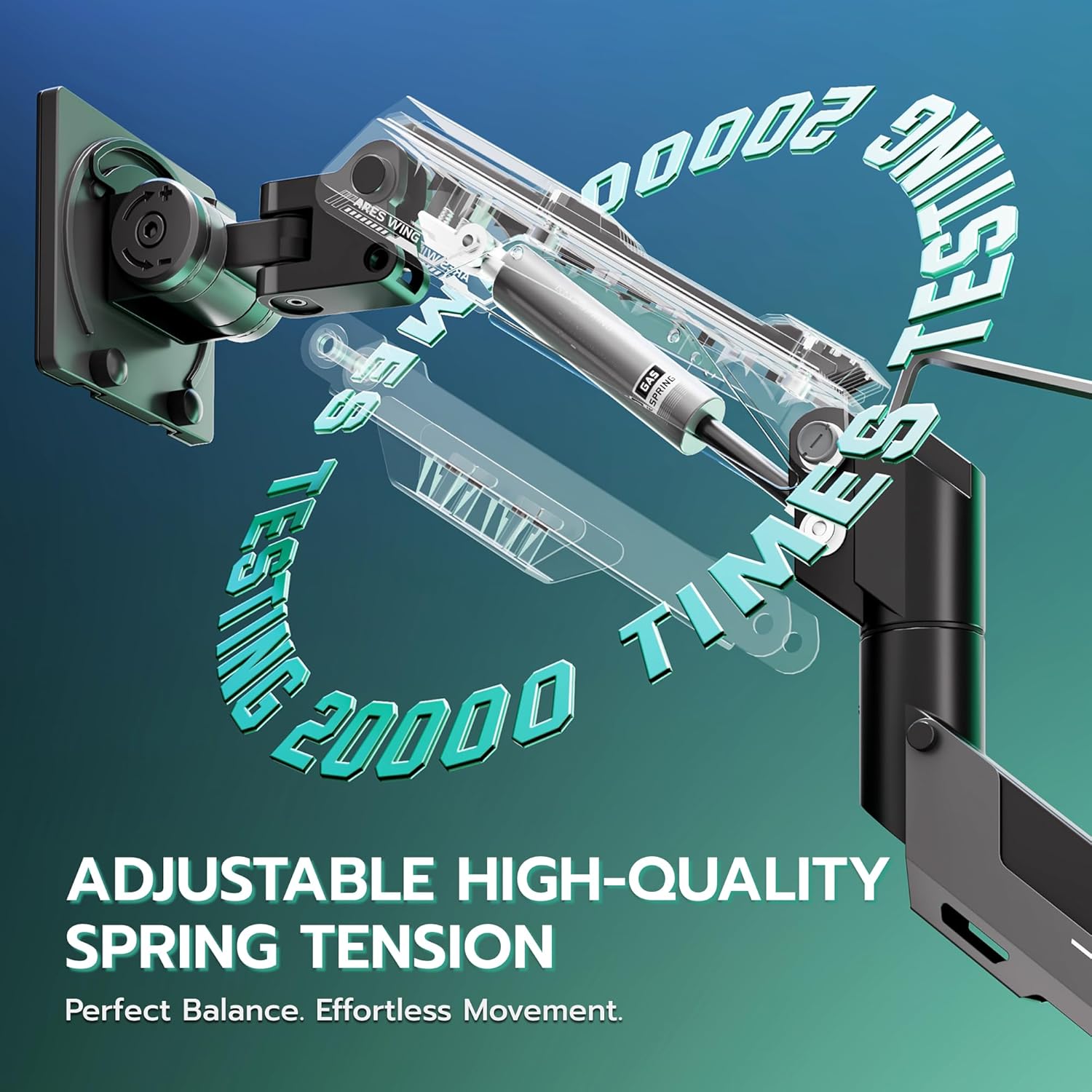
Image: Adjustable high-quality gas spring tension for perfect balance and effortless movement.
3.3 ڪيبل مينيجمينٽ
Utilize the integrated cable management system to route and conceal your monitor cables, contributing to a cleaner and more organized workspace.

Image: Integrated cable management for a clean setup.
3.4 Operation Video
وڊيو: ختمview of the ARES WING heavy-duty monitor arm's features and adjustability for 57-inch ultrawide screens.
4. سار سنڀال
To ensure the longevity and optimal performance of your ARES WING monitor arm, follow these maintenance guidelines:
- باقاعده صفائي: هٿ ۽ بنياد کي نرم، ڊي سان صاف ڪريوamp ڪپڙو. گھڙڻ وارا صاف ڪندڙ يا محلولن کان پاسو ڪريو جيڪي ختم کي نقصان پهچائي سگھن ٿا.
- ڪنيڪشن چيڪ ڪريو: وقت بوقت سڀني پيچرن ۽ ڪنيڪشنن جو معائنو ڪريو ته جيئن پڪ ڪري سگهجي ته اهي تنگ رهن. جيڪڏهن ضروري هجي ته ٻيهر سخت ڪريو.
- گيس اسپرنگ ايڊجسٽمينٽ: If you notice the monitor arm sagging or rising unexpectedly, re-adjust the gas spring tension as described in Section 3.2.
- اوور لوڊ ڪرڻ کان پاسو ڪريو: Do not exceed the maximum weight capacity of 66 lbs (flat screen) or 52.8 lbs (curved screen) to prevent damage to the arm and monitor.
5. مسئلا حل ڪرڻ
If you encounter issues with your monitor arm, refer to the following common solutions:
- Monitor Sags or Rises: This is typically due to incorrect gas spring tension. Refer to Section 3.2 for instructions on how to adjust the tension to match your monitor's weight.
- Arm is Loose/Wobbly: Ensure all mounting screws (both at the desk and the VESA plate) are securely tightened. Check the desk clamp or grommet mount for stability.
- Difficulty Tilting Monitor: If the monitor cannot be tilted, loosen the adjustment screw on the head of the arm until it can be tilted to the desired position.
- Monitor Rotation Issues: If the monitor does not rotate smoothly or is stuck, check for any obstructions and ensure the rotation mechanism is not overly tightened.
- Arm Does Not Move Smoothly: Ensure the gas spring tension is correctly set for your monitor's weight. Lubrication is generally not required for gas springs.
- ڇڪڻ جو خطرو: احتياط: Do not rotate the monitor past the rear edge of the desk to avoid an unstable situation that may cause tipping.
6. وضاحتون
| خاصيت | تفصيل |
|---|---|
| برانڊ | آريس ونگ |
| ماڊل | جي ڊي ٽي 1006 |
| چڙهڻ جو قسم | ٽيبل ٽاپ مائونٽ (سي-سي ايل)amp / Grommet) |
| حرڪت جو قسم | Rotate, Tilt, Swivel, Height Adjustment |
| مواد | المونيم |
| رنگ | ڪارو |
| مطابقت رکندڙ ڊوائيسز | مانيٽر |
| Minimum Supported Screen Size | 24 انچ |
| Maximum Supported Screen Size | 57 انچ |
| Weight Capacity (Flat Screen) | 66 پائونڊ تائين |
| Weight Capacity (Curved Screen) | 52.8 پائونڊ تائين |
| وڌ ۾ وڌ جھڪندڙ زاويه | 70 Degrees (Up) / -45 Degrees (Down) |
| سِيولِيل رينج | ±90 درجا |
| گردش | 360 درجا |
| وڌ ۾ وڌ اوچائي جي ترتيب | 22.4 انچ |
| وڌ ۾ وڌ واڌ | 23.3 انچ |
| Desktop Thickness (C-Clamp) | 0.47"-1.77" (1.2-4.5cm) |
| Desktop Thickness (Grommet) | 0.5"-2.0" |
7. وارنٽي ۽ سپورٽ
ARES WING products are manufactured with quality and reliability in mind. This product comes with a standard manufacturer's warranty against defects in materials and workmanship.
For warranty claims, technical support, or assistance with installation and operation, please contact ARES WING customer service through the retailer where the product was purchased or visit the official ARES WING webرابطي جي معلومات لاء سائيٽ.
مھرباني ڪري وارنٽي جي مقصدن لاءِ خريداري جو ثبوت رکو.


