
1. تعارف
This user manual provides detailed instructions for the Bemi Cognita Tab 6+ E-Reader. Please read this manual carefully before using your device to ensure proper operation and to maximize your reading experience. Keep this manual for future reference.
1.1 پيڪيج مواد
- Bemi Cognita Tab 6+ E-Reader
- USB چارجنگ ڪيبل
پڪ ڪريو ته سڀئي شيون موجود آهن ۽ باڪسنگ ڪرڻ وقت سٺي حالت ۾ آهن.
2. ڊوائيس اوورview
Familiarize yourself with the physical components of your Bemi Cognita Tab 6+ E-Reader.

شڪل 2.1: سامهون view of the Bemi Cognita Tab 6+ E-Reader. The device features a 6-inch E-Ink display with the Bemi logo and model name visible. The screen is designed to mimic paper for a comfortable reading experience.

شڪل 2.2: اڳيان ۽ پوئتي view of the Bemi Cognita Tab 6+ E-Reader. This image highlights the device's thin design and the textured back cover, which provides a secure grip.

شڪل 2.3: پاسي view of the Bemi Cognita Tab 6+ E-Reader, illustrating the location of the power button and a small LED indicator. This button is used for turning the device on/off and waking it from sleep.
2.1 اهم اجزاء:
- 6-inch E-Ink Touchscreen: Glare-free display for comfortable reading.
- پاور بٽڻ: Located on the side for turning the device on/off and sleep/wake.
- USB-C پورٽ: چارج ڪرڻ ۽ ڊيٽا جي منتقلي لاء.
- مائڪرو ايس ڊي ڪارڊ سلاٽ: Expandable storage up to 256GB.
- Side Control Buttons: For page turning and navigation.
- SMARTlight: Adjustable front light for reading in various conditions.
3. سيٽ اپ
3.1 شروعاتي چارجنگ
Before first use, fully charge your Bemi Cognita Tab 6+ E-Reader. Connect the provided USB cable to the device's USB-C port and the other end to a compatible USB power adapter (not included) or a computer's USB port.
- مڪمل چارج ٿيڻ ۾ عام طور تي 2-3 ڪلاڪ لڳن ٿا.
- چارجنگ انڊيڪيٽر لائيٽ چارجنگ اسٽيٽس ڏيکاريندي.
3.2 پاور آن/آف
- پاور آن ڪرڻ: Press and hold the Power button (refer to Figure 2.3) for a few seconds until the screen activates.
- پاور آف ڪرڻ: Press and hold the Power button until a power-off menu appears, then select "Power Off".
- سمهڻ/جاڳڻ: Briefly press the Power button to put the device into sleep mode or wake it up.
3.3 وائي فائي ڪنيڪشن
Connecting to Wi-Fi allows you to download books, transfer files, and access online services.
- From the home screen, tap the سيٽنگون آئڪن
- چونڊيو وائي فائي.
- وائي فائي سوئچ کي ٽوگل ڪريو On.
- The device will scan for available networks. Select your desired network from the list.
- جيڪڏهن چيو وڃي ته پاسورڊ داخل ڪريو، پوءِ ٽيپ ڪريو ڳنڍڻ.
3.4 شروعاتي ترتيب
Upon first power-on, you may be guided through initial setup steps, including language selection and time zone settings. Follow the on-screen prompts.
4. آپريٽنگ هدايتون
4.1 انٽرفيس کي نيويگيٽ ڪرڻ
The Bemi Cognita Tab 6+ features a touch-sensitive E-Ink screen and physical side buttons for navigation.
- ڇڪڻ جا اشارا: چونڊڻ لاءِ ٽيپ ڪريو، اسڪرول ڪرڻ لاءِ سوائپ ڪريو، زوم ڪرڻ لاءِ پنچ ڪريو (جتي سپورٽ هجي).
- پاسي جا بٽڻ: Use the physical buttons on the side to turn pages forward or backward during reading.
- جي-سينسر: The device automatically rotates the screen orientation based on how you hold it, accommodating both right and left-handed users.
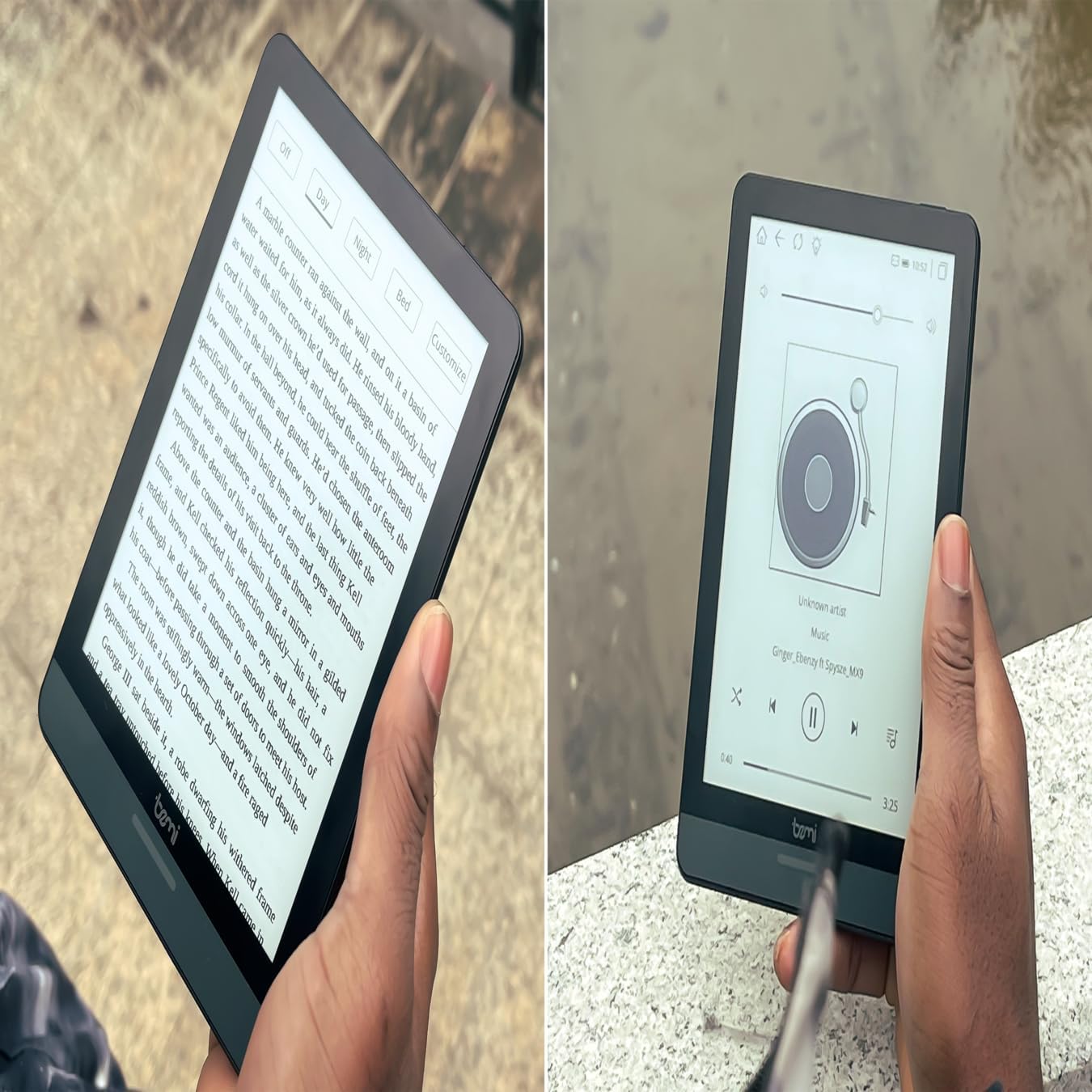
شڪل 4.1: User holding the Bemi Cognita Tab 6+ E-Reader while reading. The image shows the clear text display on the E-Ink screen, highlighting the device's readability.
4.2 ڪتاب پڙهڻ
To open and read a book:
- هوم اسڪرين تان، تي ٽيپ ڪريو لائبريري or ڪتاب آئڪن
- Browse your collection or use the search function to find a book.
- Tap on the book cover to open it.
- Use the touch screen or side buttons to turn pages.
4.3 Adjusting SMARTlight
The SMARTlight feature allows you to adjust both the brightness and color temperature of the screen's front light.
- During reading, tap the center of the screen to bring up the reading menu.
- جي ڳولها روشني or SMARTlight آئڪن
- Adjust the sliders for brightness (intensity) and color temperature (warm to cool) to your preference.
4.4 منتقلي Files
You can transfer e-books and other supported files to your device via Wi-Fi or USB cable.
- وائي فائي ذريعي: If your device supports cloud services or direct Wi-Fi transfer, follow the specific application instructions.
- USB ڪيبل ذريعي:
- Connect your E-Reader to a computer using the provided USB cable.
- The device will appear as a removable storage drive on your computer.
- Drag and drop your desired files (e.g., EPUB, PDF, MOBI) into the appropriate folders on the E-Reader (e.g., "Books" folder).
- ڪيبل کي ڊسڪنيڪٽ ڪرڻ کان اڳ ڊوائيس کي پنهنجي ڪمپيوٽر مان محفوظ طور تي ٻاهر ڪڍو.
4.5 Using MicroSD Card
To expand storage, insert a microSD card (up to 256GB) into the designated slot.
- Gently insert the microSD card with the gold contacts facing down until it clicks into place.
- ڪڍڻ لاءِ، ڪارڊ کي نرميءَ سان اندر جي طرف دٻايو جيستائين اهو ٻاهر نه اچي.
- Files on the microSD card will be accessible through the device's file manager or library.
5. سار سنڀال
5.1 ڊوائيس کي صاف ڪرڻ
- ڊوائيس جي اسڪرين ۽ باڊي کي نرميءَ سان صاف ڪرڻ لاءِ نرم، لِنٽ فري ڪپڙو استعمال ڪريو.
- ضدي داغن لاءِ، ٿورو ڊيampen پاڻي سان ڪپڙو يا اسڪرين ڪلينر خاص طور تي اليڪٽرانڪس لاءِ ٺهيل آهي.
- سخت ڪيميڪلز، ٻرندڙ مواد، يا گهڻي نمي استعمال ڪرڻ کان پاسو ڪريو.
5.2 بيٽري جي سنڀال
- بيٽري جي زندگي کي وڌائڻ لاءِ، بيٽري کي بار بار مڪمل طور تي چارج ڪرڻ کان پاسو ڪريو.
- جڏهن گهڻي عرصي تائين استعمال ۾ نه هجي ته ڊوائيس کي ٿڌي، سڪل جاءِ تي رکو.
- Charge the device regularly, even if not used, to prevent deep discharge.
5.3 اسٽوريج
When not in use, store your E-Reader in a protective case to prevent scratches and damage to the screen.
6. مسئلا حل ڪرڻ
If you encounter issues with your Bemi Cognita Tab 6+, refer to the following common solutions:
| مسئلو | حل |
|---|---|
| ڊوائيس آن نٿو ٿي. | Ensure the battery is charged. Connect the device to a power source for at least 30 minutes. If it still doesn't turn on, try a hard reset by holding the power button for 10-15 seconds. |
| اسڪرين منجمد آهي يا غير جوابده آهي. | Perform a soft reset by holding the power button for 5-7 seconds until the device restarts. If the issue persists, try a hard reset. |
| وائي فائي سان ڳنڍجي نٿو سگھي. | Check if Wi-Fi is enabled in settings. Verify the Wi-Fi password. Restart your E-Reader and your Wi-Fi router. Ensure you are within range of the Wi-Fi signal. |
| Books are not appearing in the library. | کي يقيني بڻايو files are in a supported format (e.g., EPUB, PDF). If transferred via USB, ensure they are in the correct folder. Try refreshing the library or restarting the device. |
| بيٽري جلدي ختم ٿئي ٿي. | Reduce screen brightness. Turn off Wi-Fi and Bluetooth when not in use. Close background applications. Ensure the device is not constantly searching for networks. |
7. وضاحتون
| خاصيت | تفصيل |
|---|---|
| ماڊل نالو | Bemi Cognita Tab 6+ |
| اسڪرين جي ماپ | 6 Inches (E-Ink Carta, 1024x758, 212 ppi) |
| اندروني ياداشت | 32 جي بي |
| وسعت وارو اسٽوريج | MicroSD card slot, up to 256 GB |
| رابطي | وائي فائي، بلوٽوت |
| آپريٽنگ سسٽم | Android 8.1 |
| انساني انٽرفيس ان پٽ | Touchscreen, Side Control Buttons |
| خاص خاصيتون | Adjustable SMARTlight, G-Sensor for auto-rotation, Glare-Free & Eye-Friendly E-Ink Display |
| طول و عرض (تقريبن) | 7 ملي ميٽر ٿولهه |
| شامل اجزاء | USB ڪيبل |
8. وارنٽي ۽ سپورٽ
8.1 وارنٽي ڄاڻ
Your Bemi Cognita Tab 6+ E-Reader comes with a standard manufacturer's warranty. Please refer to the warranty card included in your product packaging or visit the official Bemi webوارنٽي ڪوريج ۽ مدت بابت تفصيلي شرطن ۽ ضابطن لاءِ سائيٽ.
اختياري تحفظ جا منصوبا وڌايل ڪوريج لاءِ موجود ٿي سگهن ٿا. تفصيل لاءِ مهرباني ڪري پنهنجي پرچون ڪندڙ سان چيڪ ڪريو.
8.2 ڪسٽمر سپورٽ
For technical assistance, troubleshooting beyond this manual, or warranty claims, please contact Bemi customer support:
- Webسائيٽ: www.bemi-electronics.com
- اي ميل: Refer to the Bemi webرابطي جي اي ميل لاءِ سائيٽ.
- فون: Refer to the Bemi website for contact phone numbers.
When contacting support, please have your device model (Cognita Tab 6+) and purchase information ready.