
BOTSLAB G980H 3 Channel Dashcam
BOTSLAB G980H 3-Channel 4K Dash Cam User Manual
Model: G980H 3 Channel Dashcam
1. تعارف
This manual provides detailed instructions for the installation, operation, and maintenance of your BOTSLAB G980H 3-Channel 4K Dash Cam. Please read this manual thoroughly before using the device to ensure proper functionality and safety. Keep this manual for future reference.
2. پيڪيج مواد
پڪ ڪريو ته هيٺ ڏنل سڀئي شيون توهان جي پيڪيج ۾ شامل آهن. جيڪڏهن ڪا به شيءِ غائب يا خراب آهي، مهرباني ڪري ڪسٽمر سپورٽ سان رابطو ڪريو.

Image: Contents of the BOTSLAB G980H Dash Cam package, including the main unit, rear camera, cables, and accessories.
- BOTSLAB G980H Multi-Channel Dash Cam Unit
- Rear Camera (6.5M cable)
- 128GB مائڪرو ايس ڊي ڪارڊ
- Car Charger (3.5M cable)
- Installation Pry Bar
- Electrostatic Film (x2)
- 3M Tapes (x2)
- استعمال ڪندڙ دستي
- ڊيڄاريندڙ ڪارڊ
3. پراڊڪٽ ختمview
The BOTSLAB G980H is a 3-channel dash camera system designed to record video from the front, rear, and interior of your vehicle. It features 4K front recording, 1080P for rear and cabin cameras, a 3.18-inch touch screen, voice control, built-in GPS, and 5.8GHz Wi-Fi for fast file منتقلي
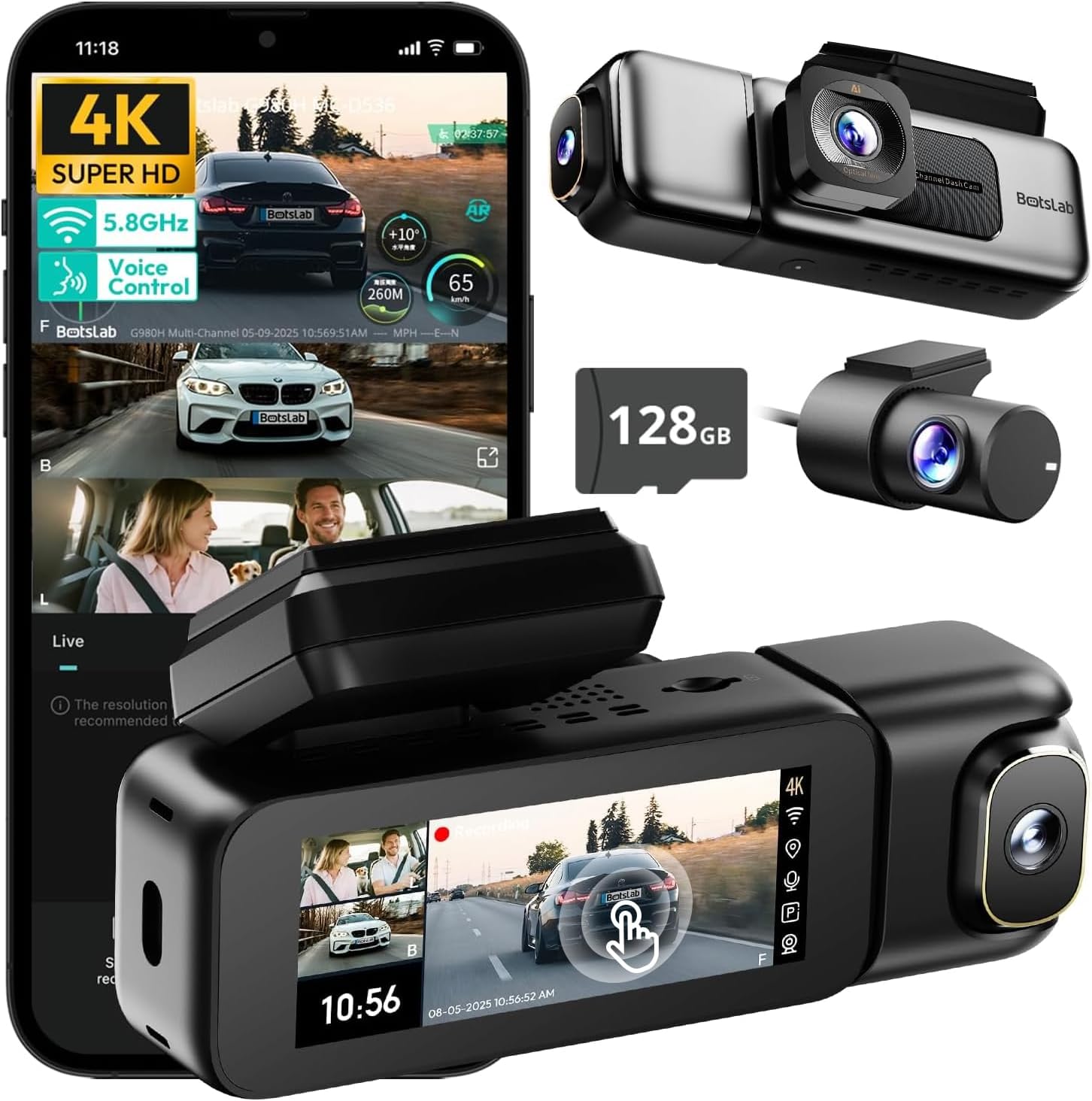
Image: The BOTSLAB G980H 3-Channel Dash Cam, showing the main unit, detachable cabin camera, rear camera, and a 128GB MicroSD card.

Image: Visual representation of the dash cam's wide viewing angles: 170° for the front camera (4K), 120° for the cabin camera (1080P), and 150° for the rear camera (1080P).

Image: Diagram illustrating the dash cam's low-light performance features, including F1.8 aperture, 940nm infrared lights, WDR technology, and a 6-lens system for clear footage.

Image: Illustration highlighting the supercapacitor's role in maintaining data safety during sudden power loss and its resistance to extreme temperatures (-20°C to 70°C).
اهم خاصيتون:
- 3-چينل رڪارڊنگ: Simultaneous 4K front, 1080P rear, and 1080P cabin recording.
- ويڪرو View زاويه: 170° front, 150° rear, and 120° cabin for comprehensive coverage.
- 3.18" Touch Screen: Intuitive interface for settings adjustment and playback.
- وائس ڪنٽرول: Hands-free operation for common functions.
- بلٽ ان GPS: Records speed, location, and routes.
- 5.8GHz وائي فائي: تڪڙو file transfer and app connectivity.
- پارڪنگ مانيٽر: Three modes (Sentry, Time-Lapse, Collision Detection) for 24/7 surveillance (requires hardwire kit).
- سپر ڪيپسيٽر: Enhanced durability and safety in extreme temperatures.
- WDR & HDR: Optimized imaging in varying light conditions.
- لوپ رڪارڊنگ: Continuous recording, overwriting oldest files جڏهن ڪارڊ مڪمل آهي.
- جي-سينسر: خودڪار طريقي سان foo کي لاڪ ڪري ٿوtagٽڪراءَ دوران.
4. سيٽ اپ ۽ انسٽاليشن
Follow these steps to properly install your BOTSLAB G980H Dash Cam in your vehicle.

Image: The dash cam's adjustable design, featuring a magnetic snap-on mechanism for the cabin camera and 90-degree vertical and 360-degree horizontal rotation for optimal view حسب ضرورت

Image: A simplified diagram showing the typical installation points for the G980H Multi-Channel Dash Cam, including the main unit on the windshield, the rear camera, and the car charger connection.
- مائڪرو ايس ڊي ڪارڊ تيار ڪريو: Insert the provided 128GB MicroSD card into the dash cam's card slot. Ensure the card is correctly oriented.
- فرنٽ ڪيمرا لڳايو:
- ونڊ شيلڊ واري علائقي کي صاف ڪريو جتي توهان ڊيش ڪيم لڳائڻ جو ارادو ڪيو آهي.
- Apply the electrostatic film to the chosen area on the windshield.
- Attach the dash cam mount to the electrostatic film using the 3M adhesive tape. Ensure a secure fit.
- Slide the main dash cam unit onto the mounted bracket.
- ريئر ڪيمرا انسٽال ڪريو:
- Identify a suitable location on your rear windshield for the rear camera. Clean the area.
- پوئين ڪئميرا کي ان جي چپڪندڙ استعمال ڪندي ڳنڍيو.
- Route the rear camera cable to the main dash cam unit, tucking it along the vehicle's headliner and pillars using the pry bar.
- پوئين ڪئميرا ڪيبل کي مکيه ڊيش ڪيم يونٽ تي مقرر ڪيل پورٽ سان ڳنڍيو.
- پاور Connectنيو:
- Connect the car charger cable to the main dash cam unit.
- ڪار چارجر کي پنهنجي گاڏي جي 12V پاور آئوٽليٽ (سگريٽ لائٽر ساڪٽ) ۾ لڳايو.
- Route the power cable neatly to avoid obstruction.
- ڪئميرا جي زاوين کي ترتيب ڏيو: Power on the dash cam and adjust the front, cabin (if detachable), and rear camera angles to ensure optimal coverage. The cabin camera features a magnetic snap-on design and can be rotated 90 degrees vertically, while the main unit allows 360-degree rotation for the front lens.
5. بنيادي آپريشن
Learn how to use the primary functions of your dash cam.
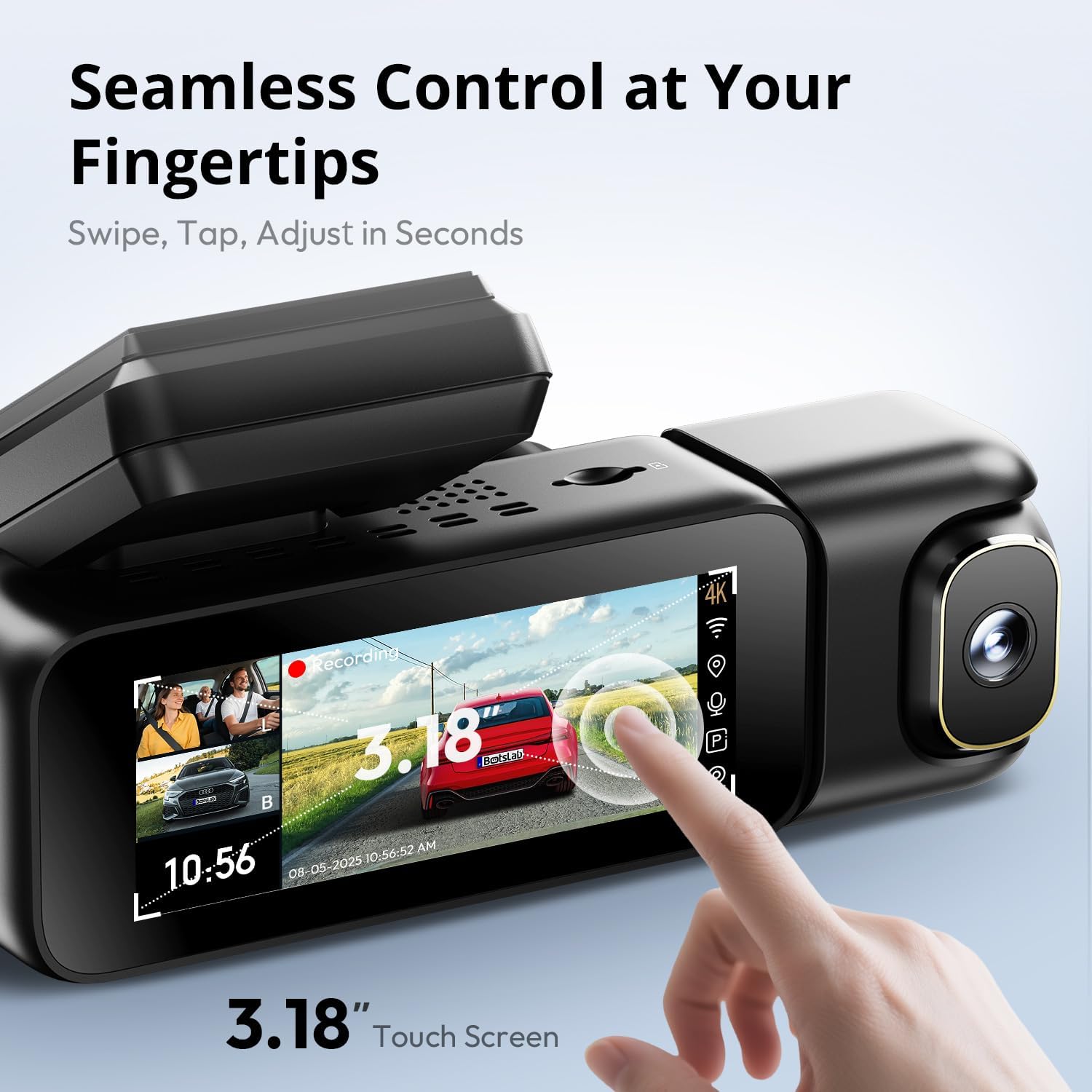
Image: A close-up of the dash cam's 3.18-inch touch screen, showing the live view from multiple cameras and on-screen controls for recording and settings.
پاور آن / آف:
- جڏهن توهان جي گاڏي جي اگنيشن آن ٿيندي ته ڊيش ڪيم خودڪار طريقي سان آن ٿيندو ۽ رڪارڊنگ شروع ڪندو.
- اهو اگنيشن بند ٿيڻ کان ٿوري دير بعد پاڻمرادو بند ٿي ويندو.
رڪارڊنگ:
- عام رڪارڊنگ: The dash cam continuously records in a loop. When the MicroSD card is full, the oldest unlocked files ختم ٿيل آهن.
- ايمرجنسي رڪارڊنگ (جي-سينسر): In the event of a sudden impact or collision, the built-in G-sensor will automatically detect the event and lock the current video segment (including 8 seconds prior to the event) to prevent it from being overwritten.
اسڪرين آپريشن:
- The 3.18-inch touch screen allows you to navigate menus, adjust settings, and view زنده فوtage or recorded videos.
- Swipe and tap gestures are used for control.
6. ترقي يافته خاصيتون
وائس ڪنٽرول:
Operate your dash cam hands-free using voice commands for safer driving. The dash cam responds to specific phrases.
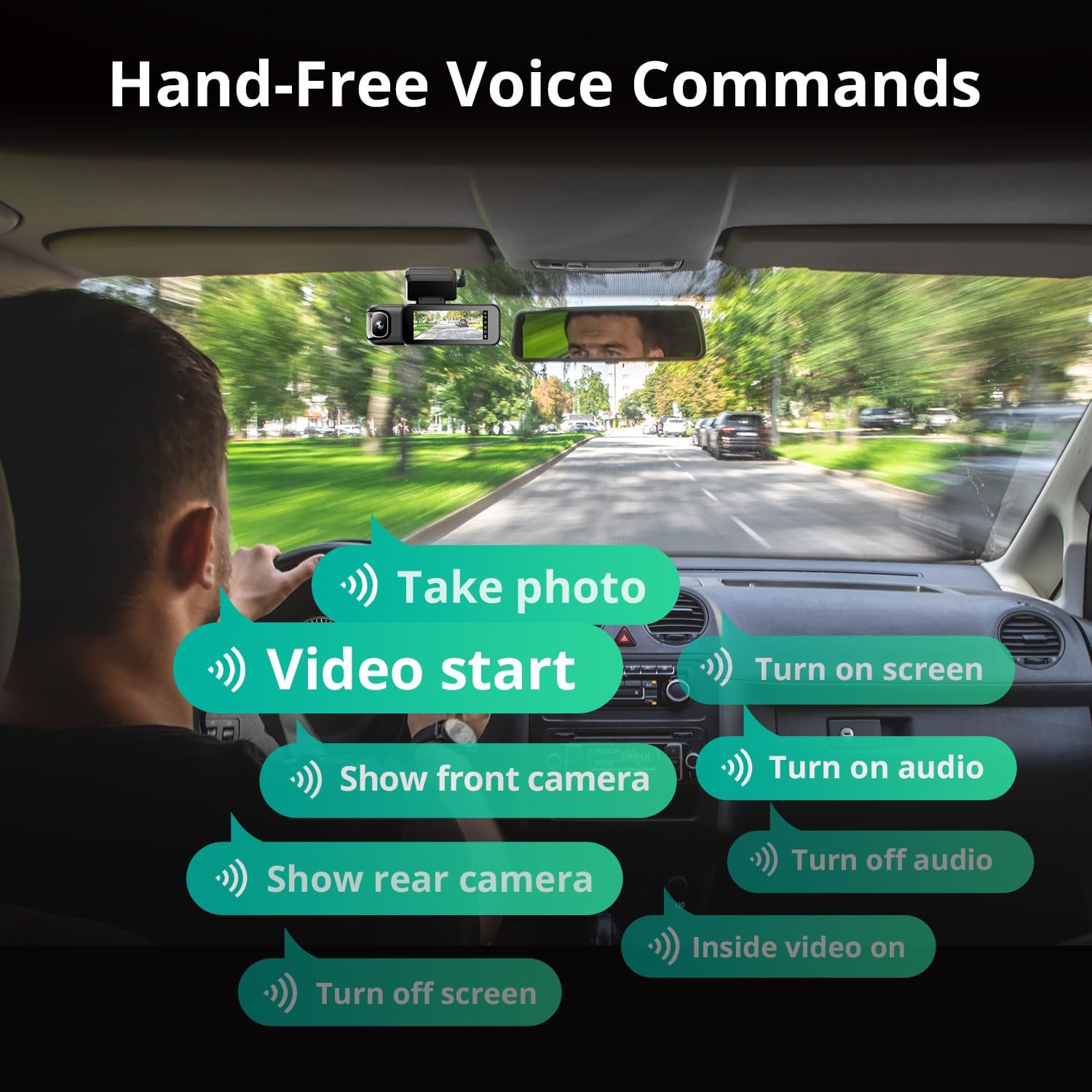
Image: A visual guide to the available voice commands, such as "Take photo," "Video start," "Turn on screen," "Show front camera," "Show rear camera," "Turn on audio," "Turn off audio," "Inside video on," and "Turn off screen."
عام آواز جي حڪمن ۾ شامل آهن:
- "فوٽو ڪڍو"
- "Video start"
- "Turn on screen"
- "فرنٽ ڪيمرا ڏيکاريو"
- "پوئتي ڪئميرا ڏيکاريو"
- "آڊيو آن ڪريو"
- "آڊيو بند ڪريو"
- "Inside video on"
- "Turn off screen"
24/7 پارڪنگ مانيٽر:
The dash cam offers continuous surveillance when your vehicle is parked. A hardwire kit (ASIN: B0FH2H9DDB) is required for this functionality.
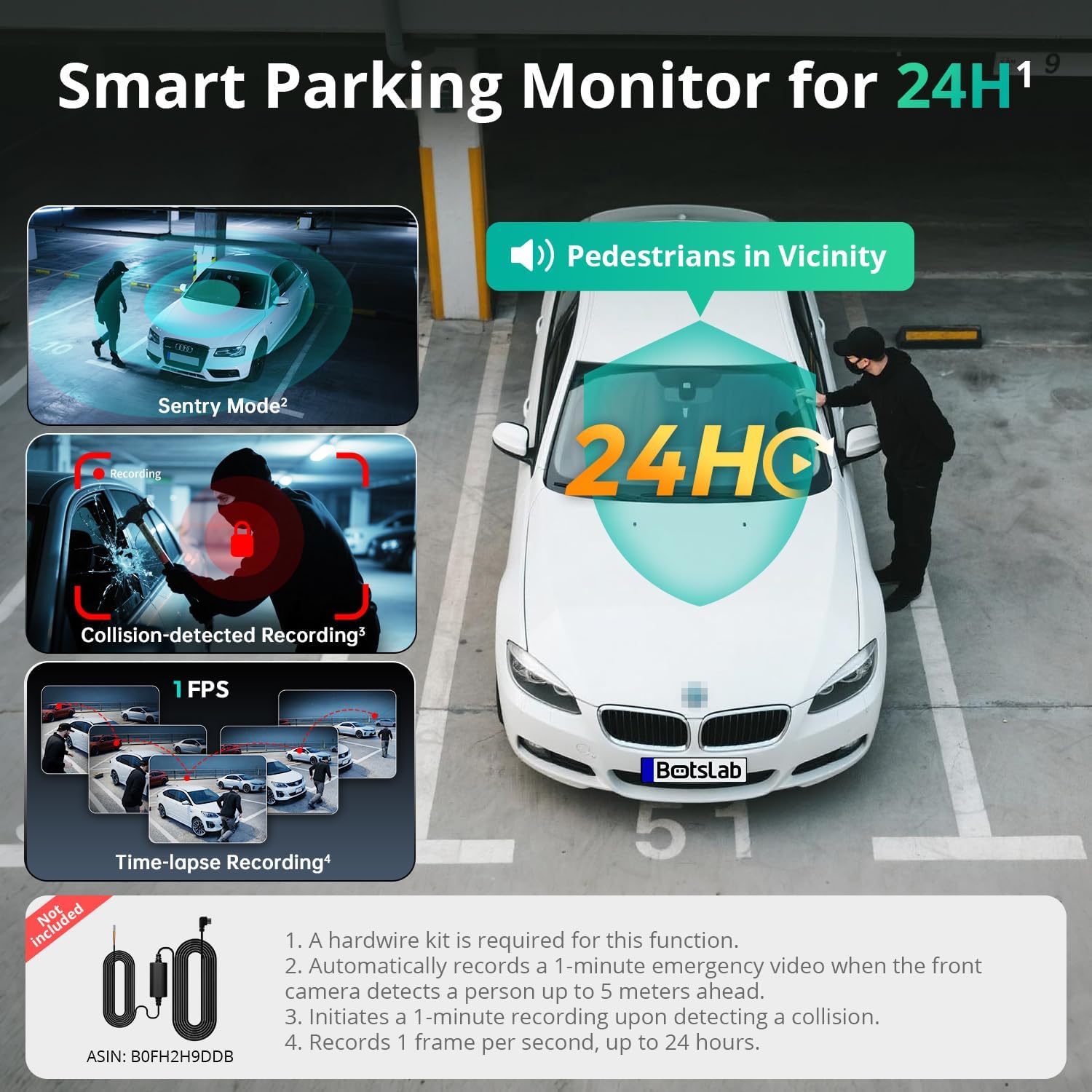
Image: An illustration of the three parking monitor modes: Sentry Mode (detects people within 5 meters), Collision-detected Recording (locks footage on impact), and Time-lapse Recording (1 frame per second for extended surveillance).
دستياب طريقا:
- Sentry Mode: Automatically records a 1-minute emergency video when the front camera detects a person within 5 meters.
- وقت گذرڻ: Records at 1 frame per second for extended surveillance, up to 24 hours.
- تصادم جي چڪاس: Locks 1-minute footage upon detecting an impact.
بلٽ ان GPS:
The integrated GPS module records your vehicle's speed, location, and driving routes. This data can be viewed via Google Maps integration through the BOTSLAB App or a dedicated PC player.

Image: A visual showing the dash cam's built-in GPS functionality, displaying recorded routes, speed, and location data integrated with Google Maps on a smartphone and computer.
5.8GHz Wi-Fi & BOTSLAB App:
Connect your dash cam to the BOTSLAB App on your smartphone via 5.8GHz (or 2.4GHz) Wi-Fi for fast file transfers, live view, settings configuration, video editing, and sharing.

Image: An illustration demonstrating the 5.8GHz Wi-Fi capability for 5X faster file transfer speeds, enabling quick preview and playback of recorded videos on a smartphone.

Image: Screenshots of the Botslab App interface on a smartphone, showing options to capture, edit, and share video footage, as well as a timeline for video playback and management.
Image: A smartphone displaying the Botslab App icon, with logos for Google Play and the App Store, indicating where to download the application.
To use the app:
- Download the BOTSLAB App from the Google Play Store or Apple App Store.
- Register and sign in to your account.
- Follow the in-app instructions to connect your dash cam via Wi-Fi.
7. سار سنڀال
- لينس صاف ڪريو: صاف وڊيو معيار کي يقيني بڻائڻ لاءِ ڪئميرا لينس کي باقاعدي طور تي نرم، لِنٽ فري ڪپڙي سان صاف ڪريو.
- MicroSD ڪارڊ: Format the MicroSD card periodically (e.g., once a month) through the dash cam's settings to maintain optimal performance and prevent data corruption. Back up any important files فارميٽ ڪرڻ کان اڳ.
- فرم ويئر اپڊيٽس: Check for firmware updates via the BOTSLAB App to ensure your dash cam has the latest features and improvements.
- گرمي پد: Avoid exposing the dash cam to extreme temperatures for prolonged periods when not in use. The supercapacitor design supports a wide operating temperature range of -20°C to 70°C.
8. مسئلا حل ڪرڻ
| مسئلو | ممڪن سبب | حل |
|---|---|---|
| ڊيش ڪيم آن نٿو ٿئي. | بجلي جي فراهمي نه آهي؛ ڪار چارجر ۾ خرابي؛ ڪنيڪشن ڍلو. | Check car charger connection; try a different 12V outlet; ensure vehicle ignition is on. |
| رڪارڊنگ بند ٿي وڃي ٿي يا منجمد ٿي وڃي ٿي. | MicroSD card error; card full; incompatible card. | Format the MicroSD card; replace with a high-quality U3 or higher speed card; ensure card capacity is supported (up to 512GB). |
| غريب وڊيو معيار. | گندو لينس؛ حفاظتي فلم اڃا تائين لينس تي آهي؛ غلط ريزوليوشن سيٽنگون. | Clean lenses; remove any protective films; check video resolution settings in the menu. |
| وائي فائي ڪنيڪشن جا مسئلا. | Incorrect password; distance from phone; app issues. | Ensure correct Wi-Fi password; keep phone close to dash cam; restart app and dash cam. |
| وائس ڪنٽرول جواب نه ڏئي رهيو آهي. | Loud environment; incorrect commands; microphone obstructed. | Speak clearly and directly to the dash cam; ensure correct commands are used; check for obstructions near the microphone. |
| پارڪنگ مانيٽر ڪم نه ڪري رهيو آهي. | Hardwire kit not installed; incorrect settings. | Ensure the hardwire kit (ASIN: B0FH2H9DDB) is correctly installed; verify parking monitor settings are enabled. |
9. وضاحتون
| خاصيت | تفصيل |
|---|---|
| ماڊل نالو | G980H 3 Channel Dashcam |
| سامهون ڪئميرا ريزوليوشن | 4K (2160p) |
| Rear/Cabin Camera Resolution | 1080 ص |
| جو ميدان View | Front: 170°, Rear: 150°, Cabin: 120° |
| ڏيکاريو | 3.18" ٽچ اسڪرين |
| رابطي | 2.4/5.8GHz وائي فائي |
| جي پي ايس | بلٽ ان GPS |
| ذخيرو | Supports up to 512GB MicroSD card (128GB included) |
| طاقت جو ذريعو | Supercapacitor |
| آپريٽنگ جي درجه حرارت | -20 ° C کان 70 ° C (-4 ° F کان 158 ° F) |
| طول و عرض | 3.5 x 3.5 x 1.18 انچ |
| شيءِ جو وزن | 1.78 پائونڊ |
10. وارنٽي ۽ سپورٽ
BOTSLAB is committed to providing excellent customer service and support for your product.

تصوير: هڪ اوورview of Botslab Care services, including 365-day professional service, lifetime technical help, 30-day free returns, and 24/7 customer support.

Image: Contact information for Botslab support, including the Botslab APP, global.botslab.com, service@botslab.com, and Botslab Users Group on Facebook.
- وارنٽي: Your BOTSLAB G980H Dash Cam comes with a comprehensive 12-month warranty.
- ٽيڪنيڪل سپورٽ: Lifetime technical support is available for all BOTSLAB products.
- رابطي جي حمايت: If you encounter any issues or have questions, please contact us through the Amazon Message Center or via the following channels:
- BOTSLAB App: Download the app, then navigate to Me > Support.
- Webسائيٽ: گهمڻ global.botslab.com
- اي ميل: service@botslab.com
- ڪميونٽي: Join the Botslab Users Group on Facebook.
Ask a question about this manual
Ask about setup, troubleshooting, compatibility, parts, safety, or missing instructions. Manuals+ will review the question and use this page’s manual context to help answer it.