
FLEXISPOT V9-Max-AR
FLEXISPOT V9-Max-AR Exercise Bike with 2D Desktop User Manual
Model: V9-Max-AR (Exercise Bike with Desk)
1. تعارف
This manual provides essential information for the safe and effective use of your FLEXISPOT V9-Max-AR Exercise Bike with 2D Desktop. Please read all instructions carefully before assembly and operation. Retain this manual for future reference.
اهم حفاظتي ڄاڻ
- هر استعمال کان اڳ پڪ ڪريو ته سڀئي حصا محفوظ طور تي مضبوط آهن.
- وڌ ۾ وڌ وزن جي سفارش 300 پائونڊ کان وڌيڪ نه ڪريو.
- آپريشن دوران ٻارن ۽ پالتو جانورن کي ورزش واري سائيڪل کان پري رکو.
- ڪو به نئون ورزش پروگرام شروع ڪرڻ کان اڳ ڊاڪٽر سان صلاح ڪريو.
- Use the product on a stable, level surface.
2. پراڊڪٽ ختمview ۽ اجزاء
The FLEXISPOT V9-Max-AR is a versatile exercise bike designed for indoor use, featuring an integrated 2D adjustable desktop. It combines a stationary bike with a functional workspace, allowing for simultaneous exercise and productivity.

Figure 2.1: User operating the FLEXISPOT V9-Max-AR Exercise Bike with the desktop in use.
Key features include an 8-level quiet magnetic resistance system, an LCD display for tracking workout metrics, and a robust design supporting up to 300 lbs. The adjustable seat and desktop accommodate various user heights and preferences.
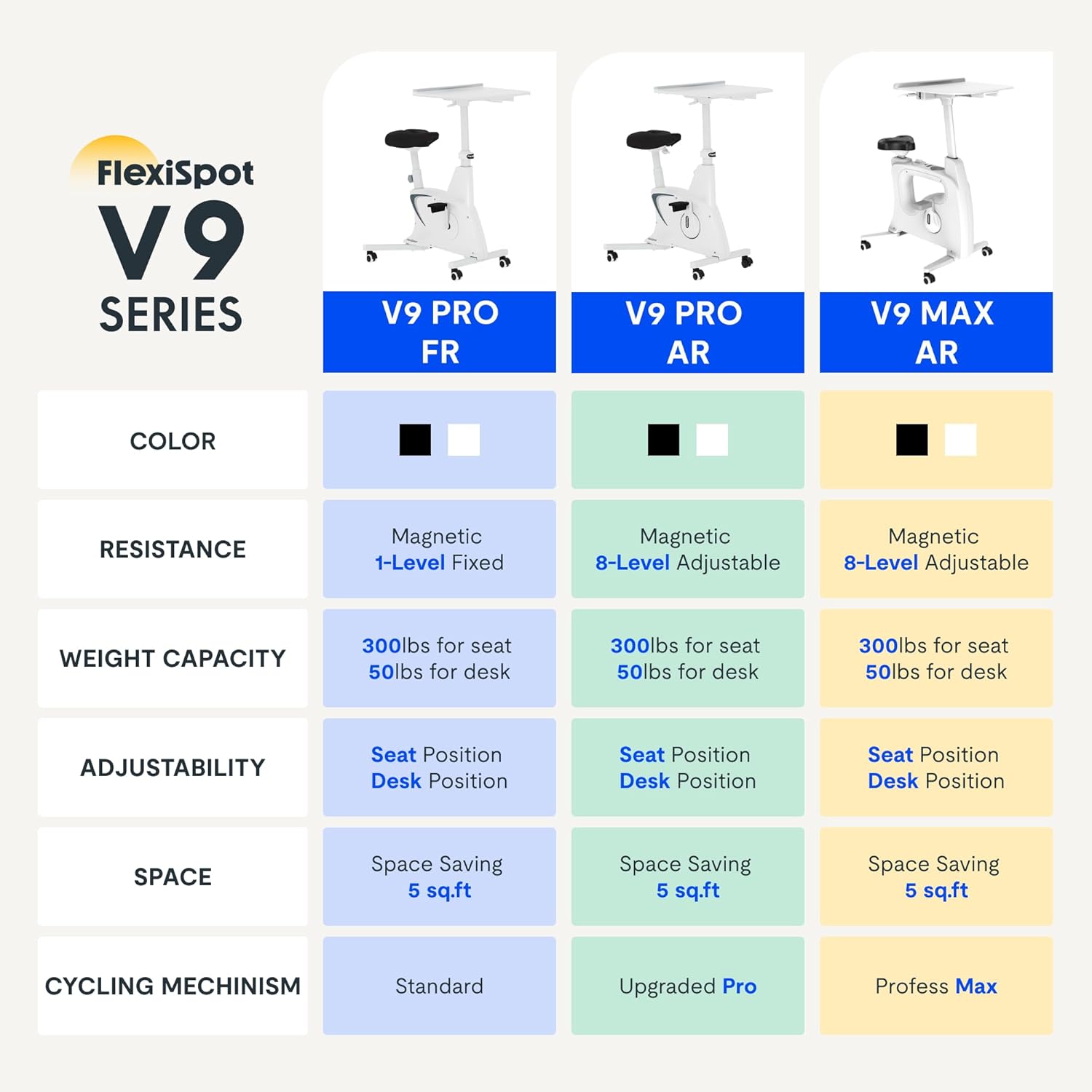
Figure 2.2: Comparison of FlexiSpot V9 series models, highlighting features like resistance and adjustability.
خاص جزا:
- Main Frame with Flywheel and Resistance Mechanism
- Adjustable سيٽ
- Adjustable Desktop
- پيادل
- LCD ڊسپلي ڪنسول
- ٽرانسپورٽ ويلز
3. سيٽ اپ ۽ اسيمبلي
The FLEXISPOT V9-Max-AR is designed for quick and straightforward assembly, typically requiring about 10 minutes.
اسيمبلي جا قدم:
- سڀني حصن کي کوليو ۽ پيڪنگ لسٽ جي خلاف تصديق ڪريو.
- Attach the front and rear stabilizers to the main frame using the provided screws.
- Install the pedals, ensuring the left pedal is tightened counter-clockwise and the right pedal clockwise.
- Mount the seat post and seat onto the main frame, securing them firmly.
- Attach the desktop support column to the main frame.
- Secure the desktop to its support column.
- Insert batteries into the LCD display (batteries not included) and connect the sensor wire.
- Ensure all screws and connections are tightened before first use.

Figure 3.1: Illustration of adjustable components for personalized setup.
4. آپريٽنگ هدايتون
Adjusting Seat and Desktop:
- سيٽ جي اوچائي: Use the quick-release lever located on the seat post to adjust the seat to a comfortable height. Ensure your leg has a slight bend at the knee when the pedal is at its lowest point.
- Desktop Height: The desktop can be adjusted vertically. Locate the adjustment lever beneath the desktop and raise or lower the desktop to your desired working height.
- Desktop Depth: The desktop can also be adjusted horizontally (forward/backward) to optimize your working posture.
مزاحمت جي سطح:
The V9-Max-AR features 8 levels of quiet magnetic resistance. Rotate the resistance knob, located below the desktop, clockwise to increase resistance and counter-clockwise to decrease it.

Figure 4.1: LCD display and resistance control knob.
LCD ڊسپلي استعمال ڪندي:
The built-in LCD display monitors your workout statistics. It tracks:
- وقت
- رفتار
- مفاصلو
- ڪيلوريون سڙي
- Total Distance Covered (Odometer)
- گردش جي رفتار
Press the button on the display to cycle through different metrics or hold it to reset values (refer to display specific instructions for exact operation).
Using the 2D Desktop:
The spacious desktop (20" x 22.8") is designed to hold a laptop, notebook, mobile phone, or water cup. It provides a stable surface for working or entertainment while exercising.

Figure 4.2: Desktop in use for studying or working.
پورٽيبلٽي:
Equipped with movable silent wheels, the exercise bike can be easily relocated within your home or office. Simply tilt the bike and roll it to your desired position.
5. سار سنڀال
Regular maintenance ensures the longevity and optimal performance of your FLEXISPOT V9-Max-AR Exercise Bike.
- صفائي: سائيڪل کي باقاعدي طور تي اشتهار سان صاف ڪريوamp ڪپڙو ۽ هلڪو صابڻ. گھڙڻ وارا صاف ڪندڙ يا محلولن کان پاسو ڪريو.
- چڪاس: وقت بوقت سڀني بولٽن، نٽ، ۽ هلندڙ حصن کي تنگي لاءِ چيڪ ڪريو. ڪنهن به ڍڪيل حصن کي فوري طور تي سخت ڪريو.
- لوڻ: مقناطيسي مزاحمتي نظام لاءِ ڪنهن به مخصوص لوبريڪيشن جي ضرورت ناهي.
- اسٽوريج: سائيڪل کي سڌي سج جي روشني ۽ انتهائي گرمي پد کان پري سڪل، ٿڌي جاءِ تي رکو.
6. مسئلا حل ڪرڻ
هي حصو انهن عام مسئلن کي حل ڪري ٿو جيڪي توهان کي پنهنجي ورزش واري سائيڪل سان منهن ڏيڻا پوندا.
| مسئلو | ممڪن سبب | حل |
|---|---|---|
| LCD ڊسپلي ڪم نه ڪندي | بيٽريون مئل يا غلط نصب ٿيل آهن. | Replace batteries (AAA, not included) or ensure correct polarity. |
| Unstable or wobbly bike | ڍِلا بولٽ يا اڻ برابر مٿاڇري. | Check and tighten all assembly bolts. Ensure the bike is on a flat, stable surface. |
| مزاحمت تبديل نه ٿيندي | مزاحمتي ميڪانيزم جو مسئلو. | Ensure the resistance knob is properly engaged. If the issue persists, contact customer support. |
| چِڪڻ يا غير معمولي آواز | ڍلو جزا يا رگڙ. | Inspect all connections and tighten any loose parts. Ensure no foreign objects are interfering with moving parts. |
7. وضاحتون
Detailed specifications for the FLEXISPOT V9-Max-AR Exercise Bike:
- ماڊل: V9-Max-AR (Exercise Bike with Desk)
- برانڊ: FLEXISPOT
- رنگ: ڪارو
- مزاحمتي ميڪانيزم: مقناطيسي
- مزاحمت جي سطح جو تعداد: 8
- وڌ ۾ گھٽ وزن سفارش: 300 پائونڊ
- پيداوار جا طول و عرض (ڊي x ڊبليو x ايڇ): 37.6" x 23.2" x 47.2"
- ڊيسڪ ٽاپ جا طول و عرض: تقريبن 20 "x 22.8"
- Minimum Height (Seat): 29.6 انچ
- Maximum Height (Overall): 47.2 Inches (desktop height can go up to 47.2")
- طاقت جو ذريعو: Pedal-powered (non-electric)
- ڊرائيو سسٽم: بيلٽ
- خاص خصوصيت: Adjustable Seat, Adjustable Desktop
- تجويز ڪيل استعمال: اندريون
- Space Occupied: تقريبن 5 چورس فوٽ

شڪل 7.1: پيداوار جا طول و عرض.
8. وارنٽي ۽ سپورٽ
FLEXISPOT is committed to providing quality products and customer satisfaction.
- واپسي: هي پراڊڪٽ 30 ڏينهن جي آسان واپسي جي لائق آهي. تفصيل لاءِ مهرباني ڪري پنهنجي خريداري پليٽ فارم جي واپسي پاليسي جو حوالو ڏيو.
- وارنٽي: For specific warranty terms and conditions, please refer to the official FLEXISPOT webسائيٽ تي وڃو يا سڌو سنئون انهن جي گراهڪ سپورٽ سان رابطو ڪريو.
- ڪسٽمر سپورٽ: For any questions, assistance, or troubleshooting not covered in this manual, please contact FLEXISPOT customer support. Contact information can typically be found on the manufacturer's webسائيٽ يا توهان جي خريداري دستاويز.
9. اضافي معلومات
While no specific official product videos were provided in the product data, users may find helpful assembly or usage guides on the manufacturer's official website or their authorized channels. Always ensure the source is official for accurate information.
Ask a question about this manual
Ask about setup, troubleshooting, compatibility, parts, safety, or missing instructions. Manuals+ will review the question and use this page’s manual context to help answer it.