
1. پراڊڪٽ ختمview
The Cordless CL-07 PRO Smart Door Lock is an advanced access control system designed to enhance home security with cutting-edge technology and seamless functionality. It offers multiple secure entry methods and remote monitoring capabilities.
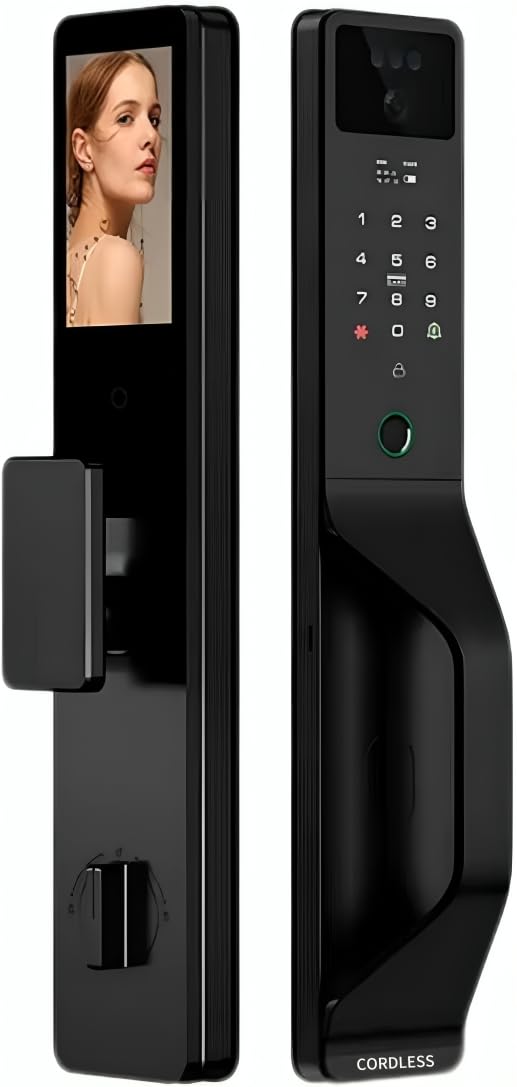
تصوير 1.1: اڳيان ۽ پوئتي view of the CL-07 PRO Smart Door Lock. The front panel features a keypad, fingerprint sensor, and camera, while the back panel shows the internal display screen and manual lock mechanism.
اهم خاصيتون:
- گھڻن کي کولڻ جا طريقا: Supports 3D face recognition, fingerprint, password, magnetic card, mechanical key, and Tuya Smart App control.
- Two-Way Video Communication: Integrated smart camera with real-time two-way video call functionality for remote interaction with visitors.
- ريموٽ مانيٽرنگ: Wi-Fi enabled with Tuya Smart App integration for comprehensive access control and visitor management via mobile device.
- ورسٽائل تنصيب: Compatible with both wooden and armored doors.
- Internal Display Screen: Provides convenient interface navigation and visitor monitoring from inside.
شامل اجزاء:
- Smart Lock Unit (Front and Back Panels)
- اسمارٽ ڪئميرا
- Video Display Screen
- Mechanical Key(s)
- انسٽاليشن هارڊويئر
2. سيٽ اپ ۽ تنصيب
Proper installation is crucial for the optimal performance and security of your CL-07 PRO Smart Door Lock. It is recommended to follow these steps carefully or seek professional assistance.
2.1 انسٽاليشن کان اڳ جي چيڪ لسٽ:
- Verify door compatibility (wooden or armored doors).
- Ensure door thickness is within the specified range (refer to specifications).
- پڪ ڪريو ته سڀئي شامل اجزا موجود آهن.
- Gather necessary tools (screwdriver, drill, measuring tape, etc.).
2.2 تنصيب جا مرحلا:
- دروازو تيار ڪريو: Remove any existing lock hardware. Ensure the door frame and boreholes are clean and properly sized according to the installation template (if provided).
- مورٽيز لاڪ انسٽال ڪريو: Insert the mortise lock into the door edge and secure it with screws.
- Mount Front Panel: Route the cables from the front panel through the door. Align the front panel with the mortise lock and secure it.
- ڪيبل ڳنڍڻ: Connect the cables from the front panel to the back panel, ensuring proper alignment of connectors.
- پوئتي پينل انسٽال ڪريو: Attach the back panel to the door, securing it with mounting screws. Ensure the lock operates smoothly before tightening fully.
- بيٽرين کي انسٽال ڪريو. Insert the required batteries (not included) into the battery compartment on the back panel.
- شروعاتي سيٽ اپ: Follow the on-screen prompts on the internal display to set up the administrator password and connect to your Wi-Fi network via the Tuya Smart App.
3. آپريٽنگ هدايتون
The CL-07 PRO Smart Door Lock offers various methods for secure access and monitoring.
3.1 Unlocking Methods:
- 3D Face Recognition: Stand directly in front of the lock's camera at the recommended distance. The lock will automatically recognize your registered face and unlock.
- فنگر پرنٽ جي رسائي: Place your registered finger firmly on the fingerprint sensor. The lock will verify your fingerprint and unlock.
- پاسورڊ داخلا: Touch the keypad to activate it, then enter your registered password followed by the '#' key.
- Magnetic Card: Present your registered magnetic card to the card reader area on the lock.
- مشيني چاٻي: In case of power failure or emergency, insert the mechanical key into the hidden keyhole and turn to unlock.
- ٽويا سمارٽ ايپ: Open the Tuya Smart App on your smartphone, select the lock, and use the remote unlock function.
3.2 Tuya Smart App Integration:
- ريموٽ انلاڪنگ: Unlock the door from anywhere using the app.
- رسائي جو انتظام: Add, modify, or delete user fingerprints, faces, passwords, and magnetic cards. Set temporary access codes for guests.
- سرگرمي لاگز: View a history of all lock and unlock events, including method used and timestamp.
- Two-Way Video Call: Receive notifications when someone is at your door. Initiate a two-way video call through the app to communicate with visitors.
- حقيقي وقت جي نگراني: Access the live camera feed from the lock via the app.
4. سار سنڀال
Regular maintenance ensures the longevity and optimal performance of your smart door lock.
- صفائي: Wipe the lock's surface with a soft, dry cloth. Avoid using abrasive cleaners, solvents, or harsh chemicals, as they can damage the finish and electronic components.
- بيٽري مٽائڻ: Replace batteries promptly when the low battery indicator appears. Use high-quality alkaline batteries.
- سينسر جي سنڀال: Keep the fingerprint sensor and camera lens clean and free of dust or smudges for accurate recognition.
- مشيني ڪي هول: Ensure the mechanical keyhole is clear of obstructions.
- فرم ويئر اپڊيٽس: Check the Tuya Smart App periodically for available firmware updates to ensure your lock has the latest features and security enhancements.
5. مسئلا حل ڪرڻ
If you encounter issues with your CL-07 PRO Smart Door Lock, refer to the following common problems and solutions:
| مسئلو | ممڪن سبب | حل |
|---|---|---|
| تالا جواب نه ڏئي رهيو آهي / بجلي ناهي | Dead batteries; Incorrect battery installation. | Replace batteries with new ones; Ensure batteries are inserted with correct polarity. |
| Fingerprint/Face recognition failure | Dirty sensor/camera; Unregistered fingerprint/face; Improper placement. | Clean sensor/camera; Re-register fingerprint/face; Ensure proper placement and angle. |
| وائي فائي ڪنيڪشن جا مسئلا | Incorrect Wi-Fi password; Router too far; Network interference. | Verify Wi-Fi password; Move router closer or use a Wi-Fi extender; Restart router and lock. |
| تالا لڳائڻ جو طريقو ڦاسي پيو آهي | Misalignment during installation; Obstruction in door frame. | Check installation alignment; Remove any obstructions. If issue persists, contact support. |
جيڪڏهن انهن حلن جي ڪوشش ڪرڻ کان پوءِ به مسئلو برقرار رهي، مهرباني ڪري ڪسٽمر سپورٽ سان رابطو ڪريو.
6. وضاحتون
| وصف | تفصيل |
|---|---|
| ماڊل نمبر | CL-07 PRO |
| برانڊ | بي تار |
| طول و عرض | 10 x 8.5 x 20 سينٽي |
| شيءِ جو وزن | 850 جي |
| مواد | ايلومينيم، ٽمپرڊ گلاس |
| رنگ | Black And Silver |
| طاقت جو ذريعو | بيٽري سان هلندڙ (بيٽريون شامل نه آهن) |
| جلدtage | 12 وولٽ |
| رابطي | وائي فائي فعال |
| خاص خاصيتون | 3D Face Recognition, Fingerprint Scanner, Mobile App Control, Two-way Audio |
| انسٽاليشن جو طريقو | دروازي جو جبل |
| مطابقت رکندڙ دروازا | Wooden and Armored Doors |
| ڪنٽرولر جو قسم | Smartphone App, Touch Panel |
7. وارنٽي ۽ سپورٽ
For warranty information and technical support, please refer to the documentation provided with your purchase or visit the official Cordless webسائيٽ. وارنٽي دعوائن لاءِ خريداري جو ثبوت رکو.
ڪسٽمر سپورٽ: For further assistance, troubleshooting, or inquiries, please contact Cordless customer support through the channels specified in your product packaging or on the official brand webسائيٽ.